
With the large-scale application of Google SGE (Search Generative Experience) in 2026, WordPress SEO is no longer just about installing an SEO plugin and inserting keywords. To obtain sustained free traffic in this AI-driven era, Naiba has reorganized this super guide containing 35 practical techniques, deeply integrating traditional SEO details with the latest AI efficiency-boosting methods, to help everyone optimize WordPress SEO together.
Why Should You Still Do WordPress SEO in 2026?
Where there is traffic, there is search; where there is search, SEO is involved. The traffic obtained through SEO is the most valuable and relatively stable. Although AI search is becoming popular,High-quality, uniquely insightful (E-E-A-T) native contentStill the source of traffic. SEO traffic does not require additional spending and is more trustworthy and persistent than advertising traffic. To this day, 70% of Naibabiji's traffic still comes from organic search.
Take a simple example,Naibabijiis a website built using WordPress. Usually, only SEO optimization is done for website promotion, and no other off-site promotion is carried out.
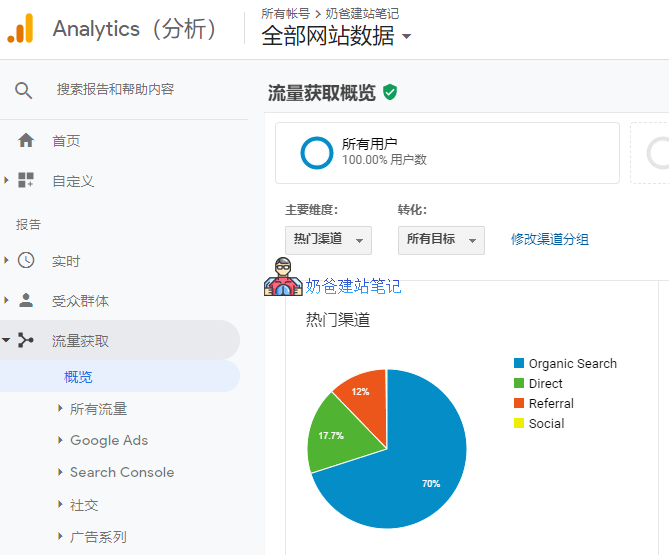
According to statistics from Google Analytics, 70% of the traffic sources in the past week came from Organic Search.
As Naiba understands, most companies either pay for specialized SEO services or directly spend money on paid search (SEM) because no one in-house knows how to do SEO.
In the long run, paid advertising can be unsustainable for many small and medium-sized enterprises. Therefore, learning WordPress optimization techniques to obtain free search engine traffic is an excellent choice.
Advantages of WordPress for SEO Optimization
The prevailing view online is that WordPress is more suitable for Google SEO (Baidu SEO is also possible). The reasons are as follows:
- Open source and free, with powerful features;
- Reasonable structure, conducive to SEO layout;
- Abundant Theme templates ensure diverse appearances and prevent homogenization. Coupled with SEO Plugins, there's no need to worry about losing SEO information when changing Themes;
- Numerous developers mean many features can be implemented with ready-made Plugins.
Prerequisites for WordPress SEO Optimization

To performWordPress SEO optimization, the prerequisite is that you have an installed WordPress website. If not, please refer to the article below to install one.
- WordPress Installation Tutorial: Building Your Own Website with WordPress
- Recommended WordPress Hosting
WordPress SEO optimization encompasses two aspects: content and technology.
Content is the foundation of SEO optimization; any techniques or tricks only help your content achieve better rankings.。
Without content, technology alone is meaningless. Now, let's get to the point and see what WP SEO optimization includes.
35 Core Steps for WordPress SEO Optimization
Please bookmark this article. I will update it periodically. When you feel lost about SEO, revisit this article, and I believe it will be helpful to you.
1. Domain Canonicalization: With or without www?
Most people habitually think that any website should be like www.baidu.com. However, in reality, baidu.com is the primary domain, and www.baidu.com is a subdomain.
If beginners are unclear about whether to include www in the domain or even don't understand domain resolution, it is recommended to search online for related tutorials. Naibabiji'sDomain Topicalso contains tutorials on domain resolution; you can browse through them.
Simply put:
- For domestic SEO optimization, it is recommended to use a domain with www;
- For international SEO optimization, it is recommended to use a domain without www.
For Google SEO optimization, the mainstream SEO viewpoint now recommends directly using the primary domain, with the www. domain set up with a 301 redirect to the primary domain. It should be noted here that if your website has already been using a www. domain for some time, there is no need to deliberately switch to a non-www version. Although it is recommended, this does not have a direct impact on SEO effectiveness.
2. Enforce SSL (HTTPS) Access
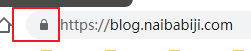
If you pay attention, you will notice that websites with SSL security certificates enabled, i.e., accessed via https, have a small lock icon. If not enabled, it indicates insecurity.
Google has also stated that it recommends enabling SSL security certificates for websites. Moreover, there are free SSL certificates available, and many Shared Hosting services offer one-click SSL certificate installation, so you don't need to worry about additional costs or technical issues.
References:Secure Your Website with HTTPS
3. Site Title and Subtitle Optimization
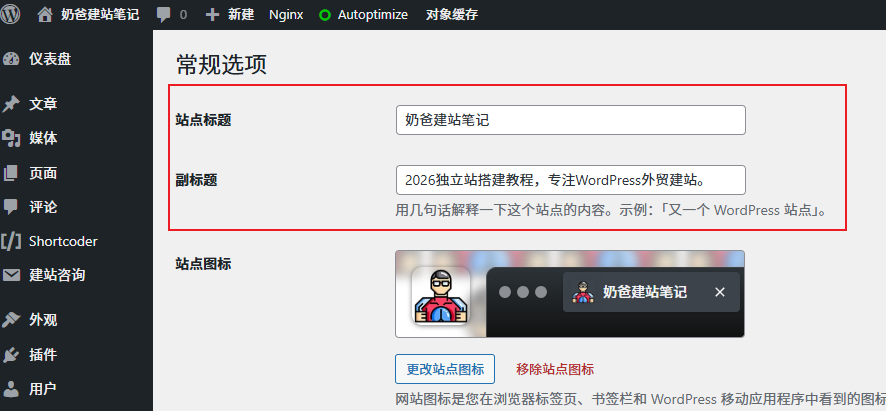
WordPress settings include options for Site Title and Tagline.
The Site Title is usually the name of your website, while the Tagline is a short phrase that describes the overall content of your site. It's best for this phrase to contain the keywords you want to target for SEO, such as 'foreign trade website building', 'WordPress foreign trade website building', 'foreign trade website building tutorial' for Naibabiji.
Only when the website title contains keywords is it possible for others to see your site when searching for related content on search engines.
AI Prompt:„Please generate 5 click-attracting taglines that contain core value based on the keyword “WordPress Website Building„.“
4. Install WordPress SEO Plugin
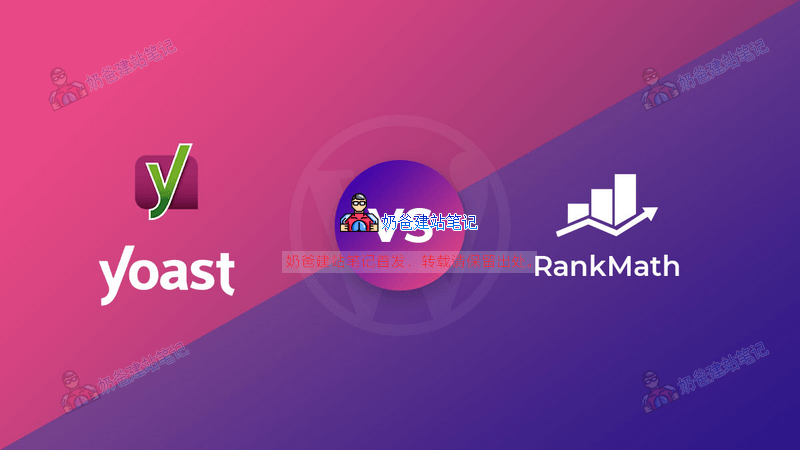
There are many SEO plugins for WordPress. Naibabiji currently uses Slim SEO,Rank Math和Yoast SEOwhich is also used by many websites.
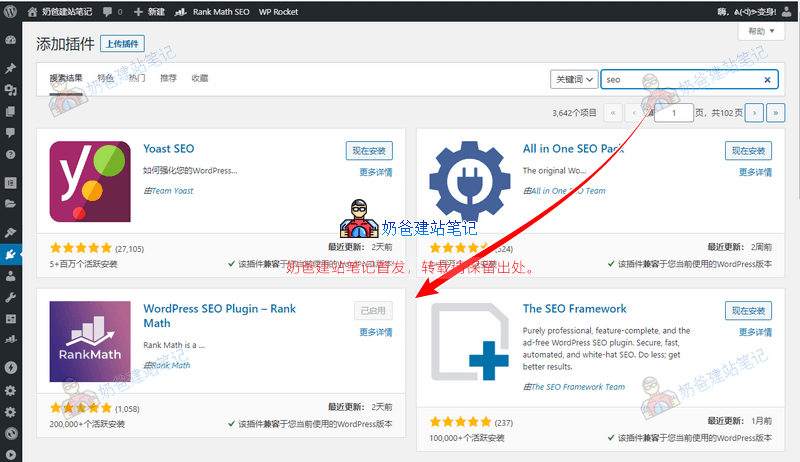
The method to install an SEO plugin is simple: directly select 'Add New' in the WordPress Admin Dashboard plugins section, then search for SEO. The four SEO plugins shown in the image above can all be considered, butonly use one SEO plugin at a time.(Some SEO plugins have additional paid AI features; you can consider upgrading or manually analyzing using free AI tools.)
These SEO plugins help you standardize your website's title, description, and some social meta tags, preventing these critical codes from changing due to Theme switching.
Regarding WordPress SEO plugins, Naibabiji has shared the following content. If you are interested, you can click the links to continue reading.
- Free Advanced WordPress SEO Plugin Rank Math Usage Tutorial
- Free Advanced SEO Plugin The SEO Framework Download and Usage Tutorial
- Essential Plugin for Chinese Website Baidu SEO_Baidu Search Push Management WP Plugin
- WordPress's #1 SEO Plugin Yoast SEO Chinese Premium Version Download and Tutorial
5. Set SEO-friendly Permalinks
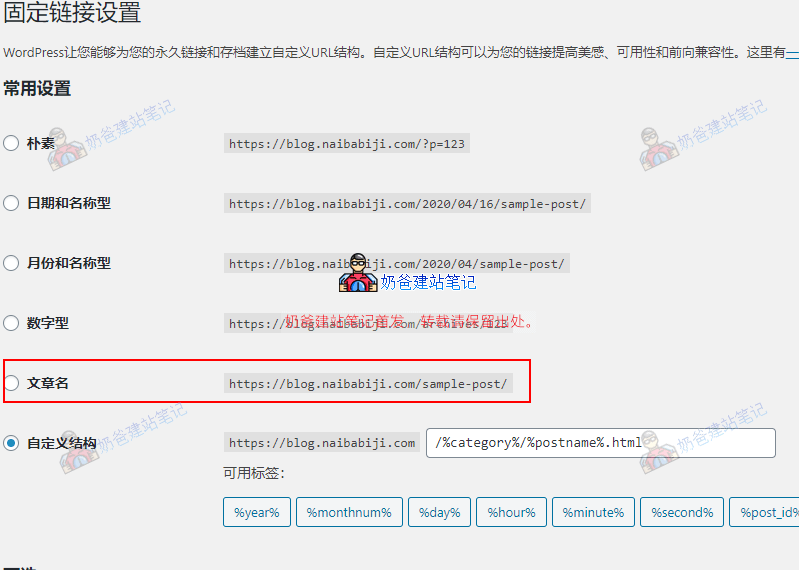
WordPress Permalink settings are very convenient; you can modify them directly in the Admin Dashboard settings.
It is recommended to choose the 'Post name' format for Permalinks. Including keywords in the URL can significantly increase the chance of being selected for Google snippets.
Naibabiji currently uses a custom structure for Permalinks due to some legacy issues, making it troublesome to change now.
Once Permalinks are set, it is not recommended to change them after the website has many pages indexed by search engines.
For a more detailed introduction to Permalinks, please continue reading the article below:
6. In-depth Keyword Research (AI Tool Assisted)
Use DeepSeek / Kimi to batch cluster keywords. Stop writing articles blindly; instead, strategize based on users' real pain points (Intents).
💡 Tip: If you encounter obstacles accessing foreign AI, it is recommended to use Stable access solution to obtain more comprehensive data analysis.
7. Craft a Title That „Even AI Would Approve“
A good title must contain keywords and be attractive. The 2026 title formula: [Keyword] + [Specific Benefit/Data] + [Timeliness]. For example: „WordPress SEO Optimization: A Complete Practical Guide with a 200% Traffic Increase in 30 Days (2026 Edition).“
Regarding this point, Naiba's own copywriting is not very good, and I can't come up with titles that make people want to click after reading them.
However, no matter how you name it, remember to include the main keywords of your article in the title. For example, the following:
- The Ultimate Solution for WordPress SEO Optimization
- Do These WordPress SEO Optimizations, and Traffic Will Soar
- Start with These Points to Do WordPress SEO Optimization Well
One keyword can be combined into many different titles, but which title can increase the click-through rate more is also a subject of study.
For English websites, you can use the following websites to test the quality of titles.
When writing article titles, be careful not to use too many words, otherwise the search results will not display completely.
8. Deep Meta Description Writing
Although not directly involved in ranking, it directly affects CTR. Use AI to assist in writing summaries of appropriate length, ensuring keywords naturally appear in the first half of the description.
The editing of titles and descriptions can be assisted by SEO plugins, as shown in the figure below:
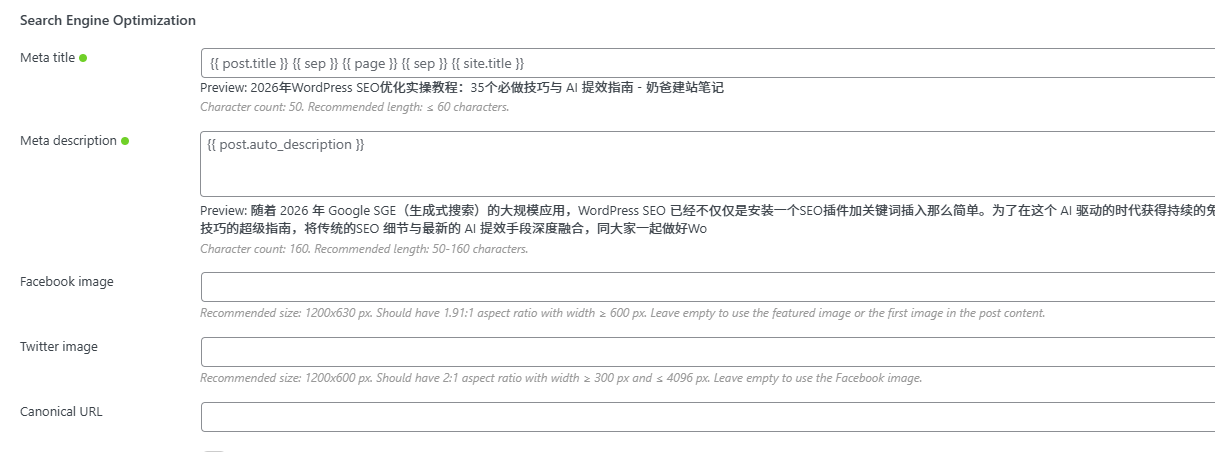
If you do not fill it in manually, the SEO plugin will automatically call the article title and the first paragraph content as the page title and description. With AI assistance, you can manually fill in more SEO-friendly titles and descriptions.
References:Creating Good Titles and Summaries in Search Results
9. Proper Use of H1-H6 Heading Tags
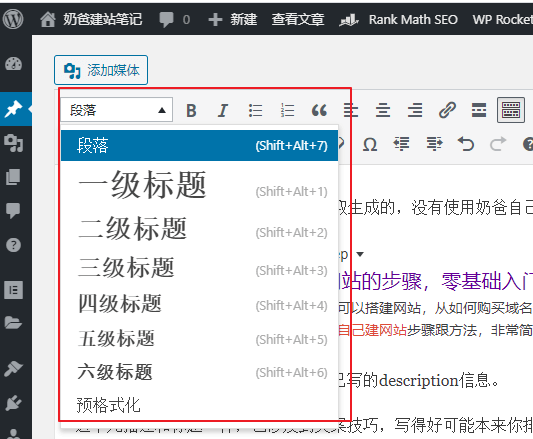
Google has said when communicating with SEOers that even if your website has multiple H1 tags, Google can identify which one is the correct title.
However, Naiba's suggestion is that regardless of whether Google can identify it, we should use various levels of headings normally and reasonably. A clear heading hierarchy structure can help Google SGE better understand your article structure.
The usual specification for using headings is:
- Use H1 for the webpage title
- Use H2 for subheadings
- Others decrease in order
For example, this article uses three levels of headings: H1, H2, and H3.
After all, h1 to h6 are part of the webpage specification code, and everyone likes those who follow the rules.
Reference reading:Google Says Webpages Can Have Multiple H1 Tags, What Should We Do?
10. Use Table of Contents for Long Articles
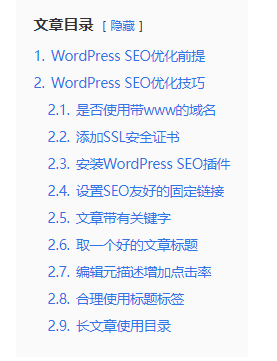
Google relatively prefers long articles, but long articles are not very suitable for user reading. Therefore, adding an article table of contents can improve user experience on one hand, and on the other hand, it also facilitates search engines in determining the article content.
The method to add an article table of contents in WordPress is very simple: install a table of contents plugin and use it in conjunction with reasonable heading tags.
11. Add ALT Tags and Textual Support for Images
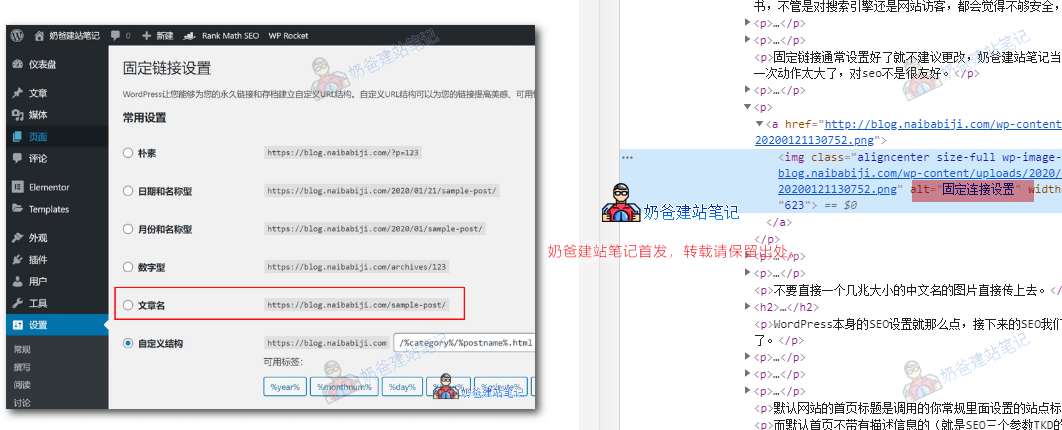
For example, in the image above, the ALT tag is set to „固定链接设置“ (permalink settings). Then, when someone searches for „固定链接设置“ on Google Images, there is a chance your image will appear.
Filling in ALT tags is a very important optimization method for those image websites.
For more detailed usage of ALT tags, please read the following article:
12. Name images appropriately
Most websites overlook this point when doing SEO, but if your industry has intense SEO competition, paying attention to every detail can help improve rankings.
Typically, the images we upload to websites have random names or are directly named in Chinese.
Actually, we can also name images in line with the article content, such as using names like wordpress-seo-*.png for images in this article. (However, Naiba is now a bit lazy, and many images have meaningless names.)
Suggestions for image naming are:
- Do not use Chinese names for images
- Do not use meaningless names
- It is recommended to use English words related to the content for naming
- Separate words with hyphens
- Include keywords in the featured image name of the article
13. Pay attention to article writing techniques to enhance content E-E-A-T weight
Articles are the most important thing for gaining search rankings, so writing a good article is the foundation for achieving SEO rankings. Incorporating your personal experience (Experience) and professional cases into the article is key to standing out in 2026, a time when AI-generated homogeneous content is prevalent.
What is EEAT?
Experience + Expertise + Authoritativeness + Trustworthiness = EEAT, which is the core content quality assessment standard proposed by Google in the „Search Quality Evaluator Guidelines.“
In the AI era, users can obtain information from AI more efficiently. Therefore, to gain more traffic for articles, they need to include something AI lacks: personal experience. The ultimate goal of search engines like Google is to provide the best user experience. When it discovers content containing unique, verifiable real experiences (such as specific times, locations, data, or process reviews) paired with professional analytical frameworks, it treats this as a strong signal of high quality. This stands in stark contrast to AI-generated content that merely aggregates information.
Naiba's experience is,When writing an article, ask yourself::
- Does the content have user search demand?
- Does the article content meet user needs?
- Does the article content include SEO optimization techniques?
- Is the content you write more in-depth or practical than what AI provides?
14. Pay attention to article length
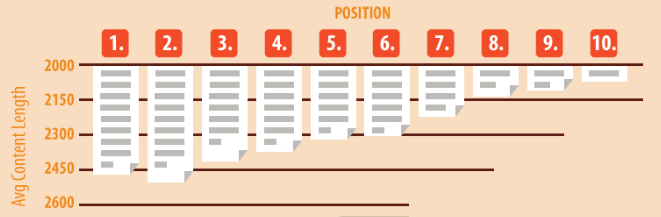
Some foreign websites and institutions have conducted surveys and statistics on the relationship between article length and rankings. In fact, in our daily use of Google search, you will also notice that longer articles often achieve good rankings.
However, this viewpoint should also be analyzed on a case-by-case basis; not all content is suitable for long articles.
On the basis of meeting user search needs, appropriately expanding the content breadth is still very beneficial.
15. Use appropriate Nofollow links
Do not indiscriminately pass link authority to low-quality websites; reasonably mark untrusted external links.
If you have no special settings, every link inserted in your article is dofollow.
So what is a Nofollow link?
<a href="https://blog.naibabiji.com/" rel="nofollow">奶爸建站笔记</a>
Links like the one above containing rel="nofollow" attribute are nofollow links.
The purpose of adding nofollow is to tell search engines not to follow this link. Wikipedia explains it as follows:
nofollow is an attribute in HTML used to tell search engines not to follow specific webpage links. It can be used to prevent behaviors like adding links in comments on high-PR websites to boost one's own site rankings, thereby improving search result quality and preventing the spread of spam links. Website administrators can also use nofollow for paid links on their pages to prevent such links from lowering search rankings.
For more knowledge about Nofollow, you can continue reading the following articles:
- Which Pages Should Use Noindex or Nofollow Tags
- How to check if an external link is nofollow?
- What can we do about Google's Nofollow link update on March 1st?
16. Optimize internal linking
Internal link optimization is easy to understand. The links inserted in this article, which point to pages on Naibabiji, are all called internal links.
The role of internal links is, on one hand, to connect the articles and content of your website, and on the other hand, to enrich the breadth and depth of the article's content.
The following is an internal link:
17. Optimize external linking
Traditional SEO knowledge tells us that external link optimization refers to links left for you by other websites that are not your own, called external links.
For example, if you think Naiba's article is good and repost it on your blog, or insert the address of Naiba's article in your blog post, then you have created an external link for Naiba.
Naiba has little research on external links. First, external links are always on other people's websites and are uncontrollable. Second, building external links is quite an effort-intensive task.
If you can obtain some high-quality external links, the effect on SEO rankings is relatively significant. (Authoritative websites, or large websites, can leave links for you, so the quality of such external links is quite high.)
Buying paid links is not recommended; buying poorly may backfire and directly result in no ranking.
18. Submit Sitemap
A sitemap is a collection of links to all articles and pages on your website, helping search engines discover the pages on your site.
Now mainstream WordPress SEO plugins support sitemap functionality, so there is no need to install additional corresponding plugins. (WordPress natively supports it too, but it's better to use the SEO plugin directly, as it's more user-friendly.)
For a tutorial on generating a sitemap in WordPress, please refer to the article below:
After setting up the sitemap, you can submit it to major search engines, such as Google, Bing, Yandex, etc.
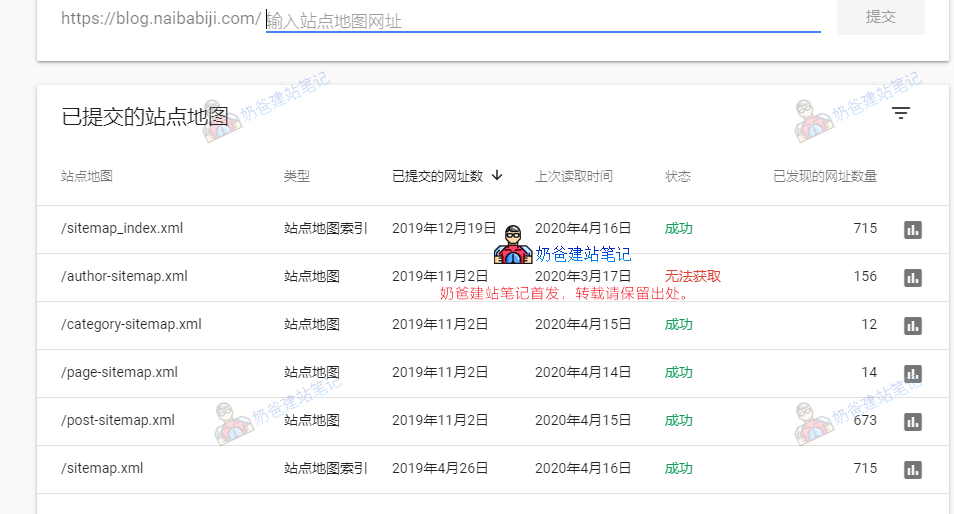
This involves the use of Google Search Console. Refer to the article below:
For other search engines, you can directly search for their corresponding webmaster centers and then submit the sitemap.
19. Conduct keyword research
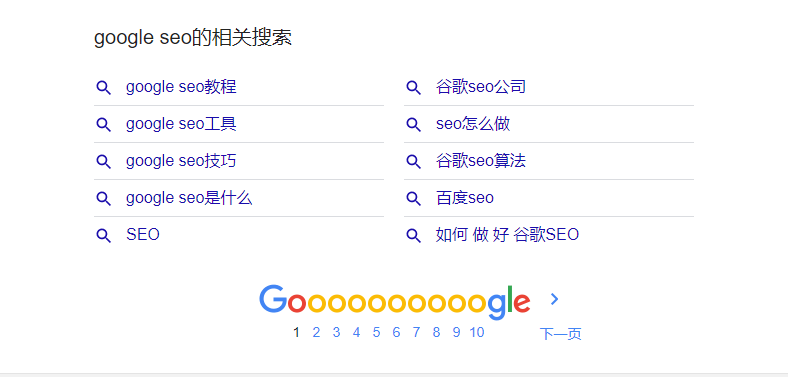
Keyword research runs throughout the entire SEO process and is involved in almost every step.
There are many tools for researching keywords for English websites, such asKWFinder,SEMrush和Ahrefs.
For Chinese websites, you can use sites like Aizhan, 5118, etc.
Of course, using Google search yourself can also reveal many keywords. For example, the screenshot above shows some search terms related to Google SEO.
20. Use structured tags
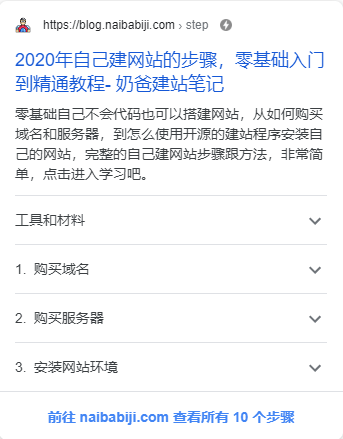
Structured tags, also known as Schema, are highly favored by Google.
schema.org was collaboratively created by Google, Microsoft, and Yahoo! with the aim of establishing a structured data markup schema supported by major search engines to provide users with a better web experience. Markup within web pages helps search engines understand the information on the page and deliver richer search results. Shared markup vocabulary allows website administrators to more easily decide on a markup schema and maximize the benefits from their work.
This Rank Math plugin supports Schema tags, and you can also install a dedicated Schema plugin to achieve this.
In your usual search results, some websites display results with ratings, which actually utilize schema tags.
References:Understand how structured data works
21. Keep important article content updated
In many cases, the content we share in articles can become outdated over time. For example, Naibabiji'sSiteGround Website Building Tutorialhas received feedback from visitors that many tutorials found online describe outdated operational methods, and only after reading the article shared by Naiba did they solve their problem.
Therefore, keeping content up-to-date also helps with your website's traffic and ranking.
22. Optimize website speed
Website speed is also a factor affecting page ranking. Research shows that if a page takes more than 4 seconds to load, a quarter of visitors will choose to abandon the site.
After a default WordPress installation with premium themes and corresponding plugins, without optimization, the loading speed is relatively slow, so some speed optimizations are necessary.
At the most basic level, you can consider using CDN services and caching plugins.
Regarding WordPress speed optimization, you can refer to the following articles.
- Website slow? 10 WordPress optimization methods to help you speed up
- WordPress Speed Optimization Topic Articles
Of course, if you are not very proficient in technical optimizations, you can directly consider purchasing a server with higher configuration.
A server with better performance will significantly improve website loading speed.
However, do not blindly believe the optimization scores written in online articles; base it on the actual user loading experience. (This is Naiba's personal opinion, for reference only.)
23. Dead link detection
After operating a website for a period, some dead links (i.e., links that cannot be opened or result in access errors) may appear.
These dead links can affect search engine crawling and degrade user experience.
WordPress has dead link checker plugins; you can install one to check and then handle the dead links accordingly.
24. Ensure mobile access is normal
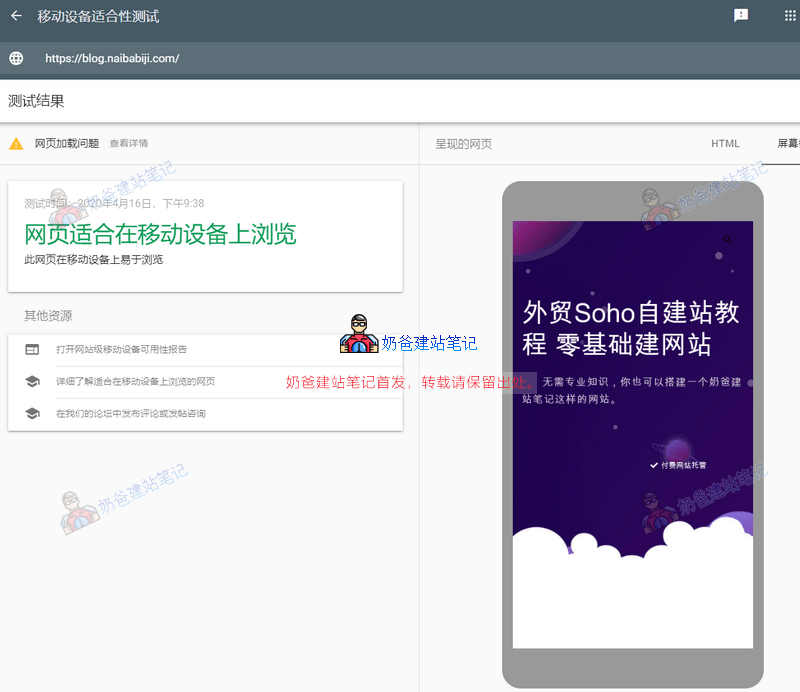
Most WordPress themes are responsively designed, displaying different layouts based on the browser, so generally, there is no need to worry about mobile incompatibility issues.
At the same time, Google has aMobile-Friendly Test toolthat you can use to test your site.
However, in actual testing, this result has bugs. Websites that open normally when tested on a mobile phone may report errors in Google's Mobile-Friendly Test tool, so don't worry too much about this test; base it on your website's actual test results (many website administrators abroad have also encountered this issue, and currently, there is no feasible solution).
Additionally, you can also install anAMP plugin, this is a mobile-friendly format introduced by Google. If there are AMP pages in search results, they will automatically redirect to the AMP page to view the content.
25. Install tracking code
Installing tracking codes can slow down website speed to some extent, but analyzing statistical data is a routine task for SEO optimization.
For foreign trade websites, Naiba recommends using Google Analytics, which can be used in conjunction with Google Search Console.
26. Track keyword rankings
If you are a professional SEO practitioner, then monitoring keyword rankings is also a very important task.
Analyze SEO effectiveness based on ranking changes and determine how to continue optimizing and maintaining rankings.
Naibabiji currently hopes to rankbuilding your own websitethis keyword first. However, we don't monitor ranking changes daily, only occasionally searching and checking.
As a corporate website, it is still recommended to monitor the ranking changes of your main keywords daily.
Check if your rankings have changed, if new competitor websites have appeared, and then analyze those competitor websites.
27. Use high-quality images
High-quality images usually have larger file sizes, so if your website's network speed is relatively slow, it's best to use a CDN service when using high-quality images to avoid slowing down the website.
Additionally, high-quality images are mainly used to achieve better rankings in Google Image Search. If your website's business doesn't attract many users through images, then there's no need to specifically create high-quality images.
As long as the article's accompanying images are clear, that's sufficient.
28. Increase user session duration

Session duration is a factor that significantly affects Google website rankings, and it corresponds to „website bounce rate".
If the website bounce rate is low, the corresponding session duration will be relatively high.
If the bounce rate is high, the session duration is usually not very long.
If the bounce rate is too high and the session duration is short, Google may consider that your webpage content does not meet the user's search needs.
However, this is not absolute; it depends on the actual article content. For example, for a problem-solving article, if someone finds the solution at a glance and then closes the webpage, it actually meets their user needs.
If you deliberately hide the answer deep within the content to increase session duration, it might instead cause Google to lower the webpage ranking.
29. Delete meaningless articles
When optimizing a website for SEO rankings, the more focused and precise the overall content, the easier it is to optimize.
This is referred to as „content pruning“ abroad.
It involves deleting articles that are unrelated to the website's theme or outdated.It's better to have a small amount of high-quality content than a large amount of irrelevant content.。
Naibabiji previously included some parenting logs, but they were later uniformly deleted.
30. Delete duplicate content
Sometimes, over time, you may not realize that you've written similar articles on the same topic. There might be slight differences between the two articles.
But it's best to merge the two articles into one, delete one of them, and set up a 301 redirect to the other.
31. Create an About page
Pages like About Us, Contact Us, and Privacy Policy can increase the website's trustworthiness, indirectly affecting how visitors promote your website, thereby influencing website traffic and rankings.
32. Delete spam comments
After a website goes live, it is often plagued by spam comments.
These spam comments often contain numerous links, and some website administrators, thinking they are genuine comments, happily approve them.
In reality, these spam comments with links can damage your website's image and affect SEO rankings.
33. Add breadcrumb navigation
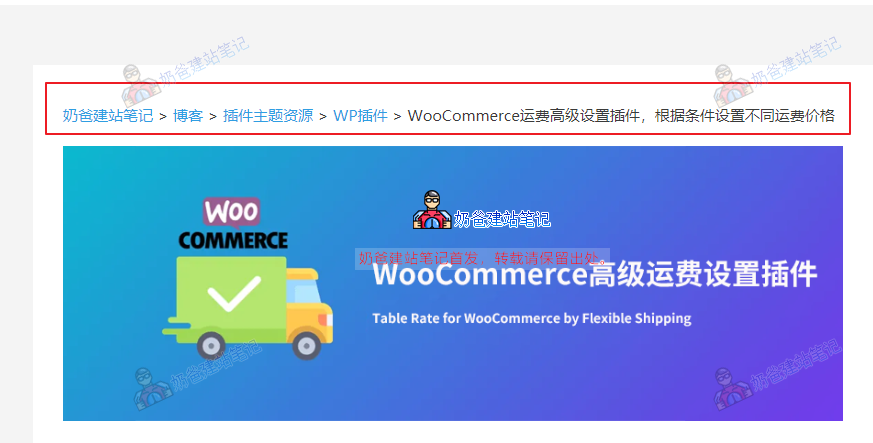
The location in the screenshot is the breadcrumb navigation.
Breadcrumb navigation allows users to clearly understand their position on the website and easily switch to the parent directory.
It also increases the crawling path for search engine spiders.
Some advanced WordPress Themes come with built-in breadcrumb navigation. If your Theme does not support it, you can also implement it yourself using a Plugin or code.
34. Use outbound links
Using outbound links (External Links), which your installed SEO Plugin likely also prompts you about.
This means that at appropriate times, you should insert links to external websites in your articles.
The purpose is similar to writing a paper, where citing authoritative sources enhances the credibility of your article.
(Actually, Naiba is also wondering if this is a scoring rule Google intentionally created to promote reconnection across the internet, especially since many people nowadays prefer not to include any external URLs on their websites.)
References:STUDY – OUTGOING LINKS USED AS RANKING SIGNAL
35. Implement topic cluster content model
Create „pillar pages“ and related „cluster articles“ around core topics, and connect them closely through internal links to comprehensively establish the website„s authority in that field.
For example:
For instance, the article I created titled „WordPress SEO Optimization Tutorial„ is a core article on WP SEO optimization. Although it provides 35 optimization tips, the details for each tip are not in-depth. Later, I can write detailed articles for each point and link these pages to this article through internal linking. After completing these articles, it can clearly tell search engines: “My website is the ultimate authority on WordPress SEO optimization, covering all relevant aspects.„ This greatly satisfies search engines“ preference forin-depth, comprehensive, and authoritative content. It also differentiates from AI-generated content, serving as a cornerstone for building long-term, stable search traffic in the era of AI content.
WordPress SEO Optimization Summary
The core logic of WordPress SEO in 2026 is:Use AI to improve efficiency by 10 times, and use „human“ to provide 10 times the value. Only articles that truly solve users' problems can remain stable amidst algorithm fluctuations.
Above, we have summarized manyWordPress SEO optimization methods. However, in the actual process of operating a website, we don't need to implement every single one, as few people can consistently complete so many optimization items for all pages.
We only need to focus on basic SEO optimization and perform detailed SEO for pages and keywords with higher competition. By making the content more accurate and comprehensive than competitors, the chances of ranking higher increase significantly.
Finally, friends who like this article might consider adding it to their bookmarks. Naiba will continuously update this article, and you can revisit it when you're unsure how to perform SEO for your WordPress website.
WordPress SEO Plugin Recommendations
Here are some classic WordPress SEO Plugins to share with you. Click the links to go directly to the Plugin's official website for full details.
- Yoast SEOCurrently the most used SEO Plugin by WordPress users, available in free and premium versions;
- All in one SEOThe second most popular SEO plugin, available in both free and premium versions;
- Rank MathA rapidly rising SEO plugin, with the free version offering many advanced features, and a premium version also available;
- Smart SEO ToolThe SEO plugin that best suits the usage habits of Chinese users, completely free;
- All-in-one search auto-submission management pluginA paid plugin that helps submit your posts to search engines for indexing, recommended for Chinese websites;
- Popular Keyword Recommendation Plugin ProDon't know how to write articles for SEO? This plugin is essential, suitable for both Chinese and English websites;
- Spider AnalyserTracks search engine crawls of your website, helping analyze indexing status. Ideal for those who enjoy analyzing website data.
Comments are enabled for this article. If you have any thoughts, feel free to discuss and share.
🚀 Still don't know how to implement after reading so much?
「WordPress建站陪跑」——Naiba guides you through hands-on practice. From server optimization to the most cutting-edge AI SEO strategy deployment for 2026, we accompany you throughout, rejecting empty theory.👉 Start My SEO Profit Journey
Followed the website building tutorial. Used the $12/month plan. But on the first day, the website's CPU and runtime were often maxed out. On the second day, the domain website was sometimes accessible, sometimes not. The Baota Panel IP address also showed a 503 error.
CPU maxing out is usually a problem with the program, possibly due to plugin compatibility or some code not being set up correctly.