
WordPress is the most suitable open-source website building program for Google SEO. Here, Naiba will introduce how to achieveHow to Get a New Website Built with WordPress Quickly Indexed by Google。
Preparations before Website Indexing
If we want our website to be indexed by search engines like Google, we should do some preparatory work before building it to ensure that when Google crawls, the site contains content.
在WordPress Beginner SEO Setup Tutorialwhat is actually discussed are things to do after the website is built. Before building the website, we should also do one thing, which isPrevent Search Engines from Indexing When the Website is Not Fully Built。
Using WordPress is very simple. We are inInstall WordPress. As shown in the figure below:
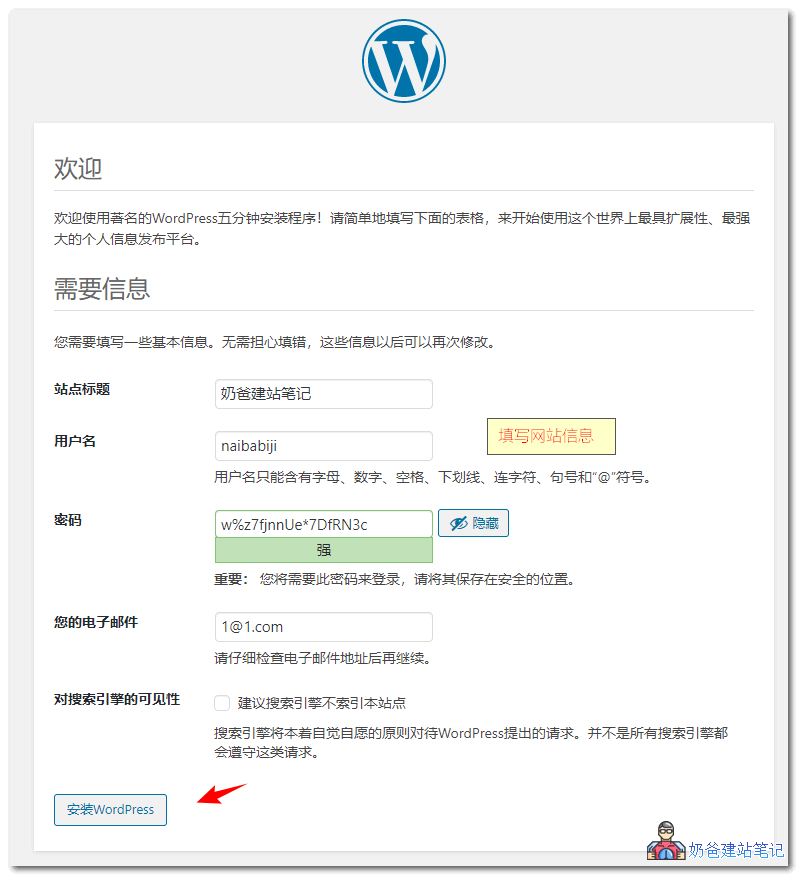
In the image above, check the option to discourage search engines from indexing this site.
This way, search engines like Google will not crawl and index your website. After your website is built, simply go to Settings > Reading, uncheck this option, and it will no longer block indexing. Google can then index your website normally.
Let Google Index Your Website
Once your website is built and you disable the search engine visibility feature, you can start letting Google and other search engines crawl and index your site.
The specific operation method is as follows:
1. Submit your website sitemap to major search engines. If you don't have a sitemap,read this article firstcreate one, and then go tomajor search engine submission portalsSubmit your sitemap.
2. Register aGoogle Search Console account, add your website.
Usually, within one day after the operation, you can check whether your website is indexed by Google using site:domain.
If more than 3 days have passed and Google still hasn't indexed your website, then you need to check the following:
- Whether you forgot to enable the option for visibility to search engines;
- Whetherrobots.txt fileis blocked;
- Whether the website server is blocking search engine crawls (for example, if the firewall is blocking it, you can use search engine crawl testing tools to determine, or installspider logging pluginCheck if there are logs.)
- Whether the website content is not yet fully developed (for example, just the website is installed, no content has been filled, the homepage is empty, with only a 'hello world' post)
Getting a WordPress website indexed by Google is quite simple. Basically, after you submit the sitemap address, Google spiders will crawl and fetch your website 24/7. To improve Google SEO, you also need to regularly add valuable content to the website to gain search engine rankings and obtain more traffic.