2026 Zero-Basics Website Building Tutorial: 18 Detailed Steps to Build Your Own Website
2026 Update: Building a Website from Scratch, Detailed Steps to Independently Create a Professional Personal Website (Includes AI-Assisted Efficiency Solutions)
Website creation isn't as complex as you might think
In 2026, AI technology has lowered the barrier to building personal websites to a historic low. Following Naiba's website building tutorial, even beginners can easily achieve high-quality self-built sites with AI assistance, creating professional websites with excellent performance.
If you still don't know how to proceed after reading the self-build website tutorial, you can choose ourWebsite Building Coaching Service

Core 4 Steps for Self-building a WebsiteQuick Launch
Master these 4 core website creation processes, and your website can be successfully launched
Beginner Reminder:Truly operating a website well goes far beyond these 4 steps! The following 18-step detailed guide to building your own website will show you the complete process from planning to profitability.
Complete Flowchart for Building Your Own Website
Click the image to enlarge and view the steps for building a website 👇
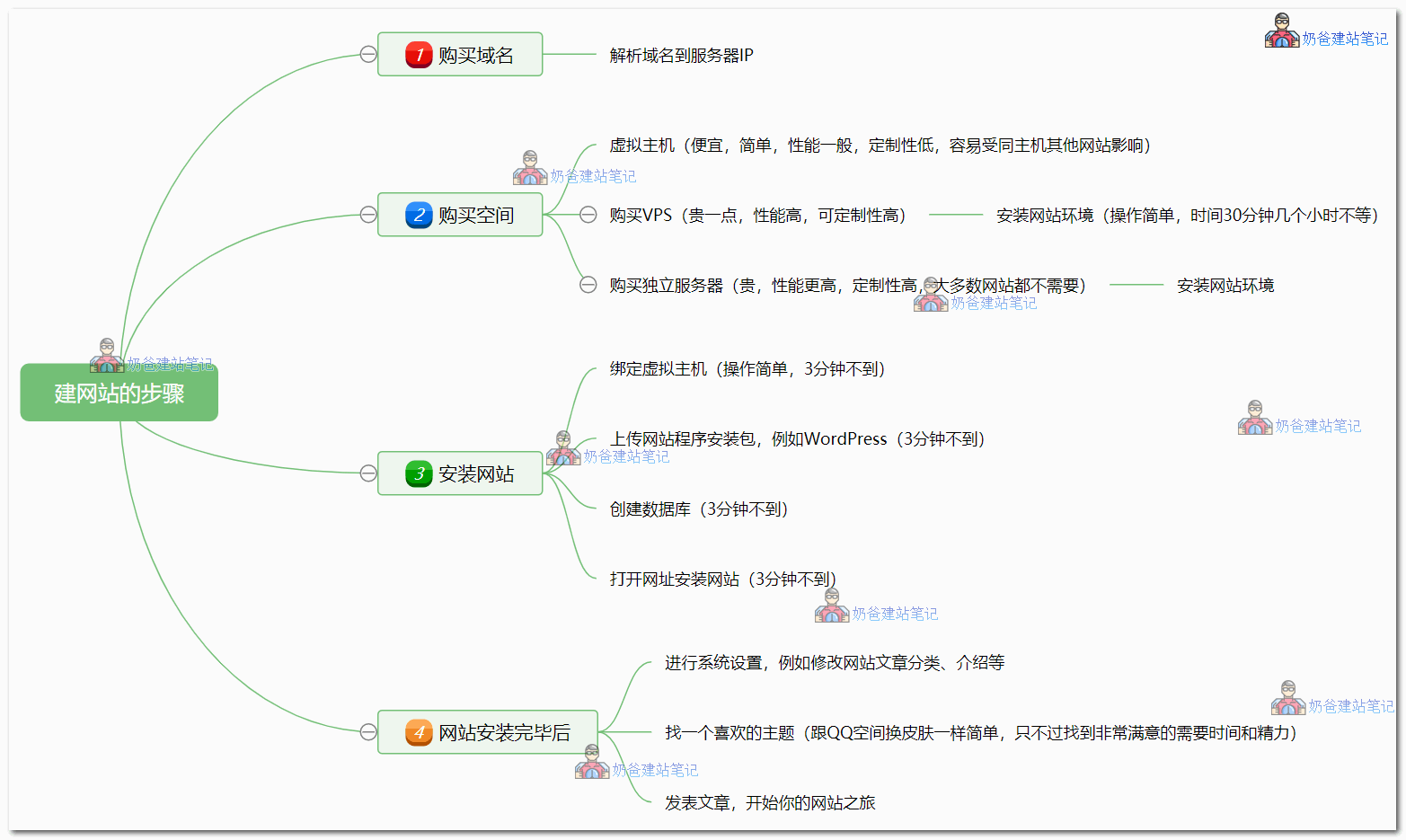
2026 Website Creation 18-Step Detailed Guide
Complete Path from Website Building Planning to Self-Built Website Monetization and Profitability
Phase One: Personal Website Building Preliminary Preparation
Define goals and create a professional website development plan
Website Planning
Determine the website type, target audience, and basic structure
- ✅ Determine the website purpose (blog/corporate/e-commerce)
- ✅ Analyze the target user group
- ✅ Plan the website section structure
- ✅ Develop promotion and monetization plans
Website Budget Planning
Understand your website building costs and arrange your budget reasonably
Total: The annual cost of building your own website is usually within a thousand yuan.
💰 View detailed cost analysisPhase Two: Basic Setup for Self-Built Website
Purchase domain and server to complete the core framework of the website setup.
Register Domain
Choose a memorable web address
⏱️ Estimated Time: 30 minutes
Select a Server
Choose a stable "home" for your website
Install Website Environment
Configure Server Runtime Environment (VPS Users)
Note:Shared Hosting users can skip this step.
Recommended for VPS users.Baota Panel, one-click installation, simple and easy to use.
⏱️ Estimated time: 1-2 hours (can do other things simultaneously)
Domain Name Resolution
Point the domain name to your server.
Connect the domain name and the server so that users can access your website via the domain name.
Install Website Program
Deploy WordPress, website officially goes live
Powerful features, good scalability, suitable for various types of websites
Installation TutorialDomestic CMS, suitable for simple corporate websites.
Learn More⏱️ Estimated Time: 10 minutes
Phase Three: Website Production, Configuration, and Optimization
Fine-tuned settings to ensure the professionalism of personal website construction.
Basic Configuration
Complete basic website setup, Theme selection, and Plugin installation
- Set website title and description
- ConfigurationPermalink
- Create basic page categories
- InstallPremium Themes
- Recommended:Astra Theme
- Customize Website Appearance
- SEO:Rank Math
- Cache:Choose One from Multiple Options
- Page Editing:Elementor
- UseCursor / ClaudeAssist with personalized code modifications
- Use AI to quickly generate website SEO descriptions and supporting text
- Tip: If you encounter obstacles accessing foreign AI services, you can useStable access solution
Phase Four: Website Operation and Self-built Website Traffic Promotion
Fill with high-quality content and attract traffic through SEO optimization after website creation
Operation and promotion
Complete workflow for content creation, SEO optimization, and traffic promotion
📝 Content Creation
- Populate basic pages (About Us, Contact Us, Product Introduction)
- Regularly publish high-quality articles
- Recommendation: At least 1 piece of original content per week
📊 Data Analysis
- InstallGoogle Analytics
- SubmitSitemapTo search engines
- Monitor website performance data
🚀 SEO Optimization
- LearnSEO Basics
- RegularlyPerformance Optimization
- Multi-channel Promotion and Traffic Generation
Stage Five: Guide to Monetizing and Profiting from a Self-Built Website
Explore multiple monetization models to realize the value conversion of website creation
Profit Optimization
Explore monetization methods and avoid common mistakes
💰 Monetization Methods
After the website gains traffic, you can try various monetization methods:
- Product/Service Sales
- Ad Network Revenue
- Membership Subscription Model
- Consulting Service Fees
⚠️ Common Mistakes to Avoid
Common mistakes made by beginners in website building should be avoided promptly:
- Excessively pursuing perfection and delaying the launch
- Neglecting basic SEO setup
- Irregular website data backup
- Lack of content update plan
Frequently Asked Questions about building your own website
The 6 most concerning questions for beginners building their own website
How much does it cost to build your own website?
+Hardware costs (required):
- Domain: 50-100 RMB/year
- Server: 200-800 RMB/year
Software costs (optional):
- Paid Theme: 200-500 RMB (one-time)
- Paid Plugin: 100-300 RMB/year
Summary: The basic annual cost for building your own website is 500-1000 RMB/year.
Do I need to continue paying after building my own website?
+Yes, renewal is required:
- The domain name needs annual renewal, otherwise the website will be inaccessible.
- The server also requires annual renewal, otherwise website data will be lost.
- Just like renting a house, you need to pay the "rent" regularly.
💡 Tip:You can purchase multiple years upfront, often at a discount.
Do I need to know programming to build my own website?
+No need!Now building your own website is very simple:
- WordPress provides a visual operation interface
- Drag-and-drop page editor, WYSIWYG
- Rich selection of Themes and Plugins, ready to install and use
💡 Bonus Points:If you know a little HTML/CSS, you can better customize the website's appearance.
What are the alternatives besides WordPress?
+Other free website building programs:
- PbootCMS- Domestic, suitable for corporate websites
- Drupal- Powerful features, suitable for large websites
- Joomla- Medium complexity websites
- Hugo/Hexo- Static blog generators
Why recommend WordPress?Good usability, strong extensibility, active community, and abundant resources.
View detailed comparisonMust domain and server be purchased?
+If you want others to access your website, you must purchase them!
- Domain= Website address, allowing people to find your website
- Server= The home of the website, storing website files
Free alternatives:
- GitHub Pages (suitable for technical blogs)
- Netlify/Vercel (suitable for static websites)
- But functionality and freedom are limited
Does it require ICP filing?
+Check server location:
🇨🇳 Domestic Server
- ✅ Must have ICP filing
- ✅ Fast access speed
- ❌ ICP filing process is cumbersome (15-30 days)
🌍 Overseas Server
- ✅ No ICP filing required
- ✅ Ready to use upon purchase
- ❌ Slightly slower domestic access
💡 Suggestion:Beginners can start with an overseas server for quick deployment and experience.
🎉 Start your website building journey now
By following these 18 steps to build your own website, you can fully create a professional website. Remember, the most important thing is to take action!
⚡ Quick start to building your own website
- Register a domain name (Recommended:Namesilo)
- Purchase server space (Recommended for beginners:Shared Hosting)
- Install WordPress (Installation Tutorial)
- Choose a good-looking Theme (Theme Recommendations)
- Start creating content

Downloaded WordPress here, thank you for sharing
The blogger's site loads very quickly here.
There's no reason for a domestic server to be slow.
Is there a detailed tutorial? Find a cheaper one, domain and hosting to build a website and try it out. I bought a domain before, is the domain permanent or yearly? That one was a PeanutHull domain.
You haven't carefully read my website articles, there are so many tutorials.
The senior„s tutorial is very clear, even a beginner like me can follow your steps one by one; the WordPress link attached in the article cannot be downloaded, so I searched and downloaded it from Baidu, but during installation, the “PHP version„ option does not display any choices, and when submitting, it reports “PHP version number cannot be empty,„ preventing WordPress installation. I don“t know how to solve this. Could the senior help clarify this confusion?
Are you using Baota Panel? Try CTRL + F5 to force refresh; if that doesn't work, click "Repair Baota Panel" in the top right corner and try again.
Using Baota Panel, still not working after refreshing and repairing; then I re-bound the domain, database, etc., and when searching for the domain, it shows "500 - Internal Server Error". The first time after binding the domain, the search came up normally, but this time the search won't open; currently looking for a solution -_-||
For this kind of problem, you can directly reinstall the server OS and then reinstall Baota. If you research the problem, you might still have issues later; reinstalling is more direct.
Yeah, I thought the same before. If I really can't figure it out, I'll just reinstall. Thanks.
Can domestic domains use foreign servers? Can they access the internet scientifically?
You can use foreign servers, which allows you to access the internet freely if you know how.
Why was my digital user account directly locked after registration?
It's likely that big data identified you as having the potential to exploit loopholes, so your account was disabled.
Senior, I am using the free version of the ASTRA Theme, I can't find how to set up borderless featured images for posts like this website. Is it only available in the PRO version?
Hmm, the margin feature is in the pro version, the free version doesn't have it.
Keep it up Naiba, it's written very clearly, I'm still learning too...
Hello blogger, I want to build a foreign trade website for selling shoes, but there are a huge variety of products. If I upload them, do I have to upload them one by one each time? Also, if I change websites and use the blogger's Baota Panel backup directly on another website, can it still be used?
WordPress can change the website address; re-uploading is not required.
Hello LEE, may I ask what WordPress Theme is used for this website?
astra, it's written at the bottom of the website.
After reading the Alibaba Cloud promotional server introduction for a long time ~~already confused by the server options above~
Huawei Cloud is a bit more expensive compared to them and doesn't support one-time purchase for 3 years
Tencent Cloud is simpler~
I want to ask the blogger: For a personally built website, besides images and text, if I add some original videos~
How should I choose a server?
For example: the type with 2 cores, 4G RAM, 8M bandwidth, and 1200G monthly traffic~~ can it support videos?
Enough, anyway you don't have much traffic. If the traffic becomes too high, you can upload videos to video sites for external linking or use a CDN.
I built a WordPress website myself using the Baota Panel, and haven't purchased hosting yet. How do I put the finished site into the hosting space?
You haven't purchased hosting space, and then you need to put the finished site into the space. Do you see the problem?
The website shows a 404 Not Found error when entering the admin page. What's going on? Can't fix it no matter what.
Pseudo-static not configured
May I ask what the blogger's contact information is? Could you provide an email, WeChat, Line, etc.?
Seeing your comment, I understand why some foreign trade clients ask me to place contact buttons in various positions on the website when building their sites.
Thank you
Hello Naiba, may I ask which small feature of Elementor Pro is used to implement the step-by-step process flow at the bottom of this page? It generates arrow line indicators as the page scrolls, looks very nice.
The UAE plugin that comes with astra pro
May I ask, what should I do if element and the simple table of contents are incompatible? When I turn on element, I cannot use element's table of contents for jumping (although the table of contents can still be generated, I cannot click on it to jump to the corresponding location).
You can consider installing a table of contents plugin as a replacement.
Great guide! In 2024, building websites with intuitive tools has become even easier. I like how you break down the steps: from choosing the right domain and hosting to using website builders like WordPress or Wix. The sections on SEO and mobile optimization would be a useful addition! This is the next task that helps add value.
I built a website, but it feels messy. Although all the necessary functions work, I applied the WoodMart template overall, used visual editing for some modules, and edited separate styles with HTML for others. It's just that many areas are not unified.
I need to change the domain and server now, and I'm struggling with whether to rebuild or directly transfer the current website. I don't know if this lack of uniformity will have any impact on the website. If the impact is significant, I will rebuild.
I am a beginner. Building this website has basically been a bit of this and a bit of that, without a clear direction. So, please answer my doubts, thank you.
If you think rebuilding will be better than the current one, then rebuild. If it will be the same as now, then just transfer directly.
Come and study hard