2026 Zero-Basics Website Building Tutorial: 18 Detailed Steps to Build Your Own Website
Updated 2026: Build a Website from Scratch, Detailed Website Creation Steps Teach You to Independently Build a Professional Personal Website (Includes AI-Assisted Efficiency Solutions)
Website creation is actually not as complicated as you think
In 2026, AI technology has lowered the barrier to building personal websites to a historic low. Following Naiba's website building tutorial, even beginners can easily achieve high-quality self-built websites with AI assistance, creating professional websites with excellent performance.
If you still don't know how to operate after reading the self-build website tutorial, you can choose ourWebsite Building Coaching Service

Core 4 Steps for Self-Building a WebsiteQuick Launch
Master these 4 core website creation processes, and your website can be successfully launched
Beginner Reminder:Running a successful website involves far more than these 4 steps! The detailed 18-step guide below for building your own website will show you the complete process from planning to profitability.
Complete Flowchart for Building Your Own Website
Click the image to enlarge and view the website building steps 👇
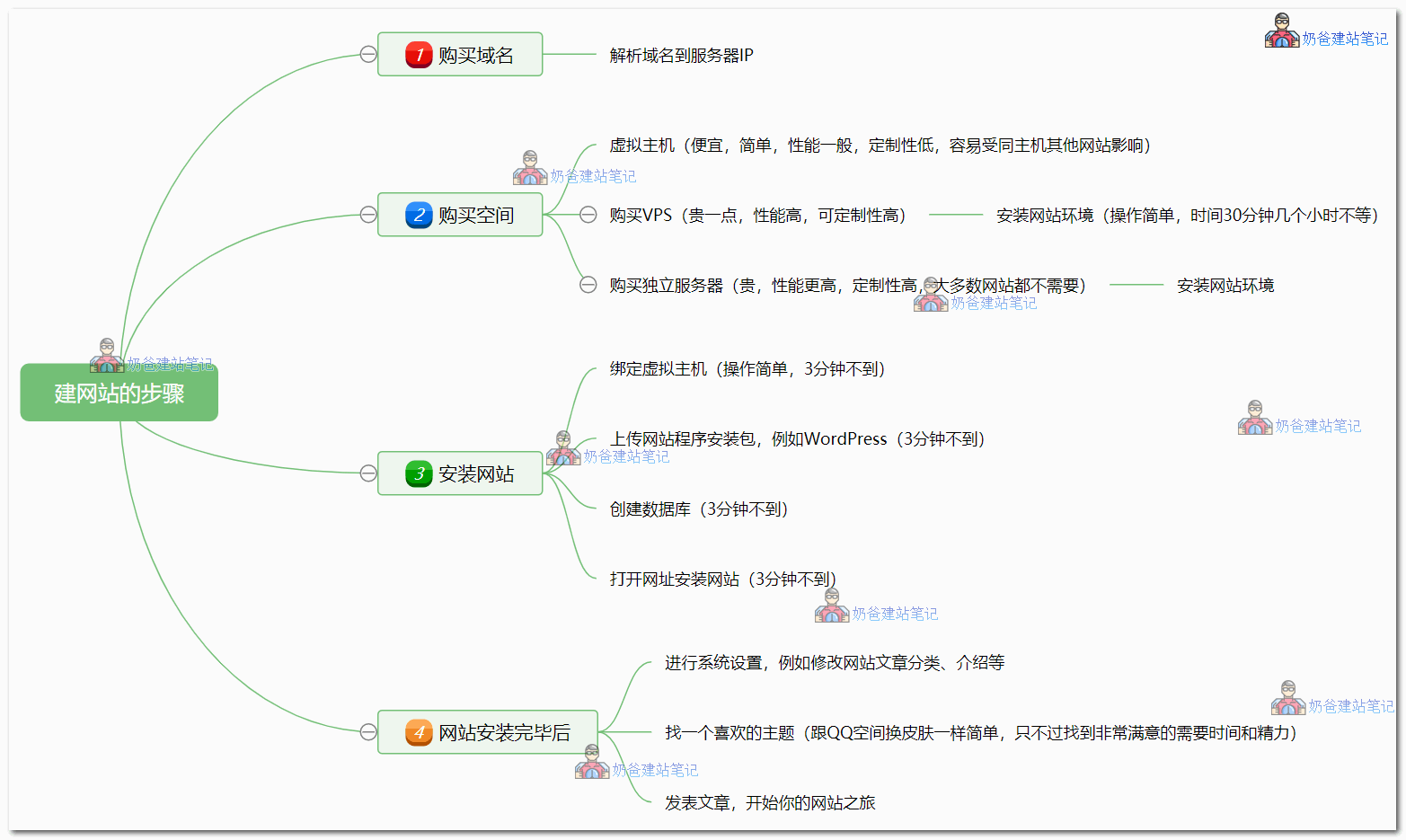
2026 Website Creation Detailed 18-Step Guide
The complete path from website building planning to self-built site monetization and profitability
Phase One: Pre-Website Building Preparation
Define goals and create a professional website creation plan
Website Planning
Determine website type, target audience, and basic structure
- ✅ Determine website purpose (Blog / Business / E-commerce)
- ✅ Analyze target user group
- ✅ Plan website section structure
- ✅ Develop promotion and monetization plan
Website Building Budget Planning
Understand the cost of building your own website and arrange your budget reasonably
Total: The annual cost of building your own website is usually under a thousand RMB
💰 View detailed cost analysisPhase Two: Self-Built Website Foundation Setup
Purchase domain and server, complete the core framework for website building
Register a Domain
Choose a memorable web address
⏱️ Estimated Time: 30 minutes
Choose a Server
Select a stable "home" for your website
Install Website Environment
Configure server runtime environment (for VPS users)
Note:Shared Hosting users can skip this step
Recommended for VPS usersBaota Panel, one-click installation, simple and easy to use.
⏱️ Estimated Time: 1-2 hours (can do other things simultaneously)
Domain Name Resolution (DNS)
Point your domain name to your server
Connect your domain name and server so users can access your website via the domain.
Install Website Program
Deploy WordPress, website officially goes live
Powerful features, good extensibility, suitable for various types of websites
Installation TutorialDomestic CMS, suitable for simple corporate websites
Learn More⏱️ Estimated Time: 10 minutes
Phase Three: Website Production, Configuration, and Optimization
Fine-tuned settings to ensure the professionalism of personal website building
Basic Configuration
Complete basic website settings, Theme selection, and Plugin installation
- Set website title and description
- ConfigurePermalink
- Create basic page categories
- InstallHigh-quality Theme
- Recommended:Astra Theme
- Customize website appearance
- SEO:Rank Math
- Cache:Choose one from multiple options
- Page Editor:Elementor
- UseCursor / ClaudeAssist in personalized code modifications
- Utilize AI to quickly generate website SEO descriptions and supporting text
- Tip: If you encounter obstacles accessing foreign AI services, you can useStable Access Solution
Phase Four: Website Operations and Self-Built Website Traffic Promotion
Fill with high-quality content, attract traffic through SEO optimization after website creation
Operation and Promotion
Complete workflow for content creation, SEO optimization, and traffic promotion
📝 Content Creation
- Fill basic pages (About Us, Contact Us, Product Introduction)
- Regularly publish high-quality articles
- Recommendation: At least 1 original article per week
📊 Data Analysis
- InstallGoogle Analytics
- SubmitSitemapto search engines
- Monitor website performance data
🚀 SEO Optimization
- LearnSEO basics
- RegularlyPerformance optimization
- Multi-channel promotion and traffic acquisition
Phase Five: Self-built Website Monetization and Profit Guide
Explore multiple monetization models to achieve value conversion from website creation
Profit Optimization
Explore monetization methods, avoid common mistakes
💰 Monetization Methods
After the website gains traffic, you can try various monetization methods:
- Product/Service Sales
- Advertising Network Revenue
- Membership Subscription Model
- Consulting Service Fees
⚠️ Common Mistakes to Avoid
Common mistakes made by beginners in website building should be avoided promptly:
- Over-pursuing perfection and delaying the launch
- Neglecting basic SEO settings
- Not backing up website data regularly
- Lacking a content update plan
FAQ for Building Your Own Website
The 6 Most Concerned Questions for Beginners Building Their Own Website
How much does it cost to build your own website?
+Hardware Costs (Required):
- Domain: 50-100 yuan/year
- Server: 200-800 yuan/year
Software Costs (Optional):
- Paid Theme: 200-500 yuan (one-time)
- Paid Plugin: 100-300 yuan/year
Summary: The basic cost to build your own website is 500-1000 yuan/year
Do I need to continue paying after building my own website?
+Yes, renewal is required:
- The domain needs to be renewed annually, otherwise the website will be inaccessible
- The server also needs to be renewed annually, otherwise website data will be lost
- Just like renting a house, you need to pay "rent" regularly.
💡 Tip:You can purchase multiple years at once, often with a discount.
Do I need to know programming to build my own website?
+No!Building your own website is now very simple:
- WordPress provides a visual operation interface
- Drag-and-drop page editor, WYSIWYG
- Rich selection of Themes and Plugins, ready to install and use directly
💡 Bonus points:If you know a bit of HTML/CSS, you can better customize your website's appearance.
What are the alternatives to WordPress?
+Other free website building programs:
- PbootCMS- Domestic (China), suitable for corporate websites
- Drupal- Powerful, suitable for large-scale websites
- Joomla- Medium complexity websites
- Hugo/Hexo- Static blog generators
Why recommend WordPress?Good usability, strong extensibility, active community, abundant resources.
View detailed comparisonMust I purchase a domain and server?
+If you want others to access your website, you must purchase them!
- Domain= Website address, so people can find your site
- Server= The home for your website, where website files are stored
Free alternatives:
- GitHub Pages (suitable for technical blogs)
- Netlify/Vercel (suitable for static websites)
- But functionality and freedom are limited
Is ICP filing required?
+Depends on server location:
🇨🇳 Domestic servers (in China)
- ✅ ICP filing is mandatory
- ✅ Fast access speed
- ❌ Filing process is cumbersome (15-30 days)
🌍 Overseas Servers
- ✅ No ICP Filing Required
- ✅ Ready to Use Immediately
- ❌ Slightly Slower Access from Mainland China
💡 Suggestion:Beginners can start with overseas servers for quick launch and experience.
🎉 Start Your Website Building Journey Now
By following these 18 steps to build your own website, you can definitely create a professional website. Remember, the most important thing is to take action!
⚡ Quick Start to Building Your Own Website
- Register a domain name (Recommended: Namesilo)
- Purchase server space (Recommended for beginners: Shared Hosting)
- Install WordPress (Installation Tutorial)
- Choose a nice-looking Theme (Theme Recommendations)
- Start Creating Content

Downloaded WordPress here, thanks for sharing.
The website loads very fast here, blogger.
It makes no sense if domestic servers aren't fast.
Is there a detailed tutorial? I want to find a cheaper one, and try building a website with a domain and server. I bought a domain before, is the domain permanent or for one year? That was a PeanutHull domain.
You haven't read my website articles carefully, there are so many tutorials.
Senior„s tutorial is very clear, even a beginner like me can follow your steps one by one; the WordPress link attached in the article cannot be downloaded, I searched and downloaded it from Baidu, but during installation, the “PHP version„ option doesn“t show any choices, and when submitting, it reports „PHP version number cannot be empty“, WordPress cannot be installed, I don„t know how to solve this, can the senior help clarify my confusion?
Are you using Baota Panel? Try CTRL + F5 to force refresh, if that doesn't work, click 'Repair Baota Panel' in the top right corner and try again.
I am using Baota Panel, after refreshing and repairing, it still doesn't work; then I re-bound the domain, database, etc., and when searching the domain, it shows '500 – Internal Server Error'. The first time I bound the domain, the search came up normal, but this time it won't open; I'm looking for a solution -_-||
For this kind of problem, you can directly reinstall the server OS and then reinstall Baota. If you figure out the problem, there might still be issues later, reinstalling is more straightforward.
Yeah, I thought the same before, if I really can't figure it out, I'll just reinstall, thanks.
Can domestic domains use foreign servers? Can you access the internet freely?
You can use foreign servers, if you know how, you can access the internet freely.
Why did my registered Digital user account get directly 'Account Locked'?
Probably big data found you have the potential to take advantage of offers, so they disabled your account.
Senior, I am using the free version of the ASTRA Theme, I can't find how to set borderless featured images for posts like this website. Is it only available in the PRO version?
Well, the margin feature is for the pro version, not included in the free version.
Keep it up, Naiba! Your writing is very easy to understand. I'm still learning too...
Hello, blogger. I want to build a foreign trade independent website for selling shoes, but there are a huge variety of products. Do I have to upload them one by one each time? Also, if I change websites and use the Baota Panel backup you mentioned, can I continue using it directly on a different website?
WordPress allows you to change the website address; there's no need to re-upload everything.
Hello LEE, may I ask which WordPress Theme is used for this website?
Astra, it's written at the very bottom of the website.
I've been looking at the Alibaba Cloud promotional server descriptions for a while now... I'm already confused by the server options above.
Huawei Cloud is a bit more expensive compared to them and doesn't support a one-time purchase for 3 years.
Tencent Cloud is simpler.
I'd like to ask the blogger: For a personally built website, besides images and text, if I add some original videos,
how should I choose the server?
For example: the type with 2 cores, 4G RAM, 8M Bandwidth, 1200G monthly Traffic... can it support videos?
It's enough. After all, you probably don't have much traffic. If the traffic gets too high, you can upload the videos to a video site for external linking or use a CDN.
I built a WordPress website myself using the Xiaopi Panel, and I haven't bought hosting space yet. How do I put the finished site into the hosting space?
You haven't bought hosting space, and then you need to put the finished site into the hosting space. Do you see the problem here?
When accessing the admin page of the website, it shows 404 Not Found. What's the reason? I've tried everything but can't fix it.
Pseudo-static is not configured.
May I ask what the blogger's contact information is? Could you add an email, WeChat, Line, etc.?
Seeing your comment, I understand why some foreign trade clients ask me to place contact buttons in various positions on the website when I build sites for them.
Thank you.
May I ask, Naiba, which small feature of Elementor Pro is used to implement the step-by-step process at the bottom of this page? It generates arrow line indicators as the page scrolls, which looks very nice.
The UAE Plugin that comes with Astra Pro.
May I ask, what should I do if Elementor and the simple table of contents are incompatible? When I enable Elementor, I cannot use Elementor's table of contents for jumping (although the table of contents can still be generated, I cannot click on it to jump to the corresponding position).
You can consider installing a table of contents plugin as an alternative.
Great guide! In 2024, building a website has become even easier with intuitive tools. I like how you break down the steps: from choosing the right domain and hosting to using website builders like WordPress or Wix. The sections on SEO and mobile optimization would be a useful addition! This is the next task that will help add extra value.
I built a website, but it feels very messy. Although all the necessary functions work, I used the Woodmart template overall, edited some modules visually, and edited separate styles for some modules using HTML. Many areas are just not uniform.
I now need to change the domain and server. I'm struggling with whether to rebuild it or directly transfer the current website. I don't know if this lack of uniformity will have any impact on the website? If the impact is significant, I will rebuild it.
I'm a beginner, and building this website has been a bit haphazard without a clear direction, so I'd appreciate it if you could answer my questions. Thank you.
If you think a rebuild will be better than the current state, then rebuild it. If it will be the same as the current one, then just migrate it directly.
Here to study seriously