
Breadcrumb navigation(English: Breadcrumb Trail) is a navigation aid in the user interface.Breadcrumb navigationTypically located below the title or header, it provides users with a path back to the homepage or entry page of the website, usually represented by the greater-than sign (>), although some designs use other symbols (such as «).
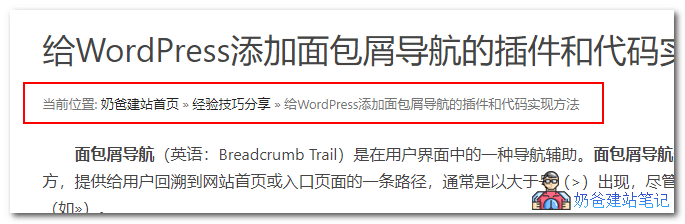
They mostly look like this: Home > Category Page > Subcategory Page or Home >> Category Page >> Subcategory Page. For example, the current breadcrumb navigation effect of Naiba Web Development is shown in the figure below:
The role of breadcrumb navigation
Breadcrumb navigation has two main purposes:
- Enhance user experience, allowing users to easily know their current location and conveniently jump to the homepage and parent directories.
- Let search engines clearly understand the website structure, which helpswebsite SEOeffectiveness.
WordPress breadcrumb navigation plugin
Breadcrumb NavXT
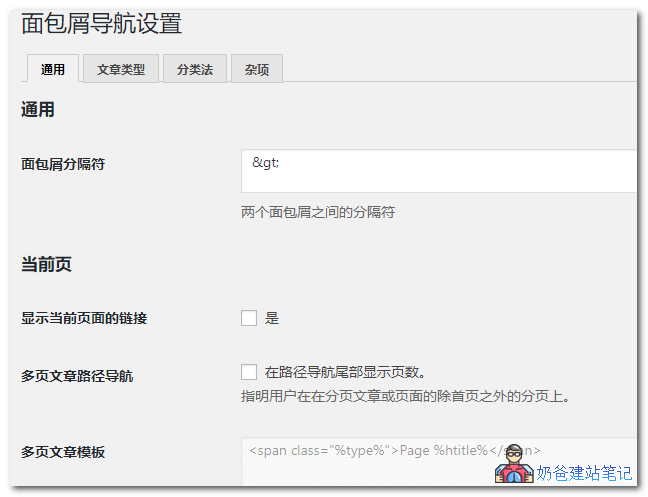
ThisWordPress breadcrumb navigation pluginsupports the Chinese language. You can set the breadcrumb separator in the backend, choose whether to display the current page link, and specify which pages or post types show breadcrumb navigation. Breadcrumb navigation can be set to display on all pages supported by WordPress.
Breadcrumb NavXT download address:
If you need to install Breadcrumb NavXT, simply search for the plugin name from the WP backend or download the installation package from below to install.
Breadcrumb NavXT usage method:
After installing and activating Breadcrumb NavXT, find the page file in the website template theme files where you want to display breadcrumb navigation, and insert the following code snippet in the appropriate location.
<div class="breadcrumbs" typeof="BreadcrumbList" vocab="https://schema.org/">
    <?php if(function_exists('bcn_display'))
    {
        bcn_display();
    }?>
</div>
Flexy Breadcrumb
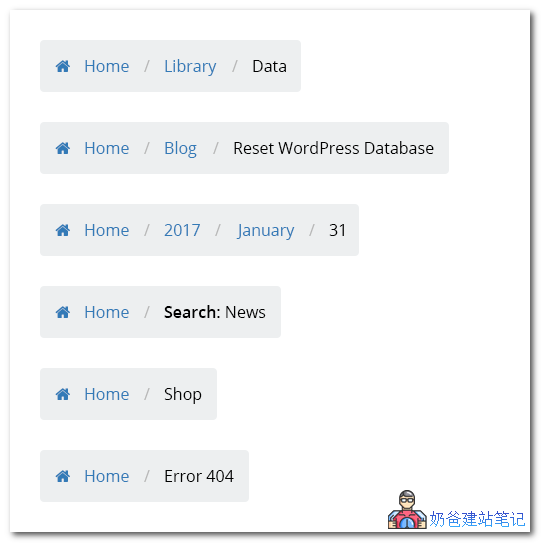
Compared to Breadcrumb NavXT above, Flexy Breadcrumb does not have a Chinese language, but the backend settings are relatively simple. You can set the font color, size, and icon information of the navigation.
It also supports setting the hierarchy of breadcrumb navigation, distinguishing by category, date, or TAG.
The advantage of Flexy Breadcrumb is that it supports shortcodes. You can use shortcodes to reference it in articles or other places that support shortcodes, and you can also add it to theme templates.
In addition, the default style of Flexy Breadcrumb is relatively nice.
Flexy Breadcrumb download address:
You can directly search for the plugin name in the backend to install it, or download the installation package and upload it for installation.
Flexy Breadcrumb usage method:
After installing and activating the plugin, you can directly insert the shortcode when publishing an article [flexy_breadcrumb] , or insert the following code snippet in a suitable location within the website's theme template files.
<?php echo do_shortcode( '[flexy_breadcrumb]'); ?>
The above two WordPress breadcrumb navigation plugins are ones that Naiba finds quite useful. If you have better recommendations, feel free to share them with me.
WordPress breadcrumb navigation code
If you prefer not to use a plugin to implement WordPress breadcrumb navigation, you can also use the following code to achieve it.
Multiple conditional code
This multiple conditional code is fromWP UniversityAs seen there, the functionality is quite comprehensive, supporting the theme language pack textdomain attribute (if your website is a single-language version, you don't need to modify the language pack; just modify the code directly.)
/**
 * WordPress 添加面包屑导航
 * https://blog.naibabiji.com/skill/wordpress-mian-bao-xie-dao-hang.html
 */
function twentytwelve_breadcrumbs() {
	$delimiter = '»'; // 分隔符
	$before = '<span class="current">'; // 在当前链接前插入
	$after = '</span>'; // 在当前链接后插入
	if ( !is_home() && !is_front_page() || is_paged() ) {
		echo '<div itemscope itemtype="http://schema.org/WebPage" id="crumbs">'.__( '当前位置:' , 'twentytwelve' );
		global $post;
		$homeLink = home_url();
		echo ' <a itemprop="breadcrumb" href="' . $homeLink . '">' . __( '首页' , 'twentytwelve' ) . '</a> ' . $delimiter . ' ';
		if ( is_category() ) { // 分类 存档
			global $wp_query;
			$cat_obj = $wp_query->get_queried_object();
			$thisCat = $cat_obj->term_id;
			$thisCat = get_category($thisCat);
			$parentCat = get_category($thisCat->parent);
			if ($thisCat->parent != 0){
				$cat_code = get_category_parents($parentCat, TRUE, ' ' . $delimiter . ' ');
				echo $cat_code = str_replace ('<a','<a itemprop="breadcrumb"', $cat_code );
			}
			echo $before . '' . single_cat_title('', false) . '' . $after;
		} elseif ( is_day() ) { // 天 存档
			echo '<a itemprop="breadcrumb" href="' . get_year_link(get_the_time('Y')) . '">' . get_the_time('Y') . '</a> ' . $delimiter . ' ';
			echo '<a itemprop="breadcrumb"  href="' . get_month_link(get_the_time('Y'),get_the_time('m')) . '">' . get_the_time('F') . '</a> ' . $delimiter . ' ';
			echo $before . get_the_time('d') . $after;
		} elseif ( is_month() ) { // 月 存档
			echo '<a itemprop="breadcrumb" href="' . get_year_link(get_the_time('Y')) . '">' . get_the_time('Y') . '</a> ' . $delimiter . ' ';
			echo $before . get_the_time('F') . $after;
		} elseif ( is_year() ) { // 年 存档
			echo $before . get_the_time('Y') . $after;
		} elseif ( is_single() && !is_attachment() ) { // 文章
			if ( get_post_type() != 'post' ) { // 自定义文章类型
				$post_type = get_post_type_object(get_post_type());
				$slug = $post_type->rewrite;
				echo '<a itemprop="breadcrumb" href="' . $homeLink . '/' . $slug['slug'] . '/">' . $post_type->labels->singular_name . '</a> ' . $delimiter . ' ';
				echo $before . get_the_title() . $after;
			} else { // 文章 post
				$cat = get_the_category(); $cat = $cat[0];
				$cat_code = get_category_parents($cat, TRUE, ' ' . $delimiter . ' ');
				echo $cat_code = str_replace ('<a','<a itemprop="breadcrumb"', $cat_code );
				echo $before . get_the_title() . $after;
			}
		} elseif ( !is_single() && !is_page() && get_post_type() != 'post' ) {
			$post_type = get_post_type_object(get_post_type());
			echo $before . $post_type->labels->singular_name . $after;
		} elseif ( is_attachment() ) { // 附件
			$parent = get_post($post->post_parent);
			$cat = get_the_category($parent->ID); $cat = $cat[0];
			echo '<a itemprop="breadcrumb" href="' . get_permalink($parent) . '">' . $parent->post_title . '</a> ' . $delimiter . ' ';
			echo $before . get_the_title() . $after;
		} elseif ( is_page() && !$post->post_parent ) { // 页面
			echo $before . get_the_title() . $after;
		} elseif ( is_page() && $post->post_parent ) { // 父级页面
			$parent_id  = $post->post_parent;
			$breadcrumbs = array();
			while ($parent_id) {
				$page = get_page($parent_id);
				$breadcrumbs[] = '<a itemprop="breadcrumb" href="' . get_permalink($page->ID) . '">' . get_the_title($page->ID) . '</a>';
				$parent_id  = $page->post_parent;
			}
			$breadcrumbs = array_reverse($breadcrumbs);
			foreach ($breadcrumbs as $crumb) echo $crumb . ' ' . $delimiter . ' ';
			echo $before . get_the_title() . $after;
		} elseif ( is_search() ) { // 搜索结果
			echo $before ;
			printf( __( 'Search Results for: %s', 'twentytwelve' ),  get_search_query() );
			echo  $after;
		} elseif ( is_tag() ) { //标签 存档
			echo $before ;
			printf( __( 'Tag Archives: %s', 'twentytwelve' ), single_tag_title( '', false ) );
			echo  $after;
		} elseif ( is_author() ) { // 作者存档
			global $author;
			$userdata = get_userdata($author);
			echo $before ;
			printf( __( 'Author Archives: %s', 'twentytwelve' ),  $userdata->display_name );
			echo  $after;
		} elseif ( is_404() ) { // 404 页面
			echo $before;
			_e( 'Not Found', 'twentytwelve' );
			echo  $after;
		}
		if ( get_query_var('paged') ) { // 分页
			if ( is_category() || is_day() || is_month() || is_year() || is_search() || is_tag() || is_author() )
				echo sprintf( __( '( Page %s )', 'twentytwelve' ), get_query_var('paged') );
		}
		echo '</div>';
	}
}
Actually, this piece of code is similar to the one aboveBreadcrumb NavXT, but the plugin has become a code version.
In the above code, Naiba has changed the default English display to Chinese „Current Position“ and „Home“. If you need to achieve multilingual support with the theme file„s language files, please replace twentytwelve in the code with your own theme“s textdomain (you can find it by searching for textdomain in functions.php).
Code usage method:
Copy the code above and add it to your theme file's functions.php. Beginners are recommended to useSafe Method to Add Code to the functions.php File: Code SnippetsUse this plugin to add code.
Then insert the following code into the page code where you need to display the navigation content:
<?php if(function_exists('twentytwelve_breadcrumbs')) twentytwelve_breadcrumbs();?>If the effect is not satisfactory, just add a CSS effect to beautify it. Naibabiji uses just the following bit of CSS code.
div#crumbs {
    margin-top: 24px;
    margin-top: 1.714285714rem;
    font-size: 13px;
    font-size: 0.928571429rem;
    line-height: 1.846153846;
    color: #757575;
}
Simple code
The code above is actually quite complex. The essence of breadcrumb navigation is simply adding a home link, category link, and article title on the current page. We can easily achieve this by directly adding the following piece of code in the theme template.
<a href="/" title="Home">首页</a> » <?php the_category(","); ?> » <?php the_title(); ?>
The above directly uses WordPress built-in functions to call categories and article titles, which is simple and straightforward.
Alright, all the above content isMethods to add breadcrumb navigation to WordPress using Plugins and code. If you have any questions, feel free to join our group to discuss with us (the group QR code is at the end of the article).