
A couple of days ago, Naiba handled a real case: an e-commerce website that had long been left unmaintained was hacked, and the attacker may have been lurking for months.
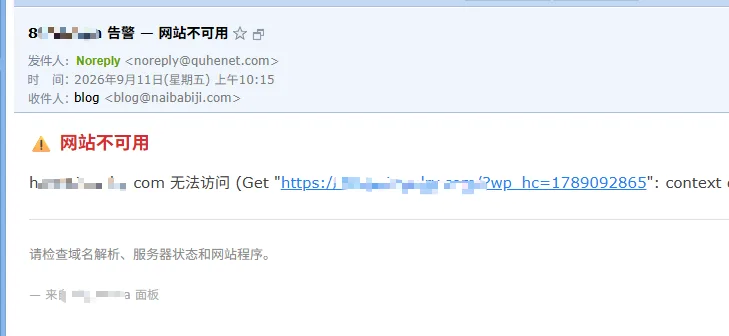
This website used a server provided by Naiba, with the client maintaining the content and security themselves. The server had WP Panel installed and website availability monitoring enabled. It wasn't until the panel alerted that the website was inaccessible that I stepped in to investigate, only to discover that multiple layers of backdoors had long been planted in the website.
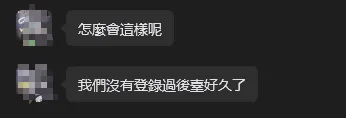
What sent the biggest chill down my spine wasn„t “the website was hacked,„ but that it had looked basically normal for all these months. The client also said they hadn“t logged into the dashboard for a long time. If it weren„t for this downtime, who knows when the next anomaly would have been discovered.
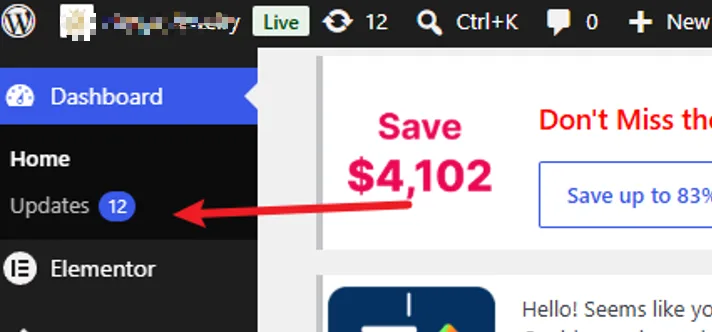
Upon further investigation of the website's intrusion records, I found that because too much time had passed, it was no longer possible to determine which vulnerability was originally used to breach the website. However, from the website dashboard, it was visible that 12 core, theme, or plugin updates had long gone uninstalled. This doesn't prove that the attacker definitely got in through some plugin vulnerability, but it at least shows that the website had long been in a high-risk state. In particular, publicly disclosed vulnerabilities are often exploited en masse by automated scanning tools, and the spread of AI has further lowered the barrier to analyzing vulnerabilities and modifying attack scripts.
This incident had a big impact on Naiba. Naiba developed the WP Panel dashboard precisely in the hope of helping novice users manage their servers and WordPress sites well. To that end, I deliberately strengthened WP Panel's security protection once again, and on top of the existing security capabilities, this time1.6.0 added a whole set of monitoring centered on "discovering intrusions earlier"。
Note, it's„discovering intrusions earlier“monitoring, which doesn't mean it can intercept intrusions.It can't guarantee that your website won't be hacked—no tool can do that. What it can do is let you receive a signal early on when something goes wrong, rather than, as in this case, only finding out when the website can no longer be opened.
1. What the attacker actually did in this case
Many friends think that a website being hacked is as simple as "a black page being hung on the homepage." In reality, the attack is far more covert—it's staged and plants hidden traps. In this case, when I cleaned it up, I found a total of four layers of persistence.
- The first layer, a fake plugin.On the surface it was a normal plugin, but in reality it provided an interface for remotely publishing posts, and could even secretly create administrator accounts on its own.
- The second layer, a "plugin" disguised as Cloudflare. It copied itself into WordPress's mu-plugins directory and would also hide itself in the dashboard. Just clicking "deactivate plugin" wouldn't remove it cleanly at all.
- The third layer, triggers in the database. The attacker planted a piece of logic in the database: as long as the homepage was edited, it would automatically reinsert the hidden spam content. So you delete it in the dashboard, refresh the front end, and the content comes back.
- The fourth layer, application passwords.The attacker used a seemingly legitimate "application password" to automatically publish posts through WordPress's interface, flooding the site with spam one post at a time. Even if you log out of the browser session, it can still be used.
With these four layers stacked together, plus expired logs, modified files, and the "publish dates" of spam posts forged to several months earlier—by the time you discover it, the evidence you could use to trace it is often already gone.
2. Why "only discovering it after the fact" is so common
Based on the enterprise website situations Naiba has encountered, only discovering it after the fact is very normal and common, because the vast majority of enterprise websites have no dedicated person managing them, and most people, when they see update prompts in the dashboard, assume it's like phone updates—the more you update, the laggier it gets—so they turn a blind eye.
A website that has not been maintained for a long time, untouched since it was built, with themes and plugins not updated, the same few administrators as before, and few people logging into the backend to take a look.
What is truly dangerous about such a site is not "no one is defending it," but "no one knows when something goes wrong."
Attackers love this kind of website: slowly gain an entry point, then take their time, spreading persistence over days, weeks, or even months. You see no anomalies on the front end, and the site still opens. By the time spam content and traffic bring down the server and the site becomes inaccessible, that is already the last link in the chain, not the first.
3. What WP Panel Added This Time
Centered around "earlier detection," version 1.6.0 builds on the existing security protection and adds the following capabilities.
1. Account and Credential Monitoring
Supports monitoring of website administrator accounts. When an administrator account is added, demoted, or promoted, the WP Panel dashboard will alert immediately. Application passwords are recorded one by one: when a new one is added, who first used it, whether the source IP has changed, and when it was revoked.
This point is especially important. The attacker in the case relied on application passwords to automatically post content over the long term.
2. Content and Settings Monitoring
For websites that have been unmaintained for a long time, if suddenly one day there are many changes to posts and pages, it is very likely that the site has been compromised. Therefore, WP Panel 1.6.0 supports monitoring and alerts for concentrated publishing, bulk modifications, deletions, and unpublishing of posts and pages. Changes to the homepage will also be notified (consecutive repeated modifications are automatically merged to avoid repeatedly disturbing you). Open registration and changes to the default role will also be prompted.
3. Database Persistent Object Monitoring
This monitors triggers, events, stored procedures, and functions in the database. It specifically targets the kind of database backdoor in the case where "content is deleted but grows back on its own."
4. File Integrity Baseline
On sites with file locks enabled and healthy status, WP Panel will save a fingerprint baseline of code files outside the site, monitoring whether files such as core, plugins, themes, and MU plugins have been modified. After normal maintenance updates are completed, the new baseline will be accepted; only abnormal changes will trigger alerts.
5. SQL Injection Request Protection
For high-confidence SQL injection requests, they are blocked directly before entering PHP; repeated triggers from the same trusted source will be temporarily banned. It should also be noted here: it is not a complete WAF, nor does it inspect POST/JSON request bodies.
6. Disable Application Passwords
A new site switch has been added. New websites disable application passwords by default, reducing the risk of "legacy remote credentials being used to post content." Existing websites remain allowed after upgrade, so it will not affect the mobile apps, auto-publishing, and third-party integrations you are currently using.
In addition to these, 1.6.0 also adds a bunch of details such as temporary maintenance windows, persistent IPv6 bans, new website logs retained for 14 days by default, and WordPress security events retained for 90 days.
4. Putting These Capabilities Back into That Case
If these features had been deployed before the website was compromised, the entire incident discovery process might have looked like this:
- Attacker quietly creates an application password → credential monitoring will leave a record of the addition.
- Fake plugin lands on disk and a new administrator appears → administrator change alerts and file integrity alerts will appear simultaneously.
- Database trigger is implanted → database object monitoring will report it.
- Tens of thousands of posts are published in a short period → abnormal content publishing volume alerts will trigger.
Any one of these signals would be enough to let us start investigating while the website is still accessible, rather than waiting until the site becomes inaccessible months later.
Of course, it must be emphasized here: these are "signals," not "convictions." They themselves cannot prove that the website has definitely been compromised, nor will they automatically delete posts, users, or plugins for you. Their value is to let you intervene at the right point in time.
5. Capability Boundaries of WP Panel 1.6.0
WP Panel version 1.6.0 cannot guarantee that a website will not be compromised; it only solves "earlier detection."
SQL protection only handles high-confidence structures at the URL level, does not inspect request bodies, cannot replace a complete WAF, and does not mean your site definitely has vulnerabilities.
The file integrity baseline manages files, but it cannot manage "pure database writes," such as publishing posts through legitimate APIs. These must be discovered through database object monitoring and content monitoring.
When a baseline is first established, it only means "the current state of the files has been recorded,"It does not mean "the website is clean". If malicious files or unknown credentials already existed before the baseline was established, manual review is still required.
All monitoring by default only alerts and preserves evidence; it will not automatically touch your data. Operations such as deleting posts, deleting users, or deleting plugins are always executed only after your confirmation.
For monitoring to be truly useful, the prerequisite is that notification channels are properly configured and someone is watching. Otherwise, it is just another record in the backend.
Final Thoughts
Back to the case at the beginning.
Website intrusions themselves are hard to completely avoid; but "being intruded for months without knowing" is something that can absolutely be changed.
What WP Panel 1.6.0 aims to do is move the time of discovering anomalies as early as possible: from „only discovering the intrusion when the website won“t open„ to “receiving an alert as soon as abnormal behavior appears on the website.„ From “logs expired, nothing can be investigated„ to “security events and evidence are kept in the panel.„
It does not promise to make your website invulnerable, but at least it will not leave you months later facing a website that won't open, without even knowing what happened.
If you also have a batch of websites that were "built and then barely managed," this 1.6.0 is worth upgrading.
For websites that are almost never updated with content after being built, Naiba is also considering adding a stricter „website freeze“ capability to limit modifications to files and critical data as much as possible without affecting normal access. However, this feature is currently only a preliminary idea and cannot replace vulnerability fixes and routine maintenance.
If a website truly does not need a backend, forms, memberships, or online transaction features, then using pure static HTML is usually more worry-free than maintaining a set of dynamic programs that have been unmaintained for a long time.
WP Panel Official Websitehttps://wp-panel.org