On August 17, Naiba took on aWordPress + WooCommerce B2C e-commerce website PageSpeed Insights score optimizationproject.
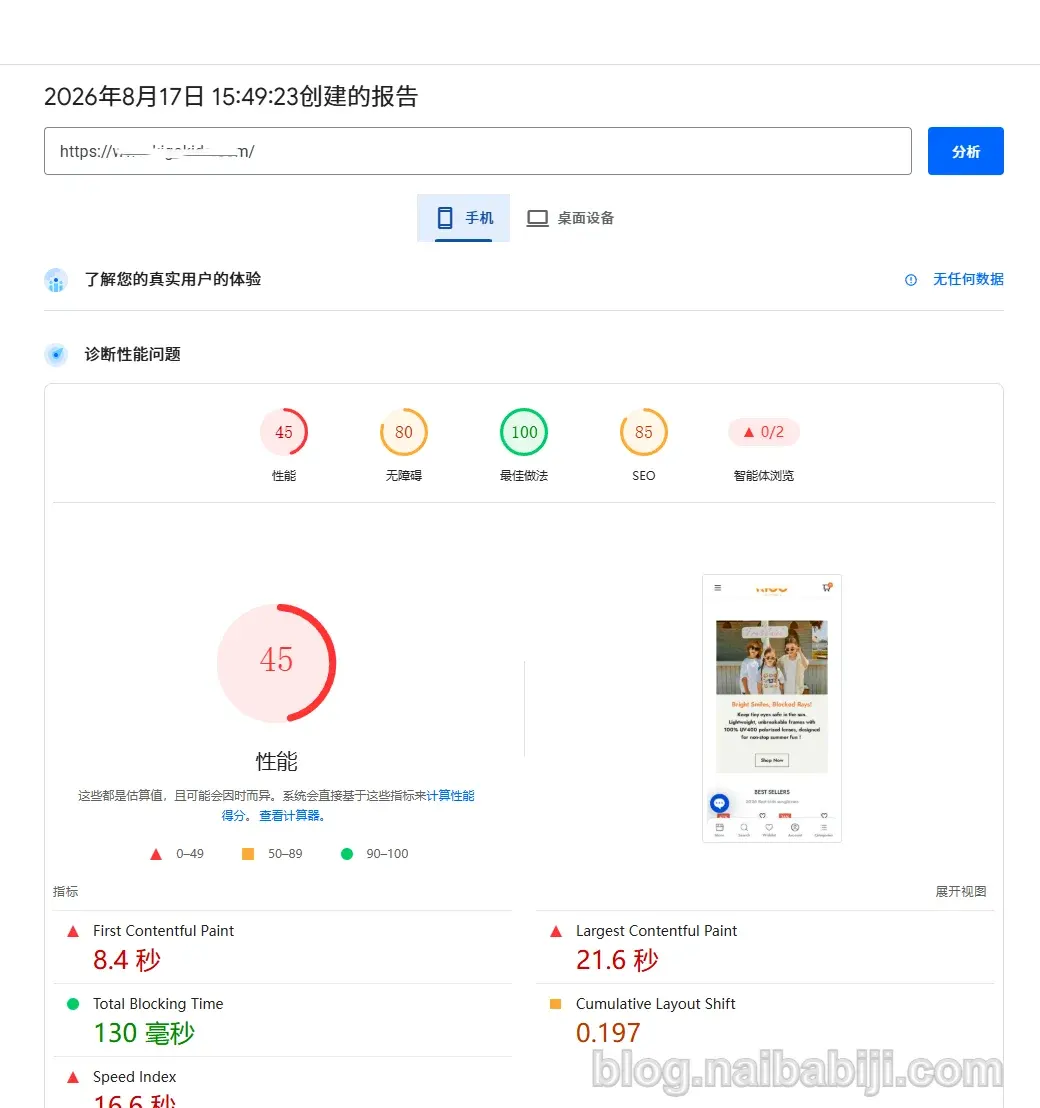
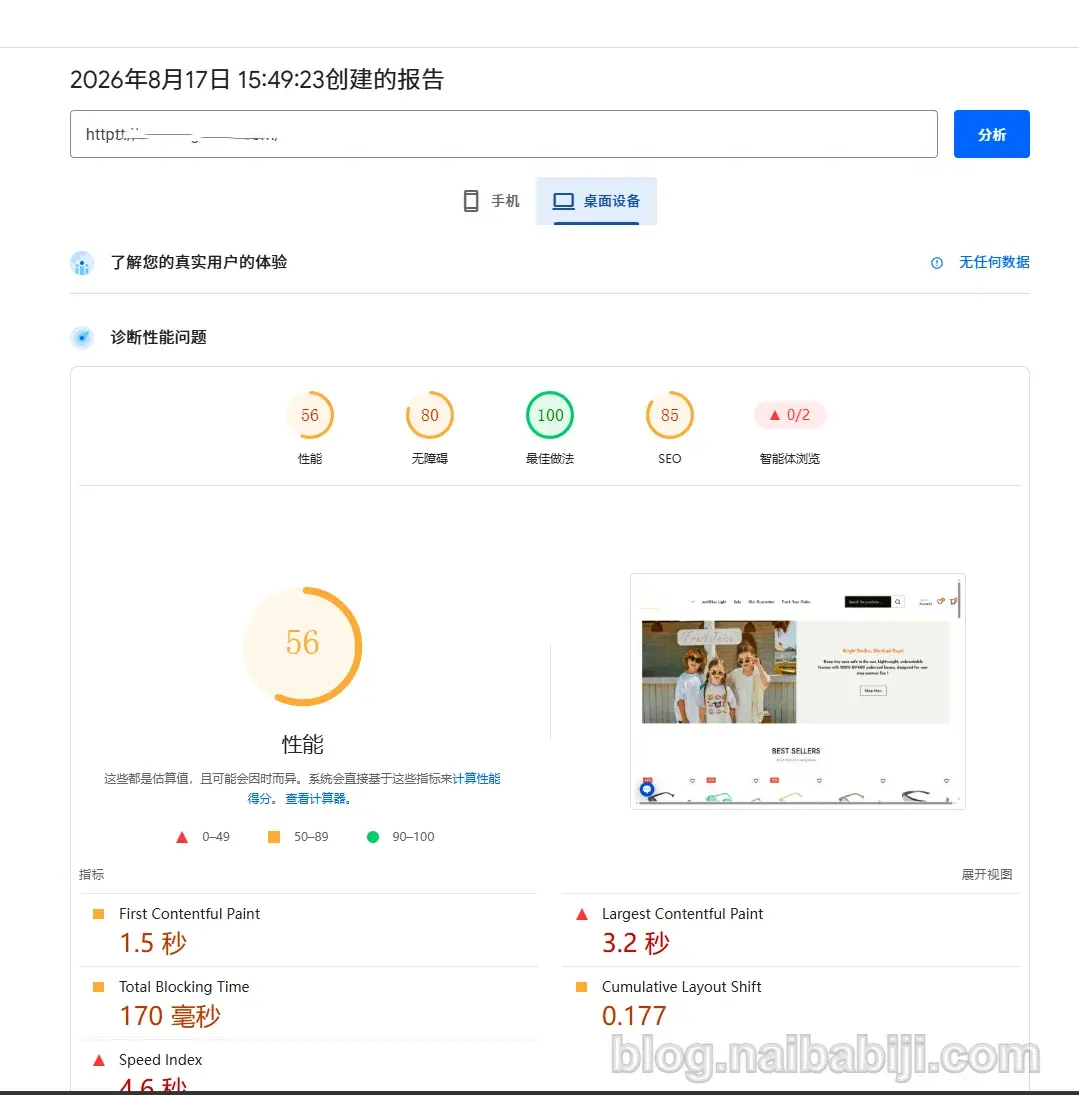
Before optimization, this website was tested using Google PageSpeed Insights:
- Mobile: around 45 points
- Desktop: around 56 points
For a WooCommerce website that is actually in operation, this score indeed leaves considerable room for optimization.
However, when I actually started working on it, I found that the website„s problems could not be solved simply by installing a “WordPress speed optimization plugin„.
From the server environment, WordPress plugins, caching, to the CSS and font loading methods of the commercial theme, and then to the Elementor page structure and Cloudflare configuration, there were optimization opportunities in almost every layer.
After completing the optimization:
- Mobile: average around 60-70 points
- Desktop: average consistently above 90 points
This article fully documents the process of this website speed optimization.
1. Basic situation before website optimization
The client's website uses a typical WordPress foreign trade B2C e-commerce architecture:
- WordPress
- WooCommerce
- Elementor
- Blonwe commercial theme
- Alibaba Cloud ECS
- 4-core CPU
- 8GB RAM
- 10 Mbps public network bandwidth
- Cloudflare CDN
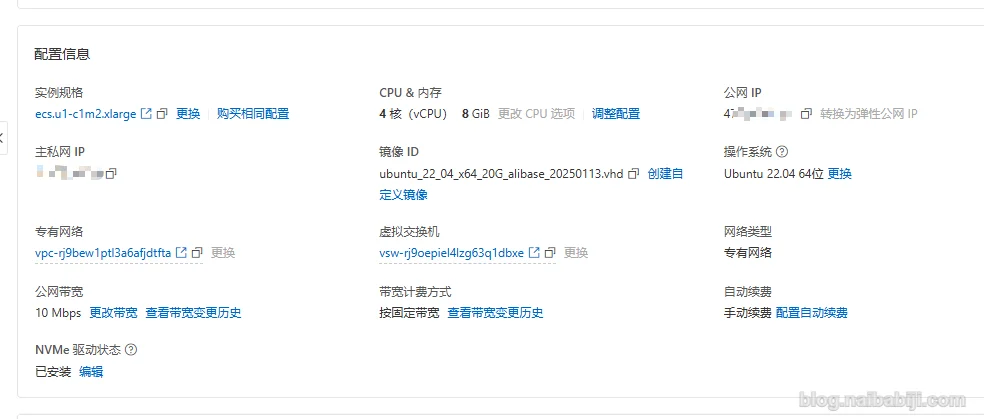
Looking at the server configuration alone, it is already quite good. The only shortcoming is that the server bandwidth is too small. With 10 Mbps public network, the maximum download speed is only a bit over 1 megabyte per second. A few megabytes of an image can make you wait two to three seconds. However, with Cloudflare CDN integrated, this shortcoming is not so obvious.
The client's server is not due to expire until April 2027, so it is impossible to ask the user to change servers right away. For WordPress websites, server performance is only one aspect; how the website itself is built and whether the server settings are reasonable also affect the score.
Therefore, we need to troubleshoot every aspect that may affect speed and score step by step.
2. Step 1: Switch the server from Baota to WP Panel
The client's original server used the Baota Panel. The first thing I did was to reinstall the server and switch to a control panel developed specifically for WordPress websites.WP Panel。
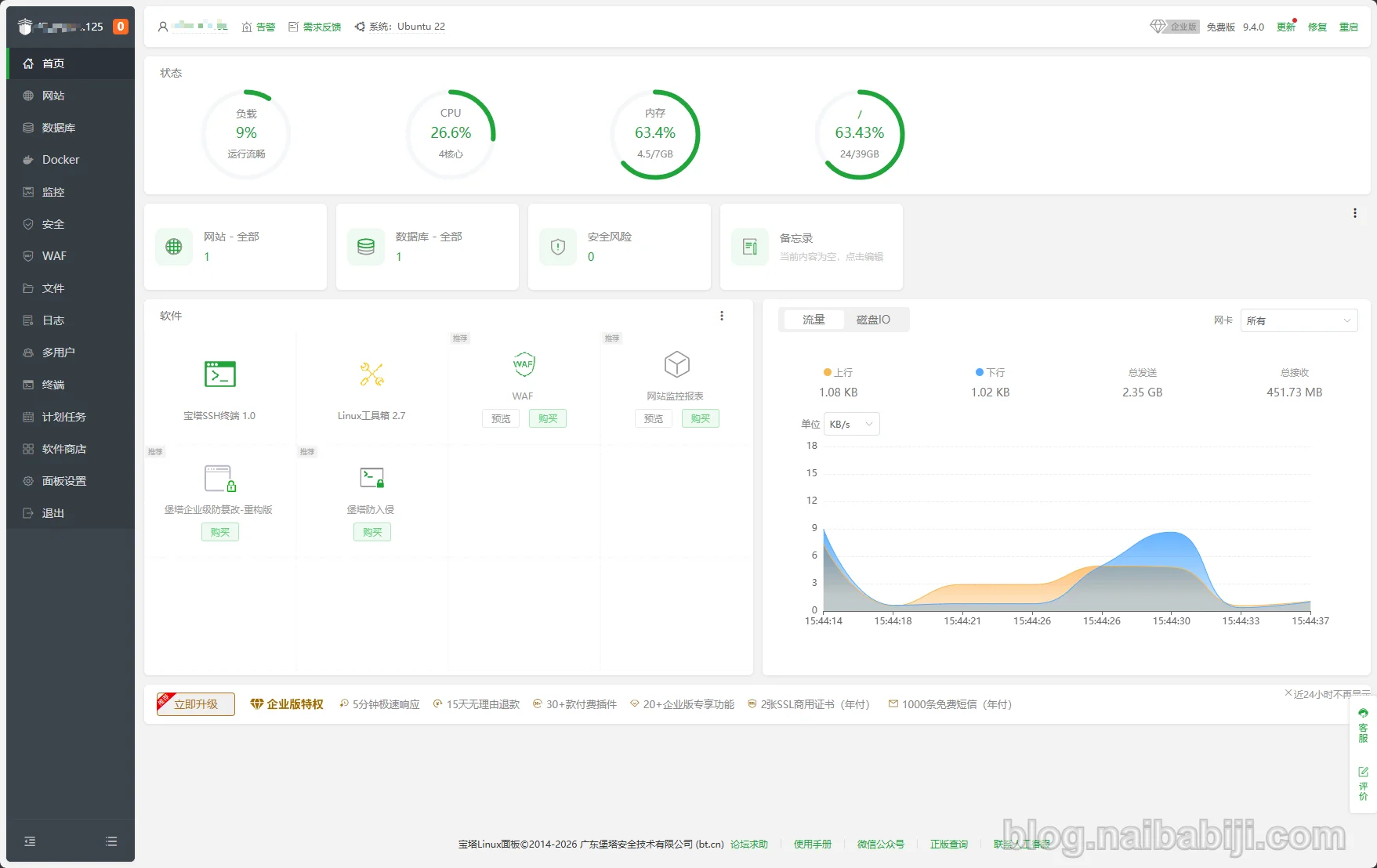
WP Panel is a server management panel developed by Naiba based on years of experience in building websites with WordPress. Compared to more general-purpose server panels, its features are more oriented towards WordPress.
For example, you can directly enable:
- Nginx FastCGI cache;
- Database cache;
- WordPress-related optimizations;
- WordPress security protection rules.
For ordinary users, there is no need to research complex Nginx configuration files on your own; basically, you can complete it through panel operations.
As of the publication of this article, the WP Panel security rules on this client's server have automatically blocked dozens of malicious IPs for us.
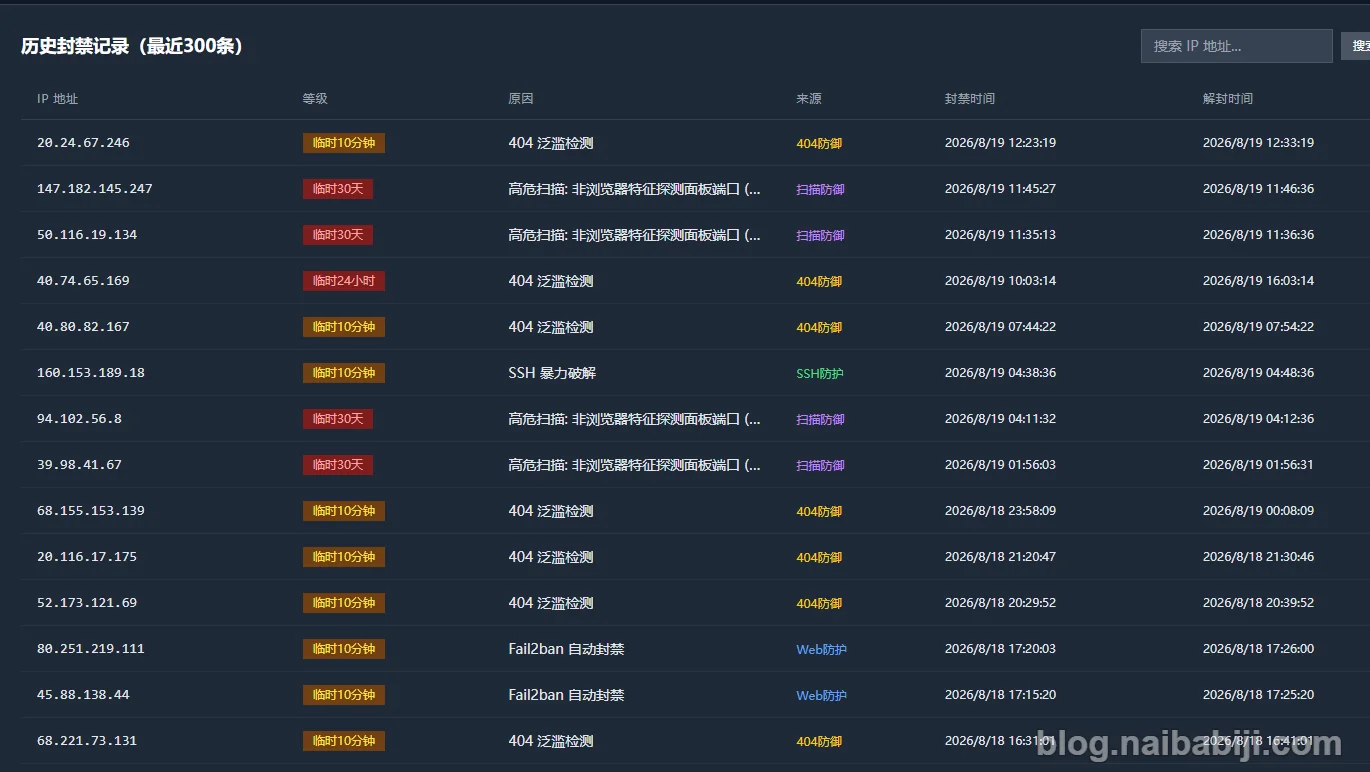
The records blocked as 404 flood detection in the screenshot above are basically robots scanning the website for vulnerabilities in batches. This usually involves scanning server files dozens of times per minute, causing the server CPU to spike. If your server CPU resources are often at 100% usage, then it is most likely a robot scanning situation.
If you also plan to migrate to the WP Panel, you can refer to:How to Migrate a WordPress Website from Baota Panel to WP Panel
It should be noted that:
Changing the server panel will not significantly improvePageSpeed score。The reason for switching to WP Panel is purely because it is more suitable for WordPress websites, with automatic security rules to help users block malicious requests, and it also has built-in Nginx FastCGI cache and database cache features, supporting one-click activation.
This client's website initially had no caching optimization plugins. Therefore, Naiba chose to use WP Panel to perform Nginx FastCGI cache optimization from the server side.
3. Step 2: Simplify WordPress Plugins
Before optimization, this website had a total of26 WordPress plugins。
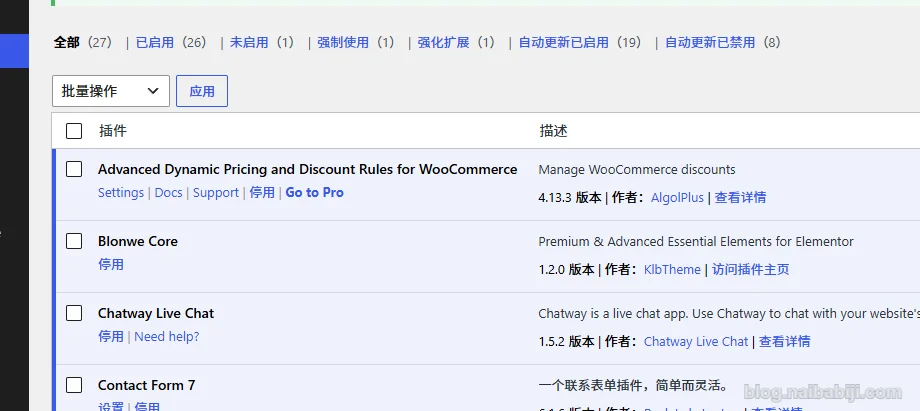
Having 26 plugins alone does not directly indicate that the website is slow. It is necessary to analyze based on the actual situation whether the plugin is used on the front end, whether there are features that can be traded off or implemented with code, and whether there are plugins with conflicting features.
Some plugins, although complex in functionality, only run in the WordPress backend and have little impact on front-end speed; conversely, some seemingly simple plugins may load additional CSS, JavaScript, or third-party requests on every page.
After investigation, we first removedChatway Live ChatThis online chat plugin, which is used infrequently, typically loads many JS and CSS files on the front end. Moreover, there is a time difference between China and the US, making online chat not very practical.
Then, we cleaned up plugins that manage code for Google Ads, Facebook Ads, etc., and instead inserted the code directly into the child theme. The client had previously installed 4 plugins with the same functionality, which was a serious duplication of features.
At the same timeDeactivated the Wordfence firewall plugin。
Some users may be surprised why you would disable a security plugin.
Based on Naiba's experience, when a website is actually infected, Wordfence doesn't really help. Naiba has personally handled cases where websites with Wordfence installed were still infected and the scanner couldn't detect the virus. At the same time, WP Panel's security rules already provide necessary protection. Unless the website's own plugin or theme code vulnerabilities are precisely exploited, most bots will be blocked during the scanning phase.
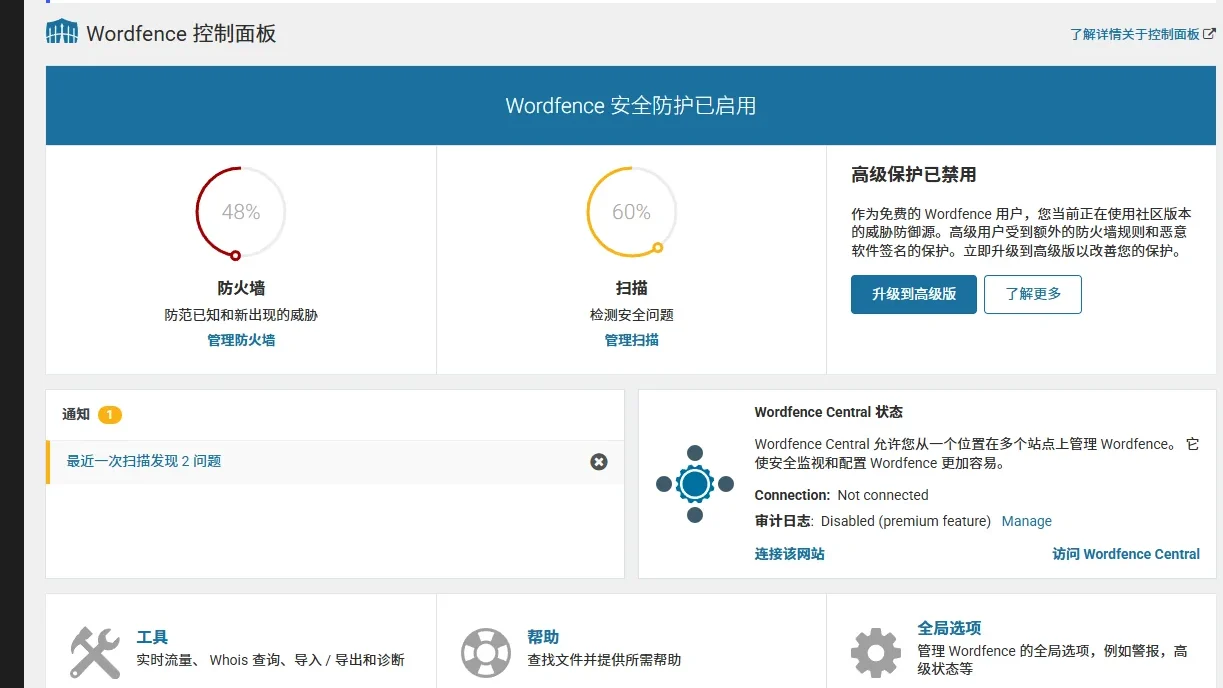
Moreover, because this type of security plugin has many features, it consumes considerable server resources. After removing it, the website will be lighter and faster.
Of course, this doesn't mean that websites using WP Panel will never be infected. Avoid using pirated resources, keep the WP core, plugins, and themes updated, use complex account passwords, and combine with WP Panel's existing protection rules. The probability of the website being compromised will be relatively low.
Fourth, Step 3: Add database cache and Nginx FastCGI cache
After cleaning up unnecessary plugins, the next step is to add optimization plugins. Initially, this website had no optimization plugins at all, so I directly enabled Nginx FastCGI page cache in the WP Panel backend, and also enabled Redis Object Cache.
Of course, after optimization was complete, I also installed the Autoptimize plugin to merge CSS files, and installed Debloat to delay loading JS files.
What does FastCGI cache do?
WordPress is essentially a dynamic program.
A normal visit to a WordPress page roughly goes through:
Browser request → Nginx → PHP → WordPress → Database → PHP generates HTML → Return to browser
For pages that don't change frequently, executing the entire PHP and database process on every visit actually generates a lot of redundant calculations.
After enabling FastCGI cache, for pages that meet the caching conditions, Nginx can directly return the previously generated page content.
In other words:
Many visits don't even need to enter PHP and WordPress again.
This is quite helpful for article pages, product pages, and most visitor-facing pages.
However, WooCommerce is different from a regular blog.
Pages like cart, checkout, and user login status contain dynamic data, so the caching strategy cannot simply cache the entire website.
WP Panel's configuration file already takes B2C scenario caching into account by default, so users don't need to handle it manually.
5. The Real Heavy Lifting: Blonwe Theme Code Optimization
After completing server and cache optimization, the truly troublesome part of this project began.
The previous website building company usedBlonwe commercial theme。

Upon inspection, I found that the theme's current version was several versions behind the latest, but the website backend could not update it properly.
From the current situation, the previous website building companymay not have purchased a legitimate license, or although they purchased a legitimate one, they did not deliver the updatable license configuration to the client.。
We contacted the website building company for updates, but as of the completion of Naiba's optimization, it still hadn't been updated. Haha.
Elementor Pro also had a similar issue:
Although the backend showed it was licensed, it could not be updated.
Since I have a legitimate Elementor Pro license (discounted purchase), this time I directly updated Elementor Pro to the current available version. (Why update? Because Elementor Pro and the free version usually update synchronously; if the versions differ too much, it may cause feature unavailability or compatibility issues.)
But the Blonwe theme could not be updated directly, so I could only optimize based on the current version the client was using.
This is also a point you need to confirm when hiring a website building company:
Are the resources used on the website legitimate or pirated? After the website is delivered, do the theme and plugin licenses belong to the client? Can they still be updated normally in the future?
If the website is intended for long-term operation, especially a WooCommerce store, I believe this is very important.
6. The Biggest Pitfall of This Theme: Embedding Fonts as Base64 in CSS
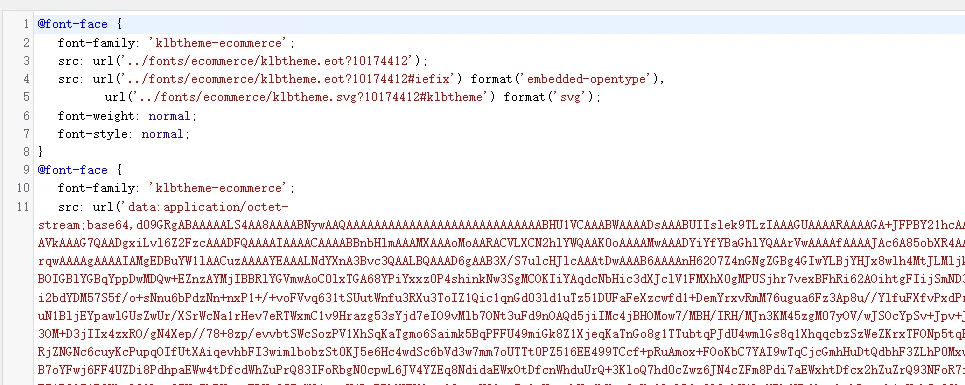
After optimizing the server, plugins, and cache, the score still wouldn't improve. Further investigation led to the theme code. This themedirectly embeds font files into the CSS file via Base64, which kept dragging down the LCP score.
This approach means that where only CSS needed to be loaded, a font file was also loaded. What was originally tens of kilobytes became hundreds of kilobytes, which is a negative performance optimization.
I usedChild Themeto split the CSS and font files apart. This way, the browser can handle CSS and font loading separately, instead of being forced to download a large chunk of font data along with the CSS.
Why use a child theme for modifications?
Because the client is using a commercial theme.
If you directly modify the parent theme:
wp-content/themes/blonwe/In the future, as long as the theme can be updated again, an upgrade may overwrite all your modifications.
Therefore, for modifications to theme code, using a child theme is a more reasonable approach.
7. Re-optimizing Elementor Page Structure
Besides the theme code, another obvious issue with this website was:
The page structure is too complex.
Elementor itself does not necessarily mean the website is slow.
Many times the real problem is that when building the site, to achieve a very simple visual effect, a lot of things are piled up:
- Section;
- Container;
- Column;
- Widget;
- Nested containers.
After the page is layered one on top of another, the final generated HTML DOM becomes very complex.
The browser not only needs to parse more HTML, but CSS selector matching, page layout calculation, and re-rendering also become more complex.
So this time I streamlined some of the more complex page structures.
8. Hero first screen module directly redesigned
The homepage Hero is one of the key modules handled this time.
The original Hero structure was relatively complex, and actual testing showed it also affected the first screen loading and layout stability of the page.
Because the previous Hero was designed using the theme's built-in elements and could not be adjusted, Idirectly used Elementor's built-in basic features to redesign this Hero.
The benefits of doing this are:
- Reduced DOM hierarchy;
- No longer relying on the original complex theme components;
- Image and text structure is easier to control;
- CSS is easier to manage;
- It is also more convenient for clients to modify content later.
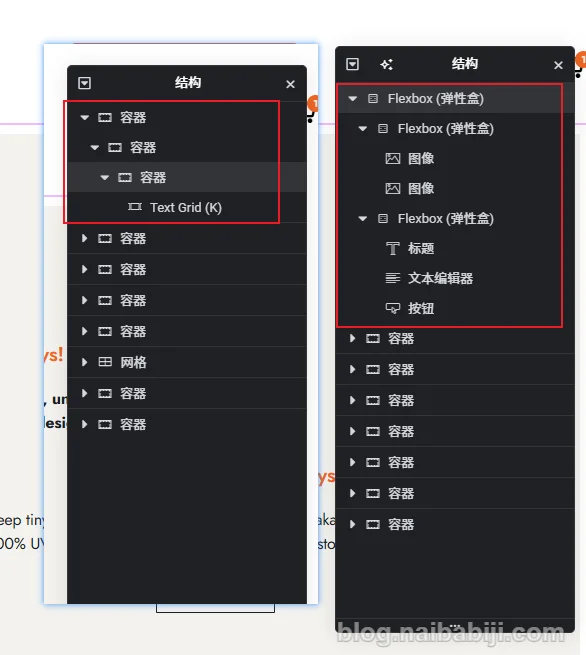
In the above image, the left side is the original Hero structure, and the right side is the Hero structure redesigned by Naiba using Elementor's built-in elements.
Initially, you can see that the Text Grid element is built into the theme, and it has 3 layers of containers on top of it, but actually only one layer of container is needed. After Naiba deleted the other two containers and tested the score, there was still no improvement. This is because the Text Grid component itself is relatively complex, so the native Elementor structure on the right was adopted, and the score improved significantly after the modification.
This is also why NaibaElementor Tutorialsrecommends that everyone try not to install too many Elementor extensions. Beginners who cannot achieve the effects they want when building websites on their own use plugins to combine them. In the end, a single page uses several Elementor extensions, making the page bloated, and then they blame Elementor for being garbage and slow.
If a simple first screen requires more than a dozen layers of DOM and a large amount of JavaScript to implement, then no matter how much you compress CSS or delay JS later, it is essentially just making up for the structural problems in the early stage.
9. Marquee module changed to pure code implementation
The website also has another marquee switching module.
The original implementation method was also relatively complex.
This kind of functionality itself doesn't actually require a huge Elementor widget or theme component to accomplish, so in the end I simply changed it to a simple code implementation.
For WordPress page design, I generally make trade-offs between two directions:
Content that the client will need to modify frequently:
Use Elementor as much as possible.
Effects that basically won't be modified and are very simple in functionality:
Consider implementing with a small amount of HTML / CSS / JavaScript.
This makes maintenance easier and also reduces unnecessary front-end resources.
Not everything should be coded by yourself, and not everything must be stuffed into Elementor. Now AI is very powerful; for some simple effects, you can use AI to generate HTML code and then insert it into an Elementor page. It's not necessary to rely on plugins. Plugins mean that for one feature, you might introduce multiple resources you don't use, ultimately causing the webpage to load slowly.
10. Cloudflare configuration errors can also drag down WooCommerce
At this point, the optimization effect has basically reached its peak. The desktop score is stable above 90. To further improve the mobile score, the overall design of the homepage would need to be changed, and fundamentally, a lightweight theme would need to be replaced. This is clearly a large-scale modification and does not fit the current situation.
However, during the final check, Naiba found that the website in visitor mode had no console errors, but the logged-in user's console showed more than a dozen 503 errors, all of which were JS errors.
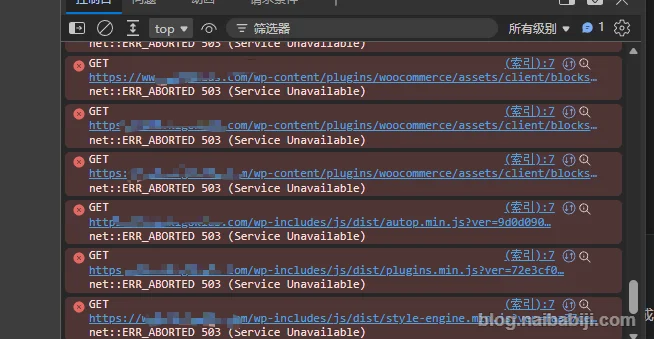
At first, I thought it was a bug caused by disabling plugins, but the problem persisted after restoring the plugins.
I thought it was a problem with the optimization, so I restored the backup data before optimization on the test server, but the problem persisted.
Checked the actual JS file, it really exists.
So this problem was not caused by our optimization, but existed from the beginning.
After investigation, I found that the client's Cloudflare configuration had issues.
I don't know if it was configured by the user themselves or by the previous website building company, but they blindly enabled all of Cloudflare's recommended configurations, which caused this 503 error.
After re-adjusting the Cloudflare configuration, the related 503 errors disappeared.
This is also why Naiba generally is unwilling to take on WordPress speed optimization. The access chain of a complete website is too long. If the website was not built by you, you don„t know which link might have buried a pit for you. Any layer of configuration anomaly may ultimately manifest as “WordPress website is slow„.
11. Final PageSpeed Insights optimization results
After all optimizations were completed, I tested again with Google PageSpeed Insights.
The final scores were approximately:
| Device | Before optimization | After optimization |
|---|---|---|
| Mobile | Around 45 | 60-70 |
| Desktop | Around 56 | 90+ |
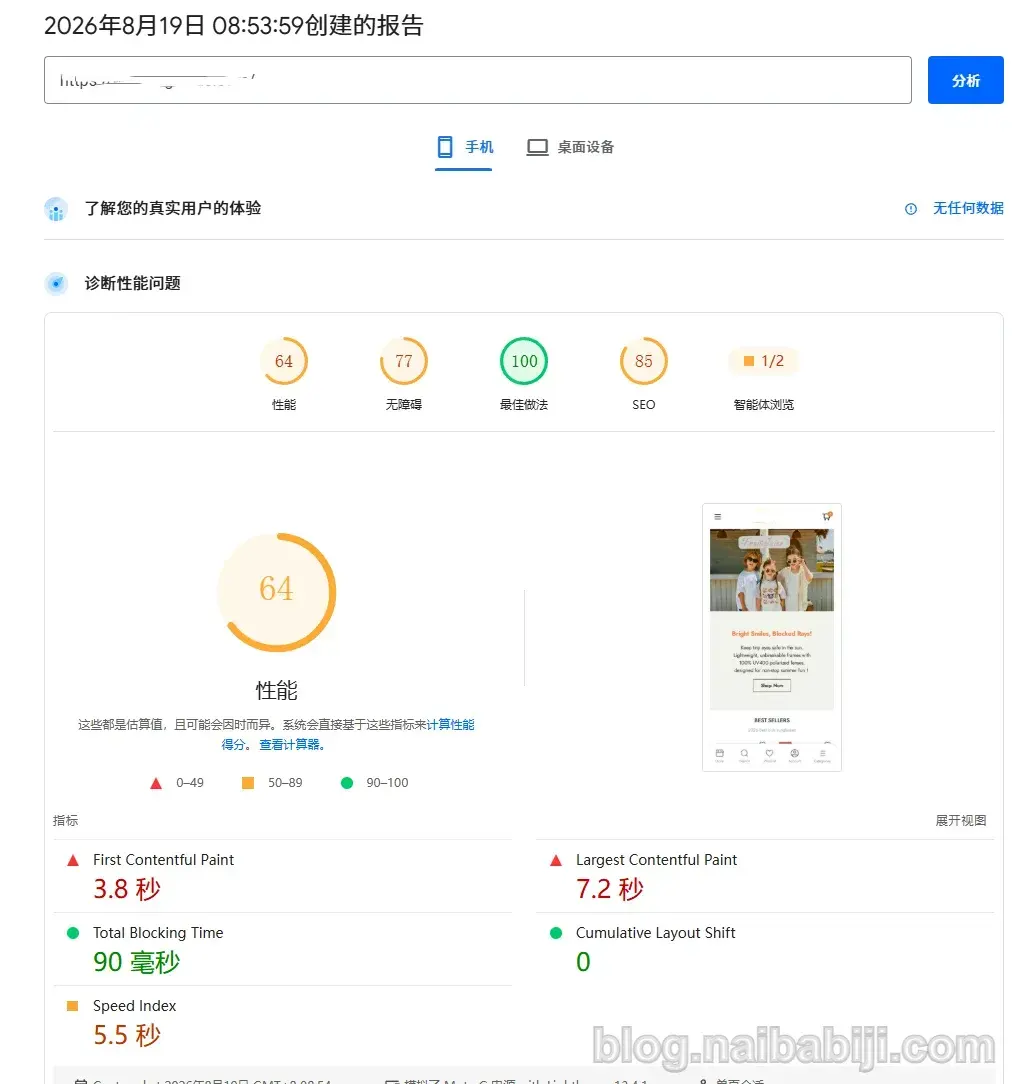
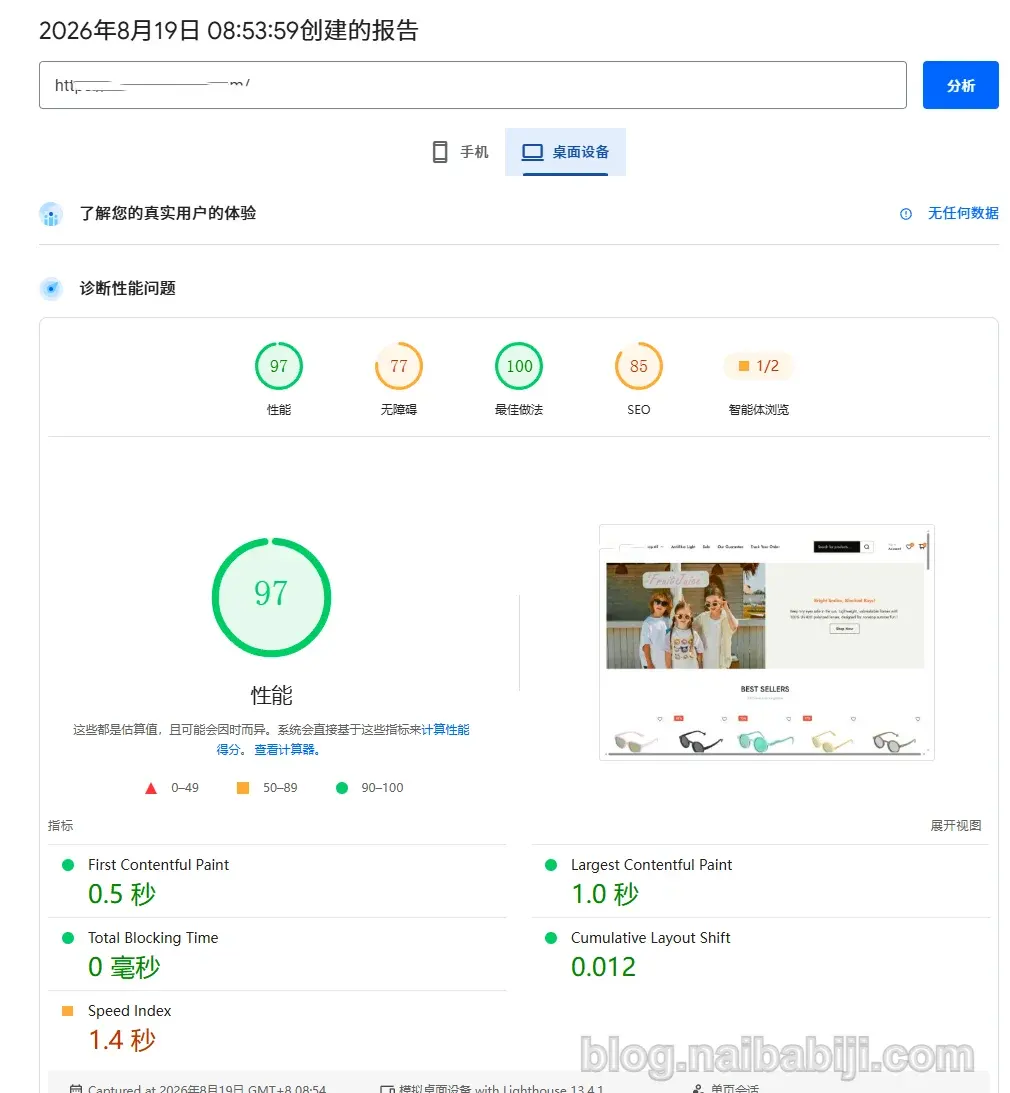
Because the lab test results of PageSpeed Insights may fluctuate each time, I ran the test several times consecutively. After multiple tests, the average desktop score was above 90, while the mobile score varied between 60 and 70. Overall, the website's score has improved significantly compared to before optimization.
12. What actually worked in this optimization?
The PageSpeed Insights score optimization for this WordPress website was not due to a single factor, but a combination of multiple modifications.
1. Server runtime environment
Switched from Baota Panel to WP Panel, which is more tailored to WordPress use cases, and configured caching.
2. Clean up inactive plugins
Not just reducing the number of plugins, but removing unused plugins and redundant features.
3. FastCGI and database caching
Reduce repeated PHP operations and database requests.
4. Theme code
Handle unreasonable CSS and font loading methods.
5. Elementor page structure
Reduce unnecessary nesting and complex DOM.
6. Redo poorly performing modules
For example, instead of patching the Hero, redesign it directly.
7. Implement simple features simply
Effects like marquees that don't require complex components are implemented with lightweight code.
8. Troubleshoot Cloudflare
Resolve WooCommerce request anomalies caused by CDN configuration.
If any of these steps is missing, the final result may be compromised.
13. WordPress speed optimization is not just about PageSpeed scores
Finally, Naiba would like to reiterate his point of view.
PageSpeed Insights scores are important, but they are not the whole story of WordPress website speed optimization.
To get a nice test number, you can use many very aggressive methods, such as:
- Defer a large amount of JavaScript;
- Remove CSS;
- Forcefully defer third-party scripts;
- Cache all pages.
Or even simpler, put only plain text content on your homepage, and you can easily get a perfect score.
But overly aggressive optimization may lead to:
- WooCommerce add-to-cart failure;
- Checkout page anomalies;
- Logged-in users see wrong cached content;
- Elementor animations fail to run;
- First click on the page has no response;
Then no matter how high the test score is, it is meaningless.
Especially for B2C e-commerce websites, the website must first ensure:
Product browsing, adding to cart, user login, and checkout processes work normally.
Then optimize performance as much as possible.
Regarding PageSpeed Insights scores, Naiba believes that as long as the score is not too low and passes the passing line, and foreign users test it on real devices and find the website loads fast, then your focus should be on website operations, not on optimizing PageSpeed Insights scores.
14. Don„t blindly believe in “install one plugin and get 100 points„
If you search online for WordPress speed optimization to increase PageSpeed Insights scores, you will likely come across recommendations for the paid plugin WP Rocket.
Naiba has also used WP Rocket to optimize websites before, and the optimization results were indeed good, but it's not that other free plugins cannot achieve the same level. It's just that WP Rocket is simpler to use.
But for:
WooCommerce + Elementor + commercial theme
This combination, real websites are usually much more complex. This client's website is a typical example:
Server caching is only part of it; what actually takes time later is:
- Commercial theme;
- Fonts;
- CSS;
- Elementor;
- Page structure;
- Cloudflare.
So if your WordPress website's PageSpeed score is low, I suggest first figuring out:
What exactly is slowing down the website?
Then optimize based on the problem.
Instead of seeing a low score and continuing to install the next „speed-up plugin“.
Summary
Before optimizing this WooCommerce website, the PageSpeed Insights score was approximately:
Mobile 45 points, desktop 56 points.
After a series of optimizations including server environment, WordPress plugins, FastCGI cache, database cache, theme CSS and fonts, Elementor page structure, Hero module, and Cloudflare:
Mobile can average 60-70 points, and desktop can average over 90 points.
Naiba hopes that through my practical process of optimizing this website, you can understandWordPress website speed optimization is essentially a process of troubleshooting.
Servers have server issues, plugins have plugin issues, themes have theme issues, and page design may also have page design issues.
Finding the real bottleneck and solving these problems one by one is often more effective than constantly installing so-called WordPress speed-up plugins.