After purchasing a domainYou need to add DNS records for the domain to access your website via the domain name.。
This article coversHow to set up DNS in NameSilo. The setup method for other domain registrars is similar and can be used as a reference.
NameSilo Tutorial on Modifying Domain Resolution IP
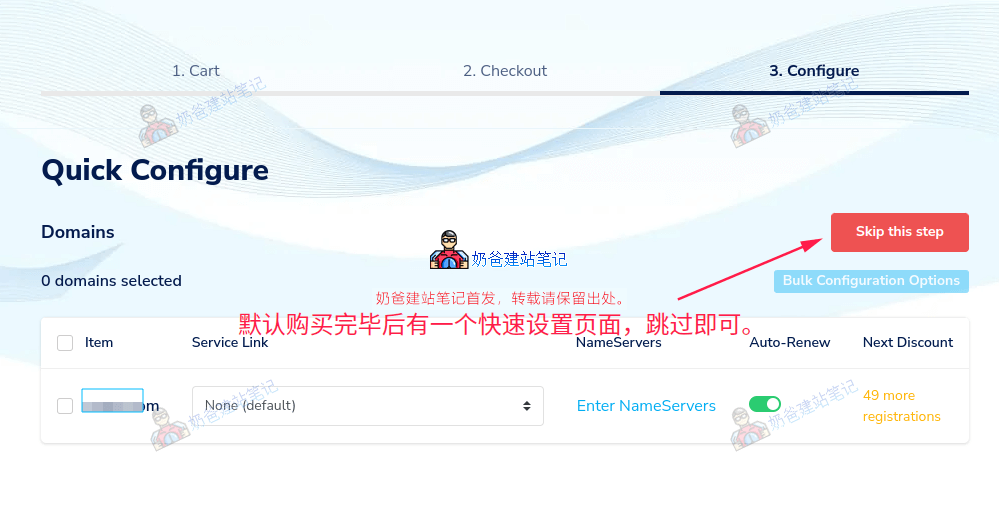
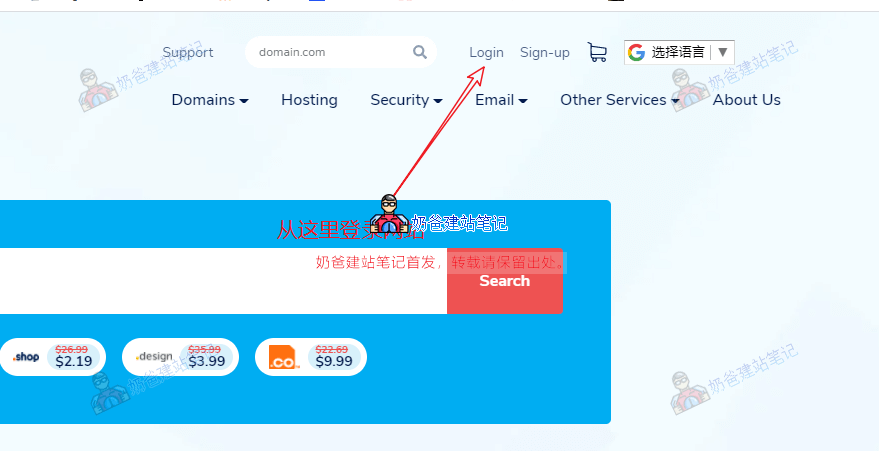
If you have just purchased a domain, you can choose to skip from the Quick Configure interface above. If you are not logged in, open theNameSilowebsite, log in first, then click on Domain Manager on the right.
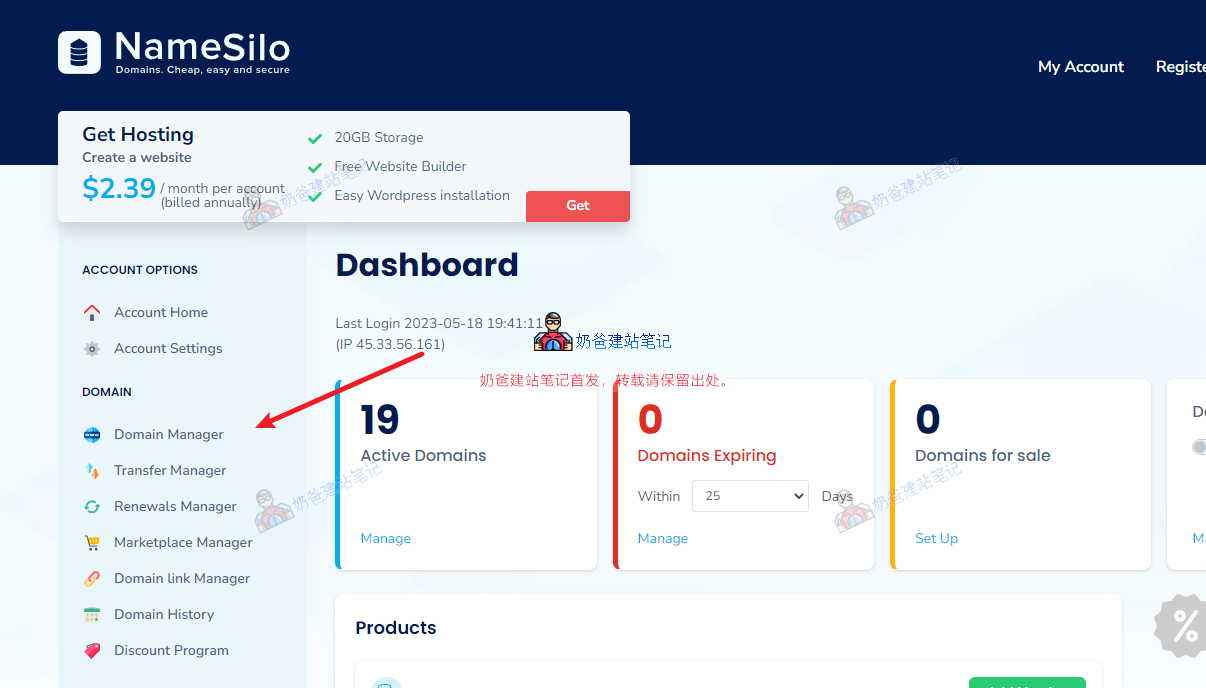
After logging in, go to the My Account interface, and click on Domain Manager in the left menu.
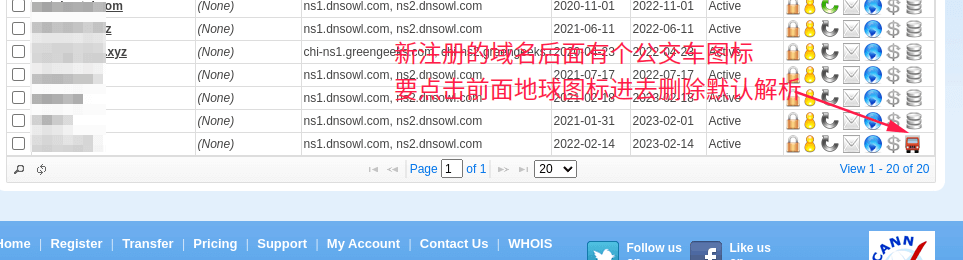
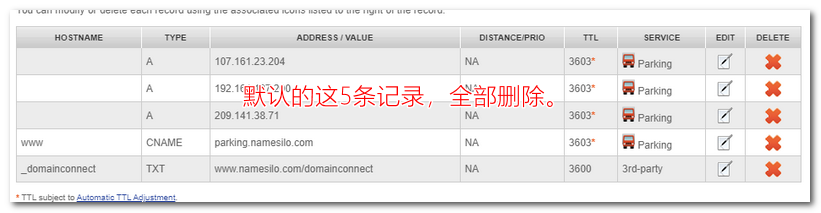
By default, a few DNS records are automatically set for newly registered domains, which we need to delete. (From the domain list, you can see a bus icon at the end, indicating that the default DNS records are active and need to be manually deleted.)
In the domain list interface, clicking the map icon allows you to modify domain DNS records.Clicking the storage icon allows you to modify DNS servers.
Ifyou need to set up domain DNS records, click the blue globe, then enter the corresponding values in the DNS management interface.
Naiba's Tip:
Newly registered domains automatically have 5 DNS records added; just delete them. (Some users are rigid; if their newly purchased domain only has 3 records here, they ask what to do. What do you think? Delete them too!)
Typically, you add an A record. Some service authentications require adding a CNAME record; just follow the prompts to add the corresponding values.
Detailed explanation of adding DNS records:
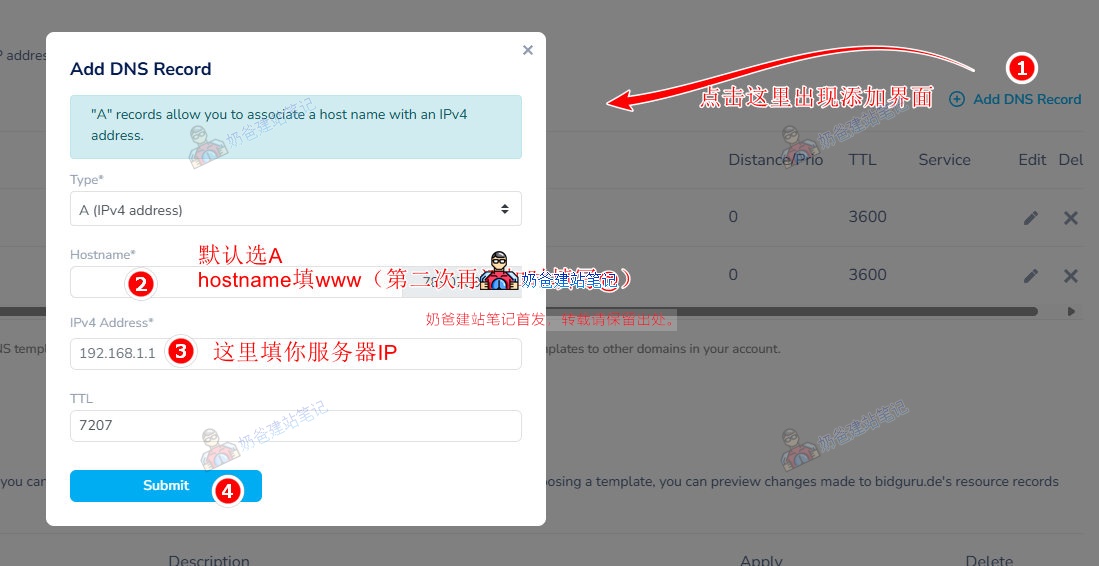
In the image above, section 1, 'Select the resource record type you want to create: A | AAAA | CNAME | MX | TXT/SPF | SRV | CAA' is where we choose the type of DNS record to add. Usually, you add an A record. In special cases, such as for business email, you may be required to add an MX record, so click MX.
Section 2, HOSTNAME, is where you fill in the subdomain. For a new website, we typically add two records: www and @. (Some domain registrars will default to @ if you leave it blank.)
Section 3 is where you fill in the server IP. After purchasing a server or Shared Hosting, you will see the corresponding IP on the server details page.
For TTL, some special DNS records may require you to fill in a specific value; if there are no requirements, keep the default 7207.
Under what circumstances do you need to modify DNS servers?
Typically, you only need to keep the default DNS servers.
only haveYou only need to modify DNS servers in the following situations:。
1. When using a third-party DNS service, such as DNSPod's service for DNS resolution.
DNSPod's DNS propagation time is faster than some default DNS servers, and paid plans support more personalized DNS settings.
2. When using certain services that require you to change to their DNS servers.
For example, when using certain CDN services, the CDN provider requires you to change your domain's DNS servers to theirs.
3. When changing to a hosting provider like SiteGround that includes domain management, DNS resolution will be automatically handled by the hosting provider, and you won't need to manually modify or add records.
After modifying the DNS servers, you can only manage domain DNS records on the corresponding website; DNS management on the original purchase site will no longer take effect.
NameSilo Tutorial on Modifying Domain DNS Servers
1. After logging into NameSilo, go to the domain list page and click the storage icon next to the domain you want to modify, as shown in the figure below:
Tip: If you cannot see this icon but see a car icon instead, first click the blue globe icon to delete all resolution records, and then you will see the DNS icon.(If you still cannot see it after deletion, follow the steps in the figure below.)
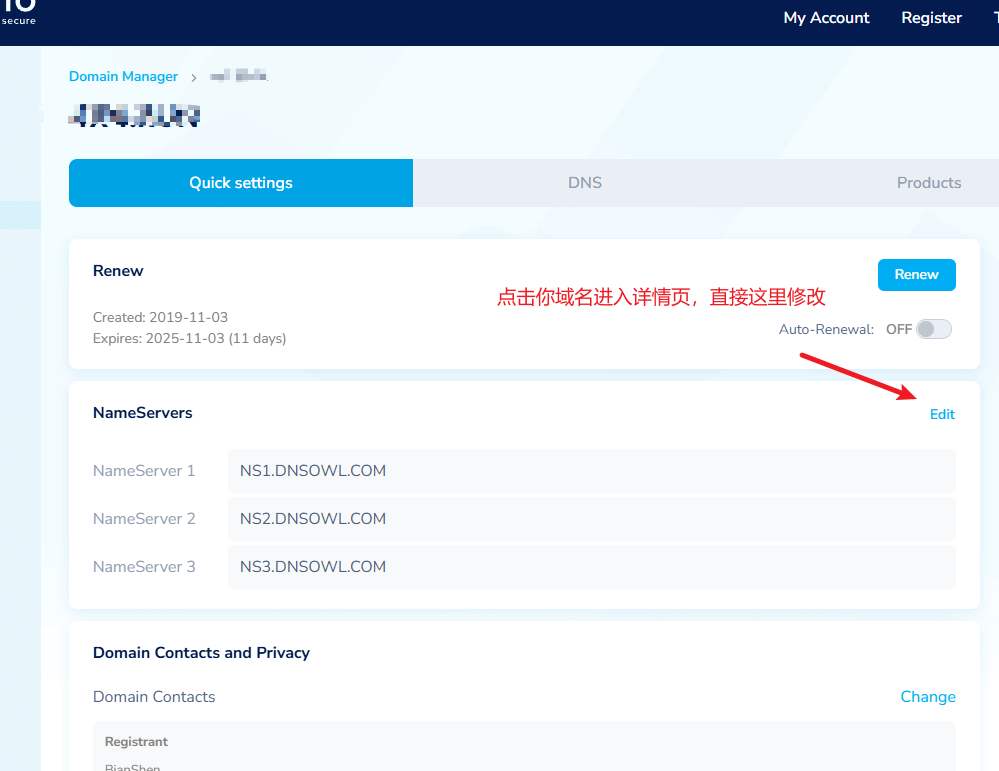
2. Click the storage icon to enter the NameSilo domain DNS modification interface, then delete the default three DNS servers and replace them with new DNS servers before saving.
By default, you must fill in two new DNS servers; the third one is optional. For example, if you wantto change the DNS servers to SiteGround's, then fill in the DNS server addresses provided to you in your SiteGround admin dashboard. The location to view them is shown in the figure below:
Website still inaccessible after modifying DNS pointing IP?
After modifying the DNS resolution, there is a propagation time. This propagation time varies depending on the DNS servers in different regions, generally ranging from a few hours to several days.
To speed up DNS propagation, you can use third-party public DNS servers. For this, you can refer to the Alibaba Public DNS resolution setup tutorial.
How to determine if DNS resolution has taken effect
The simplest method is to open the domain name you added the resolution for. If it opens normally, it proves it has taken effect; if it doesn't open, it hasn't taken effect.
You can also manually ping the domain name to see if it has taken effect. The specific method is as follows:
Start - Run - type cmd and press Enter (you can also directly press WIN + R, type cmd, and press Enter).
ping www.baidu.com
Replace www.baidu.com with your own domain name and press Enter.
Check if that IP is the IP you set. If not, it hasn't taken effect.
Of course, sometimes it might be a DNS cache issue. Enter the command below to clear the DNS cache.
ipconfig /flushdns
Try again after clearing it.
The above isHow to set up DNS in NameSiloand all content about domain name resolution. If you registered your domain with another service provider, the domain resolution method is largely similar—just add an A record pointing to your server IP.
How long does NameSilo domain resolution take to take effect?
After adding domain resolution in Namesilo, it usually takes effect within half an hour; faster DNS servers may take effect in just over ten minutes. If it hasn„t taken effect on your computer after more than half an hour, you can try modifying your computer“s DNS server and checking the resolution status according to the „Website still inaccessible after modifying DNS pointing IP?" section above.
How to set up NameSilo domain resolution with CloudFlare?
CloudFlare is a CDN service provider. To resolve a Namesilo domain to it, you first need to add your website in CloudFlare, then obtain the DNS servers provided by CloudFlare, and finally go back to the domain DNS server settings on the Namesilo website to modify the DNS records to CloudFlare's.
How to point NameSilo to Vultr?
Go to your VPS list in Vultr, find the IP record of the VPS you need to point to, then return to NameSilo's DNS management list to add an A record, and fill in the Vultr IP address as the record value.
NameSilo DNS propagation is slow or not working?
DNS changes do not take effect immediately after being added; they require some propagation time to refresh caches, typically taking effect within half an hour. If you find NameSilo's DNS propagation slow, you can use a third-party DNS service, such as DNSPod, CloudFlare, etc. You just need to modify the DNS server records to the third-party's.
🚀 Still feeling confused after reading the tutorial? Let me guide you step-by-step instead.
「Naibabiji WordPress Website Building Coaching」 — From selecting a domain and purchasing hosting to installing themes and publishing posts, I「ll guide you through every step, helping you avoid detours and reach your goals directly.
Dear Lee, I followed your steps to set up the built-in email for SiteGround, but it's not working. The domain was purchased from Alibaba Cloud. What settings are needed to use the email? Thank you!
Brother, after pointing the domain, the website keeps showing this. What should I do? Welcome to the home of xxx To change this page, upload your website into the public_html directory There is a blue triangle logo below
Hello, may I ask what is meant by step 3 in the DNS resolution, 'fill in the server IP'? I'm a complete beginner in website building, I hope you can enlighten me, thank you!
Hello, I bought a domain from Namesilo and pointed it to the hosting server. I also changed the MX records on the hosting for Tencent Enterprise Email (deleted the MX records of the hosting's built-in email), but the email still doesn't work. What could be the reason?
First time using NameSilo's DNS resolution, I found it indeed takes over 30 minutes to take effect. I have to complain here: when I use Aliyun's DNS resolution, it takes effect immediately (just for your reference).
Hello Naiba! I heard that some hosting providers force the use of their nameservers for certain security reasons (like Hostinger and GreenGeeks). Does this mean I must buy the domain from them? (I originally planned to buy a domain from NameSilo and pair it with Hostinger's cheapest plan that doesn't include a domain, but now I'm hesitant after seeing this.) I'm a beginner, thank you in advance for your guidance, Naiba!
Hello, I bought a domain from NameSilo and paired it with Hostinger hosting (server IP requires you to purchase a server first; after buying, you will have the server IP); but I can't find the IPv4 address, I've been looking and can't find it...
Hello Naiba, I bought a domain on Namesilo last year and haven't used it. This year, I bought another one. The server is with Greengeeks. I've changed the domain resolution and DNS, but it still cannot be pinged. I also asked Greengeeks to replace the new domain on the server for me. May I ask, where else should I check for the issue?
Hello Naiba! I have a question. I followed your website building process to the server purchase step. On SiteGround, at the second step of selecting a domain, when I use an existing domain, it shows the domain is invalid. What's the reason for this? Did I make a mistake in the operation?
Hello Naiba! The domain and server were originally on GoDaddy and Greengeeks' shared hosting. Now I'm transferring service providers. I purchased a VPS on AlphaVPS, successfully transferred the domain on Namesilo, and added the domain resolution. I have installed Baota Panel on the server and logged in to add the website for this domain. However, entering the domain shows the webpage cannot be opened, but pinging the domain is successful and displays the server's IP address. Downloading WordPress and extracting it into the website directory still results in the same issue. I would like to ask what problem might be occurring in this situation.
If the ping result shows the IP of your new server, then the issue is likely with the configuration of Baota Panel on the new server. You can check it carefully.
There were problem(s) with your request: My domain for CNAME record also has NS record(s) My domain for CNAME record also has SOA record(s) Please make applicable changes and try again. What should I do?
You are currently NOT using our default nameservers for this domain. Therefore, any DNS changes you make will NOT have an impact.
In order to manage your DNS with us, you need to change your nameservers to: NS1.DNSOWL.COM NS2.DNSOWL.COM NS3.DNSOWL.COM You can click here to update your domain to use our default name servers. Bro, does this pop-up mean I must use their nameservers?





When pinging the domain, it shows „Request timed out“ and „75% loss“. What does this mean?
This is caused by unstable network connectivity from within China to your server, which is a normal situation.
How can this be resolved? Could you please help?
Switch to a domestic server and packet loss will stop.
Dear Lee,
I followed your steps to set up the built-in email for SiteGround, but it's not working. The domain was purchased from Alibaba Cloud. What settings are needed to use the email? Thank you!
Nic
After changing the DNS to SiteGround's, wait a few hours normally and it should work. Email DNS propagation usually takes a longer time.
Brother, after pointing the domain, the website keeps showing this. What should I do?
Welcome to the home of xxx
To change this page, upload your website into the public_html directory There is a blue triangle logo below
This proves the DNS is correct, but the website files are not placed in the correct directory.
Hello, may I ask what should be filled in for the third item, server IP? I'm a complete beginner, thank you for your guidance!
You need to purchase a server first to get the server IP; once you buy it, you will have the server IP.
Hello, may I ask what is meant by step 3 in the DNS resolution, 'fill in the server IP'? I'm a complete beginner in website building, I hope you can enlighten me, thank you!
Hello, I bought a domain from Namesilo and pointed it to the hosting server. I also changed the MX records on the hosting for Tencent Enterprise Email (deleted the MX records of the hosting's built-in email), but the email still doesn't work. What could be the reason?
Generally, DNS resolution takes a few hours to take effect; you can wait a few hours and test again.
First time using NameSilo's DNS resolution, I found it indeed takes over 30 minutes to take effect.
I have to complain here: when I use Aliyun's DNS resolution, it takes effect immediately (just for your reference).
Normal, the older batch of domain registrars are not fast with DNS resolution.
Hello Naiba! I heard that some hosting providers force the use of their nameservers for certain security reasons (like Hostinger and GreenGeeks). Does this mean I must buy the domain from them? (I originally planned to buy a domain from NameSilo and pair it with Hostinger's cheapest plan that doesn't include a domain, but now I'm hesitant after seeing this.)
I'm a beginner, thank you in advance for your guidance, Naiba!
That's not the case.
How to fix the address in the profile always showing as invalid? Please help, teacher.
Do not translate the content into Chinese when filling it in.
Hello, I bought a domain from NameSilo and paired it with Hostinger hosting (server IP requires you to purchase a server first; after buying, you will have the server IP); but I can't find the IPv4 address, I've been looking and can't find it...
It should be available in the server details after purchase.
Hello Naiba, I bought a domain on Namesilo last year and haven't used it. This year, I bought another one. The server is with Greengeeks. I've changed the domain resolution and DNS, but it still cannot be pinged. I also asked Greengeeks to replace the new domain on the server for me. May I ask, where else should I check for the issue?
If the operations are correct, it should be accessible after waiting a few hours.
Hello Naiba! I have a question. I followed your website building process to the server purchase step. On SiteGround, at the second step of selecting a domain, when I use an existing domain, it shows the domain is invalid. What's the reason for this? Did I make a mistake in the operation?
Check if there's an input error. If it keeps prompting as invalid, you can contact customer support.
Hello Naiba, I've reached the 'decoration' step, but when I open the default WordPress interface, it shows a 404 error. What could be the issue?
A 404 error either means WordPress is not installed, or it's installed in the wrong location.
Hello Naiba!
The domain and server were originally on GoDaddy and Greengeeks' shared hosting. Now I'm transferring service providers.
I purchased a VPS on AlphaVPS, successfully transferred the domain on Namesilo, and added the domain resolution.
I have installed Baota Panel on the server and logged in to add the website for this domain.
However, entering the domain shows the webpage cannot be opened, but pinging the domain is successful and displays the server's IP address.
Downloading WordPress and extracting it into the website directory still results in the same issue.
I would like to ask what problem might be occurring in this situation.
If the ping result shows the IP of your new server, then the issue is likely with the configuration of Baota Panel on the new server. You can check it carefully.
There were problem(s) with your request:
My domain for CNAME record also has NS record(s)
My domain for CNAME record also has SOA record(s)
Please make applicable changes and try again.
What should I do?
There are conflicting DNS records. Delete the conflicting ones.
You are currently NOT using our default nameservers for this domain. Therefore, any DNS changes you make will NOT have an impact.
In order to manage your DNS with us, you need to change your nameservers to:
NS1.DNSOWL.COM
NS2.DNSOWL.COM
NS3.DNSOWL.COM
You can click here to update your domain to use our default name servers.
Bro, does this pop-up mean I must use their nameservers?
If you have already modified the DNS at your server, you can ignore this prompt.