
How to use a domain after purchase?For beginners building a website, they might not know what to do after buying a domain. Below, Naibabiji will give you a detailed introduction to the things you need to do after purchasing a domain andDomain DNS Resolution Tutorial。
How to use a domain after purchase?
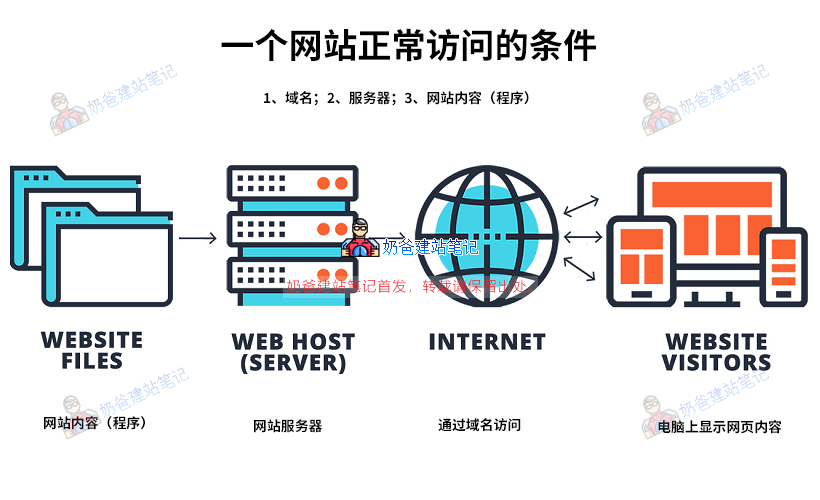
To understand how to use a domain after purchase, we first need to understand the basic conditions for a website to be accessible normally.
- A network space (server)
- A domain name pointing to the server IP (Domain Name Purchase and Resolution)
- Website content (website program) exists on the server
So, if you want toBuild Your Own WebsiteHaving only a domain name is not enough. Next, you need to purchase a server and install a website program on the server or upload your own website data.
For servers, please refer to:VPS and Server Recommendations Suitable for Beginners;
For website programs, it is recommended to use WordPress. See:WordPress Installation Tutorial。
Besides the server and website building software, purchasing a domain also involves the issue of domain filing.
If your domainIn China, and the server is also purchased fromDomestic, then before resolving the domain name, youalso needPerform real-name verification and filing for the domain.
How to perform real-name verification for domestic domains
Domain real-name verification policy
According to the "China Internet Domain Name Management Regulations", domain name registrants must submit true, accurate, and complete domain name holder information. When performing domain name real-name authentication, it is recommended that you prepare the required materials according to the authentication requirements. If multiple domain names need to use the same materials for authentication, batch authentication can be performed.
Currently involved domain names include: .com / .net / .cn / .xyz / .club / .wang / .info / .中国 / .在线 / .中文网 / .vip / .beer / .work / .fashion / .luxe / .yoga / .网址 / .top. If your domain name fails to pass real-name review within the specified time, the registry will suspend resolution (Serverhold), and your domain name will not be accessible normally. It will return to normal use only after real-name authentication is passed. Therefore, newly registered domain names need real-name authentication.
Domain real-name verification methods
Whether you are an individual or an enterprise, domain names registered in China need real-name authentication. The method of domain name real-name authentication is also very simple: just fill in your own identity information to the registrar.
For individual real-name authentication, provide an ID card; for enterprise real-name authentication, provide enterprise documents. In the domain list, there will be a real-name authentication button. Click it and follow the prompts to operate.
Real-name authentication is usually completed within 1-3 working days.
For specific steps, please refer to:
- Alibaba Cloud general domain real-name verification operation steps
- Tencent Cloud Domain Name Real-Name Authentication Guide
Domains registered abroad do not require real-name verification.
How to File for a Domestic Domain Name
Building a website in China requires domain name filing. If you are using a foreign server, then filing is not required.
Website domain filing policy
According to the "Internet Information Service Management Measures" and the "Non-operational Internet Information Service Filing Management Measures", the state implements a filing system for non-operational internet information services and a licensing system for operational internet information services. Without obtaining a license or fulfilling filing procedures, one must not engage in internet information services; otherwise, it is considered illegal.That is, all websites providing services to Mainland China must first complete ICP filing before services can be opened.
Website Domain Name Filing Method
Domain name filing usually takes about half a month, which is not as fast as real-name authentication. Compared to a few years ago, filing is now much simpler and more convenient, and can be done directly using a mini program or APP.
Simply put, website domain name filing means you submit your filing materials (identity information, website information, what kind of website you want to make, website name, website content) through a mini program, APP, or website to the regulatory authority for review. Once the review is passed, the filing is complete.
For related filing methods, refer to:
- Tencent Cloud Website ICP Filing Documentation Center
- Alibaba Cloud Website Filing Documentation Center
Naiba Tip:
Actually, you can also skip the help and directly clickAlibaba CloudorTencent CloudOn the websiteFilingbutton, and follow the prompts step by step to submit the information. Their customer service will first review your information. If there are any non-compliant areas, they will contact you by phone. Therefore, the information submitted to the regulatory authority is basically compliant, and the filing success rate is very high.
Website domain filing precautions
① To file a domain name, you need to purchase a domestic server, cloud host, or virtual host. Filing is submitted through the service provider where you purchased the host. So you can buy the domain name from Alibaba Cloud, buy the host from Tencent Cloud, perform real-name authentication on Alibaba Cloud, and submit the filing on Tencent Cloud.
② From a policy perspective, domestic filing spot checks will become increasingly strict. When submitting filing materials, think carefully about your website name and do not fill in casually. After filing is approved, spot checks will be conducted from time to time. If it is found that your website„s filing name is “Naiba Notes„ but the website actually opens as “Naiba Teaches You to Make Websites„, you will likely be required to rectify or revoke the filing.
③ In addition, for personal filing, do not include the word "blog" in the website name.
④ After filing is approved, if you change your hosting service provider, you need to resubmit the access filing. Therefore, choose a stable hosting service provider to avoid poor service and the need to change hosts, which may cause the access filing to fail and lead to filing cancellation.
General Domain Name Resolution Tutorial
After your domain name completes real-name verification and ICP filing, you should proceed with domain name resolution (for foreign domain names and hosting, you can directly perform domain name resolution). Whether you purchased your domain name from Wanwang, Alibaba Cloud, Tencent Cloud, or abroad, if you want to access your website via the domain name URL, then you need toResolve the domain name。
What is domain name resolution
Baidu BaikeExplanation: Domain name resolution is a service that points a domain name to a website space IP, allowing people to easily access the website through the registered domain name. An IP address is a digital address that identifies a site on the network. For ease of memory, domain names are used instead of IP addresses to identify site addresses. Domain name resolution is the process of converting a domain name to an IP address. The resolution work is done by DNS servers.
Simply put, you add domain name resolution to tell your domain name which IP address it corresponds to. When others visit the domain name, they directly access the IP you bound. Domain names are easier to remember than IPs, and IPs may change, but as long as you renew the domain name, it is always yours, and you can modify the corresponding IP at any time. (For example, your phone number may change, but your WeChat ID will not.)
How to perform domain name resolution
The basic operational process for domain name resolution is:
- Log in to the backend of the website where you purchased the domain name and find the domain list.
- Click the resolution button in the domain list.
- Add resolution record
Detailed domain name resolution tutorials can be found in the following articles.
- Tutorial on domain registration and DNS resolution on Tencent Cloud
- Tutorial on DNS resolution and DNS server modification for NameSilo domains
- Tutorial on DNS resolution for domains registered on Alibaba Cloud
Naiba Tip:
Usually, buy your domain name from which website, go to that website to add A record resolution. Do not modify the Nameservers (NS servers), otherwise, it will complicate simple operations.
NS servers can be understood as China Telecom, China Unicom, and China Mobile. They all provide domain name resolution functions. You can use them without changing, or switch to another provider, but it requires an extra step of switching.
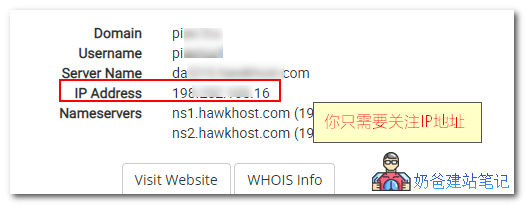
Domain name resolution record types
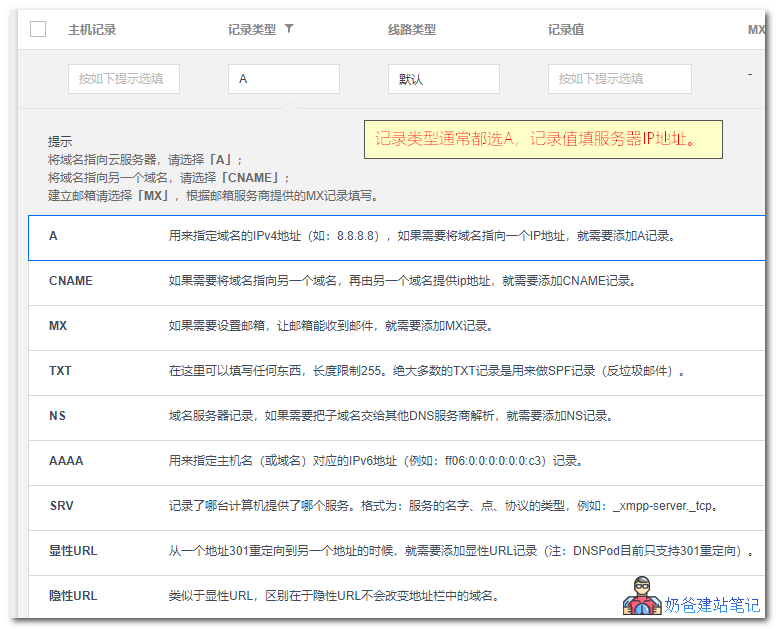
When you perform record resolution, there will be a record type. Usually, you add an A record, and the record value should be filled with the server IP address. For the host record, generally fill in www and @, which means accessing your website via www.naibabiji.com. If you want to add a record like blog.naibabiji.com, then fill in blog for the host record.
Articles about domains
- What to do after domain name ICP filing is approved and you build your own website
- Where to Download Tencent Cloud Domain Certificate_How to Obtain the Domain Filing Certificate
- Website Building Video Tutorial: Register a Domain Name
- 2019 Foreign Domain Name Registrar Namesilo Domain Registration Tutorial
- How to Choose a Domain Name for Beginners Building a Website
- How to Access a Website via IP During Tencent Cloud ICP Filing
- How to Purchase and Resolve a Domain Name with the Foreign Registrar Dynadot Tutorial