
In the WordPress admin settings, there is a „Attempt to notify any blogs linked to from the article" feature. If enabled, when you publish an article linking to another WordPress site's article, that site will automatically receive a notification that you have referenced their article.
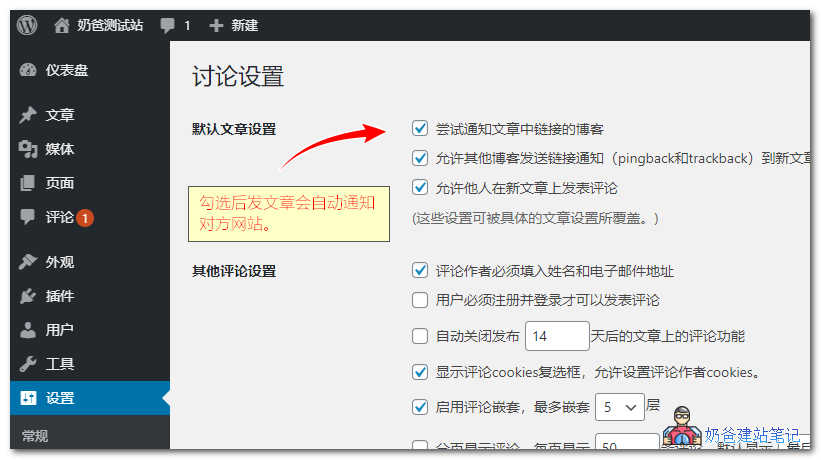
The setting for attempting to notify linked blogs is not enabled by default and must be manually checked. (It was enabled by default a few years ago.)
What are the benefits of notifying linked blogs?
In the past, it was popular to notify the other blog. The main purpose was to tell the other blogger that you referenced their article and left a link to them, respecting originality, and it was also a way to visit other blogs.
Additionally, if the other party approves your pingback notification, their site will also display your article title and link, which can indirectly attract users from their site to click and visit.
Summary of the benefits of enabling notification of linked blogs:
- Respect originality, leave a link and notify the author;
- Get acquainted; the other blogger often visits your site in return;
- Gain traffic; after the other party approves your pingback, a link to your site can be left on their site.
What are the drawbacks of pingback?
Nowadays, actively notifying other blogs is less common, but most blogs have the function of allowing other blogs to send link notifications enabled by default. This means if you add a link to another site, it will still notify them.
Disadvantages:
- It can have some impact on website speed;
- Some bloggers may directly delete it as spam, leaving no link;
- A pingback notification will also appear for citations of your own articles.
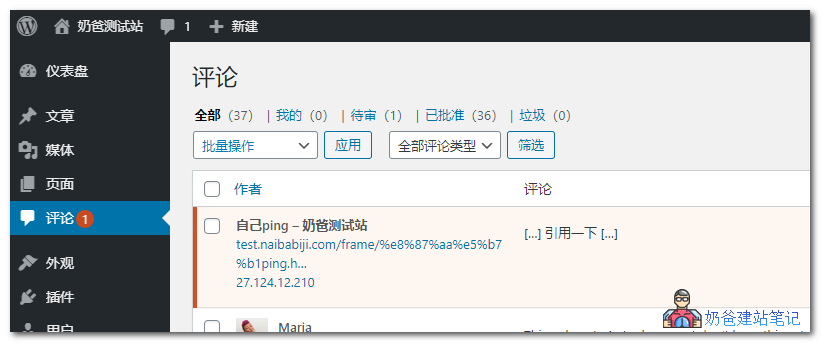
How to resolve reference notifications for your own articles
The method to resolve notifications from your own website articles is very simple.
Method 1: Add no self ping code
Just insert the following code snippet into your theme's functions file.
//no self ping
function no_self_ping( &$links ) {
    $home = get_option( 'home' );
    foreach ( $links as $l => $link )
        if ( 0 === strpos( $link, $home ) )
            unset($links[$l]);
    }
    add_action( 'pre_ping', 'no_self_ping' );
Tutorial for adding:Safe Method to Add Code to the functions.php File: Code Snippets
Method 2: Install the no self ping plugin
You can install thisno self ping plugin, compared to the code version, it adds a multi-site support feature.
That is, if you have multiple sites and don't want them to pingback each other, you can manually add the sites to the settings, so that the corresponding site's articles will not be notified.