
As mentioned in the previous article „How to Set Up Nginx Hotlink Protection in Baota Panel and LNMP Environments", one of Naiba's sites exceeded its traffic limit. Initially, it was thought to be caused by image hotlinking. After analyzing the logs, it was discovered that the spam robot AhrefsBot was crawling the site frantically, making over 6000 requests in less than a day. I immediately researched how to block AhrefsBot.
What is AhrefsBot?
AhrefsBot is a foreign search engine spider. However, for your website, it offers no benefits other than wasting resources.
Simply put, AhrefsBot is a crawling spider for marketing websites, responsible for analyzing your site's link information. This tool is useless for domestic users.
For a detailed introduction, you can check the English explanation on their official website. https://ahrefs.com/robot
AhrefsBot IP Ranges
Naiba analyzed a day's worth of website logs. Guess how many different AhrefsBot spider IPs came to crawl the website data?
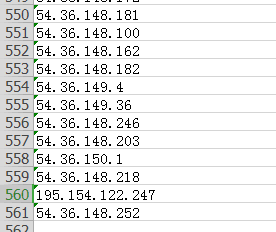
There were actually 561 IPs, and that's from less than a day's log records.
The officially announced IP ranges for the AhrefsBot crawler are as follows:
54.36.148.0/24
54.36.149.0/24
54.36.150.0/24

195.154.122.0/24
195.154.123.0/24
195.154.126.0/24
195.154.127.0/24
Alright, since it's this extreme, let's start figuring out how to block AhrefsBot's crawling.
Directly Block AhrefsBot IP Ranges
The server of the site crawled by the AhrefsBot spider uses Alibaba Cloud. The Alibaba Cloud backend has security groups available, so directly blocking AhrefsBot's IP ranges is the simplest, most brute-force method with immediate effect.
Go to the Alibaba Cloud backend, enter your server list, click on the server's security group, and configure the security group rules.
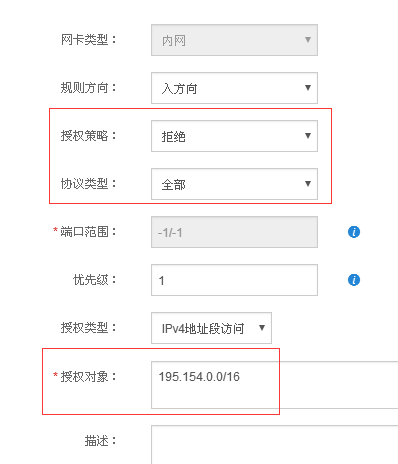
Configure according to the method in the image above, just add all these IP ranges. (Naiba directly blocked all IPs from 54.36.*.* and 195.154.*.*)
54.36.148.0/24
54.36.149.0/24
54.36.150.0/24

195.154.122.0/24
195.154.123.0/24
195.154.126.0/24
195.154.127.0/24
Block Using robots.txt
Generally speaking, any spider or crawler that follows robots rules can be blocked using robots.txt. AhrefsBot officially states it follows this rule, but in reality, if you didn't add this rule from the start, you wouldn't know when its spider would recrawl your robots.txt file to update the crawling rules.
So, more violently, directly blocking IPs is faster. If you want to add it, the rule is as follows:
User-agent: AhrefsBot
Disallow: /
Block Using Apache or Nginx
This method refers to a previous article:How to Block Specific Bots and Crawlers from Accessing a WordPress Website
If using nginx, you can also add the following code snippet to your virtual host configuration file to block AhrefsBot.
if ($http_user_agent ~* AhrefsBot) {
   return 403;
}