Naiba has a server on Alibaba Cloud in Hong Kong. Today, I received an email saying there is a prepayment of 18 USD. Logging into the backend, I found that the traffic package has been used up, so now traffic is billed on a pay-as-you-go basis. No need to guess, it's because hotlinking protection has never been set up, causing too much image traffic.
So you need to set an anti-hotlinking rule for nginx.
Method to Set Up Nginx Hotlink Protection
Insert the corresponding code into your virtual host's nginx configuration file. The complete code is as follows
location ~ .*\.(gif|jpg|jpeg|png|bmp|swf)$
{
expires 30d;
valid_referers none blocke *.域名.com *.baidu.com *.google.com;
if ($invalid_referer) {
rewrite ^/ https://另外一个网站/2019/07/18/ZjgUET.gif;
}
}
Code Explanation
The code above is added directly to the virtual host configuration file in LNMP. If you are also an LNMP user, you should be able to see
location ~ .*\.(gif|jpg|jpeg|png|bmp|swf)$
{
expires 30d;
}
The above content, just add rules on this basis.
The value after valid_referers none blocked is the domain name allowed to access images without interception.
After rewrite ^/ is the image displayed for anti-hotlinking on other websites. This image cannot be placed directly on your server, otherwise it will also be intercepted by anti-hotlinking and cannot be displayed.
If you want to add more hotlinking protection content, just add it directly to gif|jpg|jpeg|png|bmp|swf.
Baota Panel Hotlink Protection
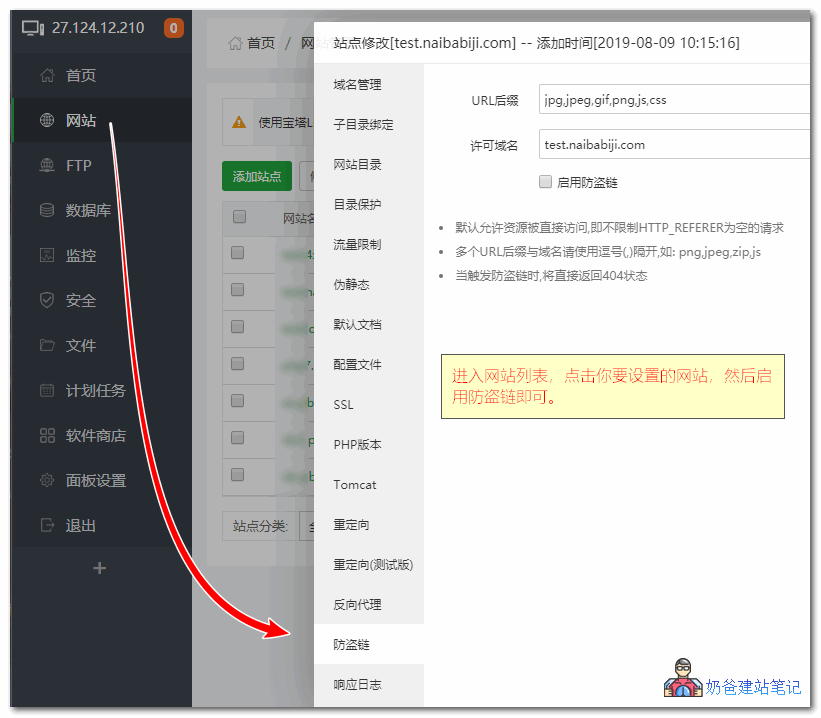
There are two methods for hotlink protection in Baota Panel.,One methodis to add nginx hotlink protection code in the website configuration file yourself in the Baota Panel backend, under Websites, Edit Website Configuration, just like the nginx hotlink protection mentioned earlier.
Another methodis to directly find the Hotlink Protection option below when editing the website and turn it on.
Restart Nginx Service
After setting, you need to restart the nginx service to load the anti-hotlinking rules.
For LNMP, you can use /etc/init.d/nginx restart or directly lnmp restart to restart.
For Baota Panel, go to the Software Store, find nginx under Runtime Environment, click on it, then click Restart under Services.
References:
http://nginx.org/en/docs/http/ngx_http_referer_module.html
http://www.ttlsa.com/nginx/nginx-referer/
Image Watermarking for Hotlink Protection
Of course, another anti-hotlinking method is to not set anti-hotlinking first, but add watermarks to images, so that others can copy them to advertise your website. Later, when traffic is insufficient or you feel it's time to reap the benefits, you can enable anti-hotlinking and set the anti-hotlinking image to your website information image, achieving the purpose of having other websites advertise your website for free.
If you want to add watermarks to WordPress images, you can refer to the following method for automatic operation.