
A couple of days ago, Naiba shared amethod for requiring site-wide registration and login to view content, however, more websites may need user login or require users to reach a certain level to view partial content.
So here's the method: today Naiba will share a WordPress plugin called Wicked Block ConditionsWordPress Plugin。
Plugin Introduction
Wicked Block Conditions is a Gutenbergeditor enhancement plugin. It can display or hide specific block content based on various specific conditions.
The judgment conditions supported by Wicked Block Conditions are as follows:
- Whether the user is logged in
- User level/role
- Date and time
- Post category or tag
- Post status
- Custom PHP function result
Moreover, multiple conditions can be mixed and combined for use.
Plugin Usage Method
After installing Wicked Block Conditions, you can add a content block in the Gutenberg editor, and on the right side of the screen, you will see a Display Conditions option. As shown in the figure below:
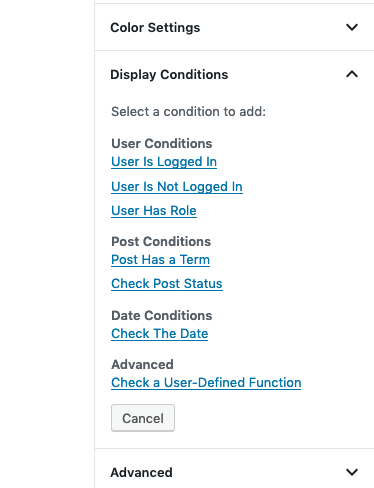
You can choose the conditions for displaying or hiding blocks according to your needs.
For example, User is logged in, User Has Role. After selection, more detailed judgment settings will appear, as shown below:
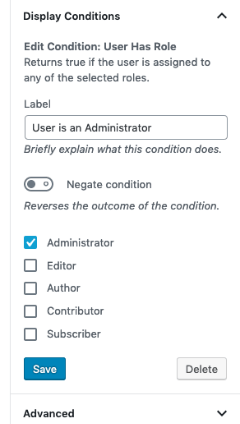
You can choose whether the user belongs to the administrator, editor, or other conditions. After saving, it will work.
Plugin Download
You can search for Wicked Block Conditions in the WordPress backend plugin center to download and install it yourself, or download it via the link below and upload it for installation.
Monetize Using This Plugin
Naiba will share a monetization model for this plugin: sharing resources useful to specific users on the site, requiring users to recharge and upgrade to VIP (manually set their user group after recharge).
Of course, if you are willing to spend money, there are also similar paid plugins on the market to choose from.