
Many friends, when using WordPress to build B2B product showcase sites, usually manage products with WooCommerce. WooCommerce is natively adapted for e-commerce transaction scenarios, with complex and redundant features. Using it for pure showcase B2B sites is completelyoverkill. Not only does the backend load slowly and operate sluggishly, but the unnecessary transaction, order, and payment modules waste server resources, dragging down site speed and backend management efficiency.
Naiba developedB2B Product Management & Display Pluginoptimized specifically for B2B product management scenarios. It is faster and lighter than WooCommerce, and comes with a built-in inquiry system, making it more suitable for B2B use cases. Some friends have asked if it's possible to convert products published with WooCommerce to B2B Product Showcase products without loss. So Naiba specially developed this WooCommerce to B2B Product Showcase Importer plugin.
What problem does this plugin solve?
It helps you convert products previously uploaded with WooCommerce into B2B Product Showcase products, so you no longer need WooCommerce, achieving site performance optimization and speed improvement.
The entire process is automated by the plugin, saving you from manually re-uploading products.
What does the plugin support?
The current version focuses on a clear goal:
- Only supports WooCommerce simple products
- Same-site conversion, no cross-site synchronization
- Reuses existing media attachment IDs, does not copy image files
- Imports title, content, excerpt, SKU, price, categories, tags, featured image, and gallery
- Automatically records source product ID to avoid duplicate imports
- Automatically refreshes permalinks after import
- Automatically deactivates WooCommerce after import to avoid default products URL conflicts
- Keeps B2B Product Showcase plugin enabled
- Provides optional cleanup of WooCommerce source products
What is not supported?
To ensure stability, the current version does not do the following:
- Does not import variable products
- Does not import variation sub-products
- Does not convert attribute combinations into variation structures
- Do not perform cross-site migration
- Do not copy media files, only reuse attachment IDs
- Do not automatically delete all WooCommerce data
If you have variable products, consider converting them to simple products and then manually fill in the batch parameters using the B2B product management plugin.
Download and Usage
Download the plugin from the cloud drive above, then upload it to the website backend to install and activate.
After installing the plugin, you can find it in the WordPress backend:
Tools > WooCommerce to B2B Importer
The page will display the current environment status and provide import settings. If WooCommerce or the B2B product display plugin is not activated, the importer will handle it automatically as much as possible. If the B2B plugin is not installed, the page also provides a backend search and installation entry.
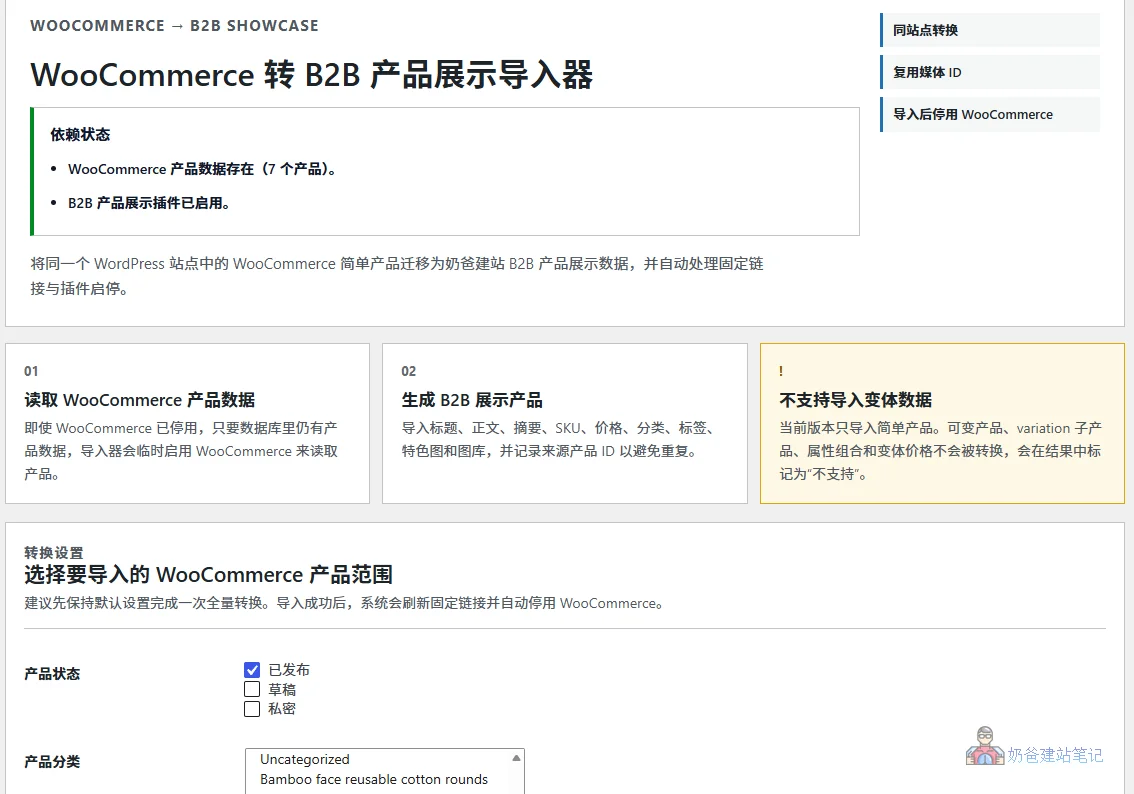
Import Process
- Open the importer page
- Check dependency status
- Select the product status, category, or tag to import
- Click Start Import
- View import results
- After import, the system will automatically refresh permalinks
- After import, WooCommerce will be automatically deactivated to avoid products path conflicts
Why automatically deactivate WooCommerce
Because both WooCommerce and the B2B product management plugin manage products and have product category and archive pages. If both systems are enabled simultaneously, routing conflicts, abnormal category links, or incorrect product page pointers may occur.
Therefore, the processing logic of this plugin is:
- Temporarily use WooCommerce to read product data during import
- Automatically deactivate WooCommerce after import is complete
- Keep the B2B display plugin enabled
- Refresh permalinks once to make new categories and product links take effect immediately
This reduces subsequent troubleshooting costs.
Whether to clean up source data

The plugin provides an optional cleanup feature. If you are sure you no longer need WooCommerce, you can clean up data to optimize the database and improve database operation efficiency.
The cleanup function will only delete WooCommerce source product posts that have been successfully converted, and will not delete:
- Media attachments
- B2B display products
- Order
- Customer
- WooCommerce Settings
- Unconverted Products
If you are sure that WooCommerce is no longer needed, this feature can help you reduce residual data in the database. But if you still need to roll back, do not execute it.
Summary
If you are transitioning from WooCommerce to a B2B product display mode, this plugin can save you a lot of repetitive data entry work. Its positioning is clear:
- Only convert within the same site
- Only support simple products
- Automatically handle import, permalinks, and plugin activation/deactivation
- Make the migration process as simple and controllable as possible
If you need to quickly migrate WooCommerce products to a B2B product display plugin, this will be a straightforward tool.