
After installing the Baota Panel, it comes with a built-in firewall. CentOS 6 uses iptables, CentOS 7 uses firewalld, and Debian/Ubuntu uses ufw.
However, since the Baota Panel is a graphical interface, even beginners can easily add firewall rules from the backend. The specific location is:Security - Firewall
Baota Panel Firewall Rules
Enter the Baota Panel backend, find Security, and then you can see the firewall interface. Here you can add or delete firewall rules, such as adding port permissions.
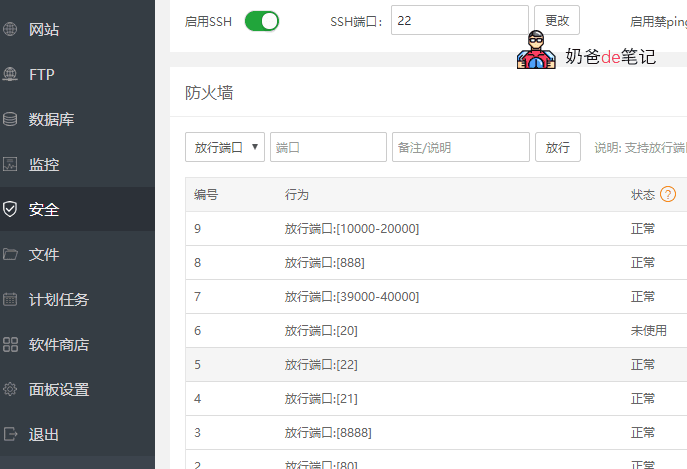
Adding the required rules from here willopen ports for Baota PanelIf you want to open many ports, you can use a dash to add them in bulk. For example, 20-20000 opens all ports from 20 to 20000.
Of course, if you purchasedAlibaba CloudorTencent Cloud, their management backend also has built-in security group firewall features, then you can turn off the firewall that comes with Baota Panel to save resources.
Linux system firewall commands
Different Linux systems have different built-in firewall software. For example, CentOS 7 has firewalld built-in, while CentOS 6's built-in firewall is iptables, so the rule commands for the two firewalls are explained separately.
firewalld open firewall port
The built-in firewall after installing the Baota Panel on CentOS 7 is firewalld. Usage is as follows:
Start: systemctl start firewalld
Check status: systemctl status firewalld
Stop: systemctl disable firewalld
Disable: systemctl stop firewalld
The command to open a port in firewalld is as follows:
sudo firewall-cmd --zone=public --add-port=3000/tcp --permanent
sudo firewall-cmd --reload
CentOS 6 iptables firewall commands
The default firewall on CentOS 6 is iptables. To check if the firewall is running, simply enter the following command.
service iptables status
If the firewall is not running, it will prompt:
iptables: Firewall is not running.
To start iptables, enter the following command:
service iptables start
To restart iptables, enter the following command:
service iptables restart
To stop iptables, enter the following command:
service iptables stop
iptables firewall open port
Open SSH service port
[root@tp ~]# iptables -A INPUT -p tcp --dport 22 -j ACCEPT
[root@tp ~]# iptables -A OUTPUT -p tcp --sport 22 -j ACCEPT
Note: If the OUTPUT policy is set to DROP in the default configuration, you need to set OUTPUT rules, otherwise SSH connection will not be possible.
Open web service ports
[root@tp ~]# iptables -A OUTPUT -p tcp --sport 80 -j ACCEPT
[root@tp ~]# iptables -A INPUT -p tcp --dport 80 -j ACCEPT
Open mail service ports 25 and 110
[root@tp ~]# iptables -A INPUT -p tcp --dport 110 -j ACCEPT
[root@tp ~]# iptables -A INPUT -p tcp --dport 25 -j ACCEPT
Open FTP service port 21
[root@tp ~]# iptables -A INPUT -p tcp --dport 21 -j ACCEPT
[root@tp ~]# iptables -A INPUT -p tcp --dport 20 -j ACCEPT
iptables open all ports
iptables -P INPUT ACCEPT
iptables -P OUTPUT ACCEPT
Firewall rules not taking effect?
Some friends may encounter that after adding firewall rules, the website still cannot be opened, for example,Firewall opened the port, still cannot access Baota
Usually this is because the server you purchased comes with a firewall outside the system, such asTencent Cloud和Alibaba Cloud, their management backend has a security group that can be configured. You need to go and open the corresponding rules (that is, you can turn off the system's built-in firewall and use their security group).