
WP Rocketis a WordPress caching plugin that can provide some WordPress optimization. Naibabiji currently no longer uses the WP ROCKET caching plugin. Although WP Rocket's caching and optimization effects feel better than the previously used WP SUPER CACHE, the speed improvement doesn't feel worth the annual renewal fee. Some people still need the WP Rocket cracked version, so it is shared here, with no security guarantee.
WP Rocket Introduction
WP Rocketis a paidWordPress caching plugin, with a starting price of $49/year, so there are fewer articles discussing thisWordPress Pluginin China compared to WP Super Cache.
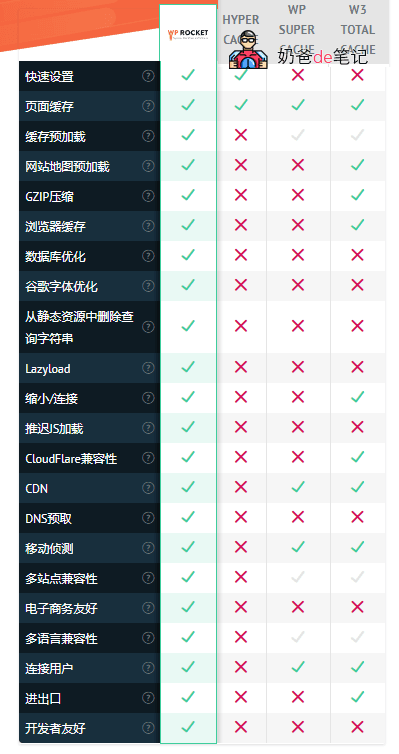
The image below is one made by WP Rocket's official teamComparisonFeature comparison of HYPER CACHE, WP SUPER CACHE,W3 TOTAL CACHE(Of course, this compares the free versions, so it's not entirely fair, but you can see the caching features supported by WP Rocket.)
WP Rocket Cracked Version Download Link
WP Rocket's starting price is $49/year. Friends who are uneasy about cracked versions can consider purchasing the official version or using other free caching plugins as alternatives.
Other Popular WordPress Cracked Plugin Recommendations
WP Rocket Usage Tutorial
After installation,WP Rocketyou can see the WP Rocket menu entry under the Settings menu on the left side of the WordPress Admin Dashboard.
Note: The interface may change with different version updates. This tutorial is updated based on WP Rocket 3.9 cracked version.
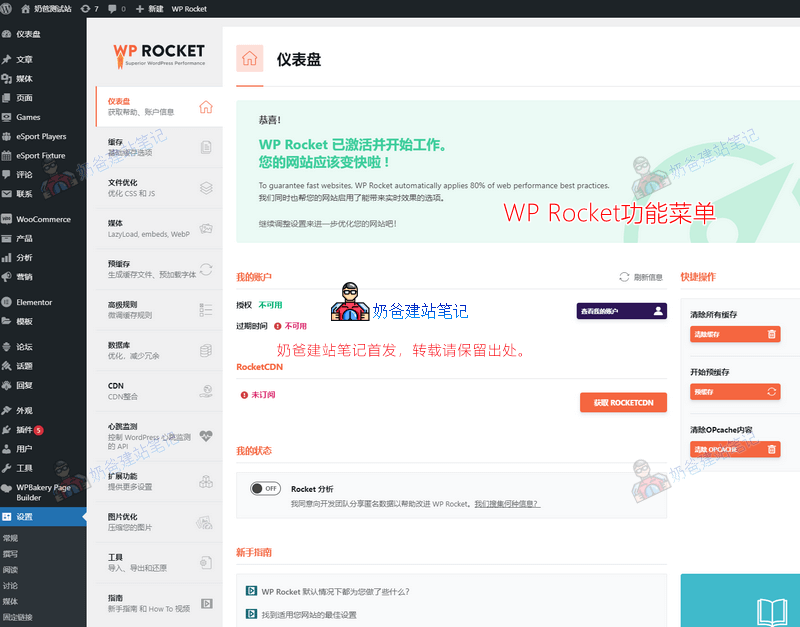
WP Rocket comes with Chinese language support. The image above shows some of WP Rocket's settings. We can see the main features are divided into:
- Cache
- File Optimization
- Media
- Preload
- Advanced Rules
- Database
- CDN
- Heartbeat
- Add-ons
- Image Optimization
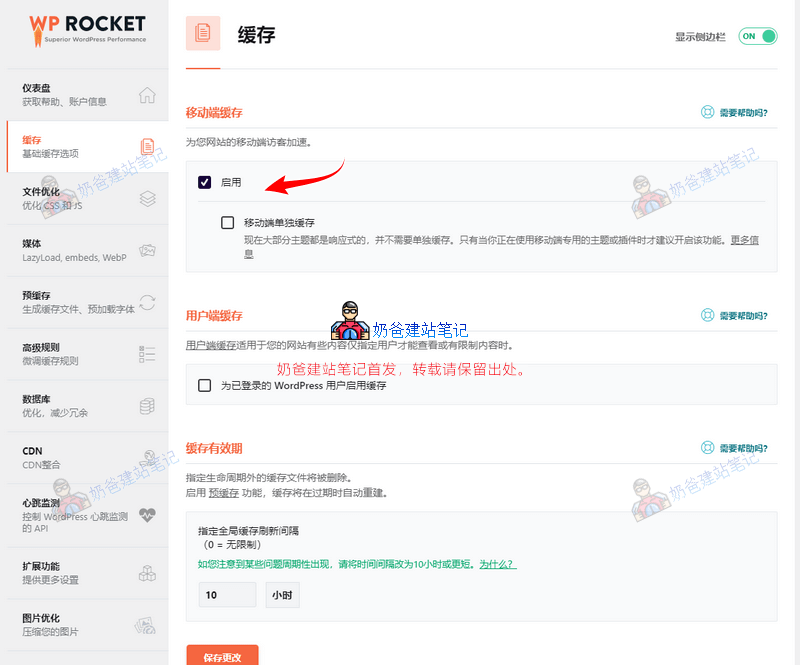
In the Cache settings, we need to enable caching. The separate mobile caching feature does not need to be turned on, as most themes are now responsively designed, so just check 'Enable'.
Whether to enable caching for logged-in WordPress users depends on your website type. If it's a B2C website or a site with open user registration and login, you can enable it. However, pay attention to whether the cache refreshes automatically after enabling, which might affect logged-in users.
The cache lifespan should be decided based on your website's update frequency and specific content. If you update posts once a week, you can set it to 7 days.
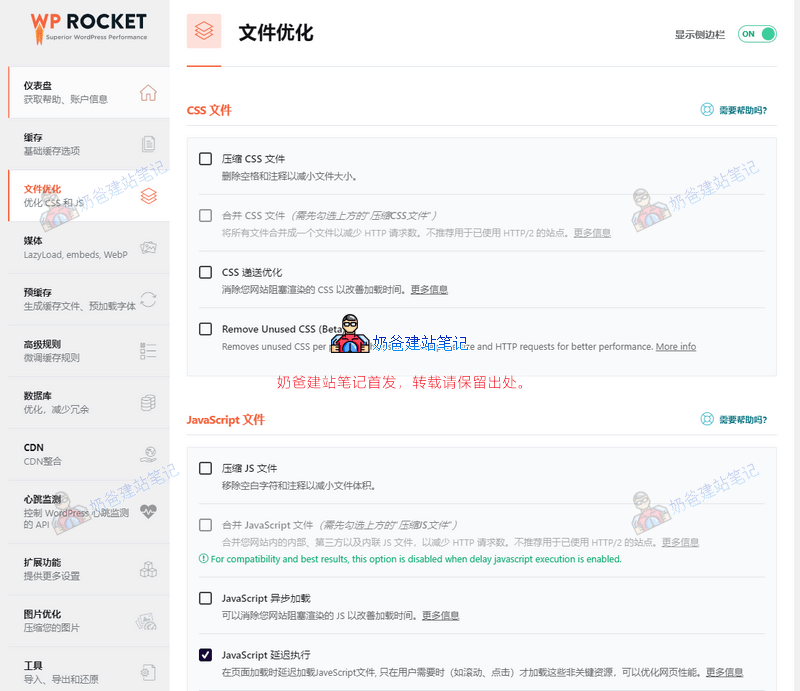
In the File Optimization settings menu, compressing CSS files is generally safe to check. However, for options like merging CSS and others, be sure to thoroughly test the frontend after checking to ensure it doesn't cause page misalignment. If there are errors, do not check those options.
Compressing JS files usually doesn't cause issues either. If merging is enabled, similarly, test extensively to ensure frontend functions work normally.
Actually, compressing CSS and JS isn't hugely significant. It might increase scores on some speed testing websites, but now most server environments support HTTP 2.0, which allows downloading multiple files simultaneously, so not merging isn't a big problem.
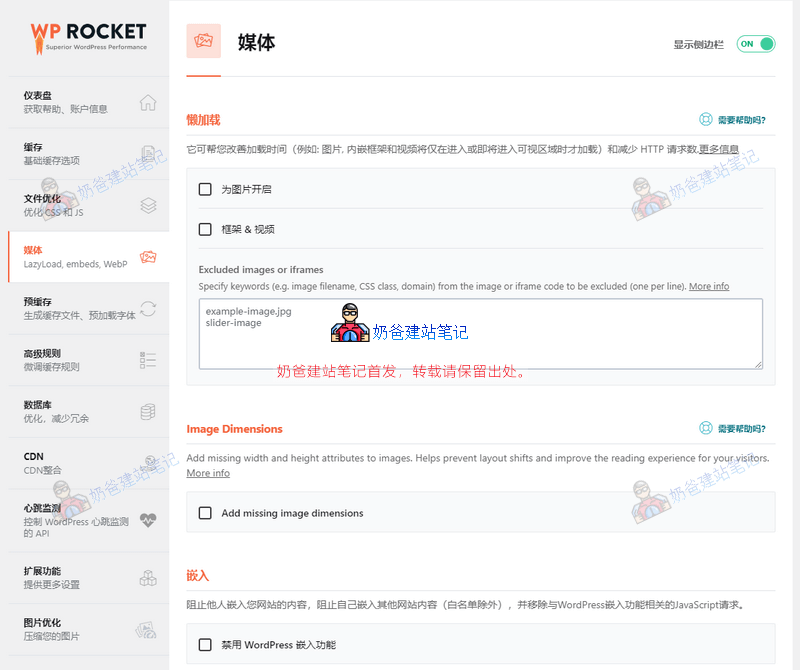
In the Media settings, enable Lazy Load based on your actual situation. Lazy Load means content loads only when it becomes visible in the browser window, which can reduce the number of HTTP requests. If your server connection speed is slow, enabling Lazy Load can save some bandwidth.
Some themes have Lazy Load enabled by default. Enable the same feature in one place only; do not enable it redundantly. Some themes may have issues when Lazy Load is enabled, so remember to test the frontend after enabling it.

Pre-caching means generating website page caches before users visit your site, so that when users access the site, they directly hit the cached pages, resulting in faster speeds.
If not enabled, by default, the first user to visit a webpage accesses the dynamic page, then the system generates a static cache, so the second user visiting that page will access the cached version.
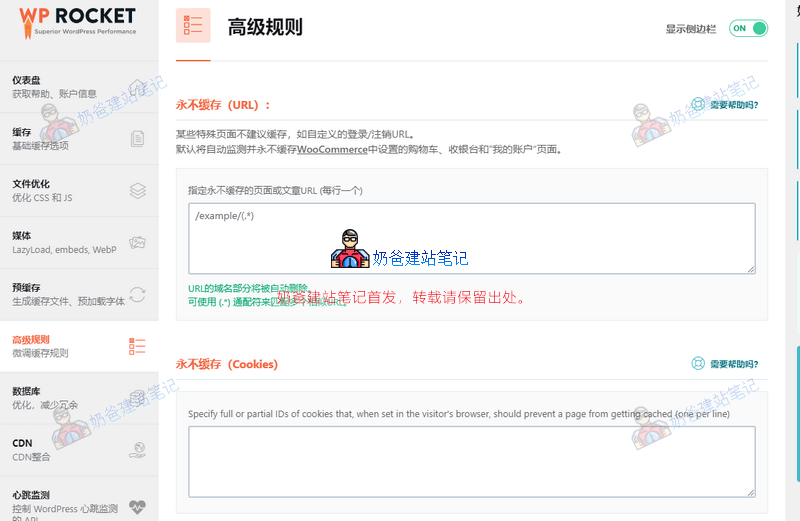
In WP Rocket's advanced rules, you can set which pages or cookies should never be cached. Beginners generally don't need to configure this.

Under the database menu, you can optimize and clean up the database. You can perform this regularly or automatically to improve website speed.
In the CDN settings, generally,WordPress Hostingcomes with a free CDN service, and it's a full-site CDN, so there's no need to configure it within WP Rocket.
The heartbeat detection feature can be enabled to reduce some server load.
Among the extension features, the one we might use is Cloudflare. If you are using Cloudflare's CDN, you can set it up to automatically clear the CDN cache.
The image optimization feature recommends installing a separate image compression plugin. If you need it, you can go ahead and install one.
Summary:
WP Rocket's settings are not complicated; basically, the default settings are sufficient. The most important point is that after enabling resource merging, remember to test several pages and functions on the website frontend to see if merging causes any webpage errors.
WP Rocket vs. WP Super Cache Comparison
NaibaWebsite Building NotesPreviously used WP SUPER CACHE and W3 TOTAL CACHE for caching, but I didn't use W3 as long as WP Super Cache, so here's a simplecomparison between WP Rocket and WP Super Cache。
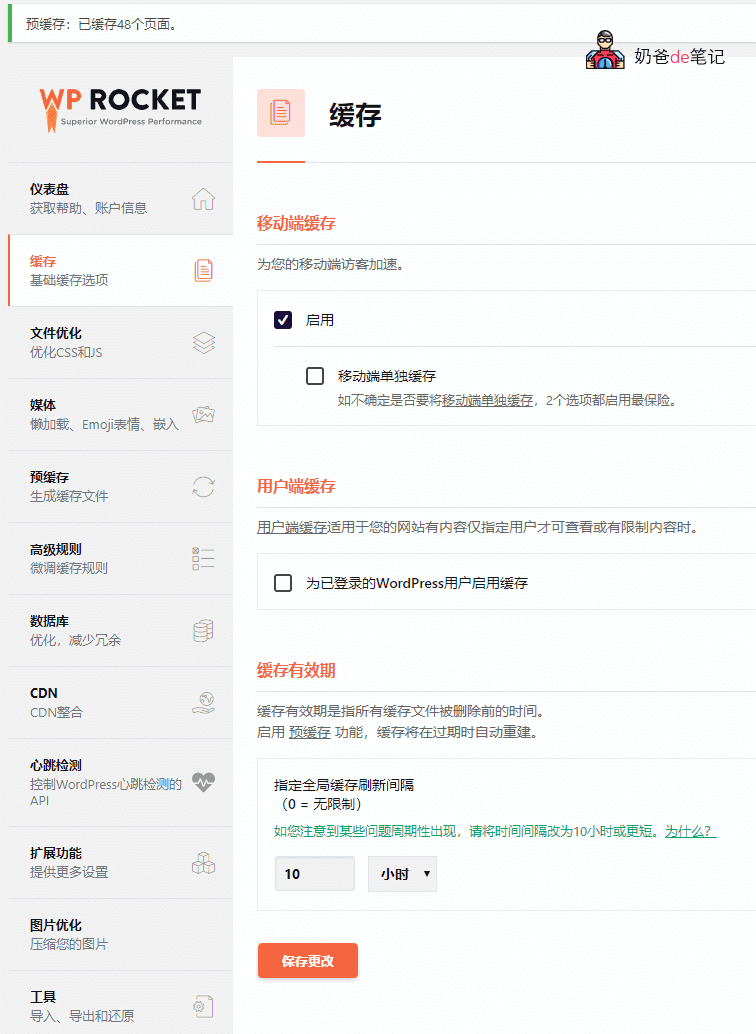
WP Rocket simplifies settings, with a user-friendly interface for beginners. Basically, after installing the plugin, you just check one box to activate it, with no advanced settings needed. Below is a screenshot
Below is a screenshot of WP Super Cache
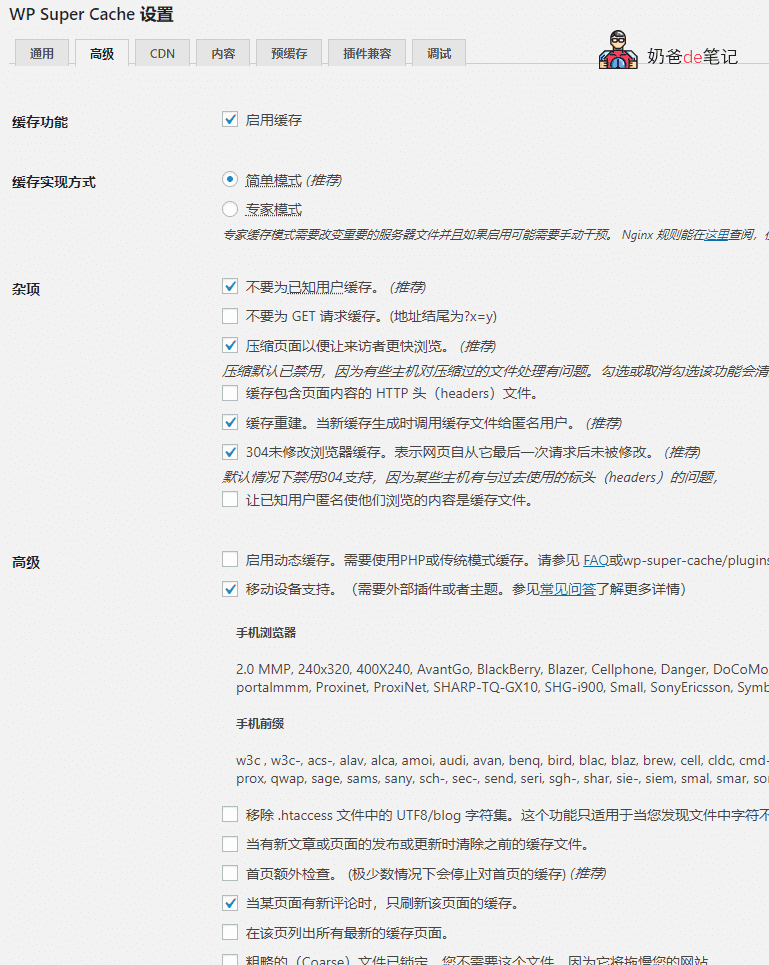
It can be seen that WP Rocket's interface is more in line with modern design, while enabling WP Super Cache is also simple, but the advanced menu appears to have many options, which can be confusing for newcomers.
The overall effectiveness of both is actually quite similar, Naiba usedGTmetrixto test webpages cached by both plugins separately. The score using WP Rocket was a few points higher, so it's negligible.
However, WP Rocket's compression of CSS files and HTML seems less prone to errors. Using WP Super Cache for compression might cause errors (or it could be due to incorrect settings).
WP Rocket supports lazy loading for media files, disabling Emoji and embed features.
Lazy loading means delayed loading; media files are loaded only when you scroll to them on the page, which can speed up the website. Disabling Emoji and embed features, since Naiba has installedWPJAM(which is no longer useful), results in duplicated functionality.
Pre-caching is supported by both WP Rocket and WP Super Cache. The former just requires checking a box and also includes a DNS prefetch feature. The latter requires an additional setup step (setting pre-cache refresh time and mode).
WP Rocket supports setting URLs, Cookies, and User Agents to exclude from caching, and also supports caching query strings. WP Super Cache only supports setting some of these, and its interface is more complex.
WP Rocket integrates database optimization and cleanup, which can replaceWP-Optimize.
Both plugins support CDN functionality.
WP Rocket has an additional Heartbeat Control feature, which can reduce or disable Heartbeat API activity to help save some server resources.
WP Rocket has additional extension features, among whichGoogle Tracking is very useful, it can cache Google Analytics code locally to avoid slow webpage loading in certain regions of China where Google Analytics code cannot be accessed. Additionally, if you use Cloudflare, it can also be integrated.
WP Rocket supports image compression (requires installing an additional plugin, not sure if there is an extra charge, not tested). WP Super Cache also supports image compression for an additional fee.
Currently, Naiba Web Development still uses WP Rocket. If one day you cannot find WP Rocket information in the source code, then it has been replaced by another plugin.
The main reasons Naiba replaced WP Super Cache with WP Rocket are: WP Super Cache settings are still a bit complex, such as the previously mentionedWP Super Cache and Tencent CDN caching commenter informationissue (the reason for changing cache plugins), and then discovering WP Rocket. After using it, it was found that WP Rocket's settings interface is very simple, pleasing to the eye, caching works, and it also supports Google Analytics code caching. Additionally, there is some subconscious bias towards paid plugins.
Popular WordPress Caching Plugins
Of course, there are many caching plugins on the WordPress platform, the most famous being WP Super Cache and W3 Total Cache, others include Hyper Cache, WP Fastest Cache, etc.
Naiba has tried many caching plugins, and the final suggestion is still for novice users to directly use WP Super Cache, because although it looks complex, it is actually quite simple to use and the performance is also quite good.
All the above plugins can be installed directly by searching in the WordPress admin dashboard.
Tips for Optimizing WordPress Website Speed
If you want to optimize the loading speed of your WordPress website, you canuse the gtmetrix websiteto perform a speed analysis.
More effective WordPress optimization techniques are:
- Use a domestic server, the higher the performance, the faster the speed;
- Use a simple WordPress theme, the simpler the code, the faster;
- Reduce unnecessary WordPress plugin usage, replace with code where possible (if the host performance is good, the impact is minimal.);
- Install a usable caching plugin;
- Use a CDN, or separate static and dynamic content, for example,using Upyun to accelerate WordPress websites
The plugin caused numerous errors after upload, the one downloaded after paying 9.9. You can contact me via email.
Method 1: Deactivate all plugins and test for plugin conflicts.
Method 2: Buy the official version directly.
Tried it, didn't work. Using the official open-source version doesn't work either.
Can I get a refund?
We tested it and it works. The issue might be with your website itself. Refunds are not supported.
I switched back to Litespeed, which my hosting also supports.