🚀 Is building a website too difficult? Let me guide you step by step—Learn about the 「Naibabiji WordPress Website Building Coaching Service」 →

Solving the Issue of WP Super Cache + Tencent CDN Caching WordPress Commenter Information

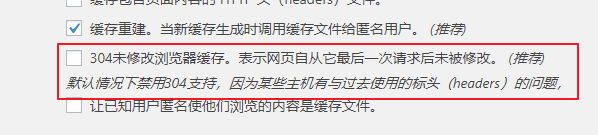
Soul BlogA senior from pointed out this issue to me, informing me that when commenting on my blog, one could directly see other people„s information in the comment box. After testing many pages, I finally found a scenario where the issue recurred. The cause of this problem lies in the WP Super Cache settings. Unchecking “304 Not Modified browser caching. Indicates the page has not been modified since it was last requested. (Recommended)„ solved it. 304未修改浏览器缓存。表示网页自从它最后一次请求后未被修改。 (推荐)After unchecking, you still need to clear the cache of WP Super Cache and Memcached, as well as the cache of Tencent CDN. PS: I tested on my own computer and virtual machine and didn't encounter this issue anymore. If you still find this problem, please let me know. Updated on June 3:Currently, it has been switched to W3 Total Cache, then switched to WP Rocket, and 304 caching has also been enabled.

🚀 Still feeling confused after reading the tutorial? Let me guide you step-by-step instead.

「Naibabiji WordPress Website Building Coaching」 — From selecting a domain and purchasing hosting to installing themes and publishing posts, I「ll guide you through every step, helping you avoid detours and reach your goals directly.

👉 Learn about Website Building Coaching Service
🔒

Comments are closed

The comment function for this article is closed. If you have any questions, please feel free to contact us through other channels.

×
二维码

Scan to Follow