After your WordPress website has been around for several years, you will find that your website database becomes very large. At this point, you need to use a database optimization plugin to clean and optimize the data.
Naiba recommends the WP-Optimize pluginWordPress Plugin
Introduction and Usage Instructions for WP-Optimize
You can directly install the WP-Optimize plugin via the WordPress backend, or you candownload it herethe WP-Optimize plugin.
Description
WP-Optimize is an effective tool that can automatically clean your WordPress database, allowing it to run at maximum efficiency.
Main Features
- Remove all unnecessary data (e.g., deleted/unapproved/spam comments, stale data) as well as pingbacks, trackbacks, and expired transient options
- Compress/defragment MySQL tables with a button
- Compress („smush“) images (existing images and automatically generate new ones)
- Detailed control over which optimizations you wish to perform
- Automatic cleanup weekly (or other intervals)
- Retain data for a certain number of weeks during cleanup
- Perform optimizations without running manual queries
- ThroughUpdraftPlusAutomatically trigger pre-optimization backups
- Display database statistics and potential savings
- Mobile-friendly and easy to use
Using WP-Optimize
WP-Optimize is very easy to use. After installing the plugin, you can optimize the database by clicking a button in the backend. Naiba mainly uses two functions.
1. Clean up redundant content in data tables, such as post revisions
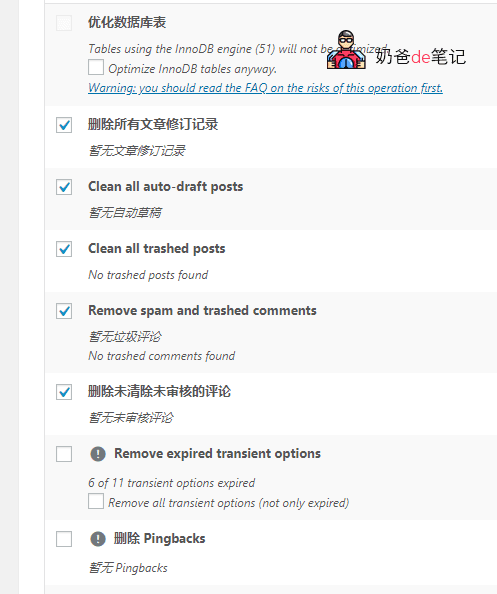
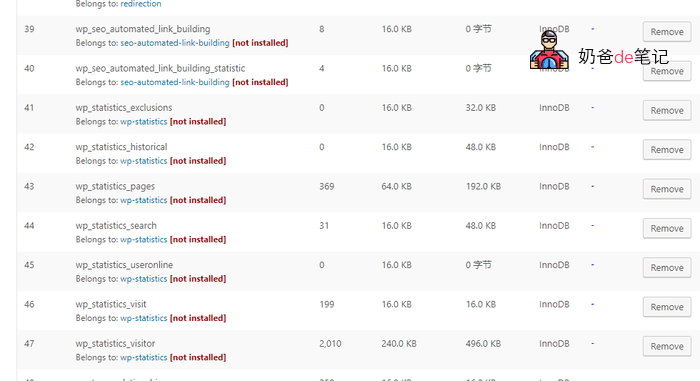
2. Delete data tables from uninstalled plugins. When you install many plugins and then delete them, many database tables are left behind. Having too many of these tables can affect WordPress's performance efficiency, so use WP-Optimize to delete these unused database tables.
Note: Cleaning the database carries risks. It is recommended to back up first. You can refer toAutomatically backup WordPress websites using plugins