Years ago when using Firefox, I installed a browser extension that displayed the server IP and flag icon in the address bar. I stopped using it after I quit blogging. Now that I've started blogging again and often visit other blogs, I've become particularly interested in the server locations of bloggers. So, I installed this Chrome extension to display website IP and flag: WebSite IP Information Query.
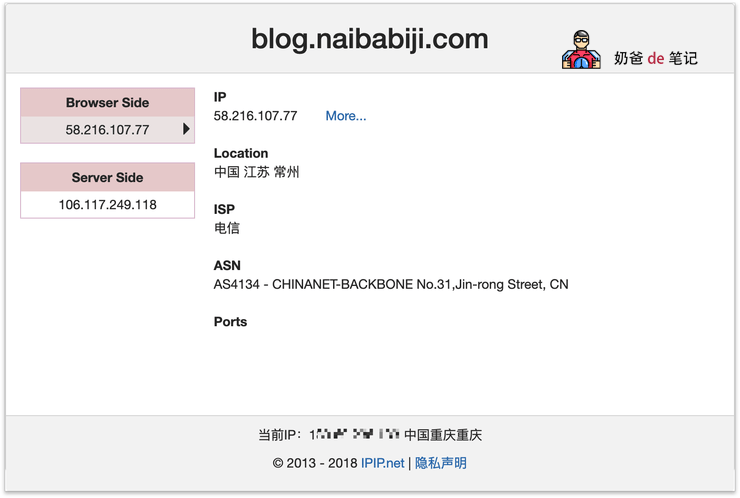
Introduction to WebSite IP Information Query
Query the current location of the IP address of the site, ASN, port open information and other information.
Query the geographic location, country flag, ASN, port open information, etc. of the IP address of the currently visited website.
Notes to be aware of:
1. After installation, please restart the browser. If you don't restart, it may not display information for already open tabs.
2. This feature displays the IP used by the browser to access the website. If you are using a proxy, it will display the proxy server's IP.
3. Due to browser API limitations, you may need to wait until the page is fully loaded before the relevant information is displayed.
4. In the new version, a method has been added to resolve the IP corresponding to the domain you are browsing from the server side. This is subject to the server's DNS settings and is for reference only.
This plugin is provided by ipip.net, and the IP address data is much more detailed and accurate than sites like ip138.
Extension Download Address:Chrome Web Store