WPJAM Basic is a multifunctional WordPress optimization plugin developed by I Love Shuizhuyu (a veteran and developer in the WordPress community). It is recommended (similar plugins include:Performance).
WPJAM Basic Feature Introduction
WPJAM Basic includes multiple built-in features, such asSMTP email sending system. If you have installed an SMTP plugin, you may consider deleting the previous one and using WPJAM Basic exclusively as a replacement, as it offers more features.
Note: To use all features, you need to follow their official WeChat account to obtain an activation code.(Easily attracting followers with technical skills)
Optimization Settings
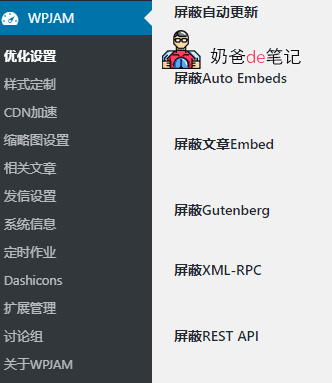
Optimization Settings includes three functions: feature blocking, cleanup optimization, and feature enhancement.
- Disable Post Revisions
- Disable Trackbacks
- Disable Emoji Images
- Disable Theme Widgets
- Disable Backend Privacy
- Disable Automatic Updates
- Block Auto Embeds
- Block Post Embeds
- Block Gutenberg
- Block XML-RPC
- Block REST API
Cleanup Optimization
- Remove Header Code
- Remove Toolbar
- Remove WordPress Case Correction
- Disallow admin Username
- Do Not Load Language Pack on Frontend
Feature Enhancement
- Remove 'category' from URL
- Add Timestamp to Uploaded Images
- Post Excerpt Optimization
- Search Results Optimization
- 404 Redirect Optimization
- Sort Users by Registration Date
- Strict User Mode
- Simplify Admin User Interface
- All Settings
- Optimized by WPJAM
- Frame Embed Support
- Media File Default Link To:
Style Customization
This feature allows customization of the WordPress admin, frontend, and login interface logos, as well as header and footer code.
CDN acceleration
CDN acceleration currently supports UCloud UFile, Qiniu Cloud, Alibaba Cloud OSS, and Tencent Cloud COS. (Yes, that's right, Upyun is not supported, probably because they had a deal with Qiniu Cloud.)
Thumbnail Settings
If your posts do not have a default thumbnail and you are too lazy to installWordPress Random Featured Image Plugin: Random Post Thumbnails, you can set a default image here to serve as the post's default featured image.
Related Articles
Setting it here directly will display related posts, no need tomanually add WordPress related posts code.
Email Sending Settings
This is a place for SMTP email settings; you don't need to install a third-party SMTP plugin yourself.
System Information
View your server information, andClear Memcached cachelocation.
Scheduled Tasks
Here are WordPress itself and installedWordPress PluginAfter the scheduled task list, you can choose to execute the task immediately or delete the scheduled task.
Dashicons
Helps you display icon fonts in the WordPress backend, with little practical significance.
Extension Management
The related articles and SMTP email sending mentioned above need to be enabled here.
There are also some features that Naiba has not enabled.
- Post Type Converter
- tracking code
- Baidu Webmaster
- User Roles
- Table of Contents
- Post Views
- Rewrite Optimization
- Mobile Theme
- Simple SEO
- 301 Redirect
Isn't it powerful? If you're interested, go ahead and download and install it. However, note that the minimum PHP version requirement is 7.2.
WPJAM BASIC Installation URL:https://wordpress.org/plugins/wpjam-basic/