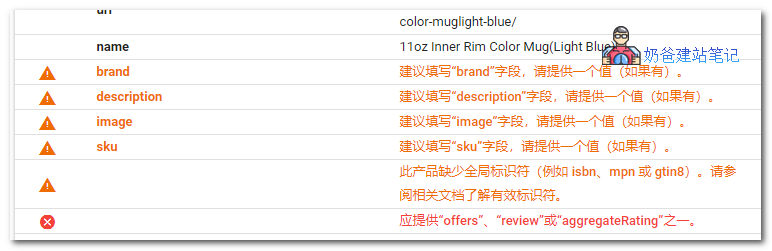
If you have usedWordPress and WooCommerce to build an e-commerce website, you might receive a prompt from Google asking you to specify „offers“, „review“, or „aggregateRating“. For example, a reminder like this:
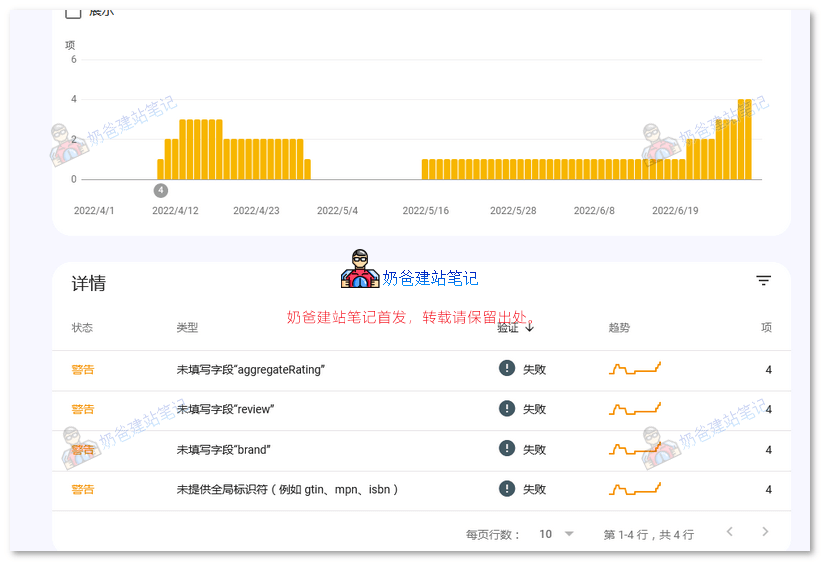
Search Console found that your site is affected by 3 product issues:
Most frequent errors
Errors may prevent your page or feature from appearing in Google Search results. We found the following errors on your site:
Should specify „offers“, „review“, or „aggregateRating“
Most frequent warnings
Warnings are intended to provide improvement suggestions. Some warnings can enhance how your page appears in Google Search; others may become errors in the future. We found the following warnings on your site:
Missing global identifier (e.g., gtin, mpn, isbn)
Field „brand“ is missing
We recommend fixing these issues whenever possible to achieve the best user experience and coverage in Google Search.
Why does this error occur?
Before we want to fix errors like aggregateRating, review, and brand, we first need to understand what these terms represent:
- offers
- review
- aggregateRating
- brand
These terms can actually be seen as data related to product attributes and reviews. If we are a normal B2B website, only using WooCommerce to display product data, then we don't need to pay attention to these error prompts at all; just let them be.
How to resolve it?
If you have a B2C website, the solution to this error is quite simple: just add the missing attributes.
For the most common SEO plugins, Yoast SEO and Rank Math have dedicated articles covering this part. You can refer to:
- How to Fix Missing Schema Properties: 'review' or 'aggregateRating' Should Be Specified
- How to Fix Aggregate Rating Errors
Simply put, for aggregateRating and review, you need to enable product reviews in WooCommerce settings, and once someone has reviewed and rated your product, the corresponding values will be added automatically.
And offers andbrandthese attributes, similarly, you need to have added promotional information or brand information to your products. As for how to create these specific attributes, please research it yourself. Naiba won't and doesn't care about this error, so don't force me to research it for you.
Impact on your website?
There is a discussion on a similar issue in the Google Search Console forum. I believe Dido Grigorov's statement, but I'm not sure if you will believe it.
Ultimate Solution
If you insist on me pointing you in the right direction, well, delete your WooCommerce and use other methods to manage products, and naturally this error will not occur.