For friends who want to build their own website, Naiba always recommends using WordPress to install the site. On one hand, because WP is easy to operate and has abundant resources; on the other hand, building a website with WordPress is SEO-friendly and can help us withGoogle SEO optimization ranking。
WordPress was released in 2003 and has now been updated to version 5.3. Over 30% of websites worldwide are built with WordPress.
The reason WordPress is so popular, besides its good ecosystem (rich themes, plugins, related tutorials and documentation), is that it is the most suitable CMS for SEO.
Why is WordPress suitable for SEO? Mainly for the following 10 reasons.
1. Supports the creation of pseudo-static links
One aspect of search engine optimization is making URLs static. Compared to dynamic pages, static pages are more SEO-friendly.
WordPress's permalinks meet this requirement well. When writing articles, you can easily set a fixed URL for each article.
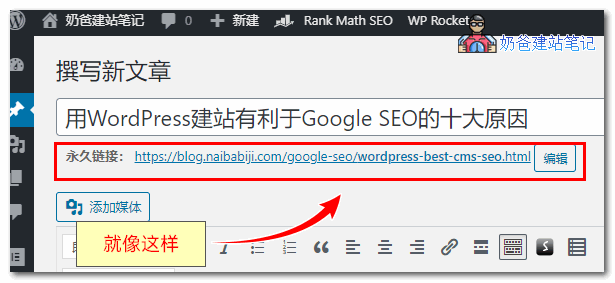
This support for custom post URLs allows you to insert relevant keywords into the article URL, which has a positive effect for English websites.
2. Easy modification of post metadata
Metadata, which refers to the webpage's title and description (and keywords originally, though Google no longer recommends manually filling in keywords), so for TDK, you only need to fill in TD yourself.
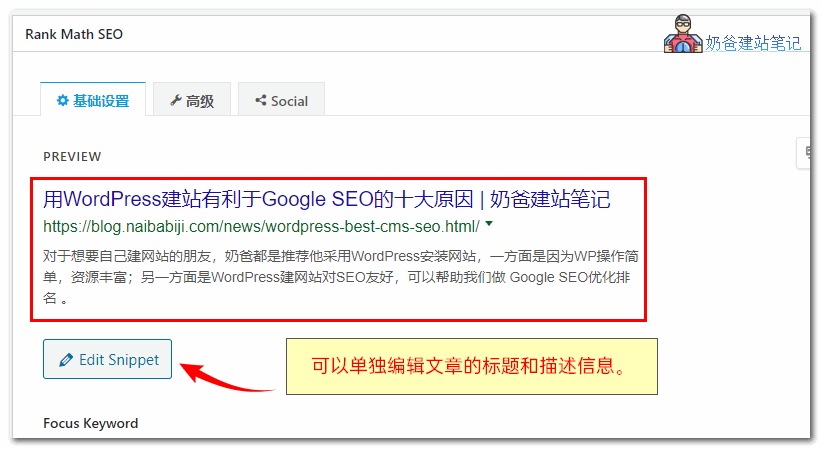
The title and description of a webpage are crucial for your article to rank in Google search results. WordPress has many SEO plugins to help you with this task.
Naiba usesRank Math.
3. WordPress has professional SEO plugins
As mentioned above, modifying TD information is just part of SEO. Some professional SEO plugins on WP can help us accomplish more SEO functions.
Popular SEO plugins on WordPress include:
There are also plugins specifically for generatingxml sitemapsfor websites, though the advanced SEO plugins mentioned above now include this feature.
4. WordPress has SEO-friendly themes
WordPress themes are very rich and of high quality. Excellent theme authors consider SEO needs from the very beginning when writing theme code.
Some corporate websites have custom-built programs with non-standard code and lack essential SEO tags, making them less competitive in SEO optimization.
5. Image optimization is very simple with WordPress
Images are also important for articles, as they can improve readability and increase user dwell time.
However, search engines do not know the content of your images by default, so you need to fill it in manually.alt tagsto inform the search engine about the image content. With WordPress, you can manually enter the alt tag when uploading an image.
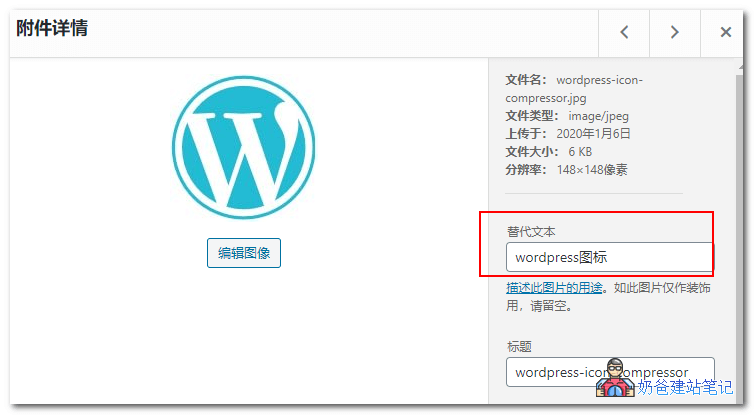
Besides the ALT tag, image size is also important. Oversized images can slow down website loading speed.
With WordPress, you can install image compression plugins or use plugins to convert images to the smaller WebP format.
6. WordPress sites load relatively fast
For most beginners, they think WordPress loads slowly, but if you know how toOptimize WordPress, then WordPress can also be fast.
If your WordPress site loads slowly, you can refer toThe Simplest Method to Improve WordPress Website Speed and Performancethis article to speed it up.
Apart from the webpage itself, the database is also a factor affecting website loading speed.
WordPress has dedicated database optimization and caching plugins. It also has excellent caching plugins that can generate static HTML cache pages for articles, making user access faster than directly accessing PHP pages.
You should know that Google has clearly stated that website speed affects search engine rankings.
7. WordPress is optimized for mobile users
Both domestically and internationally, mobile traffic has surpassed PC traffic, so mobile-friendliness is also crucial for SEO.
Most WordPress themes are responsive, automatically adjusting layout based on browser size, without affecting mobile reading.
There are also plugins that support the Google AMP protocol, allowing faster content delivery to mobile users.
8. WordPress integrates well with social media
Domestic users may not feel it (because China has started to isolate and wall off), but friends doing foreign trade websites definitely know.
On WordPress, you can easily install social sharing plugins and display content from your social platforms on your website.
Social media can also indirectly affect your website's SEO information.

9. WordPress has excellent extensibility
WordPress has very high extensibility; you can integrate many third-party applications to enhance your website's functionality, such as Google Analytics, G Suite, ConvertKit, etc.
10. WordPress provides a good user experience
Whether you are a webmaster or a visitor, WordPress can provide a great user experience.
Webmasters can easily implement website functions with the help of rich themes and plugins.
Users can enjoy beautiful themes and compatibility to read website articles, without worrying about loading issues due to using a phone or computer.
SEO is essentially about user experience. Besides content meeting user needs, the website program must also provide a good user experience to achieve good search engine rankings.
If you still don't believe that WordPress is SEO-friendly, you can search Google for professional SEO blogs and organizations to see how many are built with WordPress.
Tempted but don't know how to install WordPress? Click here to view the completeWP installation tutorialnow.