
Naibabiji has sharedSteps to Build Your Own Website和Foreign trade website building tutorials, many friends may ask, what if I want tobuild a domestic Chinese website, how should I proceed?
In this article, Naiba will share with youa tutorial on how to use WordPress to build a Chinese website.。
Basic Requirements for Building a Domestic Website
To build a Chinese website domestically, similar to the previously sharedwebsite building steps, we also need the following:
- A domain, registered from a domestic website;
- A server or Shared Hosting, registered from a domestic service provider;
- A website building program, such as WordPress;
- File an ICP (Internet Content Provider) filing for the domain, done on the website where you purchased the server.
About ICP filing:
Website ICP filing is a national policy. All websites hosted within mainland China require filing. Filing is now very convenient and can be handled directly online. The website where you purchase your server will have detailed filing instructions; just follow the steps. The processing time varies from a few days to over ten days.
Steps for building a domestic website
1. Purchase a domain
For filing, the domain must be registered domestically. If you have already registered it abroad, you need to transfer the domain to a domestic registrar first, or simply register a new one.
In theory, as long as the domain is registered on a domestic website, the filing can be approved. For easier management, the domain can be purchased from the same provider as the server, that is:
Domain registration method:
Go toTencent CloudorAlibaba Cloudthe activity page, then click on 'Products' in the top left navigation bar (if you don't see 'Products', click the website LOGO to return to the homepage first), select domain registration, then enter the domain you want to register to check its availability.
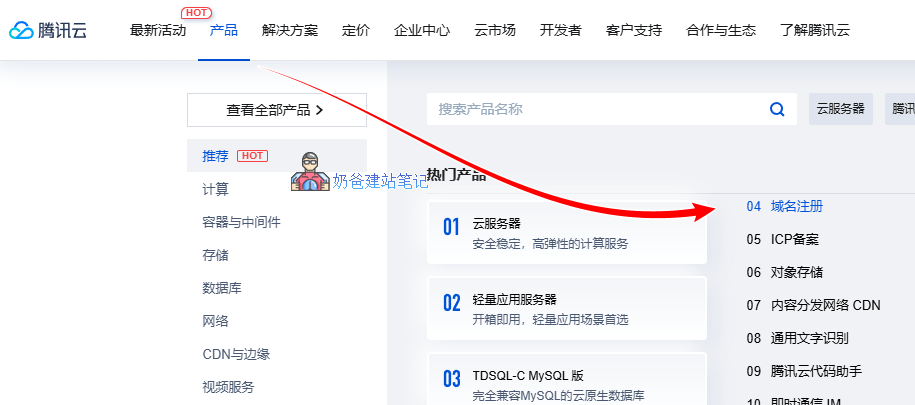
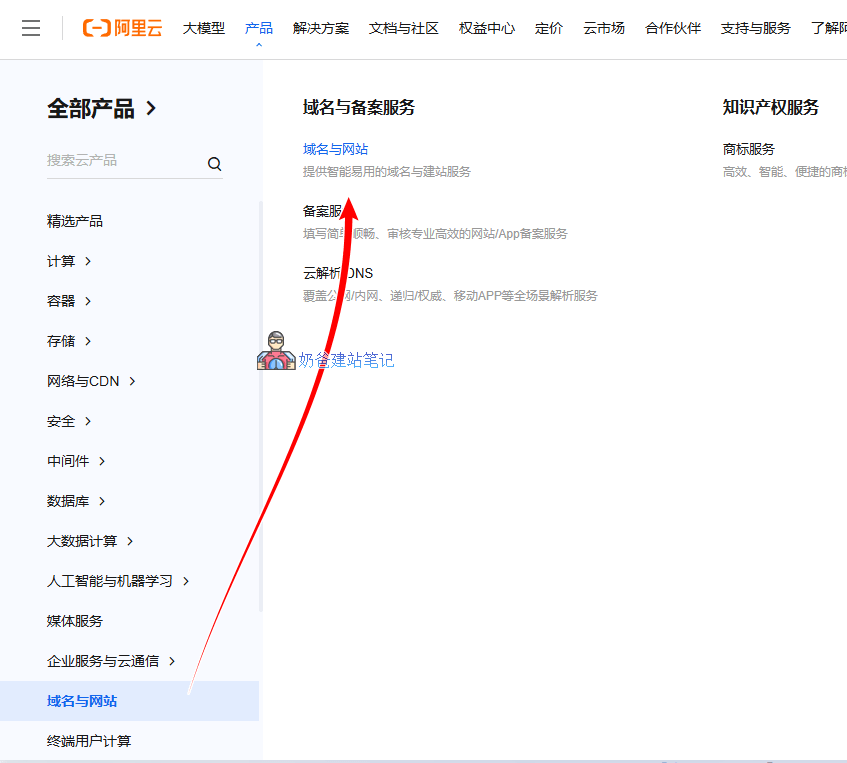
When search results show an available domain, add it to the shopping cart, then follow the step-by-step process to complete the payment.
Domain registration is relatively simple; I believe you can figure it out. Next, let's talk about how to purchase a Cloud Server / VPS.
2. Purchase a server
Due to the special requirement of ICP filing in China, choosing a stable server provider is crucial. Basically, after filing, your website is bound to the service provider where you purchased the server (if you change providers, the ICP filing needs to be updated). Therefore, do not initially choose an unknown provider just to save money or for other reasons. Later, when you want to switch to well-known providers like Tencent Cloud or Alibaba Cloud, you may find transferring the ICP filing very troublesome (small providers might create obstacles, or you might simply find the transfer process cumbersome).
There are mainly three recommended domestic service providers:Tencent Cloud、Alibaba Cloud、Huawei Cloud。
Naibabiji currently uses Tencent Cloud Lighthouse Server with a configuration of 2-core CPU, 4GB RAM, and 5M bandwidth.
How to choose among these three cloud server providers?
Simply put, choose whoever is cheaper. They all offer promotional prices for new users, so it's best to directly purchase a 3-year promotional server. We cannot predict the prices and market conditions three years later, so buy for three years first.
Tencent Cloud Server Purchase and Usage Tutorial
First, open Tencent Cloud's promotional page and select a suitable server.
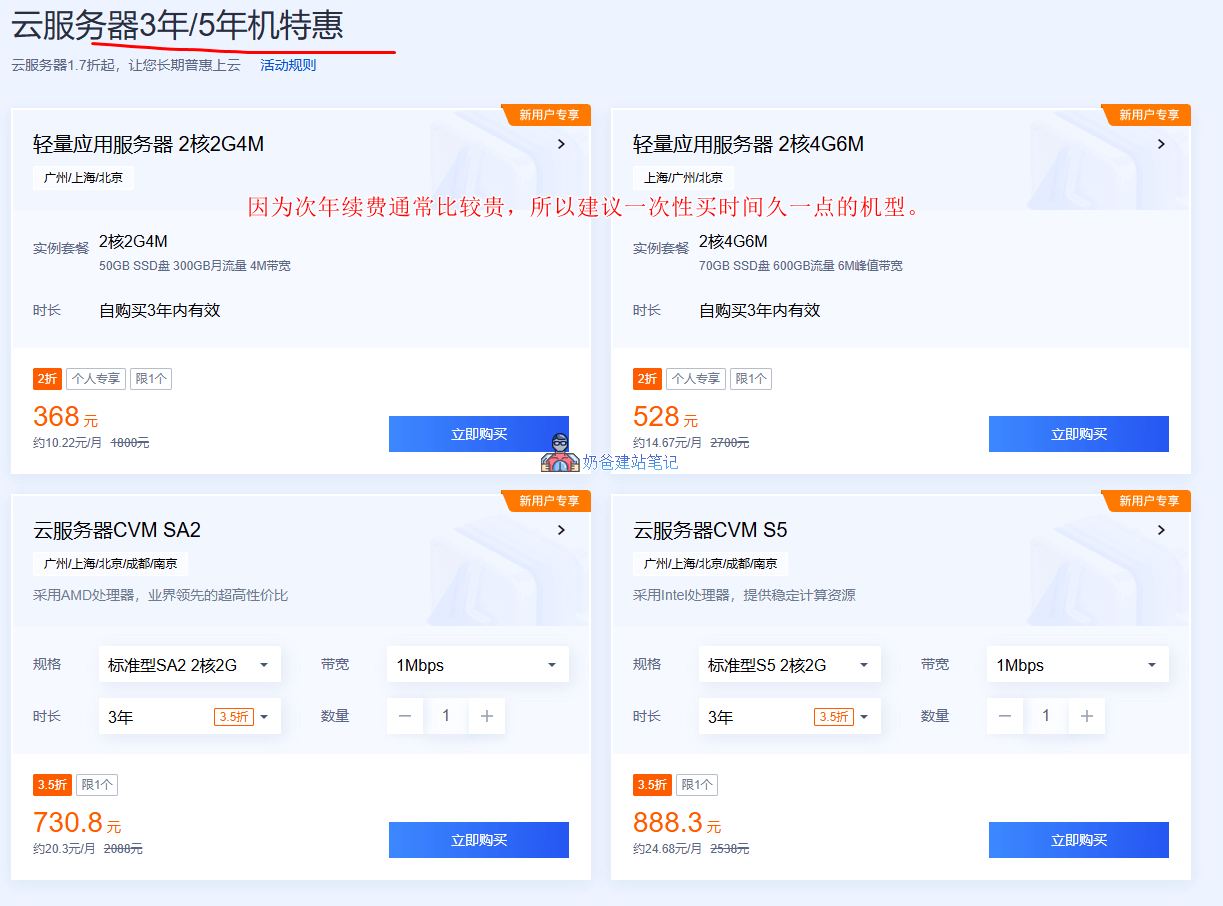
It is recommended to choose a server term of 3 or 5 years. If no suitable configuration is available, choosing 1 year is also acceptable. If there is no discounted renewal price in the second year, register a new account to purchase again.
For configuration, it is recommended not to go below 2 cores, 2GB RAM, and 3M bandwidth. Cloud servers generally perform better than Lighthouse Application Servers.
Regarding operating system selection:
If you choose a Lighthouse Application Server, during system selection, you will see some application images, including those for Baota Panel, WordPress, etc., which facilitate later server maintenance and expansion. Naiba does not recommend choosing these application images provided by Tencent Cloud. Although they reduce your operational steps, you may encounter difficulties when you want to customize the server later because you won't know how they were installed and configured.
It is recommended to choose the system imageDebian 12for use.
Server Management:
After purchase and activation, you can see your newly activated server in the Tencent Cloud backend.
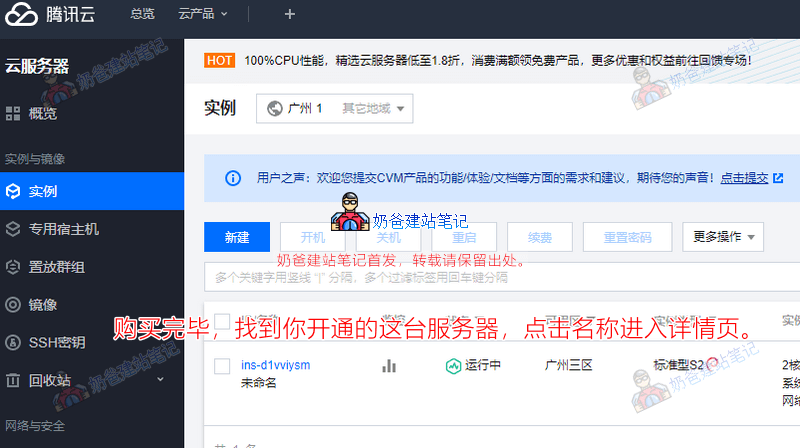
On the server details page, find 'Reset Password' under the 'More Actions' in the upper right corner.
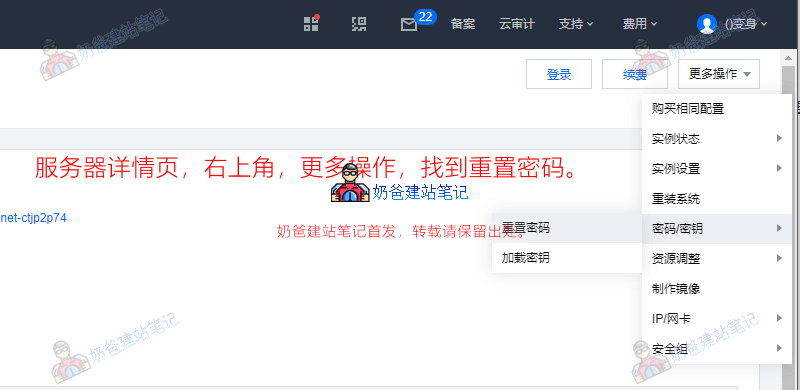
Then create a complex password for the server (remember, do not use simple, predictable passwords) and restart the server.
Add Security Group Rules:
We will later install Baota Panel to manage the server, so we need to open the management port for Baota Panel; otherwise, it will be inaccessible. The method is as follows:
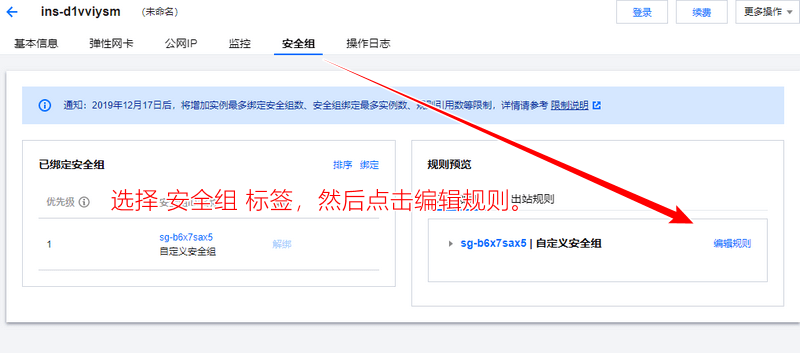
In the rules interface, select 'Add Rule'.
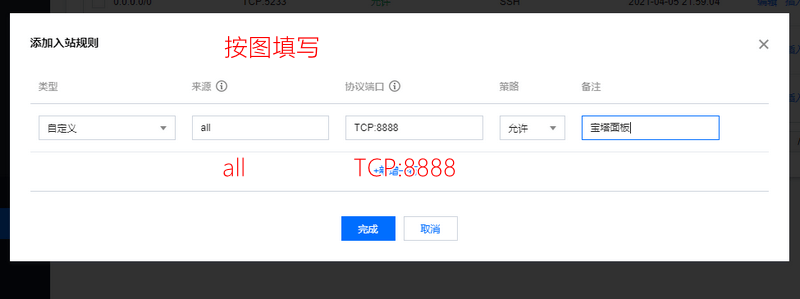
Fill in the source as 'all', and the protocol port as 'TCP:8888', then complete. (This port is randomly generated after the latestBaota Panel installationis complete. Please fill it in according to the actual situation.)
Additionally, Naiba cannot remember if new servers come with common rules by default. If you don't see any rules besides the one just added, manually add the common rules as well.
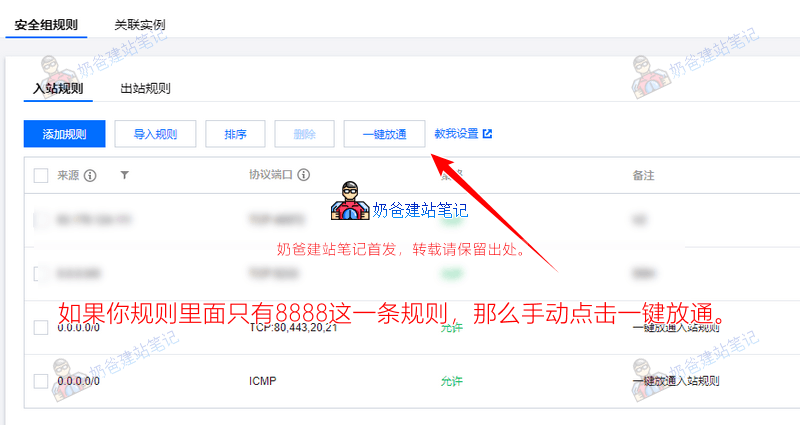
At this point, the activation and setup of the Tencent Cloud server are complete. You can proceed to the next step: installing the server environment and building the website to continue learning.
Alibaba Cloud Server Purchase and Usage Tutorial
First, open Alibaba Cloud's new user promotional page and select a suitable cloud server.
Alibaba Cloud Promotional Address
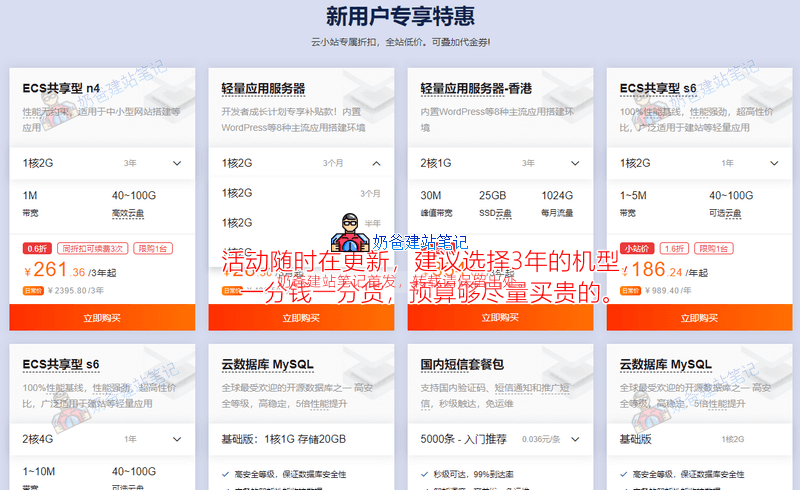
Similarly, Alibaba Cloud also offers discounts for new users, so it is recommended to directly purchase a 3-year plan. If the budget allows, buying a more expensive model will definitely offer better performance than a cheaper one.
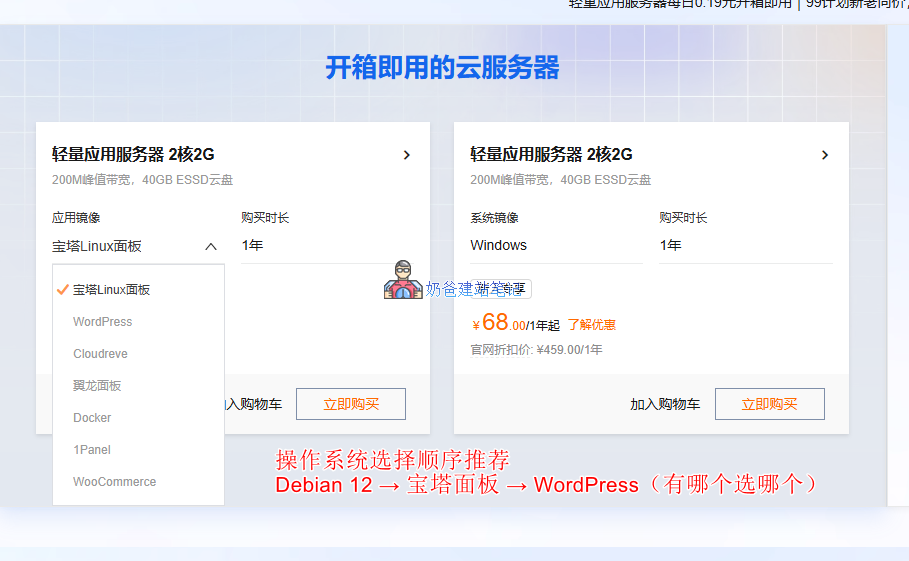
It is recommended to choose the Debian 12 series for the operating system here. It is not recommended to directly select an application image. Although choosing a pre-installed WordPress application image reduces some operational steps, it may cause trouble during later maintenance.
Server Management:
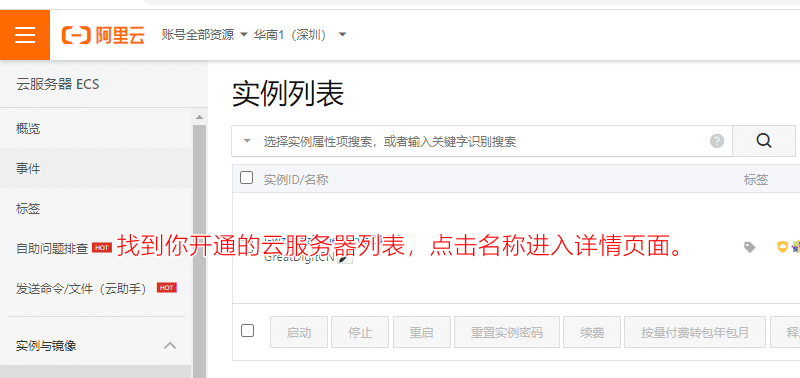
After successfully activating the server, go to the backend, find your activated server, and click on the title to enter the server details page.
Then, in the 'All Operations' section at the top right of the webpage, find the 'Reset Instance Password' function.
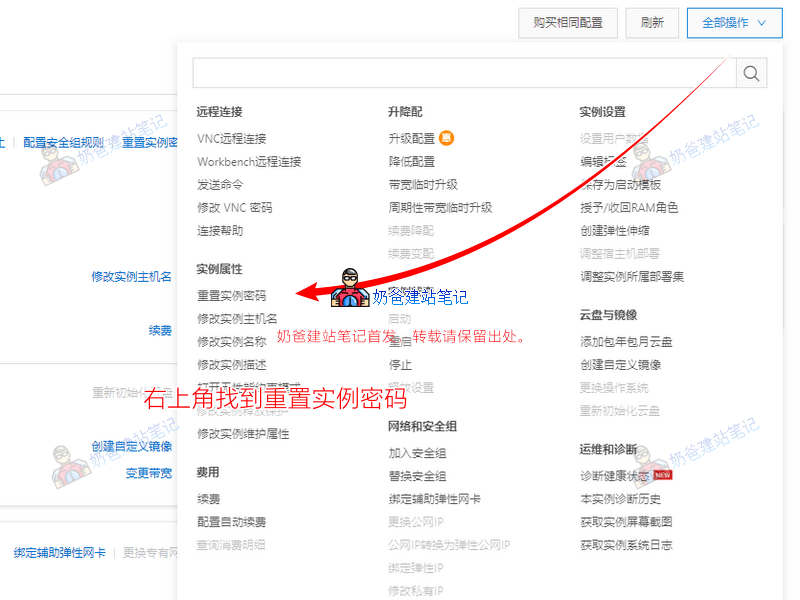
Set a sufficiently complex, non-patterned password for the server, and then restart the server. (Remember, never enter a simple password.)
Add Security Group Rules:
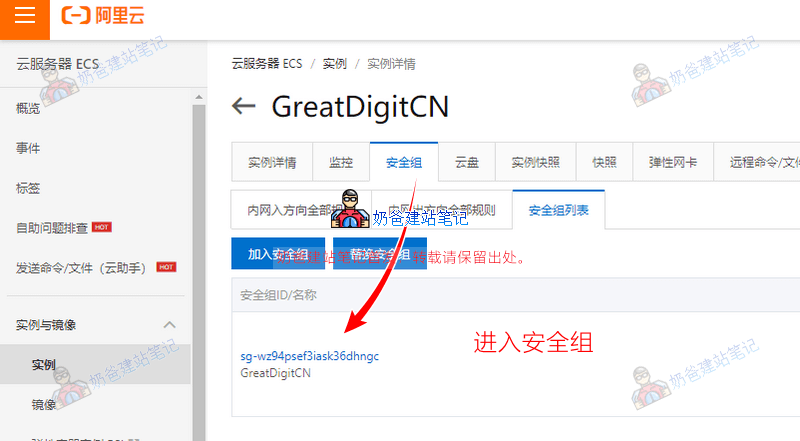
On the server details page, click the 'Security Group' tab at the top, then enter the corresponding security group details.
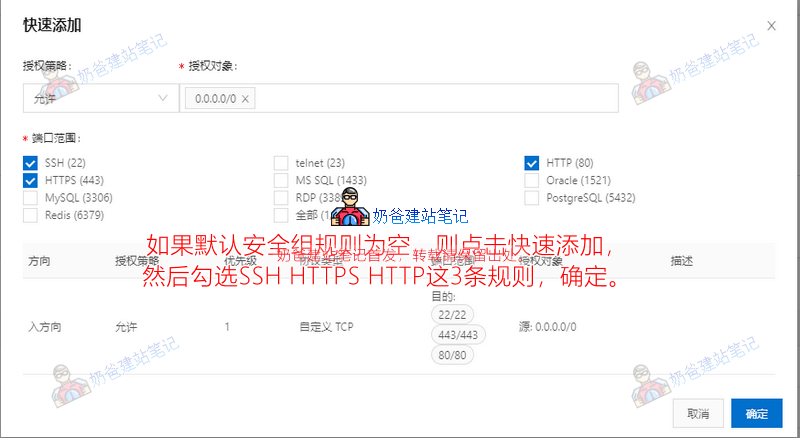
If the default security group rules are empty, manually click the 'Quick Add' button, then add access for ports 80, 443, and 22, as shown in the image below:
Then manually add a security group rule for the Baota Panel, screenshot as follows:
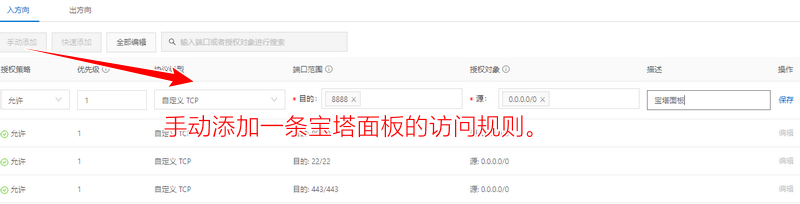
Select 'Manual Add', 'Allow', Priority 1, Custom TCP, Destination 8888, Source 0.0.0.0/0, Description 'Baota Panel'. (Similarly, after the Baota Panel installation is complete, a random port will be generated. Please come back here later to re-add it.)
Then save.
At this point, the purchase and setup of our Alibaba Cloud server are complete. Next, we will begin installing the environment and building the WordPress website on the server.
3. Set up the website environment and install WordPress
To build the website environment, we need to use an SSH management software. xShell is recommended here. You can learn more details from the article below, or directly click the button below to enter the cloud storage to download the installation package.
Download xShell Installation Package from Cloud Storage
Cloud Storage Password: 1tdg
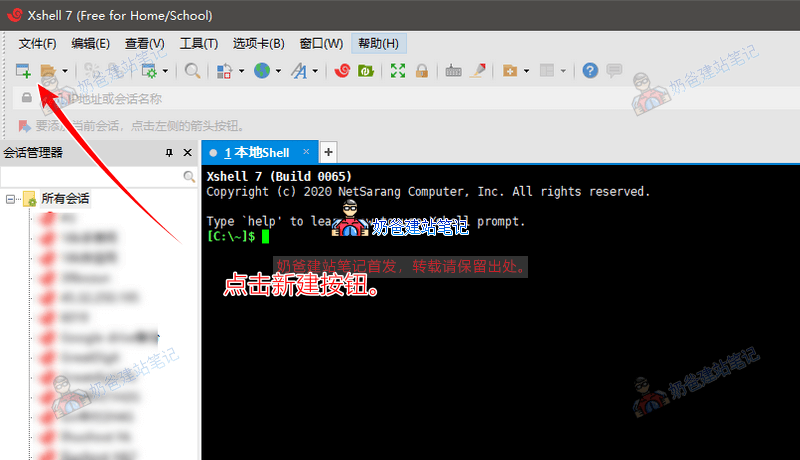
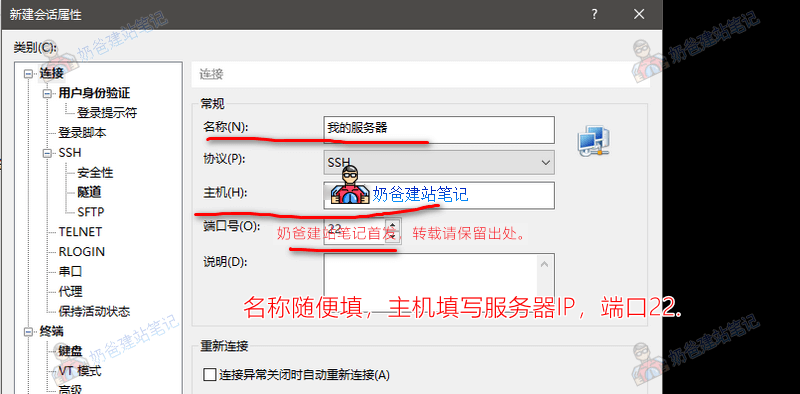
After installing xShell, start the software, then click the 'New' button, as shown in the image below:
Then fill in the Name, Host, and Port number, and click 'Connect'.
The server IP can be found on your Alibaba Cloud or Tencent Cloud server details page. Fill in the public IP address.
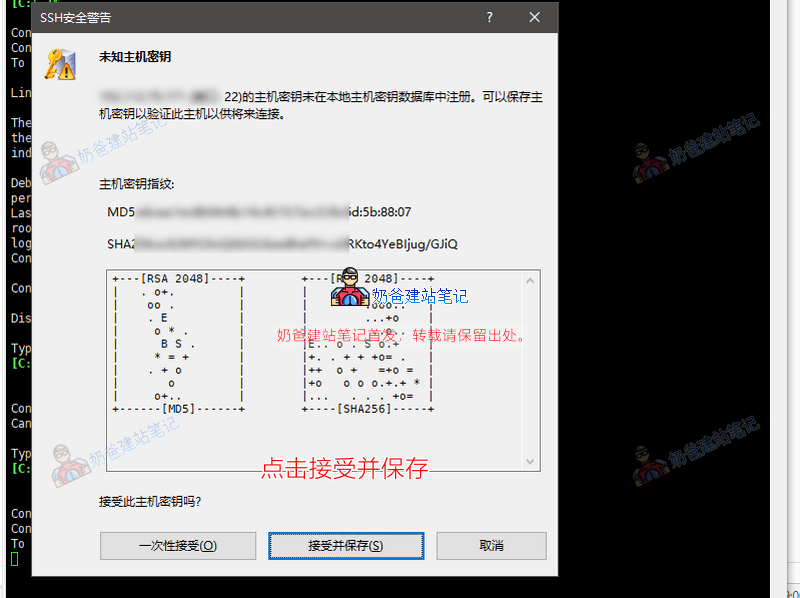
There will be a security prompt for the first connection. Click 'Accept and Save'.
Then enter 'root' for the username and the password you reset earlier.
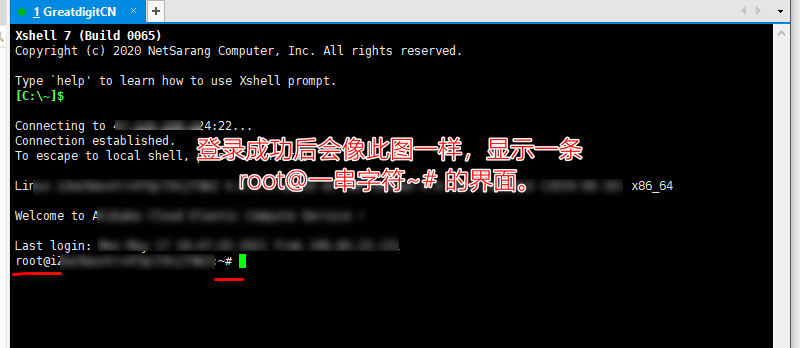
Next is the Baota Panel installation process. To avoid outdated content, please proceed to the separate Baota Panel installation tutorial page on Naibabiji.
Follow the tutorial above until the website environment is installed, then you can proceed to bind the website.
Bind Website:
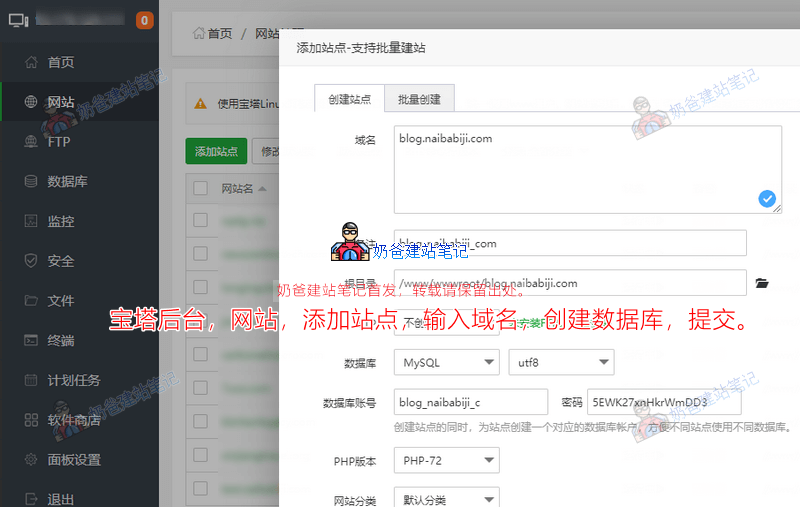
On the left side of the Baota Panel, under 'Websites', select 'Add Site'. Then enter your website's domain name, for example, naibabiji.com and www.naibabiji.com (one domain per line). Select 'Create Database', then submit.
Resolve Domain Name:
After adding the website, we need to resolve the domain name. Go back to the website where you registered the domain, find the domain resolution interface, add an A record, and fill in your server IP as the record value.
For a specific domain name resolution tutorial, please refer to the articles below:
After adding the domain name resolution and it takes effect, when you open your website URL, you might see a prompt like the one below:
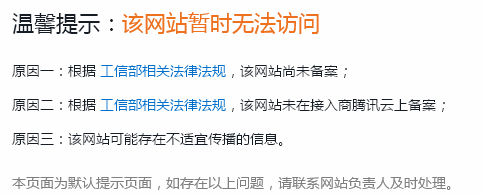
This is because the domain name has not been filed (ICP备案). Therefore, we need to file the domain name.
Domain Name Filing Method:
If you purchased your server from Alibaba Cloud or Tencent Cloud, simply click the button below to go to the corresponding filing page, then click 'Start Filing' and follow the prompts.
The filing process can take anywhere from a few days to over ten days. Once approved, your website content will be accessible normally via the domain name.
Tencent Cloud Filing Alibaba Cloud Filing
Building a WordPress Website
After your filing is approved and you can access the URL normally, we can proceed to build the WordPress website.
1. Log in to the Baota Panel backend, find 'Websites', and click the directory link next to your domain name.
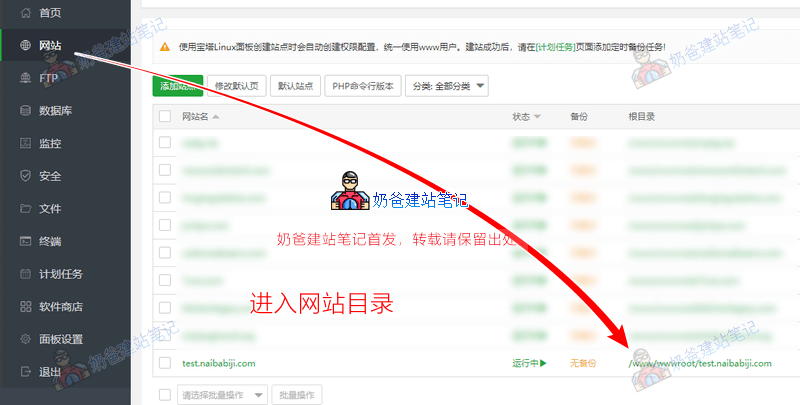
2. Remotely download or upload the WordPress installation package.
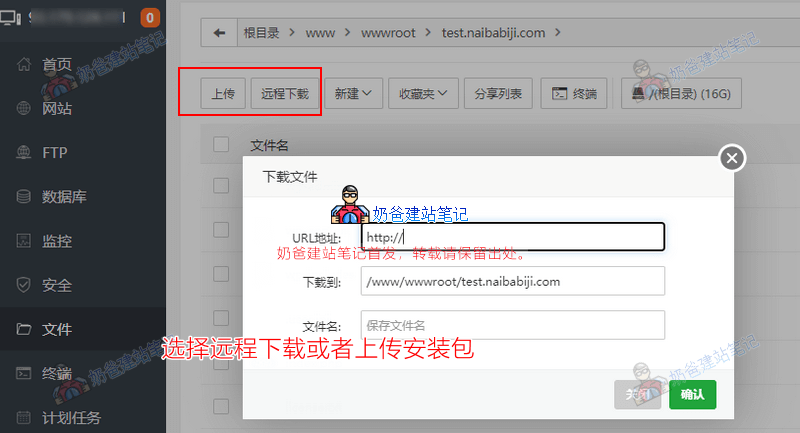
If choosing remote download, please enter this URL: https://cn.wordpress.org/latest-zh_CN.zip
If uploading manually, please firstclick here to download the WordPress installation package, then upload it.
After uploading the zip file, extract it. A 'WordPress' folder will appear.
Enter the WordPress folder, select all files, choose 'Cut', then click on your website's root directory (i.e., your domain name's folder)
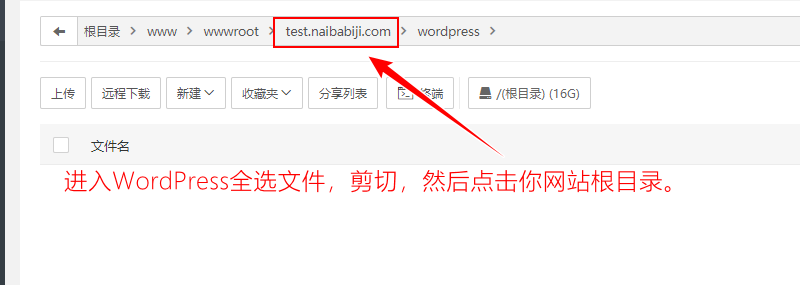
and paste.
Enter your website domain name in a browser, and the WordPress installation interface will appear. As shown below: (If the URL doesn't open, check if the domain name is resolved or if the firewall is blocking it)
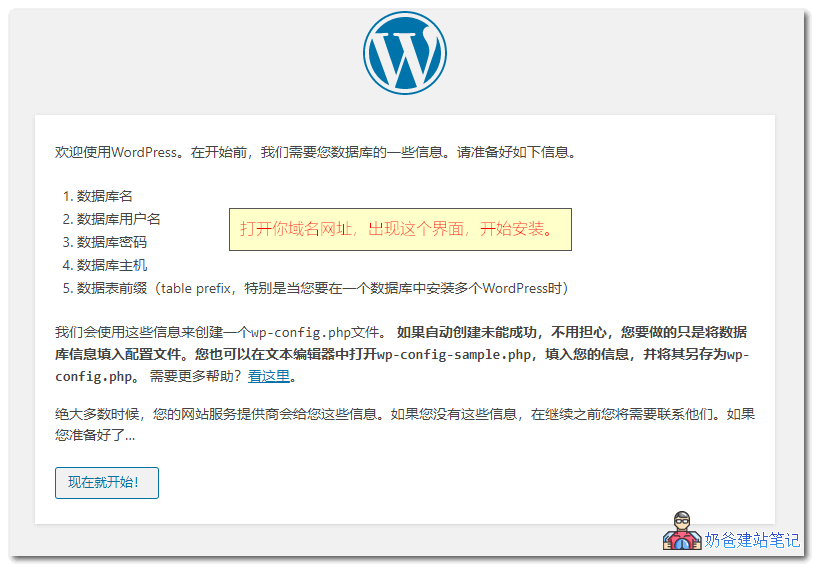
Then, database information will appear. The database is one you created yourself. If unsure, you can check or create a database in the Baota Panel backend under Database settings.
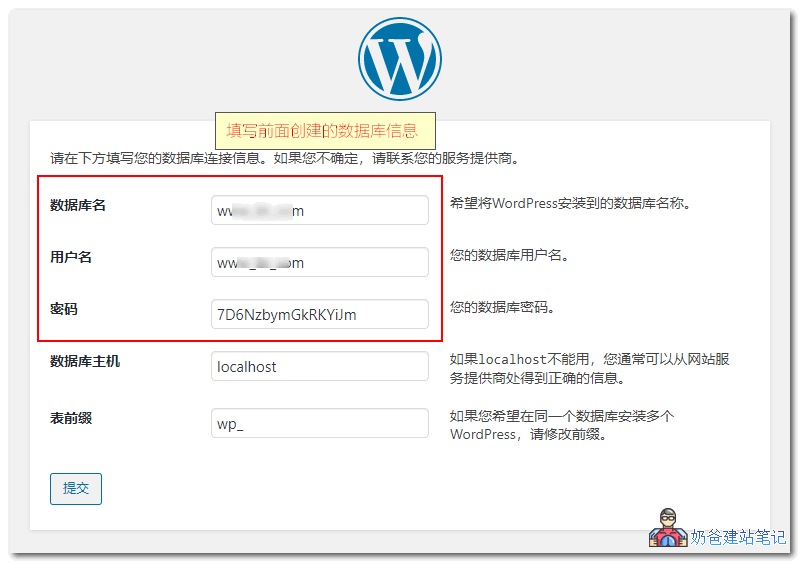
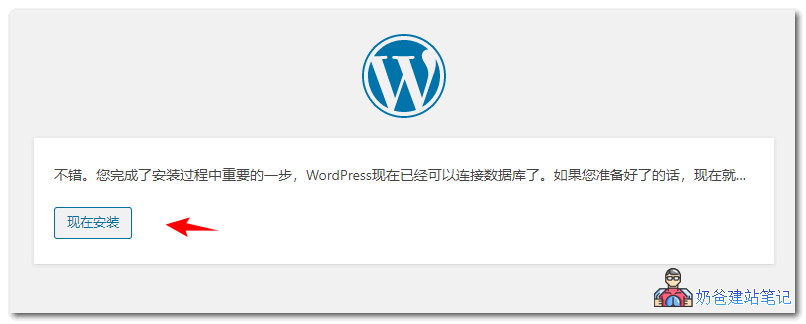
Click the 'Submit' button. It will check if your database and folder permissions are correct. If correct, the installation button shown below will appear. Click 'Install Now'.
Soon, the website information interface will appear. Enter your own website title and create an administrator account. Click the 'Install WordPress' button.
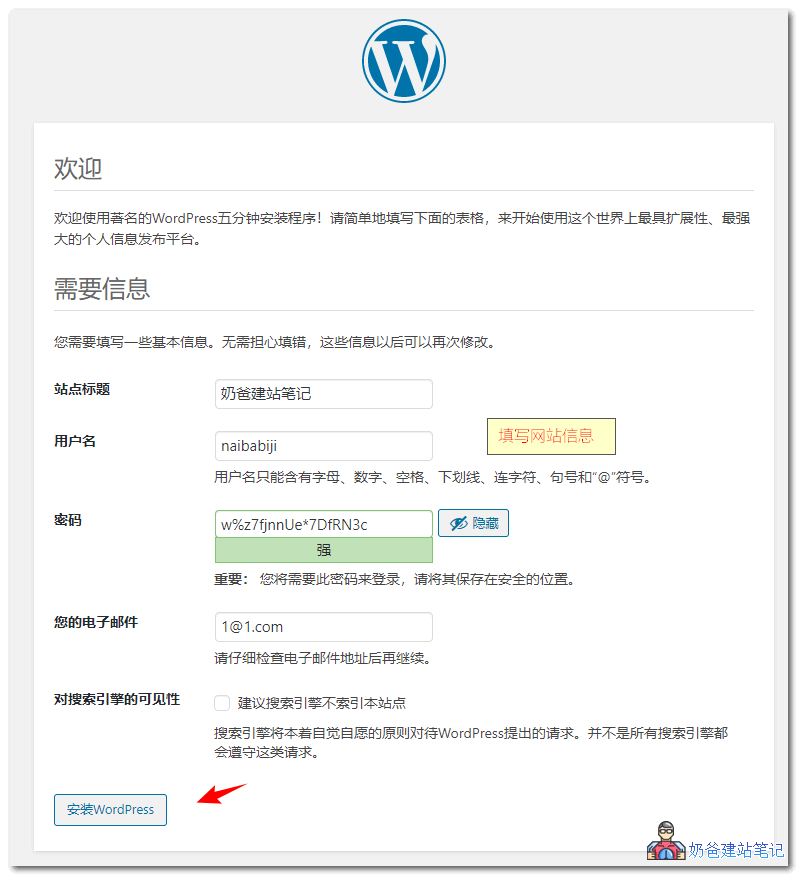
In an instant, WordPress will be successfully installed.
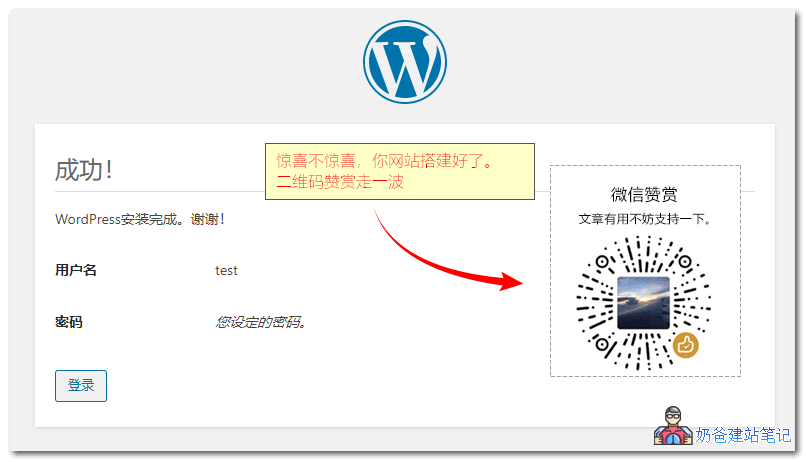
At this point, the WordPress installation tutorial is complete.
Recommended WordPress Themes for Chinese websites
在ThemeforsetThe themes purchased above are mostly English themes, which are not very suitable for use within China. Here, Naiba recommends some themes suitable for domestic websites.
- AstraA highly customizable theme. If you want to use a page builder to design your own website, this theme is recommended;
- Storeys Pro If you want to create a paid resource download site, this theme is recommended;
- JustNewsA Chinese theme specifically designed and developed for blogs, self-media, and information-based websites;
- Git A powerful free WordPress theme;
- MNewsMinimalist News & Self-Media Theme;
- DUXA powerful news and self-media theme.
Recommended plugins for Chinese WordPress websites
WordPress is a foreign program, and using domestic servers for installation can sometimes lead to compatibility issues. Here are a few recommended plugins.
- wp china yesAccelerates activities like WordPress updates, plugin and theme installations on domestic servers;
- Smart SEO ToolThe best SEO plugin for Chinese websites;
- WP RocketThe best caching plugin;
- PerformanceA lightweight WordPress optimization plugin that can disable many unused features to speed up the site.
Other website building source code
Besides WordPress, there are other free website building source codes that can also help you set up a website.
- DiscuzFor building forums;
- ZblogA blog program written by Chinese developers;
- emlogA blog program written by Chinese developers;
- dedecmsA domestic CMS system, used by many websites, but not updated for a long time and has many vulnerabilities;
- PbootCMSA domestic CMS system for template-based website building.