
It's Children's Day again. Old-timers might remember that every year on June 1st, Jun Ge used to update his LNMP one-click package. Naiba's first exposure to building websites on VPS was also through that package. In 2023, LNMP was found to have malicious code implanted in its one-click installer, and it was later discovered that Jun Ge had sold the business. Around the same time, Baota Panel began to rise, so most tutorials on Naibabiji switched to using Baota Panel for website setup.
As a newbie who started with WordPress website building in 2009, I've witnessed both the rise and decline of WordPress. If it weren't for the demand for foreign trade independent websites, I really don't know what the domestic WordPress ecosystem would look like.
The rise of AI in recent years has given Naiba the „ability“ to write programs, and I„ve tried to contribute what I can to the WordPress community.
Previously submitted to the WordPress official plugin repositoryB2B Product Management Plugin, which as of this writing has over 100 active installations. Just in time for Children's Day 2026 (who isn't still a child at heart?), Naiba had AI develop a server panel specifically for WordPress website management:WP Panel
First, how did this panel come about?
Naiba inNaibabijiI've shared manyWordPress Website Building Tutorial articles and have personally consulted with at least 5,000+ people on WeChat, so I deeply understand the difficulties beginners face when building their own websites. Although Baota Panel is already simple enough to operate, for some users it remains a barrier on the road to building a site.
For those using WordPress to build a website, getting the site running on a VPS is just the first step. The real headache for beginners is the security and stability of the site after it goes live. Bots are constantly scanning your server for vulnerabilities on the internet, and some crawlers send dozens or even hundreds of requests per minute, directly causing the server CPU to hit 100%, making the site lag and unusable. Then people complain that WordPress is garbage, slow, and not user-friendly. (⊙﹏⊙)
People who don't know how to use WordPress often find it difficult to get started. But in my opinion, for beginners building a corporate website, it is still the best choice.
Some also argue that we are now in the era of AI website building, so there's no need to use WordPress anymore.
In fact, building a website is just the first step; the core lies in later operation, management, and maintenance. At this stage, AI cannot yet create a professional-grade website with simple commands. Especially for zero-experience users, in daily operations like publishing articles and SEO optimization, AI-generated sites are far less comprehensive and user-friendly than WordPress.
The original intention behind developing the WP Panel wasto focus solely on WordPress server management. No Docker, no email, no FTP, no other language runtime environments. Install it with one command, and a clean Debian 13 turns directly into a WordPress hosting platform. Beginners can set up their own WordPress website right after installation.
What can WP Panel do?
One sentence summary:From purchasing a VPS to set up a WordPress website, to daily website operation and maintenance, WP Panel can provide you with assistance.
One-click WordPress site creation
According to the article previously published by NaibaVultr WordPress Setup Tutorial, after purchasing a VPS, you first need toinstall Baota Panel, then create a website on the Baota Panel. After the website is created, you also need to manually download the WordPress installation package, and finally open a browser to visit your domain, enter the installation interface to fill in database information, and finally set up the website account and password.
With WP Panel, you only need to purchase a VPS, replace the step of installing the Baota Panel with installing WP Panel (also one-click installation), then create a website in the backend. After creation, directly open a browser to visit your domain, configure the website account and password, and you're done. This eliminates the steps of downloading the installation package and configuring the database.
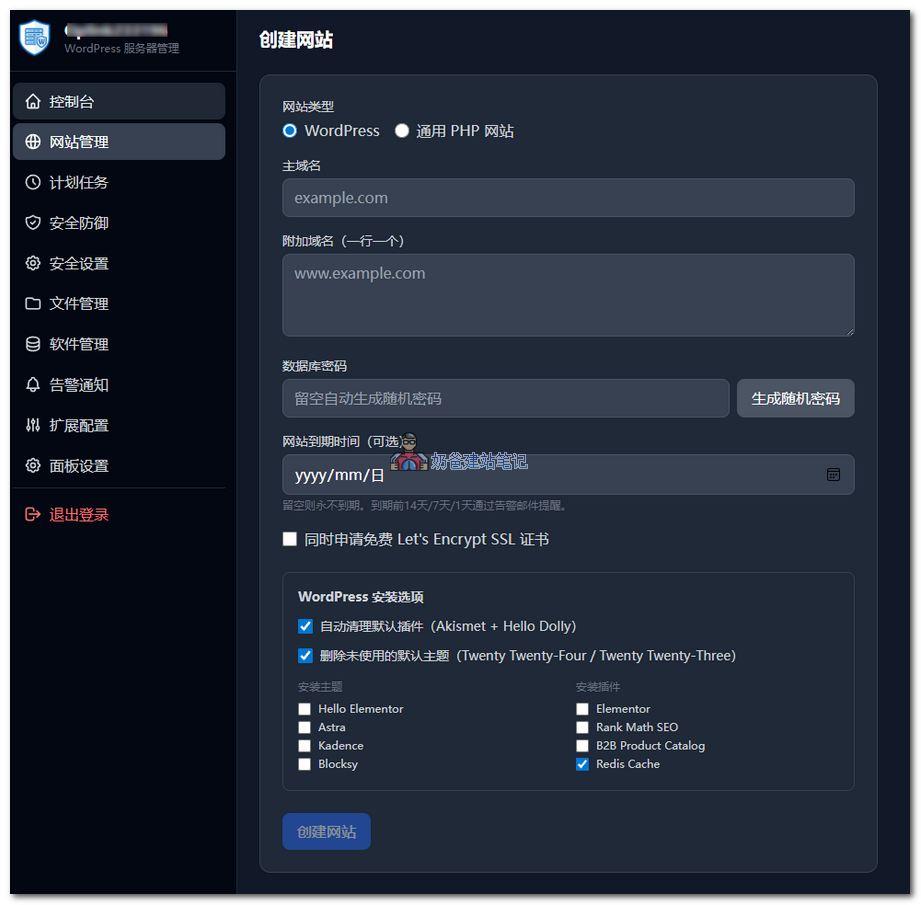
At the same time, when creating a website, WP Panel also adds a WordPress installation option, deletes default unused built-in themes and plugins, or installs popular themes and plugins.
All resources are obtained from the official WordPress source, ensuring safety and the latest versions. You can also customize the list of themes and plugins to be installed during the installation interface.
Website management
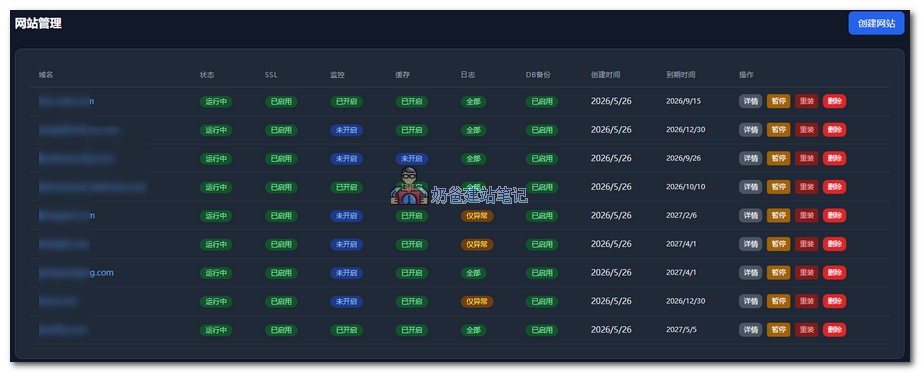
Each website supports SSL security certificate management, status monitoring, Nginx cache optimization, automatic database backup, and automatic website file backup.
It also supports expiration time settings. For users managing multiple client websites on one server, this feature is very useful. Before expiration, an email reminder is sent to the server administrator, eliminating the need to manually record client website expiration times.
WordPress optimization
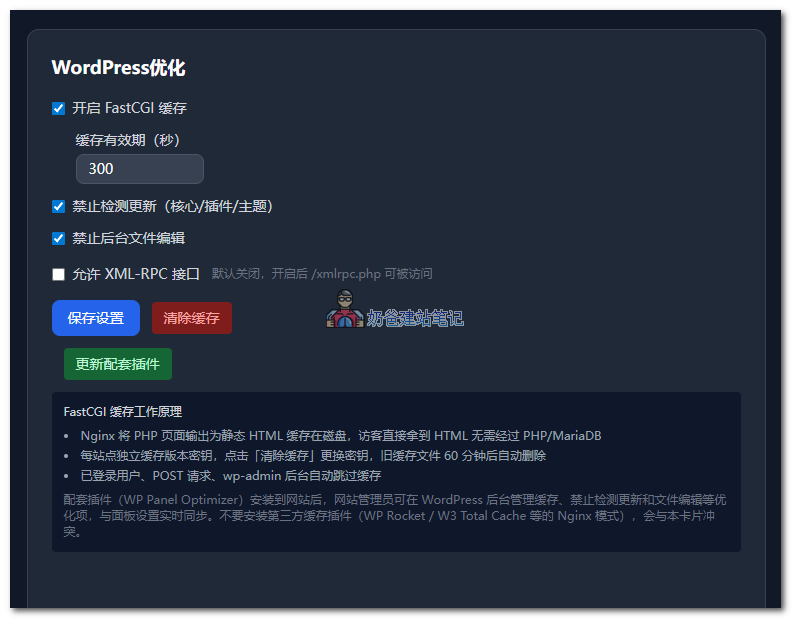
For WordPress websites, cache optimization is an unavoidable point. Naiba has previously shared aBaota Panel Nginx FastCGI cache configuration tutorial. To be honest, this operation is not simple for beginners, and it's easy to make configuration mistakes that cause the website to be inaccessible. So Naiba directly integrated this feature into the WP Panel.
Why choose FastCGI cache, and what is the difference from ordinary optimization plugins?
Compared to ordinary cache optimization plugins, such as popular cache plugins like WP Rocket, WP Super Cache, etc., they work in two different modes.
1) WP Rocket (PHP / Plugin-level cache)
- Works at theWordPress + PHP layer。
- Flow: User request → Enter WP → Plugin judgment → Read / Generate static HTML → Return.
- Cache files: Stored in
wp-content/cache/, managed by PHP. - Must go throughPHP-FPM + Databaseonce (on cache miss).
2) Nginx FastCGI Cache (Server / System-level cache)
- Works at theNginx layer,Completely bypasses PHP。
- Flow: User request → Nginx → Check local cache → Directly return HTML.
- Cache files: Stored on server disk / memory, managed by the Nginx kernel.
- PHP and MySQL are barely involved, with extremely low pressure.
Using Nginx FastCGI cache is more efficient than installing a caching plugin.
It also adds two features: disabling update detection (core/plugins/themes) and disabling backend file editing., which can be enabled directly in the backend without manually modifying the wp-config.php file.
Although disabling update detection is not a standard practice, most WordPress users that Naiba has encountered do not have a habit of regular updates. The backend accumulates a large number of update reminders over the years, and many people choose to batch update all at once, which often leads to website failures.
The reason is that plugins and themes that are not updated for a long time accumulate multiple versions of functional changes. Upgrading directly across multiple versions can easily cause compatibility issues. Since users do not have the habit of timely updates, it is better to disable update detection in the backend to avoid risks at the source.
Additionally,access to the XML-RPC interface is disabled by default.。
XML-RPC is WordPress's remote communication interface. When disabled, Nginx directly returns a 403, and requests do not reach PHP-FPM, which completely defends against xmlrpc.php brute force attacks. The vast majority of websites do not need this feature.
If you are using Baota Panel, you can go to your website logs and search for xmlrpc.php. Chances are there will be many requests for xmlrpc.php, sometimes with continuous multiple requests, which is the reason for your website suddenly becoming slow.
Scheduled tasks
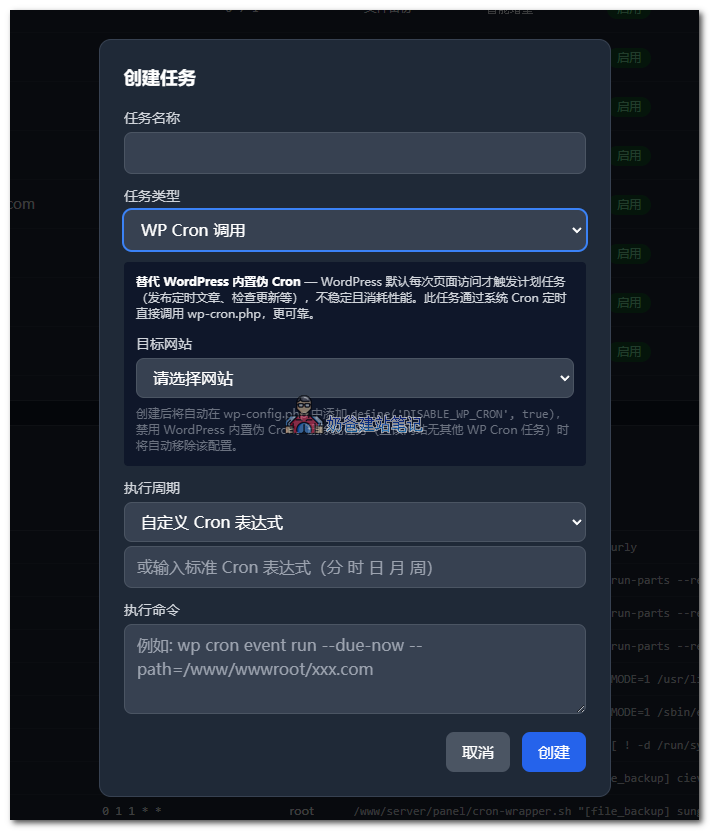
The scheduled tasks mainly have two special features:Backing up website files and creating WP Cron calls.。
Website backup supports full backup and incremental backup.
Full backup: packages the entire website root directory.
Smart incremental: only backs up files in wp-content/uploads/ that have been added or modified since the last backup.
WP Cron call is used to replace WordPress's built-in pseudo Cron — WordPress triggers scheduled tasks (publishing scheduled posts, checking for updates, etc.) only on each page visit by default, which is unstable and consumes performance. This task directly calls wp-cron.php via system Cron at scheduled times, making it more reliable.
File Management
This needs no further introduction. WP Panel has a built-in file management system. For security reasons, it does not support online editing, only upload, download, compress, decompress, cut, copy, paste, and rename functions.
Software Management
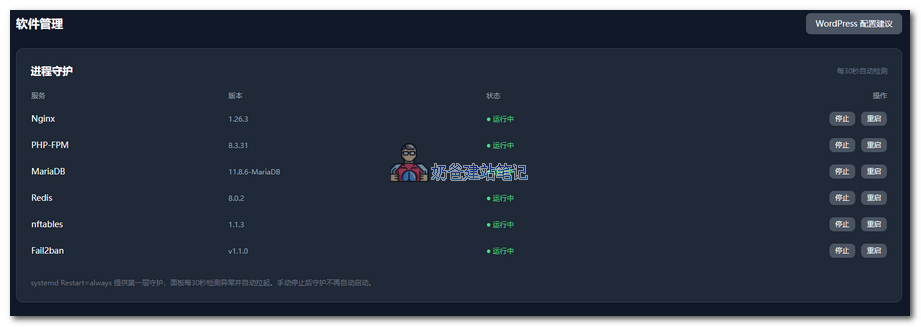
The panel recommends Debian 13 as the default operating system. Except for the Ondřej Surý source used for PHP calls (because the official WordPress recommended PHP version is 8.3, and the default source for Debian 13 installs PHP 8.4), all other software is installed from the official Debian 13 source, and the security of these software is maintained by the official Debian 13 team.
Debian 13 LTS support ends around June 2030, meaning that if you start using WP Panel today, you can be assured that the security of the software installed on your server will be maintained for at least 4 years.
The software management interface also supports configuration modifications for these software, similar to modifying software configurations in Baota, without manually editing files.
Alert notifications
By configuring SMTP sending or using Webhook push, notifications will be sent to the server administrator in scenarios such as high server resource usage, abnormal processes, or backup failures.
Highlight: Security defense
Panel's own security
To be honest, Naiba is more concerned about the security of an AI-developed panel than you are. For this reason, I have designed 4 layers of security protection. In theory, as long as your server root password and panel login account are not compromised, the risk of the server being hacked is extremely low.
If someone wants to enter your WP Panel backend, they need to break through at least four layers of defense.
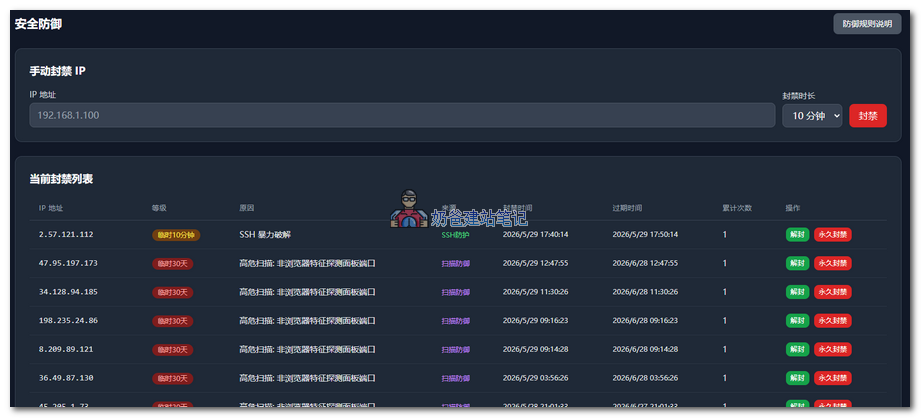
Layer 0: Scan Defense. WP Panel is accessed by default via port 8443 with a self-signed security certificate. A firewall rule is set to directly blacklist any non-browser access to port 8443. That is, as long as it is not accessing the server's port 8443 through a browser, it will be greeted with a firewall blacklist.
Layer 1: Random Entry. Like Baota Panel, it also has an 8-character random string. Directly accessing ip+8443 will not reach the panel login interface. Guessing the backend entry is an impossible task.
Layer 2: BasicAuthAuthentication. The browser pops up a native input box, requiring a username and password. The password at this layer is stored using bcrypt with 12 rounds of hashing; there is no plaintext in the database.
Layer 3: Web Login. After passing BasicAuth authentication, there is also a web form login password. It is also bcrypt hashed. After successful login, a server-side session is generated, with cookies carrying HttpOnly + Secure + SameSite=Lax, and a 30-minute sliding expiration.
For both BasicAuth and Web login credentials, if either is entered incorrectly 5 consecutive times, the IP will be blacklisted by the firewall. Unless your server has extremely high value for attack, no one would risk IP bans to guess your passwords.
Additional Protection
CSRF Token: All non-query requests must carry a unique verification token to effectively prevent cross-site request forgery, blocking malicious sites from impersonating you to submit operations.
Security Response Headers: Full security policies including HSTS, X-Frame-Options, nosniff, and Referrer-Policy are configured to defend against clickjacking, browser sniffing, and other client-side attacks, further strengthening access security.
Error Information Desensitization: Error messages from APIs are sanitized to avoid leaking server paths, running commands, or other internal information, preventing sensitive data exposure.
Fully Open Source Code: The code is open source under the GPL-3.0 license and publicly available for review. The program does not collect user data, does not connect to third-party servers externally, has no built-in web backdoors, and no online code editing functionality, eliminating risks at the source.
WordPress Specific Protection
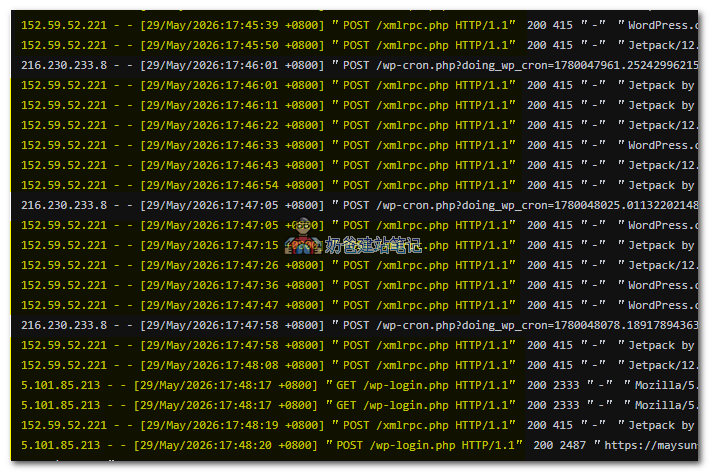
Friends often tell Naiba that their website has little traffic but is extremely slow every day. Sometimes it's not really about traffic; behind the scenes on your server, bots are frantically scanning and probing your server files. For example, in the screenshot above, you can see IP 152.59.52.221 frantically requesting /xmlrpc.php, and IP 5.101.85.213 probing /wp-login.php.
Don't be fooled by the User-Agent showing Jetpack and WordPress; this site doesn't even have Jetpack installed, so there's no way these are legitimate Jetpack requests. Moreover, checking the IPs, one is from India and the other from Russia. No verification needed—these visits are 100% bots.
To address this,the WP Panel has built-in multi-layered security protections that take effect automatically without any manual configuration.
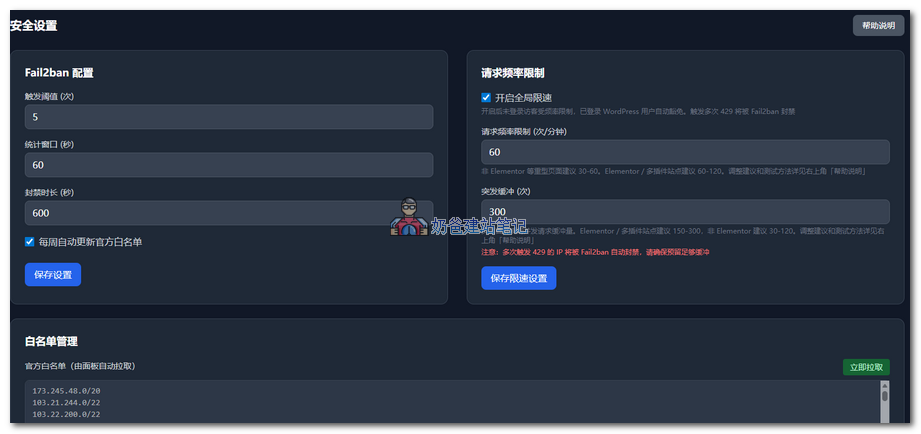
WP Panel uses Fail2ban (an automatic brute-force prevention tool on Linux servers) with multiple rule combinations to block malicious requests. It sets up two independent defense Jails („monitoring + penalty“ rule packages):
Main Defense Jail (wppanel), default threshold: 5 triggers within 60 seconds results in a ban (threshold, time window, and ban duration can be adjusted in the panel). Trigger conditions include:
- POST /wp-login.php — Login brute force, any POST request to the login page is counted
- POST /xmlrpc.php returns HTTP 403 — The site has disabled XML-RPC but is still being probed (if XML-RPC is enabled, it is not counted to avoid false bans on legitimate tools like Jetpack)
- Returns HTTP 429 — Exceeds request rate limit (rate limiting is handled independently by Nginx; 429 access logs are also included in Fail2ban counting)
- Sensitive file scanning returns HTTP 404 — Such as .env, .git, wp-config.php, .sql, .tar, .gz, .zip, etc. 404 Flood Defense Jail (wppanel-404), independent of the main Jail, with a fixed threshold that cannot be adjusted:
- If any path returns 404 30 times within 60 seconds, it is considered directory scanning and the IP is banned immediately.
Ban action: nftables is called to deny the IP's HTTP/HTTPS access, and Nginx returns 444 (closes the connection directly without any response). The first ban lasts 10 minutes, and repeat offenses increase the ban duration.
Automatically fetches IP libraries from CloudFlare, Google, and Bing official sources to add to the whitelist, preventing false bans.
Malicious requests initiated through CloudFlare can have their real IP identified and be banned.
Website Security Protection
When running multiple WordPress sites on one VPS, the biggest fear is one site getting compromised and taking down the others. WP Panel isolates sites from the moment they are created.
Each website has its own system user and user group (e.g., wp_naibabiji:wp_naibabiji) and does not share the www-data group. The PHP-FPM process pool runs as this user, isolated from Nginx.
Three restrictions are implemented at the PHP level:
- open_basedir is limited to the site's directory + /tmp + /usr/share/php, preventing cross-site file reading.
- Dangerous functions are disabled: exec, passthru, shell_exec, system, proc_open, popen, show_source.
- allow_url_include is disabled, preventing the site from loading and executing file code from external URLs.
System permissions for sensitive files have also been hardened: wp-config.php is set to 600 (readable only by the site's user), and the key directory is set to 700. Files with the same name from other sites are invisible and unreadable to the current site's user.
Each site uses an independent database and database user, with no interconnection.
In summary: After a site is compromised through a plugin vulnerability, the attacker can modify files and read/write its own database within that site, but cannot read files from other sites, connect to other sites' databases, or execute system commands. The isolation boundary is enforced at the system user and user group level, preventing cross-site access.
Is WP Panel secure?
The panel and websites each implement multiple layers of isolation and defense, which are sufficiently secure from a code perspective. However, security is never 100%. WP Panel cannot help in the following situations:
- Leakage of server or panel account passwords.
- Exploitation of system kernel vulnerabilities, allowing attackers to escalate privileges to root (WP Panel supports detecting system updates to ensure all Debian 13 security updates are applied).
- Someone simultaneously obtains my GitHub account and offline private key, pushing a malicious update to trick you into upgrading.
What if the panel code itself has vulnerabilities?
Well, it's true that AI-written code can raise security concerns, but based on our security defenses, an attacker would need to bypass the following layers to exploit a panel code vulnerability and gain server access:
- Random entry point — an 8-character hexadecimal random path with 4.3 billion combinations; brute force enumeration must first pass the next layer.
- BasicAuth — browser popup authentication, sharing a counter with web login; 5 failed attempts result in an IP ban.
- Web login — page form, same counter; 5 cumulative failed attempts result in a 24-hour IP ban.
- CSRF Token — required for non-GET requests; cross-site forgery cannot hit the target.
If any of these four layers triggers a ban, nftables directly rejects all connections from that IP at the network layer. For an attacker to exploit a panel bug, they must first penetrate these four layers to reach the buggy code, which is extremely unlikely.
Additionally,The panel code is fully open source, and white-hat hackers and security researchers are welcome to test it. Valid vulnerabilities will be acknowledged in the Release Notes after being fixed.
How to install WP Panel
After all that, are you interested in WP Panel? You can first try it on any VPS, such as one that supports hourly billing,Vultrto install and experience it. If you find it satisfactory, then deploy it to your production server.
WP Panel was developed on Debian 13. In theory, it can also be used on Debian 12, but other systems are likely to have bugs. Therefore,it is recommended to use Debian 13 to install WP Panel.。
After connecting to the VPS via SSH, simply copy and paste the command below, press Enter, and wait for the installation to complete.
apt-get update && apt-get install -y wget ca-certificates && wget -qO- https://raw.githubusercontent.com/naibabiji/wp-panel/main/install.sh | bashSummary
WP Panel is not a comprehensive panel; it only manages WordPress websites. I hope it can help more users set up their own WordPress websites using a VPS.
Finally, if you encounter any bugs in the panel, please feel free to provide feedback.
GitHub URL:github.com/naibabiji/wp-panel
I was one of the first to use WP Panel, and it's really great, truly amazing, and the one-click operation is very smooth.