Foreign Trade Website BuildingA large portion of these businesses are engaged in B2B operations and do not require WooCommerce's online ordering Add to cart and pricing features, also known as Catalog Mode. Therefore, in this article, Naiba shares several methods to remove the Add to cart button and prices.
Method 1: Using a Plugin
YITH WooCommerce Catalog Mode
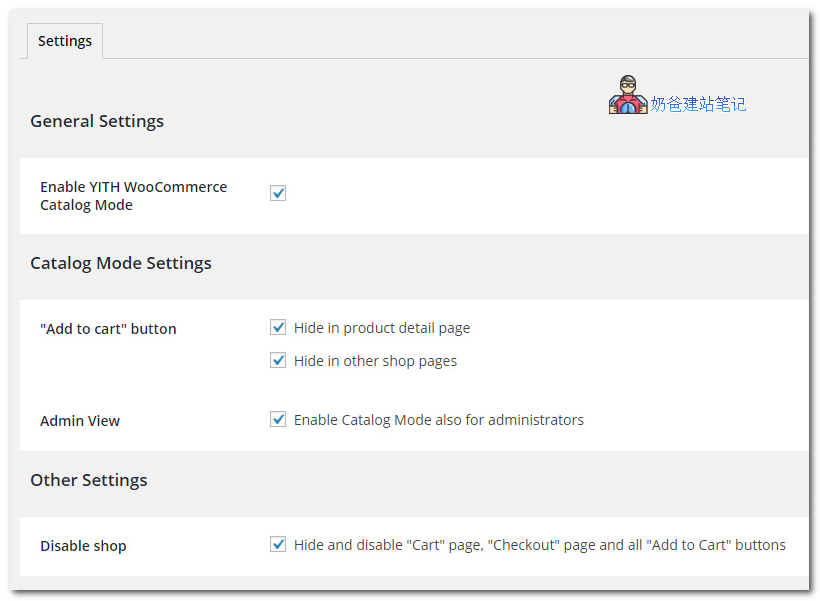
YITH WooCommerce Catalog Mode is a WordPress plugin that mainly enables catalog mode for WooCommerce, hiding the add to cart and checkout buttons.
The usage is simple: download and install the plugin, then go to the plugin settings and enable the corresponding options.
MMWD Remove Add To Cart for WooCommerce
This plugin can also help us hide the Add to Cart button and price content. After installing the plugin, go to WooCommerce settings, Products, and the Remove Add to Cart tab to configure.
Method 2: Hide in Theme Settings
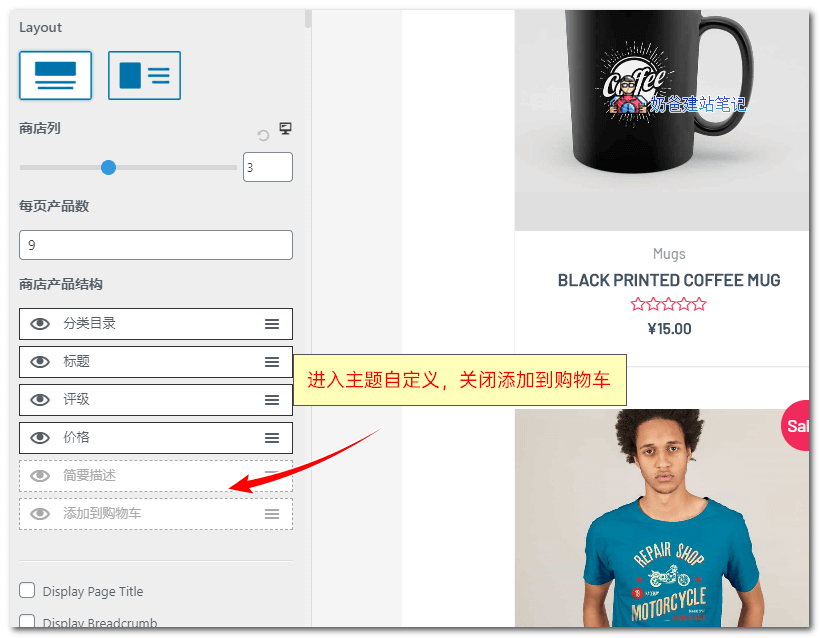
Here, usingAstra Pro ThemeFor example, after activating the WooCommerce function in the theme options, go to the theme customizer settings, you can see the store product structure options, and disable the add to cart function.
Usually, some premium WordPress themes have these settings; you can look for the options carefully.
Method 3: Using Code
If your Theme does not support hiding it, and you do not want to use a plugin to hide it, you can use the following two pieces of code to remove the Add to Cart button.
Code 1: Directly set the product to non-purchasable status
add_filter( 'woocommerce_is_purchasable', '__return_false');
Code 2: Remove the add to cart button
remove_action( 'woocommerce_after_shop_loop_item', 'woocommerce_template_loop_add_to_cart' );
remove_action( 'woocommerce_single_product_summary', 'woocommerce_template_single_add_to_cart', 30 );
Code 3: Remove price
remove_action( 'woocommerce_after_shop_loop_item_title', 'woocommerce_template_loop_price', 10 );
remove_action( 'woocommerce_single_product_summary', 'woocommerce_template_single_price', 10 );
// 另外一种移除价格方法
add_filter( 'woocommerce_get_price_html', 'naibabiji_remove_price');
function naibabiji_remove_price($price){
return ;
}
Code 1 directly sets the product as non-purchasable. Compared to Code 2, it may have better compatibility because Code 2 directly removes the corresponding hooks, which may cause display bugs on some themes.
With these 3 methods, we have achieved building a product display 2B website using WordPress and WooCommerce. Isn't it simple?
Update on August 13:
Method to Remove Add to Cart Button While Preserving Variable Product Information
Also using code methods
add_action( 'woocommerce_single_product_summary', 'hide_add_to_cart_button_variable_product', 1, 0 );
function hide_add_to_cart_button_variable_product() {

// 只删除购物车按钮和数量,保留variation
remove_action( 'woocommerce_single_variation', 'woocommerce_single_variation_add_to_cart_button', 20 );
}
If you haven't installed your own website yet, please refer to what Naiba shared:the steps to build your own website和WordPress Installation Tutorial
Related Content
Since you are reading about removing the add to cart button, you might also be interested in the following articles.