WooCommerce is a popular e-commerce plugin on the WordPress platform, and most foreign trade websites have this plugin installed.
WooCommerce lists related products on the product page, hoping to increase the user's purchase rate. However, in some cases, you may not want related products to be displayed. For example, a user visits your website to buy glasses, adds them to the cart, and then finds that the recommended related products are more attractive. They then go back to research the related glasses, look up information, and may find other better options, causing you to lose that order.
So this article introduces how toHow to Remove Related Products on WooCommerce Pages
Methods to Remove Related Products in WooCommerce
There are two methods to disable related WooCommerce products: you can insert some lines of code into the theme's functions.php file, or you can install a free plugin. Let's start with the first method.
Remove via Code
You can copy the following code snippet into your theme's functions.php file.
/**
* 删除相关产品输出
*/
remove_action( 'woocommerce_after_single_product_summary', 'woocommerce_output_related_products', 20 );
If you don't know how to add code to the functions file, you can use the following plugin to help you.
Safe Method to Add Code to the functions.php File: Code Snippets
Via Plugin Implementation
NS Remove Related Products for WooCommerce is a plugin that can help you remove related products. You just need to install and activate it.
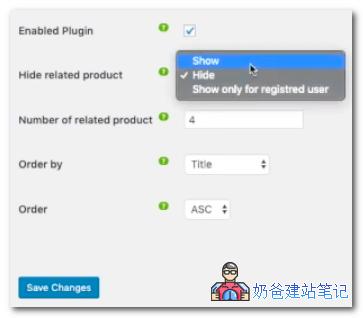
NS Remove Related Products for WooCommerce not only allows you to set whether related products are displayed, but it can also configure the number of related products to show and how to retrieve related products, among other features.
The above explains how to disable related product display on WooCommerce product pages. If you don't have a website yet, you can check outSteps to Build a Website, or directly contactNaiba Foreign Trade Website Buildingto quickly build a website.