
By default, WordPress content management only supportsPages和Posts, and does not include product content. So, how should you operate when an enterprise website needs to publish products on WordPress? Naiba here introduces how to publish and manage products in WordPress.
6 Ways to Publish Products in WordPress
To publish products on WordPress, Naiba has encountered the following methods:
- WooCommerce (Suitable for B2C/B2B Display and Sales)
- Custom Post Type UI (CPT UI, Suitable for Custom Content Types)
- Portfolio (Theme Built-in or Plugin, Lightweight but Poor Portability)
- Using Pages to Publish (Suitable for a Few Custom Products)
- Using Posts to Publish (General but Not Professional)
- B2B Product Management and Display Plugin (Recommended, Developed by Naiba, Lightweight Inquiry-Based)
1. Publishing Products via WooCommerce
WooCommerce is the most famous e-commerce plugin on the WordPress platform. Although it is mainly used for online product sales, it can also be used solely for product display, suitable for B2B websites.
First, in the WordPress Admin Dashboard, go to Plugins, search for WooCommerce, and install and activate it.
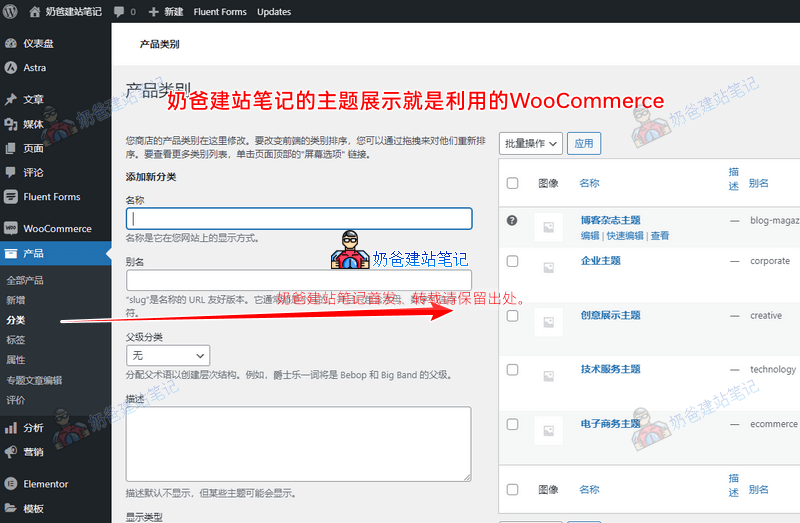
Then, you can see Products in the backend menu. First, set up product categories, and then you can add new products.
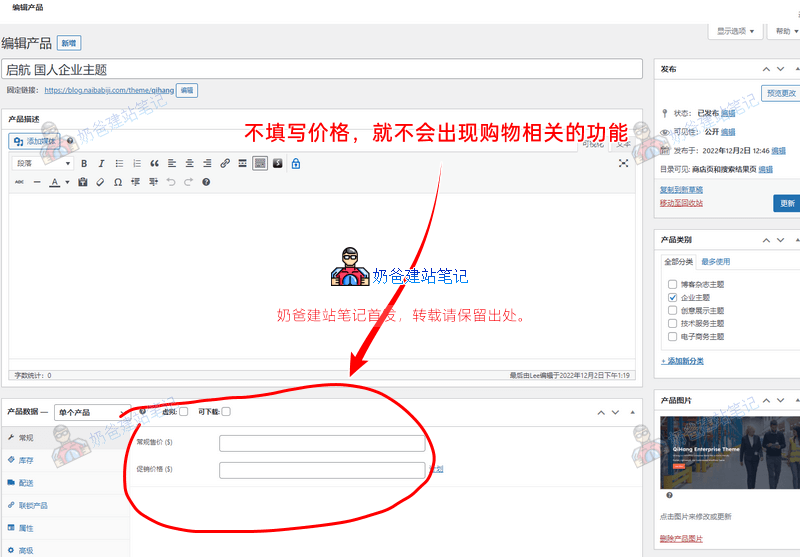
When creating a product, if you do not fill in the product price in the product data section, after publishing the product, B2C-related features such as the shopping cart and price will not appear.
Related articles:
- Several ways to delete and hide the WooCommerce Add to Cart button
- How to add an inquiry button below the WooCommerce shopping button?
- How to modify WooCommerce product sorting
2. Using Custom Post Type UI (CPT UI)
If you need to independently manage multiple content types such as products, cases, and solutions, using the Custom Post Type UI plugin is the most flexible way. It is free and lightweight, allowing you to create custom post types in the WordPress backend and manage them with field plugins. For detailed tutorials, see:How to Manage Products, Cases, and Solutions Separately in WordPress? CPT UI Plugin Tutorial。
3. Publishing Products via Portfolio
WooCommerce has certain requirements for server performance. If your website Theme is inherently heavy and the hosting performance is low, you will noticeably feel the website slowing down after publishing some products with WooCommerce. Therefore, many people also use Portfolio to publish products.
Portfolio is usually a content management format that comes with the Theme, such as Avada. It can also be implemented by installing a separate Portfolio Plugin, adding a new post format called Portfolio to WordPress for publishing and managing products.
The advantage of this method is that it is faster than WooCommerce. The disadvantage is that it is less flexible and compatible than WooCommerce, especially for products published using the Portfolio format that comes with the Theme. When you change the Theme, the new Theme may not be able to display your Portfolio data, essentially locking you into one Theme for life.
4. Publishing Products via Pages
This method is only suitable if you have a small number of products and your products are more focused on services and customization.
The principle is to design page content in the form of pages.
This method is not suitable for publishing regular products or a certain quantity of products. Management can become troublesome later, and it may also give an impression of being unprofessional.
If you have few products and they are not standard, using pages to create product pages is a good choice. Compared to using WooCommerce and Portfolio, it is more SEO-friendly.
5. Publishing Products via Posts
Also suitable for a few non-standard products, but less professional than pages, and category management is messy. Not recommended for regular product display.
6. Using B2B Product Management and Display Plugin
The B2B product management and display plugin developed by Naiba is lighter than WooCommerce, comes with an inquiry function, and is suitable for pure display B2B websites. If you previously used WooCommerce, you can use a dedicated tool to migrate with one click:WooCommerce to B2B Product Display Importer. For plugin details, visit:Lightweight Product Management Plugin: B2B Product Management Display Plugin – Naibabiji。
The above are several methods shared by Naiba. If you are B2C or planning to sell, WooCommerce is the first choice; if you only need display and flexible customization, CPT UI is recommended; if you want a lightweight inquiry-based type, try the B2B plugin. Choose the most suitable solution based on your actual situation.