Typically, if a website requires constant content updates, the Post feature is the most frequently used. Content such as company news and industry knowledge can be published via Posts. Posts support Categories and Tags, making them easier to manage and call uniformly.
How to Publish a Post
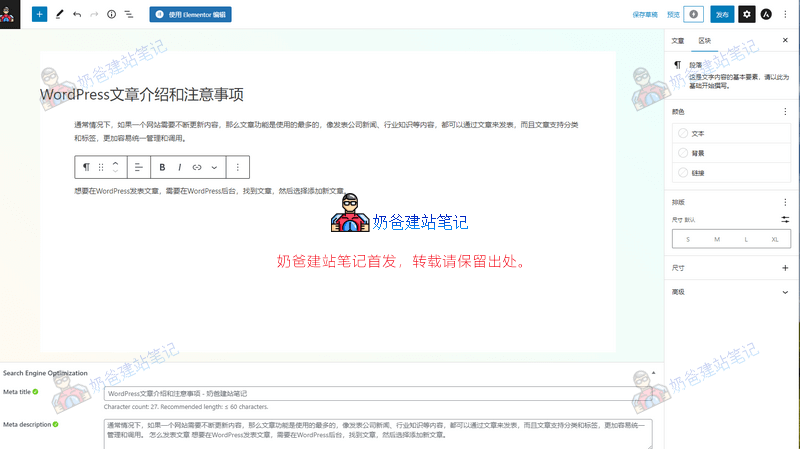
To publish a Post in WordPress, you need to go to the WordPress Admin Dashboard, find 'Posts', and then select 'Add New Post'.
The Post editing interface isPagessimilar to that of a Page. By default, it also uses the Gutenberg editor. If you have installed a third-party builder Plugin and granted it permission for Posts, you can also use that third-party builder Plugin to edit the Post content.
Post Precautions
Before you start publishing Posts, please think ahead and determine the Permalink structure for your website.
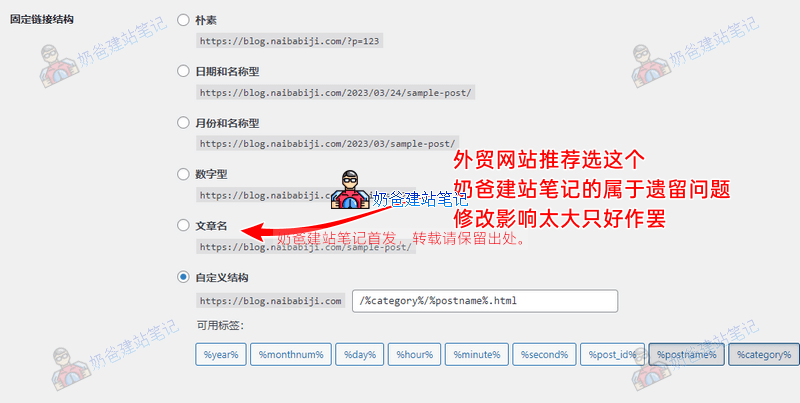
Changing Permalinks will alter the URLs of your Posts, which is a major taboo for SEO. Setting location: WordPress Admin Dashboard > Settings > Permalinks
It is not recommended to edit Posts using third-party page builders. As the number of Posts on your website increases, if you later redesign the site and switch to a different builder Plugin, the formatting of all these Posts will become completely disorganized. While Pages might also become disorganized, the number of Pages is usually smaller, making them relatively easier to fix (and website redesigns typically involve redoing Pages anyway).
Each Post can have a Featured Image set to the same dimensions, making the Frontend look more uniform.
Difference Between WordPress Pages and Posts
In WordPress, Pages and Posts are two distinct concepts. Pages are typically used to display static content, such as About Us, Contact Us, Service Introductions, etc., while Posts are used to publish dynamic content, such as news, blog entries, tutorials, etc.
Pages are often one of the core components of a website. They can be used to showcase the website's content, introduce products or services, publish articles, etc. Each WordPress Page has a unique URL address through which it can be accessed. Pages typically do not include timestamps or author information and are not archived or categorized.
Posts are the dynamic content of a website. They usually contain timestamps and author information and can be archived and categorized. Posts can be used to publish dynamic content like news, blog entries, tutorials, etc. They can be sorted and displayed by publication date, Category, Tag, etc. Each WordPress Post has a unique URL address through which it can be accessed.
In summary, Pages and Posts in WordPress are two different concepts, used for displaying static and dynamic content respectively. Pages are typically used to showcase the core content of a website, while Posts are used to publish dynamic content like news, blog entries, tutorials, etc.