
When you are performingWordPress optimization, you must have heard about generating static cache for the website, such as what was previously recommended by Naibabiji:
- Easy-to-Use WordPress Caching Plugin: Breeze
- Introduction and Download of the WP Rocket Caching Plugin, Which is Better Than WP Super Cache
- Highly Recommended WordPress Speed Optimization Plugin: Hummingbird
Although these caching plugins can also generate HTML static cache, they cannot achieve static caching of all site resources. The WP2Static recommended in this article can cache the entire site as pure static files independent of WordPress, allowing it to run on any web hosting space.
Introduction to WP2Static
Achieve security and performance through static website publishing. A plugin that solves WordPress's biggest problems.
Continue to use WordPress to its fullest potential – manage content, but eliminate security and performance issues by publishing the site as static HTML.
Static sites close all doors that outdated WordPress, themes, or plugins can open.
Pre-generated static sites outperform caching plugins, allowing you to serve users worldwide at local speed.
Incompatible with WooCommerce or membership sites, butsolutions like Snipcartallow e-commerce on static websites.
Features
- Publish an independent static HTML copy of the entire WordPress website
- Remove obvious signs of WordPress running on the site, making it unattractive to hackers
- Automatically deploy to folders on the server, ZIP files, FTP servers, S3, GitHub, Netlify, BunnyCDN, BitBucket, or GitLab
- Schedule unattended exports via the WP Crontrol plugin or by clicking custom hooks
- Desktop notifications alert you when the export is complete
Benefits
- Protect you from malicious attacks/malware
- Speed up your website by not accessing the database or executing any PHP code
- Allow you to host the website for free on free tiers like GitHub Pages, Netlify, or AWS S3, Azure, etc.
- Allow you to deploy to crazy-fast hosting options like S3 behind CloudFront
- Establish a good development->staging->production workflow and integrate with your CI tools
How to Use WP2Static
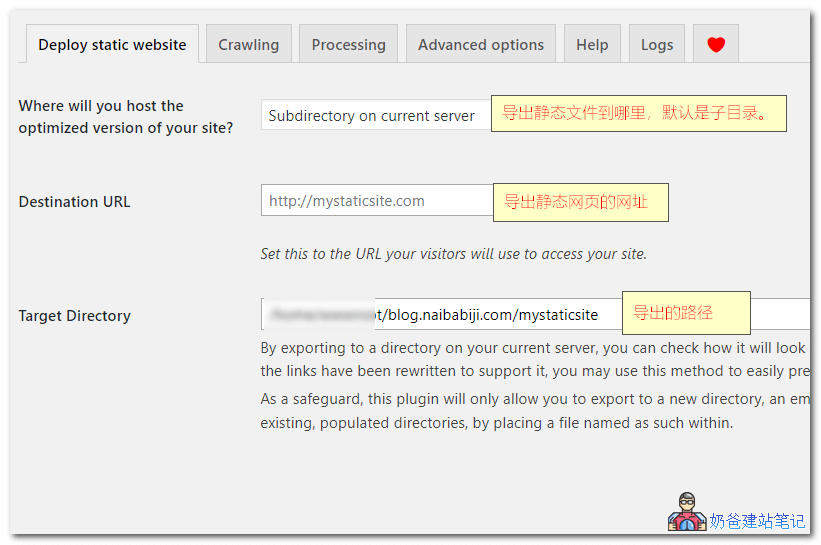
After installing the WP2Static full-site static plugin, you can configure it on the plugin settings page. Usually, you only need to set a Destination URL, then click the generate button. It will automatically generate pure static files of the current website in the 'mystaticsite' subdirectory of your site.

On the Crawling page, you can preview which URLs will have static files generated. If you find missing pages, you can manually add them here.
WP2Static Usage Considerations
- If the server configuration is low, errors may occur during generation; you can set up a website locally on your computer to generate the files.
- If there are many paginated pages, intermediate page HTML files might not be generated. You need to manually add all paginated URLs to the generation list or use the WP-PageNavi plugin, setting the „Show how many pages“ number to the maximum page count, so that all paginated pages from the homepage can be generated.
- If your website has Chinese articles or pages like categories and tags that are inaccessible after generation, you need to install theWordPress Automatic Conversion to English Pinyin Pluginto convert Chinese aliases to pinyin.
- If the directory page is missing, in „Deploy static website“, select „Subdirectory on current server“. This will generate the website to a local directory. Then, in the Crawling options, run all three options under Detection level. This way, all directory pages and article pages can be generated.
- The more plugins installed on the website, the lower the success rate of static generation may be.
- WP2Static is not suitable for websites that frequently update content.
WP2Static Plugin Download
WordPress Plugin Installation Tutorial
After installing WP2Static and generating static files, you can upload the generated files to another web hosting space to test if they can be accessed directly. Then, add CDN acceleration, and the website speed will definitely become very fast.