
While optimizing the WordPress website, Naiba found that comments somewhat slow down the website loading speed. Because WordPress defaults to referencing Gravatar avatars, and accessing Gravatar servers from within China is not stable enough, it can easily cause slow website loading.
With the Lazy Load for CommentsWordPress Pluginyou can achieve loading website comments after clicking a button or when scrolling to the comment area.
Lazy Load for Comments introduction
Lazy Load for Comments is an open-source plugin that lazy loads the default WordPress comment system. It requires no complex configuration, just a simple setting to eliminate unnecessary HTTP requests and restore page speed. It loads comment content only when needed.
You can see the specific effect atNaibabijiany article's comment section.
Lazy Load for Comments usage method
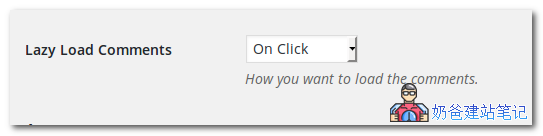
After installing the plugin, go to the WordPress admin backend, Settings → Discussion, and you'll see the buttons as shown in the image below. On Click loads comments when the button is clicked, and On Scroll loads automatically when scrolling.
Lazy Load for Comments download address
You can directly search for the plugin name in the backend to install it, or download it from the link below and upload it for installation. For installation methods, refer to:WordPress Plugin Installation Tutorial