
Any website built with WordPress will use Gravatar avatars. Gravatar is a globally public avatar system. Once you set a Gravatar avatar, it will automatically display on all websites that support the Gravatar system.
However, if your server is located in China, loading too many Gravatar avatars will slow down your website. The reason is that the Gravatar server access speed in China is not ideal.
Therefore, to speed up WordPress, it is necessary to disable Gravatar avatars or cache them for websites hosted on domestic servers.
Disabling Gravatar Avatars in WordPress
Disabling Gravatar avatars is very convenient. If your blog has a large number of comments, it is recommended to disable them, as too many avatar images can also slow down your website speed.
The disable method is as follows:
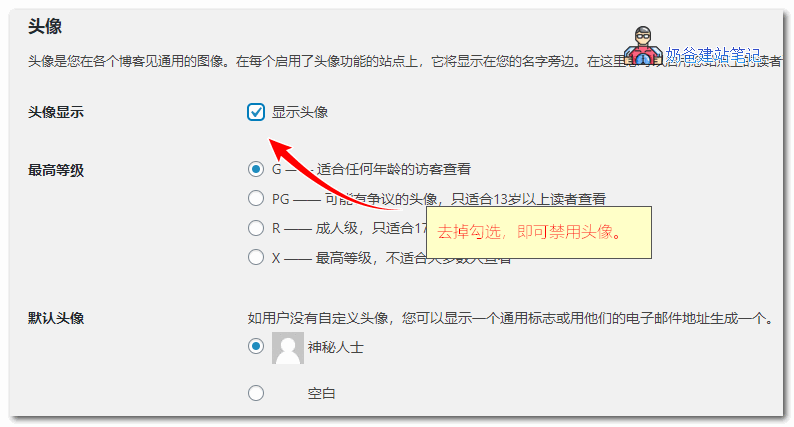
1. In the WordPress backend, go to Settings, then Discussion Settings.
2. Uncheck the option to show avatars, which completely disables the Gravatar avatar function on WordPress.
Cache Gravatar Avatars
Of course, if you completely disable Gravatar avatars and think the comment box looks unattractive, you can speed things up by caching Gravatar avatars locally. This way, users read avatars from your server, which is much faster.
There are code versions for caching Gravatar avatars online, but many are outdated and not effective for every theme. Beginners may not know how to modify them, so here are two recommended plugins for caching.
Gravatar Caching Plugin One: Harrys Gravatar Cache
Plugin download address: https://wordpress.org/plugins/harrys-gravatar-cache/
Gravatar Caching Plugin Two: FV Gravatar Cache
Plugin download URL: https://wordpress.org/plugins/fv-gravatar-cache/
Using a plugin to cache is very simple: install the plugin, activate it, and then configure it.
If you have usedHummingbirdThis optimization plugin also supports avatar caching.
Finally, if you enable Gravatar avatars, some themes do not add ALT descriptions to avatars by default. You can modify the code to add them, which is better for SEO.
Method:Add ALT Attribute to Gravatar Avatar Images in WordPress Comments