For beginners who are new to website building, the most mainstream and easiest-to-start solution currently is to use Tencent Cloud Lighthouse + Baota Panel + WordPressCompared to traditional cloud servers (CVM), Lighthouse offers higher cost-effectiveness and a more streamlined console, making it very suitable for quickly building personal blogs and corporate websites.
This article provides a complete outline of a beginner's tutorial. By following the steps below, even without a coding background, you can have your own website in a short time.
Part 1: Preliminary Preparation - Registration and Purchase
1. Select and purchase a Tencent Cloud Lighthouse Application Server
First, we go to Tencent Cloud's latest promotional activity page to select a Lighthouse instance suitable for our use.
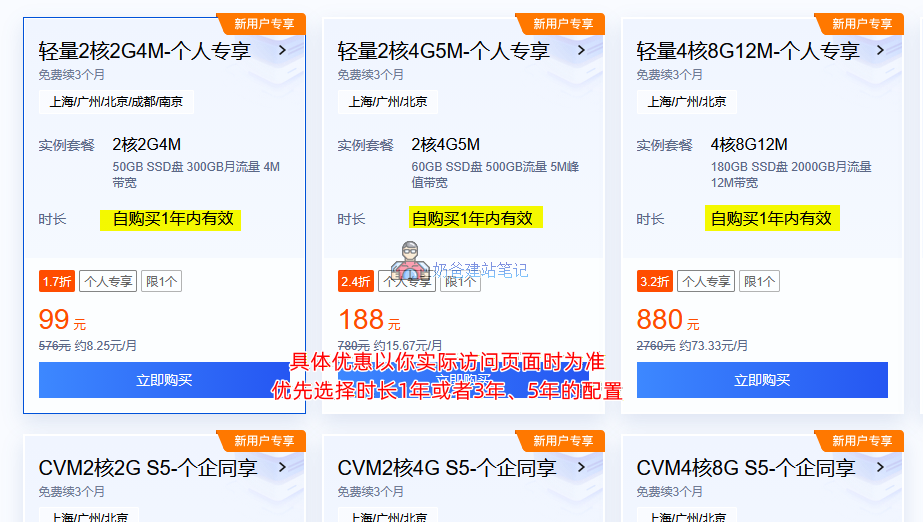
Server Configuration Selection Recommendations:
- Start with a configuration of at least 2 cores and 2GB RAM; the higher the traffic bandwidth, the better.
- Choose a duration of at least 1 year. Prices are usually higher upon renewal, requiring you to repurchase and migrate your website later. Therefore, buying for a longer period upfront saves trouble.
- CVM instances are more expensive than Lighthouse, but offer slightly better performance. For normal websites, Lighthouse is sufficient. Naibabiji itself runs on a Lighthouse cloud server.
After selecting your desired configuration, click the „Buy Now“ button and log in using WeChat.First-time purchases require real-name verification., follow the prompts to proceed.
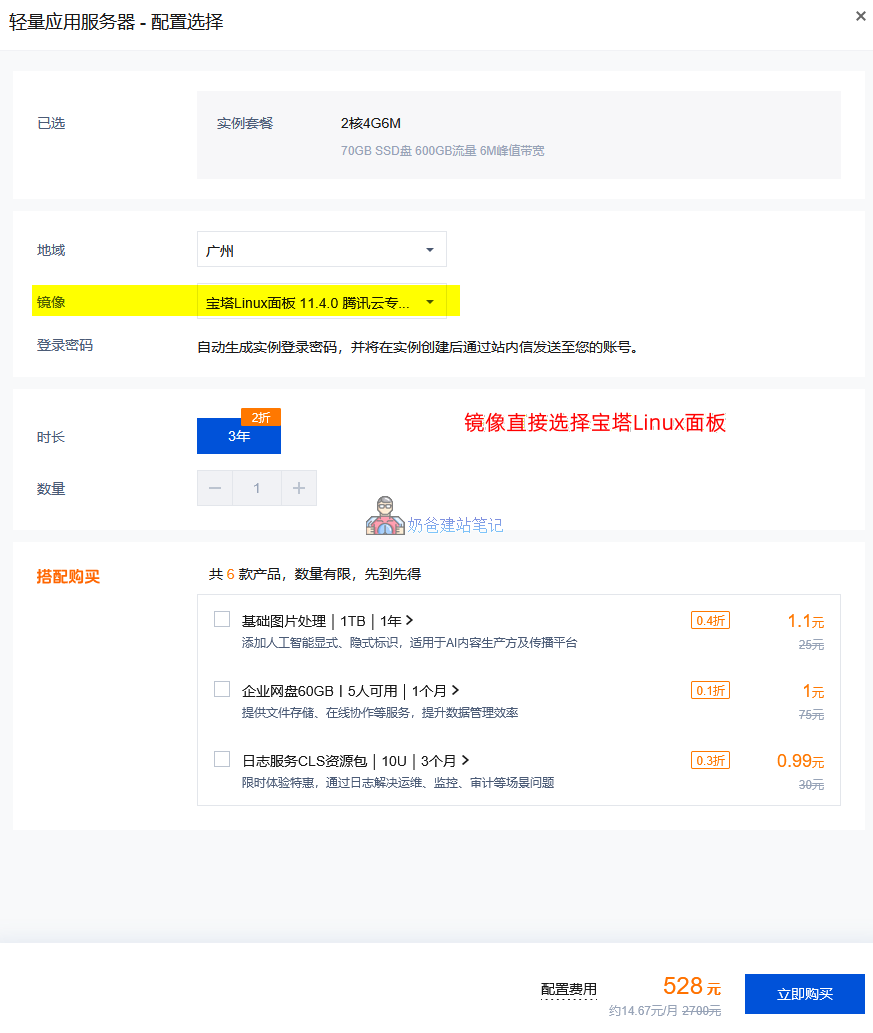
Configuration Selection Reminder:
- You can choose any region you prefer; domestic data centers are generally fast overall.
- Directly select the Baota Panel Linux image; it is not recommended to directly select WordPress or WooCommerce websites.
After payment is complete, wait for the server to be created. If you haven't registered a domain yet, you can proceed to register one.
2. Domain Registration and Preparation
If you haven't registered a domain yet, you can proceed to register one directly on Tencent Cloud.
If you have already registered a domain on another website, according to the requirements for domestic website registration (ICP filing), you need to transfer the domain to Tencent Cloud.
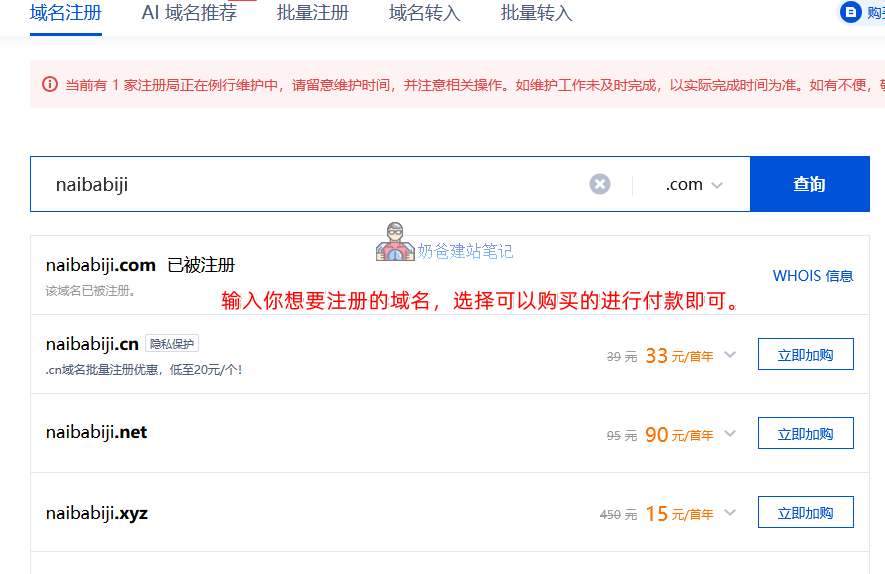
Enter the domain name you want to register in the domain search box; results that support adding to cart are available for registration.
The prices displayed are first-year promotional prices. Click the downward triangle symbol to see the renewal fee for the second year. Don't impulsively buy a $10/year domain, as the renewal fee the second year might be $100.
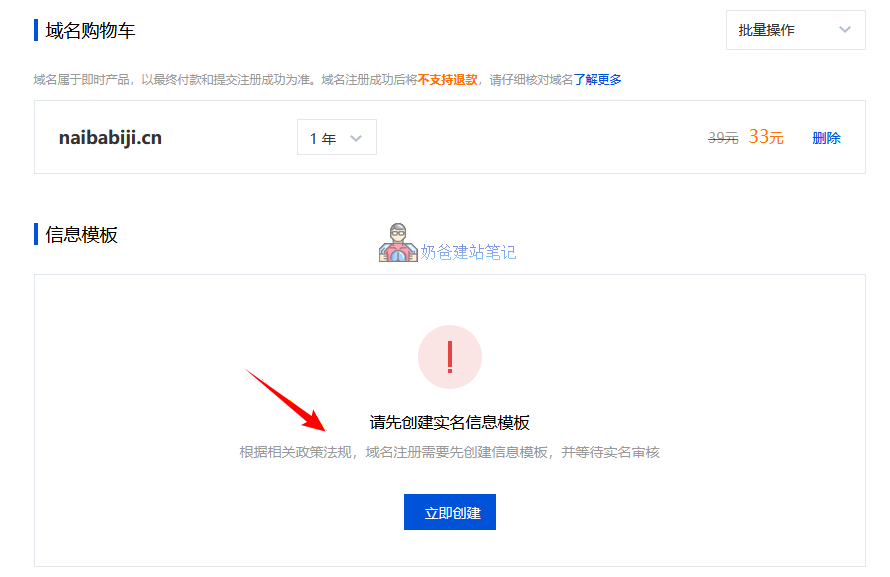
The checkout page requires you to first create a real-name information template. Create a template with your real information, then proceed to payment.
Part 2: Website ICP Filing - Mandatory in China
After purchasing the Lightweight Cloud Server and domain name, the most crucial step is website ICP filing.
According to domestic laws and regulations, usingservers located within ChinaBuilding a website requires ICP filing registration. If you purchased a Tencent Cloud server in Hong Kong or other overseas regions, you can skip this step.
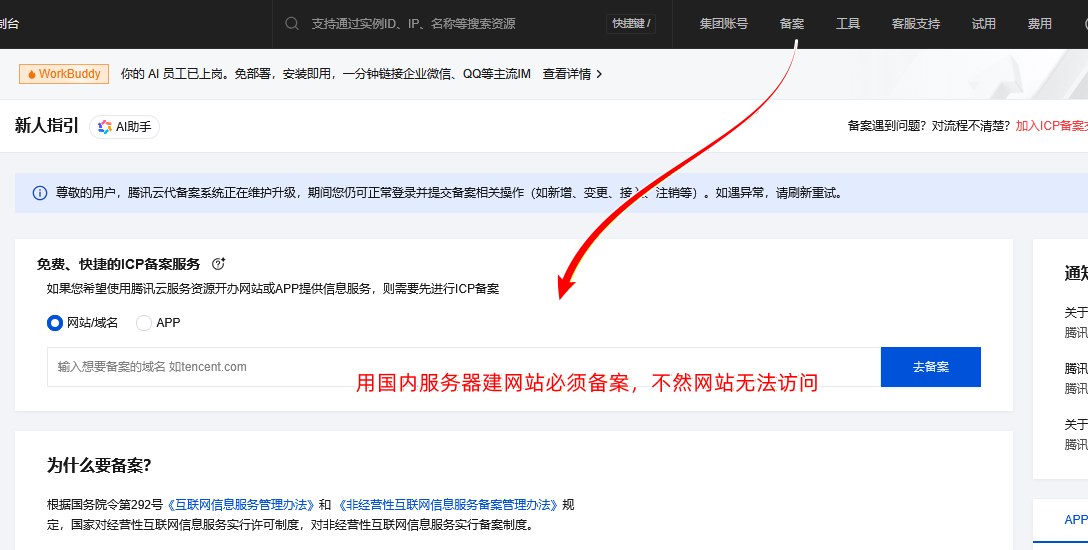
In the Tencent Cloud console, click 'Filing' in the top right corner to enter the filing interface. Follow the prompts to enter your domain name, click [Go to Filing], and then follow the instructions.
The ICP filing process is as follows:
- Fill out the filing materials;
- Tencent Cloud preliminary review;
- MIIT SMS verification;
- Administrative bureau review;
- Filing successful.
Now, the entire filing process and time are much more convenient and faster than when Naiba first started building websites. Typically, filing can be completed normally within 7-15 days, and you only need to wait during the process. (If you want to work on WordPress website building during the filing period, you can directly access it via IP, as mentioned later in the article.)
Part 3: Basic Environment Setup - DNS Resolution and Baota Panel
Assuming you have completed domain filing, next we can proceed with domain resolution and Baota Panel website building.
1. Point the domain to the server
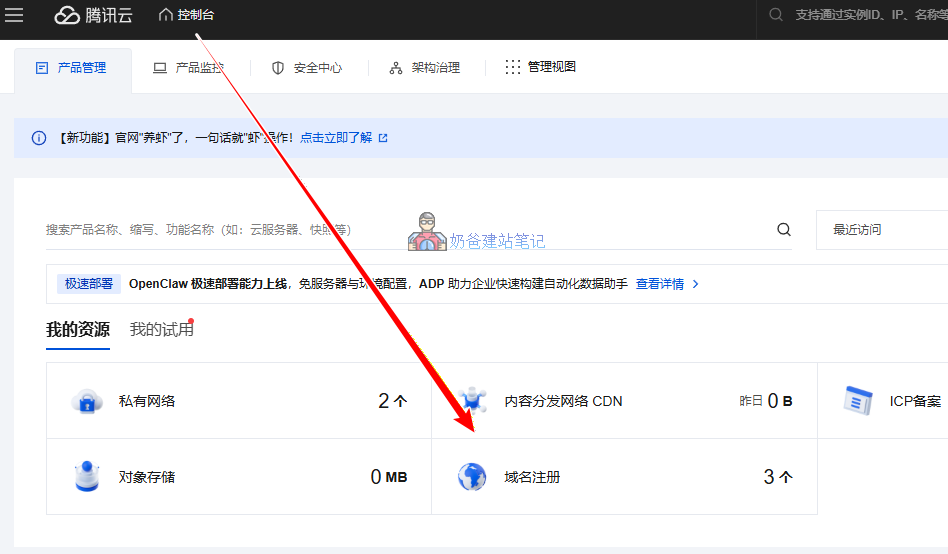
Log in to the Tencent Cloud Admin Dashboard, find My Resources -Domain Registration。
Then go toMy Domaininterface, click on the domain name you need to resolve.
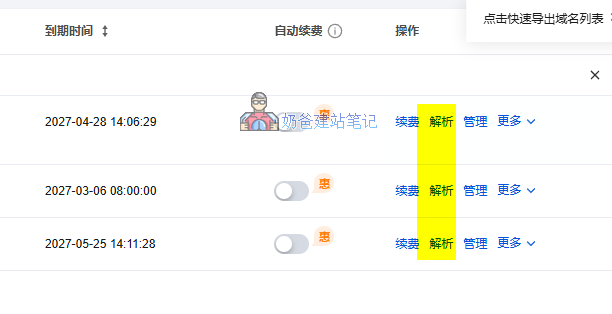
After clicking 'Resolve', you will enter the resolution interface. Directly select 'Quick Resolution for Beginners', then follow the prompts to enter the server IP and confirm. This completes the task of resolving the domain name to the server.
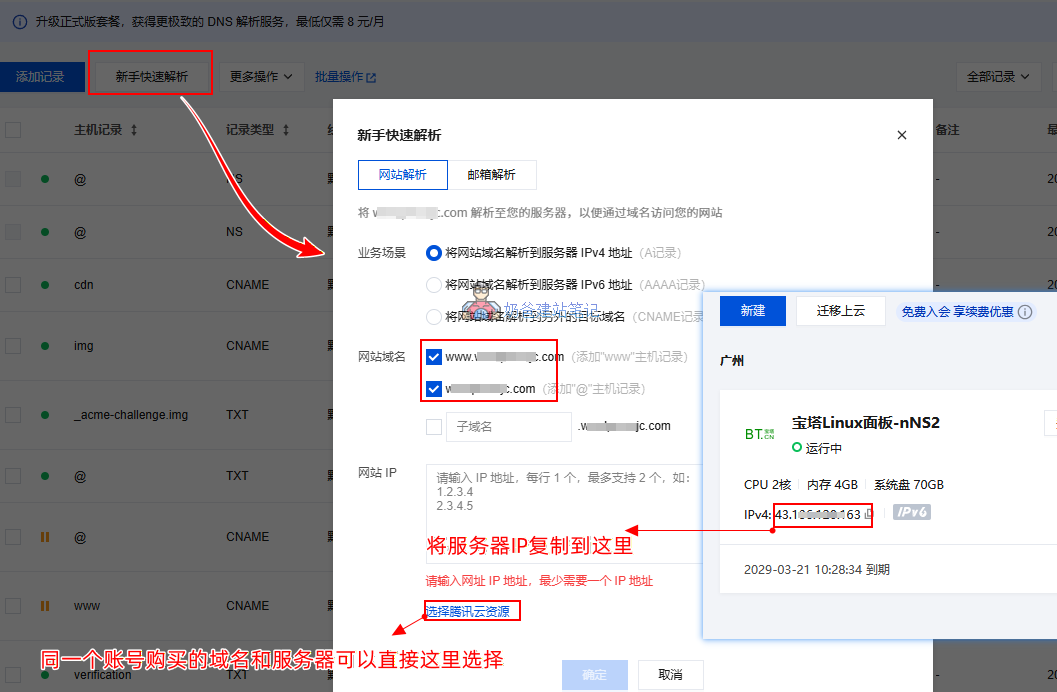
2. Configure the Baota Panel environment
From the Tencent Cloud backendConsoleHomepage,My ResourcesInside,Lightweight Application Server, access the server you purchasedDetails Page, click on theApplication Management。
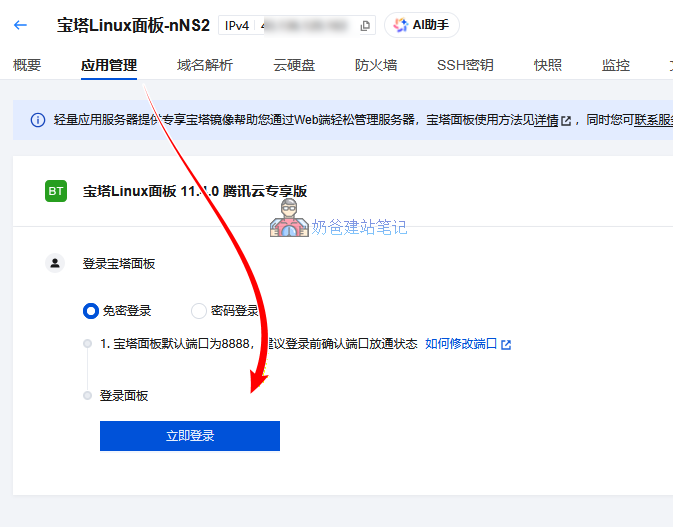
Select 'Login Now' and agree to the Baota Panel user agreement. Enter the Baota Panel interface.
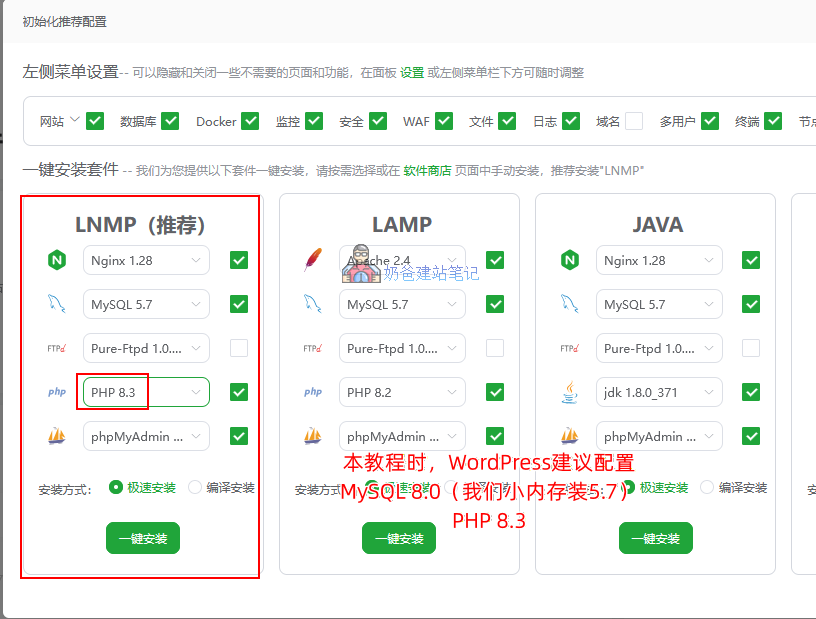
In the pop-up initialization recommended configuration interface, we choose the one-click installation for the LNMP environment.
Here, it is recommended to select PHP version 8.3. As of the publication of this article, the WordPress official recommended environment is MySQL 8.0, PHP 8.3.
Because our server doesn't have enough RAM, installing the 5.7 database is better.
3. Baota Panel Security Settings
After installing and configuring the environment, it is recommended to also perform the following operations:
- Settings – Panel SSL – Enable
- Panel Settings – Listen IPv6 – Disable
- Online Customer Service – Disable
- User Experience Improvement Plan – Disable
- BasicAuth Authentication – Enable
- Alert Notification – Alert Settings – Configure any one item
Part Four: Deploy WordPress Website Program
1. Add Website: Baota Panel – Website – Add Website
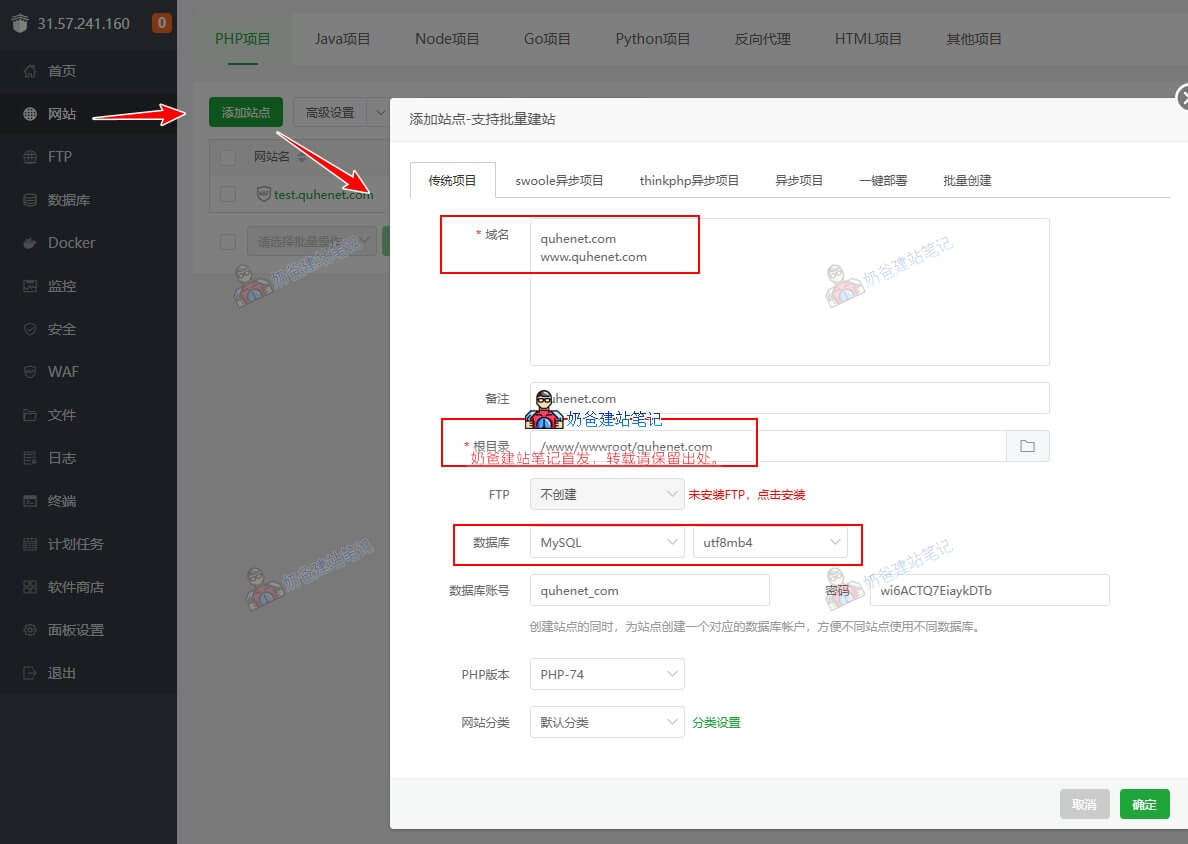
- Fill in two records for the domain: one with www and one without www
- Keep the root directory as default
- Select MySQL for the database
- Other information defaults
2. Set website configuration information
Click the settings button next to the website you just created.
- Pseudo-static – Select WordPress – Save
- SSL – Select Let’s Encrypt – Apply Certificate – File Verification (will fail if domain is not properly resolved)
3. Download WordPress installation package
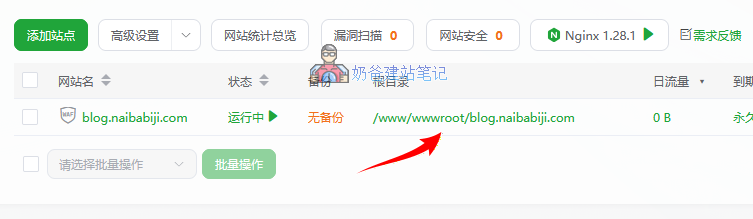
Click to enter the website root directory
Top-left corner upload/download
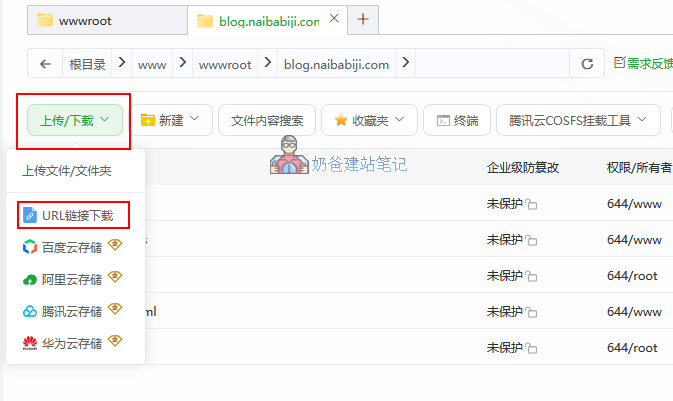
Select to download using a URL link, and fill in the pop-up interface with the website address https://wordpress.org/latest.zip
If the download fails, you canManually download the WordPress installation package, then upload it to this folder.
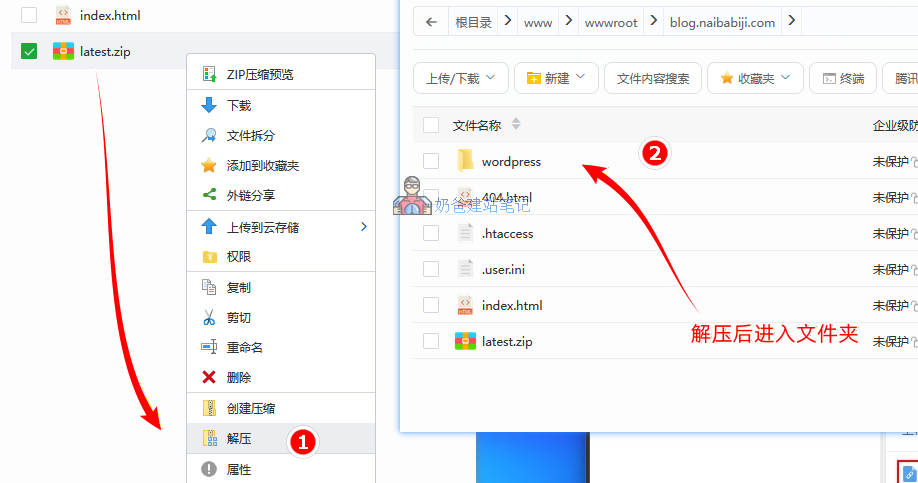
- After downloading or uploading the WordPress installation package, right-click the mouse, select Extract, and click OK in the pop-up interface.
- Enter the extracted wordpress folder
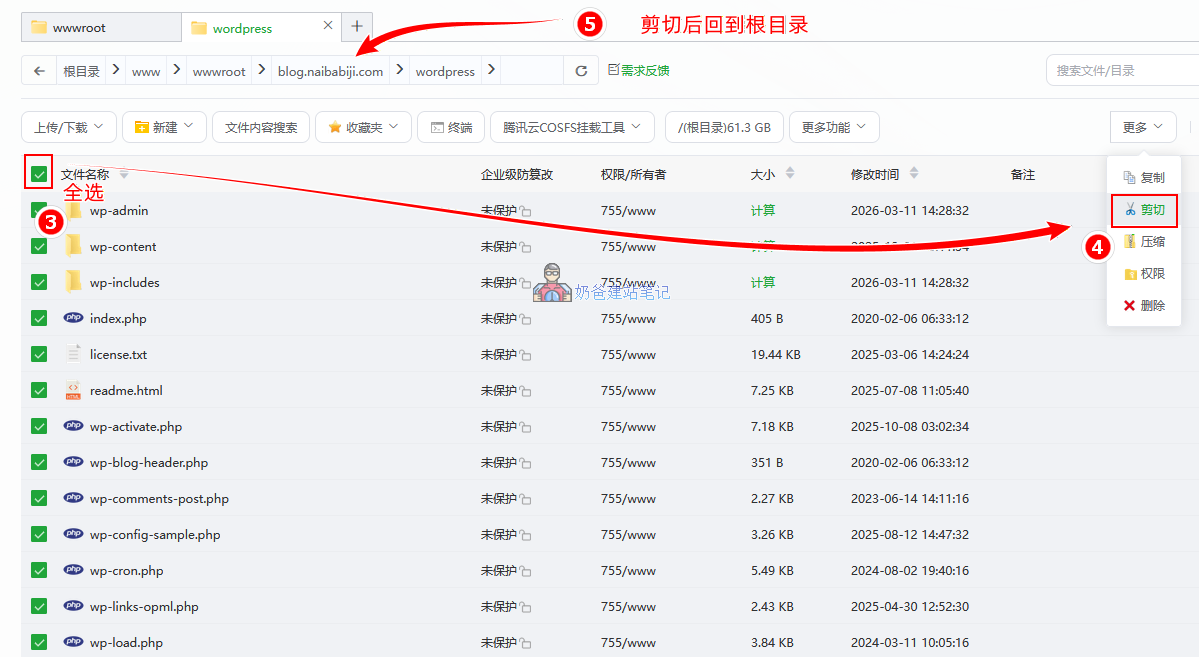
- Select all files in the top-left corner, then choose Cut under More on the right side
- Return to website root directory
- Click paste in the top right corner
4. Install WordPress website program
Open your browser, enter your website URL, and fill in the information as prompted. (Database information can be found in the database interface of the Baota Panel backend)
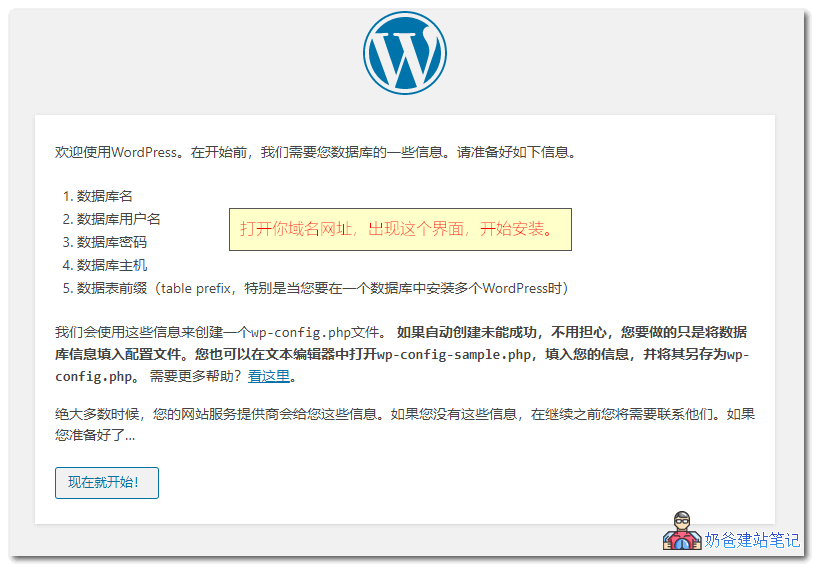
When you have completed all the processes, you can open the default WordPress interface. At this point, the WordPress website installation is complete.
The next task is website decoration. You can refer to:
Tencent Lighthouse Cloud Review
The configuration of the lightweight cloud server purchased from Naiba is 2 cores, 4GB RAM, 6Mbps, which was then upgraded for free to 4 cores, 4GB RAM, 6Mbps. We can use a dedicated VPS performance testing script to test it.
VPS Performance Test Script
We directly enter and execute the following test script inside this lightweight cloud server.
export noninteractive=true && export CN=true && curl -L https://cnb.cool/oneclickvirt/ecs/-/git/raw/main/goecs.sh -o goecs.sh && chmod +x goecs.sh && ./goecs.sh install && goecsIf you want to learn more about VPS performance testing scripts, please visit:Comprehensive VPS Testing Scripts
--------------------------------------系统基础信息--------------------------------------
 CPU 型号            : AMD EPYC 7K62 48-Core Processor @ 2595.124 MHz
 CPU 数量            : 4 Virtual CPU(s)
 CPU 缓存            : L1: 256 KB / L2: 16 MB / L3: 16 MB
 GPU 型号            : GD 5446
 AES-NI              : ✔️ Enabled
 VM-x/AMD-V/Hyper-V  : ✔️ Enabled
 内存                : 1015.80 MB / 3.57 GB
 气球驱动            : ✔️ Enabled
 内核页合并          : ❌ Undetected
 虚拟内存 Swap       : 0.30 MB / 1.00 GB
 硬盘空间            : 8.68 GB / 69.94 GB [12.4%%] /dev/vda1 - /
 启动盘路径          : /dev/vda1
 系统                : opencloudos 9.4 [x86_64]
 内核                : 6.6.117-45.oc9.x86_64
 系统在线时间        : 0 days, 00 hours, 18 minutes
 时区                : CST
 负载                : 0.01 / 0.32 / 0.49
 虚拟化架构          : KVM
 NAT类型             : Port Restricted Cone
 TCP加速方式         : cubic
 IPV4 ASN            : AS45090 Shenzhen Tencent Computer Systems Company Limited
 IPV4 Location       : Guangzhou / Guangdong / China
 IPV4 Active IPs     : 168/256 (subnet /24)
--------------------------------CPU测试-通过sysbench测试--------------------------------
1 线程测试(单核)得分: 1457.09
4 线程测试(多核)得分: 3005.39
---------------------------------内存测试-通过stream测试----------------------------------
Function    Best Rate MB/s  Avg time     Min time     Max time
Copy:           30716.3     0.005363     0.005209     0.005547
Scale:          19940.2     0.008262     0.008024     0.008477
Add:            23023.5     0.010829     0.010424     0.011529
Triad:          23585.0     0.010688     0.010176     0.011272
-----------------------------------硬盘测试-通过fio测试-----------------------------------
测试路径         块大小       读测试(IOPS)            写测试(IOPS)            总和(IOPS)
/root             4k        104.48 MB/s(26.1k)      104.75 MB/s(26.2k)      209.23 MB/s(52.3k)
/root             64k       289.50 MB/s(4523)       291.02 MB/s(4547)       580.53 MB/s(9070)
/root             512k      264.66 MB/s(516)        278.72 MB/s(544)        543.37 MB/s(1060)
/root             1m        262.42 MB/s(256)        279.90 MB/s(273)        542.32 MB/s(529)
--------------------------------------就近节点测速--------------------------------------
位置            上传速度        下载速度        延迟            丢包率
Speedtest.net   5.16 Mbps       29.08 Mbps      49.233094ms     0.00% (Sent: 403/Dup: 0/Max: 402)
其他Guangzhou    9.38 Mbps       146.17 Mbps     5.58 ms         N/A
联通Shenzhen     11.61 Mbps      63.55 Mbps      57.20 ms        N/A
电信Suzhou5G    4.36 Mbps       109.00 Mbps     28.033922ms     N/A
移动Foshan       6.41 Mbps       0.40 Mbps       14.53 ms        N/A
----------------------------------------------------------------------------------
花费          : 6 分 2 秒
时间          : Sat Mar 21 11:21:08 CST 2026
----------------------------------------------------------------------------------
For a lightweight cloud server, these test results are average. It's fine for running ordinary WordPress websites. If you want to run an e-commerce website, it is recommended to purchase a CVM server for better performance.
Tencent Cloud Website Building Frequently Asked Questions (FAQ)
Q1: Is it mandatory to have an ICP filing to build a website using Tencent Cloud?
A: This depends on the region where your server is located. If you purchase a lightweight server in Mainland China regions (such as Beijing, Guangzhou, Shanghai), the domain name must complete ICP filing with the Ministry of Industry and Information Technology before it can be resolved and accessed normally. If the server is in Hong Kong, China, or other overseas regions, no filing is required; it can be used immediately after domain resolution.
Q2: My ICP filing is not yet complete, can I build a website with Tencent Cloud?
Yes. During the filing period, only the domain name is inaccessible; the server remains fully operational and usable. Therefore, we can first build the website using the IP address and switch to the domain name after the filing is approved. Refer to:How to Access a Website via IP During Tencent Cloud Filing – Naibabiji
Q3: What should I do if I cannot access it after modifying the default 8888 port of Baota Panel?
This is because the default firewall of Tencent Cloud does not open the port you modified. Manually go to the Tencent Cloud server details page – Firewall – modify the rule for 8888 to your modified port and save, then you can access it normally.
Q4: Approximately how much does it cost to build a website like this yourself?
A: The core costs are mainly divided into two parts: „Server“ and „Domain“. Generally, the special annual fee for Tencent Cloud Lighthouse Application Server for new users is around one hundred RMB, and a common domain suffix (like .com) costs tens of RMB per year. Therefore, the starting cost for a new user to build a website is typically around 200 RMB/year, offering excellent value for money. For more detailed cost information, refer to:How Much Does It Cost to Build a Website? A Complete Breakdown of Website Construction Costs (Personal / Business / WordPress Edition)