
After purchasing a new VPS, testing its performance is crucial. Using professional VPS testing scripts, we can comprehensively understand the server's CPU performance, memory speed, disk I/O, network quality, and stability. If a machine's performance falls below expectations, we can promptly request a refund to avoid wasting money.
Comprehensive VPS Testing Scripts
1. Fusion Monster Benchmark Script - GO Version
This is a comprehensive VPS performance testing script. The GO version, compared to the previous Shell version, has no environment dependencies, absolutely no third-party shell file references, and supports new features like testing in non-root environments.
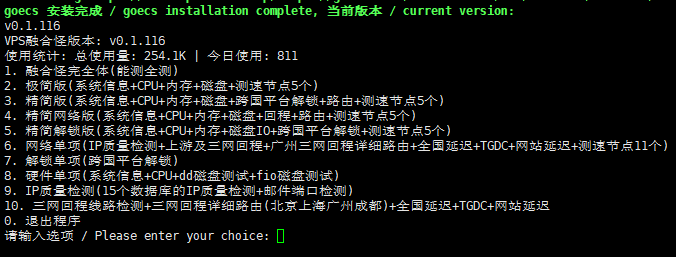
Test Script (No Acceleration for International Users)
export noninteractive=true && curl -L https://raw.githubusercontent.com/oneclickvirt/ecs/master/goecs.sh -o goecs.sh && chmod +x goecs.sh && ./goecs.sh install && goecsTest Script (Using CDN Acceleration for International/Domestic Use)
export noninteractive=true && curl -L https://cdn.spiritlhl.net/https://raw.githubusercontent.com/oneclickvirt/ecs/master/goecs.sh -o goecs.sh && chmod +x goecs.sh && ./goecs.sh install && goecsTest Script (Using CNB Acceleration for Domestic Users)
export noninteractive=true && export CN=true && curl -L https://cnb.cool/oneclickvirt/ecs/-/git/raw/main/goecs.sh -o goecs.sh && chmod +x goecs.sh && ./goecs.sh install && goecsScript Open Source Address:https://github.com/oneclickvirt/ecs
2. YABS (Yet Another Benchmark Script)
YABS is a VPS performance testing script favored by users on foreign VPS forums. This script automatically runs top-tier industry benchmark tools, includes multiple built-in tests to evaluate server performance in key areas: using fio for disk performance, iperf3 for network performance, and Geekbench for CPU/memory performance. It requires no installation of external dependencies and can run without elevated privileges.
Test Script
curl -sL https://yabs.sh | bashOr use
wget -qO- yabs.sh | bashOpen Source Address:https://github.com/masonr/yet-another-bench-script
3. Other Scripts
Below are some scripts that were once very popular but have slower updates now and fewer users. If the two commonly used VPS performance testing scripts above don't meet your needs, you can also choose from these scripts for testing.
bench.sh System Info & Speed Test
wget -qO- bench.sh | bashor
curl -Lso- bench.sh | bashUnixBench Performance Test
wget --no-check-certificate https://github.com/teddysun/across/raw/master/unixbench.sh
chmod +x unixbench.sh
./unixbench.sh
IP Quality Detection
bash <(curl -Ls https://Check.Place) -IOpen Source Address:https://github.com/xykt/IPQuality
Streaming Media Unlock Test
bash <(curl -L -s check.unlock.media)Open Source Address:https://github.com/lmc999/RegionRestrictionCheck
How to Use the Testing Scripts?
First, you need to connect to your VPS using an SSH tool. Naiba uses Xshell. Refer to:Tutorial on Using Xshell 8 to Connect to VPS_How to Log into VPS from a Computer – Naibabiji
After connecting to the VPS, copy and paste any of the script commands above into the operation interface, press Enter, and you can begin testing the VPS's performance or network speed.
How to Interpret the Test Results?
Interpreting Disk I/O Test Results
- Excellent: > 200 MB/s
- Good: 100-200 MB/s
- Average: 50-100 MB/s
- Poor: < 50 MB/s
Interpreting Network Speed Test Results
- International Bandwidth: > 100 Mbps is Excellent
- Domestic Speed: Determined based on line quality
- Latency: < 100ms is excellent, 100-200ms is good
UnixBench Score Interpretation
- < 500 points: Poor performance, suitable for lightweight applications
- 500-1000 points: Moderate performance, suitable for personal websites
- 1000-2000 points: Good performance, suitable for small and medium-sized enterprises
- > 2000 points: Excellent performance, suitable for high-traffic websites
Choosing a VPS Based on Test Results
The UnixBench test result is a comprehensive score; here we primarily select VPS based on the test results from Fusion Monster/YABS.
Core Metrics Qualification Line (2026 Standard)
1. Disk Performance – Most Critical Indicator
- Unqualified: 4K Random Read < 5,000 IOPS ❌
- Qualified: 4K Random Read 5,000-15,000 IOPS ✅
- Excellent: 4K Random Read > 15,000 IOPS ⭐
- Top-tier: 4K Random Read > 30,000 IOPS ⭐⭐⭐
2. Network Performance – Second Most Important
- Unqualified: Download Speed < 100Mbps ❌
- Qualified: Download Speed 100Mbps-1Gbps ✅
- Excellent: Download Speed > 1Gbps ⭐
- Top-tier: Download Speed > 5Gbps ⭐⭐⭐
3. CPU Performance – Basic Requirement
- Unqualified: sysbench < 600 points ❌
- Qualified: sysbench 600-800 points ✅
- Excellent: sysbench > 800 points ⭐
4. Memory Performance – Usually Sufficient
- Qualified: Read/Write Speed > 5,000 MB/s ✅
- Excellent: Read/Write Speed > 10,000 MB/s ⭐
Quick Judgment Rules (30-Second Decision Method)
Rule 1: One-Vote Veto System
If any single item is unqualified, the overall evaluation is downgraded:
- ❌ Disk 4K Read < 5,000 IOPS → Not recommended for purchase
- ❌ Network Download < 100Mbps → Not recommended for purchase
- ❌ CPU Score < 600 points → Consider with caution
Rule 2: Cost-Effectiveness Calculation Formula
性价比分数 = 4K随机读IOPS ÷ 月费美元Judgment Criteria:
- < 1,000 points: Low cost-effectiveness ❌
- 1,000-2,000 points: Medium cost-effectiveness ⭐⭐
- 2,000-4,000 points: High cost-effectiveness ⭐⭐⭐
- > 4,000 points: Extremely high cost-effectiveness ⭐⭐⭐⭐
VPS Selection Guide Based on Practical Cases
Below is thetest result of the simplified fusion monster script run on a $6/month VPSI purchased from Vultr:
---------------------基础信息查询--感谢所有开源项目----------------------
 CPU 型号          : Intel Core Processor (Skylake, IBRS)
 CPU 核心数        : 1
 CPU 频率          : 3791.996 MHz
 CPU 缓存          : L1: 32.00 KB / L2: 4.00 MB / L3: 16.00 MB
 AES-NI指令集      : ✔ Enabled
 VM-x/AMD-V支持    : ❌ Disabled
 内存              : 214.17 MiB / 954.93 MiB
 Swap              : 0 KiB / 3.03 GiB
 硬盘空间          : 6.14 GiB / 29.48 GiB
 启动盘路径        : /dev/vda2
 系统在线时间      : 0 days, 0 hour 4 min
 负载              : 0.22, 0.13, 0.06
 系统              : Debian GNU/Linux 12 (bookworm) (x86_64)
 架构              : x86_64 (64 Bit)
 内核              : 6.1.0-43-amd64
 TCP加速方式       : bbr
 虚拟化架构        : Microsoft Hyper-V
 NAT类型           : Port Restricted Cone
 IPV4 ASN          : AS20473 The Constant Company, LLC
 IPV4 位置         : Elk Grove Village / Illinois / US
------------------------CPU测试--通过sysbench测试-------------------------
 -> CPU 测试中 (Fast Mode, 1-Pass @ 5sec)
 1 线程测试(单核)得分: 		607 Scores
--------------------内存测试--感谢lemonbench开源----------------------------
 -> 内存测试 Test (Fast Mode, 1-Pass @ 5sec)
 单线程读测试:		11666.30 MB/s
 单线程写测试:		10061.02 MB/s
----------------------磁盘fio读写测试--感谢yabs开源-----------------------
Block Size | 4k            (IOPS) | 64k           (IOPS)
  ------   | ---            ----  | ----           ----
Read       | 131.03 MB/s  (32.7k) | 626.61 MB/s   (9.7k)
Write      | 131.38 MB/s  (32.8k) | 629.91 MB/s   (9.8k)
Total      | 262.42 MB/s  (65.6k) | 1.25 GB/s    (19.6k)
           |                      |
Block Size | 512k          (IOPS) | 1m            (IOPS)
  ------   | ---            ----  | ----           ----
Read       | 652.88 MB/s   (1.2k) | 684.04 MB/s    (668)
Write      | 687.57 MB/s   (1.3k) | 729.60 MB/s    (712)
Total      | 1.34 GB/s     (2.6k) | 1.41 GB/s     (1.3k)
---------------------自动更新测速节点列表--本脚本原创----------------------
位置		 上传速度	 下载速度	 延迟
Speedtest.net	 1110.89Mbps	 6717.59Mbps	 1.01ms
------------------------------------------------------------------------
 总共花费      : 3 分 28 秒
 时间          : Gum Cig 20  9:26:38 saaku UTC 2026
------------------------------------------------------------------------
Test Result Summary:
- CPU Performance (sysbench): 607 points
- Memory Speed: Read 11.6GB/s, Write 10.0GB/s
- Disk 4K Random Read: 32,700 IOPS (32.7k)
- Network Download Speed: 6.7 Gbps (approx. 6,700 Mbps)
- Monthly Fee: $6
Step 1: Check Key Metrics Against Qualification Threshold
Qualification Threshold Standard (2026):
- Disk 4K Random Read: > 5,000 IOPS ✅
- Network Download Speed: > 100 Mbps ✅
- CPU Performance: > 600 points ✅
- Memory Speed: > 5,000 MB/s ✅
Case Judgment:
- Disk: 32,700 IOPS ✅ (far exceeds the 5,000 requirement)
- Network: 6,700 Mbps ✅ (far exceeds the 100 Mbps requirement)
- CPU: 607 points ✅ (just meets the standard)
- Memory: 11,600 MB/s ✅ (far exceeds the requirement)
Conclusion: All key metrics are qualified. This is a qualified VPS!
Step 2: Calculate the Cost-Effectiveness Score
Simple Formula: Cost-Effectiveness Score = 4K Random Read IOPS ÷ Monthly Fee in USD
Cost-Effectiveness Judgment Criteria:
- < 1,000 points: Low cost-effectiveness ❌
- 1,000-2,000 points: Medium cost-effectiveness ⭐⭐
- 2,000-4,000 points: High cost-effectiveness ⭐⭐⭐
- > 4,000 points: Extremely high cost-effectiveness ⭐⭐⭐⭐
Case Evaluation: 5,450 points → Extremely high cost-performance ratio ⭐⭐⭐⭐
Practical Application: How to Choose Your VPS
Scenario 1: Personal Use (Blog, Small Website)
Requirement: All metrics meet the baseline. The Vultr tested above: Fully meets and performance far exceeds requirements ✅
Scenario 2: Enterprise Application (E-commerce, API Service)
Requirement: Requires better CPU performance. The Vultr tested above: Excellent disk and network, CPU slightly weaker but basically usable ⚠️
Scenario 3: High-Performance Demand (Database, Gaming)
Requirement: Requires top-tier CPU and memory. The Vultr tested above: CPU is the bottleneck, not suitable ❌
Now, you can go test the cost-performance ratio of your own VPS. Note: No matter how high the cost-performance ratio is, if key metrics are unqualified, the machine will just collect dust.