
Businesses building their own websiteAfter building their own website, businesses typically set up a domain email, also known as a corporate email. This article from Naibabiji will teach you how to register for Tencent Corporate Email and configure its SMTP settings on your website, enabling all website contact emails to be sent from your domain-based corporate email.
Tencent Corporate Email Registration Method
1. Open the official Tencent Corporate Email website and click the activation button.
If you need a paid corporate email, you can also considerNetEase Enterprise Email, with a price of less than 3000 yuan for 5 accounts over 6 years.
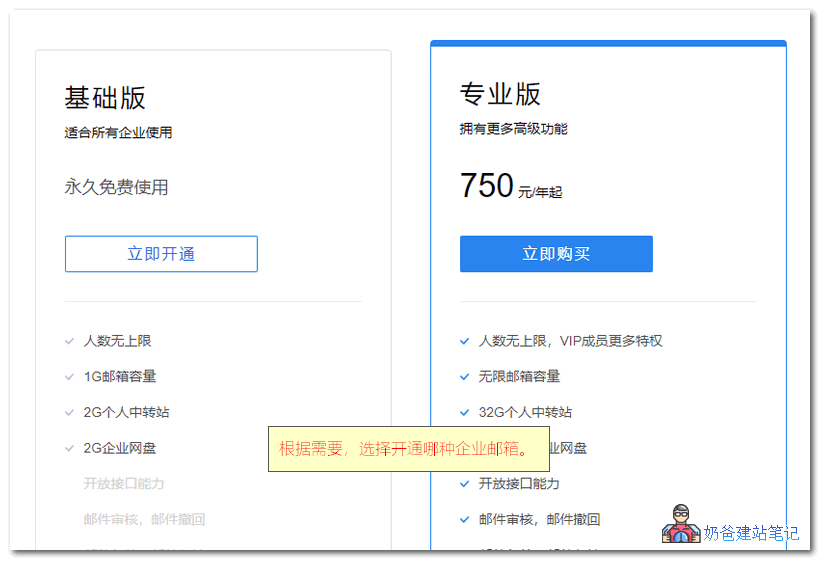
Tencent Corporate Email has two versions: Basic and Professional.
- The Basic version is free and recommended for individual webmasters or small businesses;
- The Professional version is paid and recommended for large enterprises.
We choose the Basic plan to register.
2. Select the activation method
If you have WeCom, you can scan the QR code directly. Here we take opening Tencent Enterprise Mail as a new enterprise as an example.
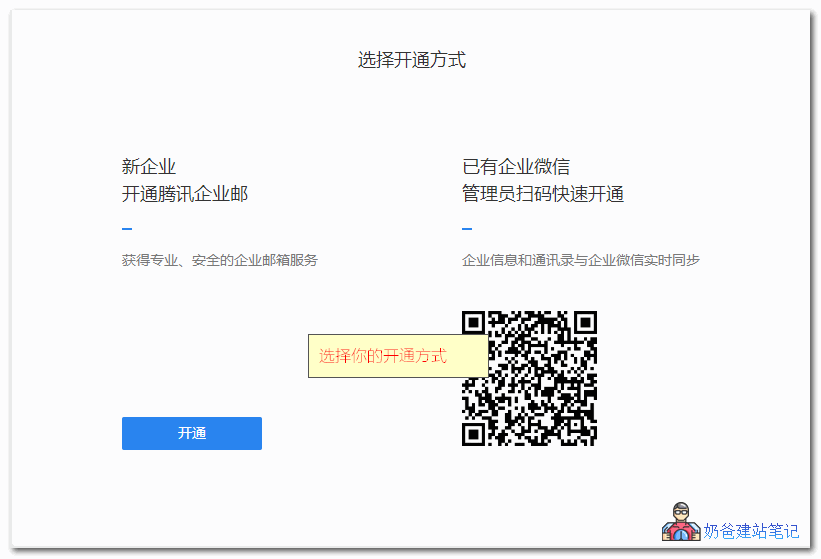
Activation will simultaneously enable WeCom; there is no option to choose otherwise, so proceed directly to the next step.
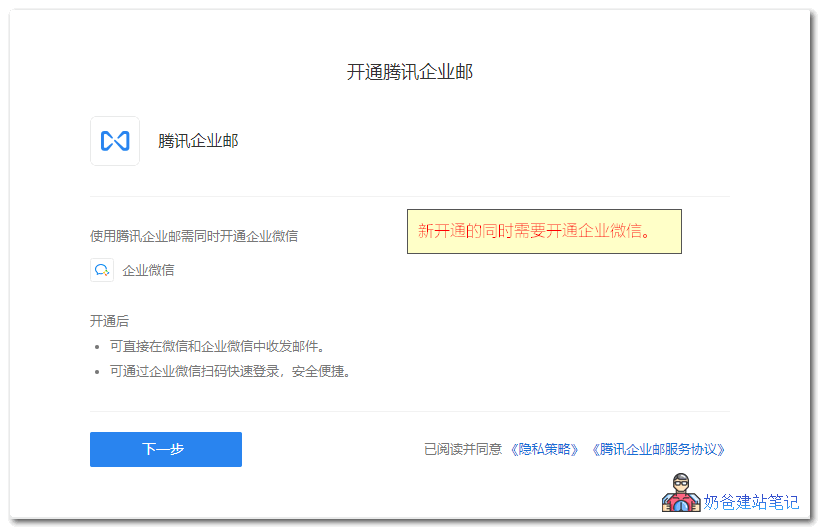
4. Fill in the registration information for WeCom.
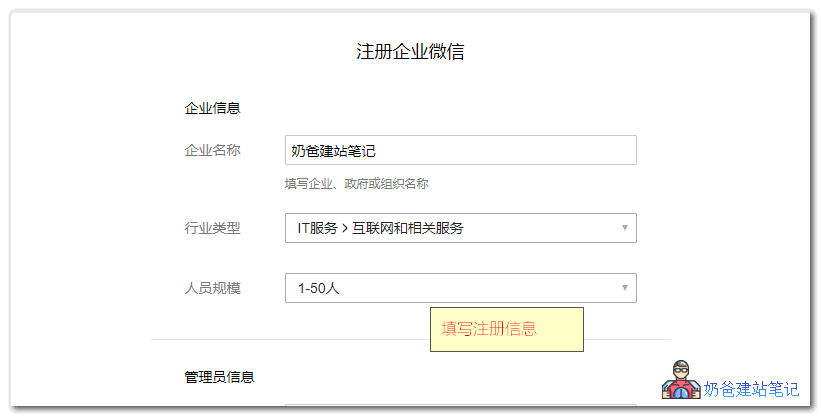
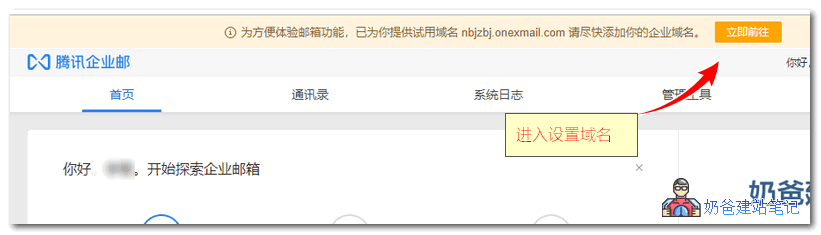
5. After successful activation, click the 'Add Corporate Domain' button at the top of the page to proceed with the setup.
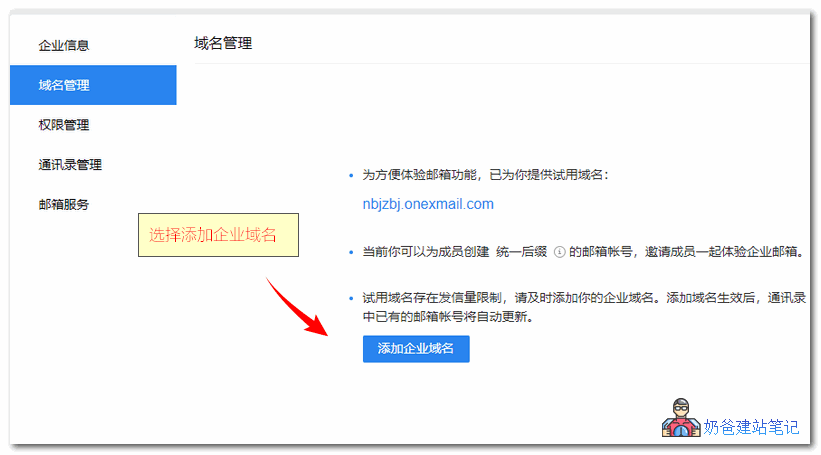
6. In the domain management section, add your corporate domain, which is your own domain name.
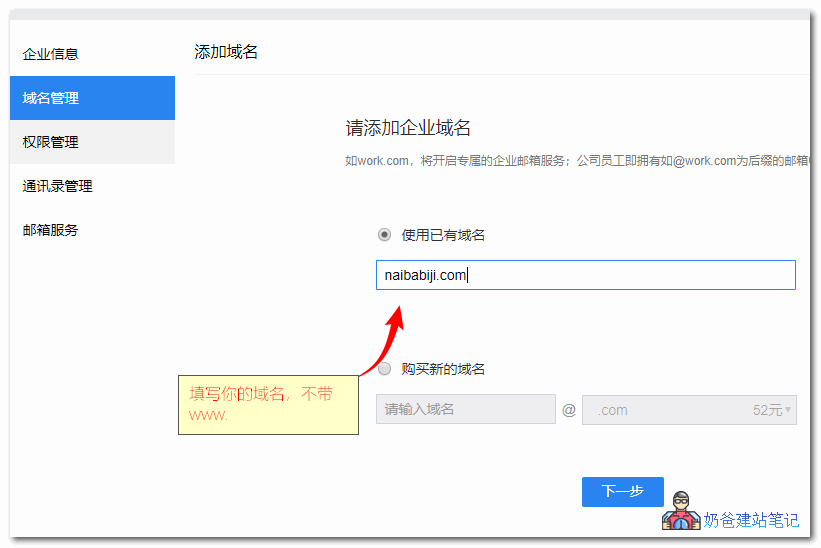
When adding the domain, enter your website's primary domain, which is the domain without 'www.'.
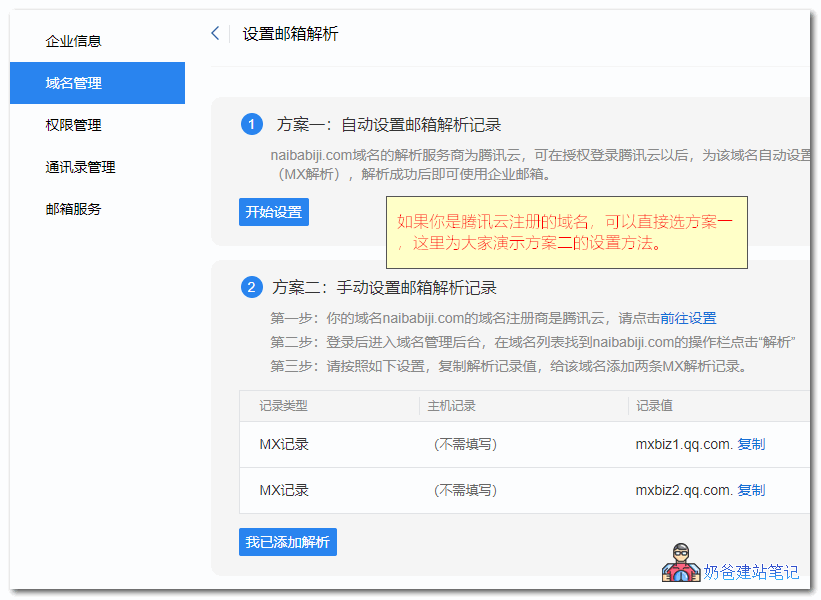
7. Set MX record.
If your domain is registered with Tencent Cloud, you can directly use Option 1.
If your domain is registered with another domain registrar, then use Method 2: manually add the resolution records.
If you are unsure how to manually add resolution records, you can refer to the following tutorials:
- Tutorial on how to purchase and configure DNS for a domain at the foreign domain registrar Dynadot
- Tutorial on building a website with Hawk Host and binding domain DNS
- Tutorial on DNS resolution for domains registered on Alibaba Cloud
- Tutorial on domain registration and DNS resolution on Tencent Cloud
- Tutorial on DNS resolution and DNS server modification for NameSilo domains
When adding, just select MX record as shown in the image below, and fill in the record value provided on the page.
Leave the host record blank by default; if it must be filled, enter the @ symbol.
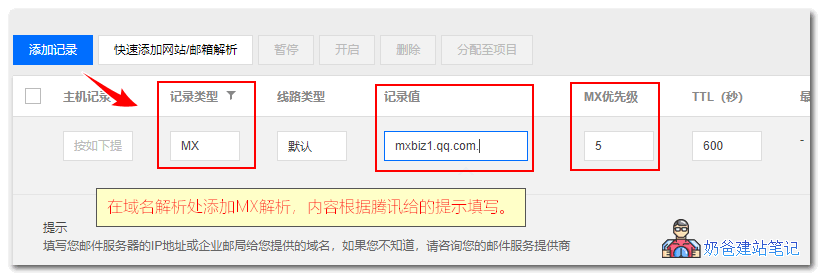
After adding, wait for the resolution to take effect.
(To improve delivery rate to other email addresses, it is recommended to also set an SPF record. Host@, and the valuev=spf1 include:http://spf.mail.qq.com ~all)
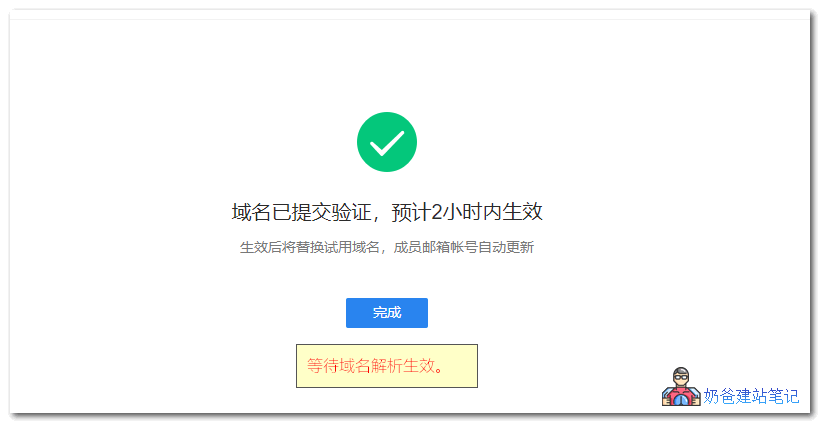
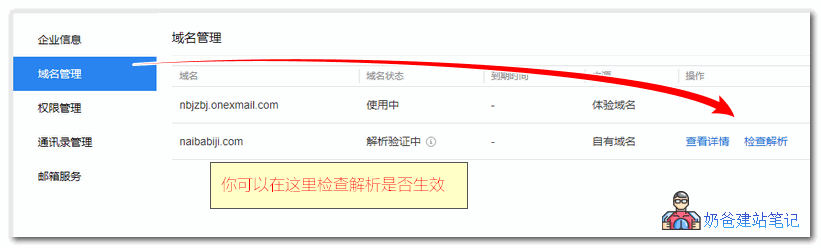
You can click the 'Check Resolution' button in the domain management interface. Once it takes effect, the corporate email is fully configured.
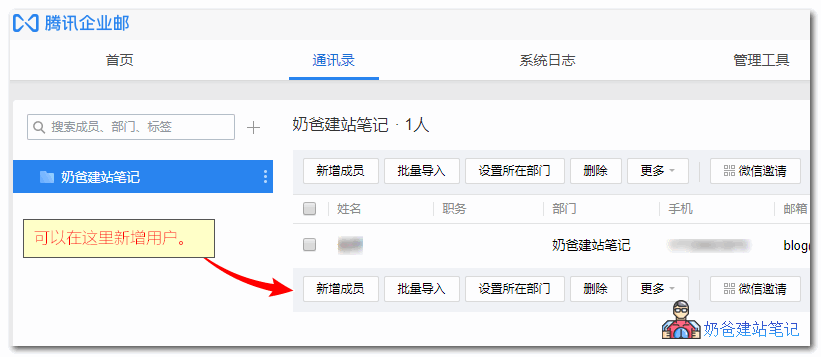
You can add other corporate email accounts in the address book.
Configuring Corporate Email SMTP for Sending
Next, let's set up how WordPress sends emails through the corporate email.
First, use your corporate email accountLog in to the enterprise email, select Settings, and then create a password.
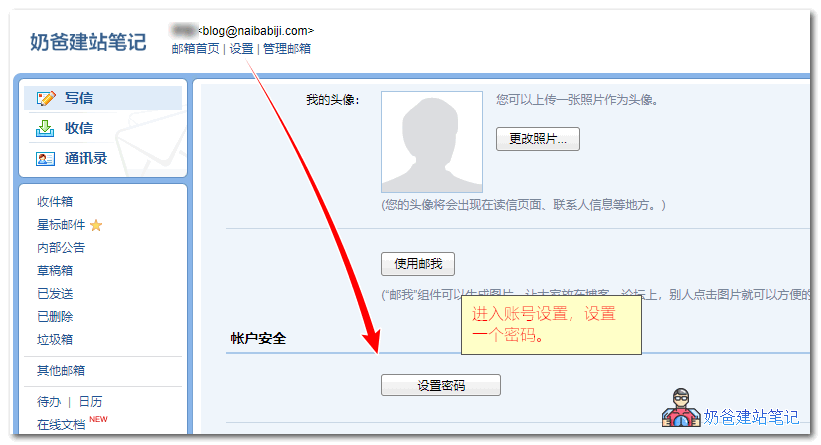
Then, install an SMTP plugin for the website. There are many SMTP plugins on WordPress. Naiba has used the following ones; you can install any of them.
On the SMTP settings interface, fill in the corresponding information as shown in the figure below:
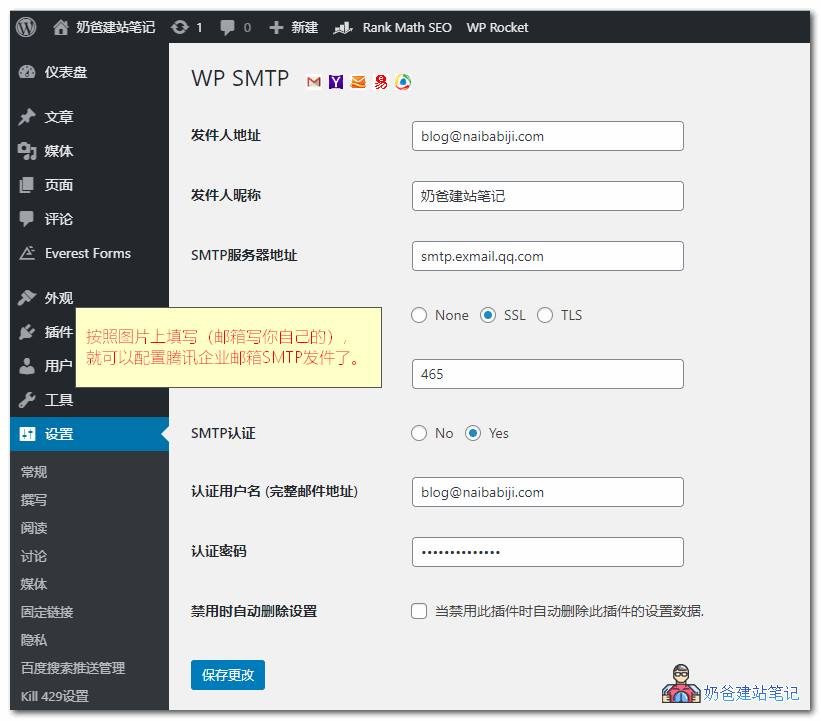
Attached are the official Tencent enterprise email POP3/SMTP and IMAP protocol parameters.
POP3/SMTP protocol
Incoming mail server: pop.exmail.qq.com, using SSL, port 995
Outgoing mail server: smtp.exmail.qq.com, using SSL, port 465
Overseas users can use the following servers
Incoming mail server: hwpop.exmail.qq.com, using SSL, port 995
Outgoing mail server: hwsmtp.exmail.qq.com, using SSL, port 465IMAP protocol
Incoming mail server: imap.exmail.qq.com, using SSL, port 993
Outgoing mail server: smtp.exmail.qq.com, using SSL, port 465
Overseas users can use the following servers
Incoming mail server: hwimap.exmail.qq.com, using SSL, port 993
Outgoing mail server: hwsmtp.exmail.qq.com, using SSL, port 465Account name: Your corporate email account name, the account name must be the full email address
Password: Your corporate email password
Email address: The full email address of your corporate email
After setting up, you can send a test email. If it is sent successfully, it means all settings are correctly configured.
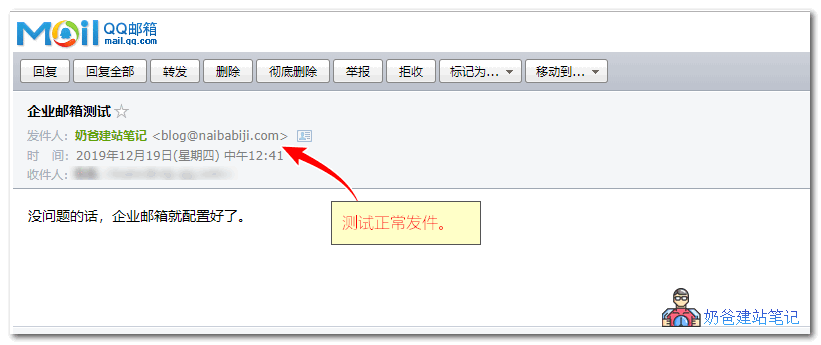
If sending fails, check three areas:
- Check if the account is filled in correctly and if the account has sending permissions (Tencent enterprise email has permissions enabled by default; you can also check in the permission settings).
- Check if the plugin configuration is correct and if the wrong email account and password are entered;
- Check the server firewall to see if port 465 is blocked; if so, open it.Baota Panel Firewall Open Port Tutorial