Sometimes website redesigns involve modifying a large number of posts, and manual operation is too time-consuming. Therefore, Naibabiji shares methods for WordPressBulk Delete Posts in Categories、Clear Post Featured Images, Replace Content和Modify Post Publishing Statusmethods.
Please note that the method shared in this article involves database operations; please back up first.
- Tutorial on Automatically Backing Up Websites and Databases to FTP Storage Space with Baota Panel
- SiteGround Virtual Host Manual Website and Database Backup Tutorial Using cPanel
- Automatically backup WordPress websites using plugins
Bulk Delete Posts Under a Category
1. Use phpMyAdmin to log in to your database backend and switch to your website's database.
2. Click SQL, copy the database command, and execute it.
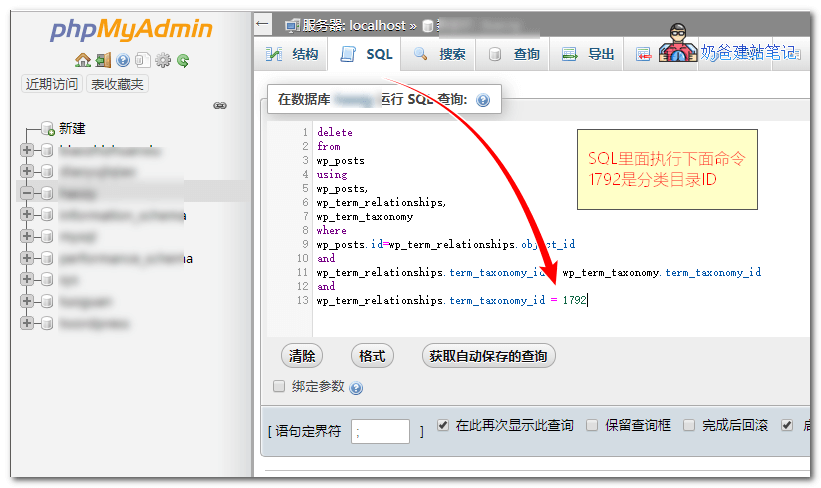
The database command is as follows. The final 1792 represents the category ID you want to delete. You can determine the ID by hovering over the category in the URL.
delete
from
wp_posts
using
wp_posts,
wp_term_relationships,
wp_term_taxonomy
where
wp_posts.id=wp_term_relationships.object_id
and
wp_term_relationships.term_taxonomy_id = wp_term_taxonomy.term_taxonomy_id
and
wp_term_relationships.term_taxonomy_id = 1792
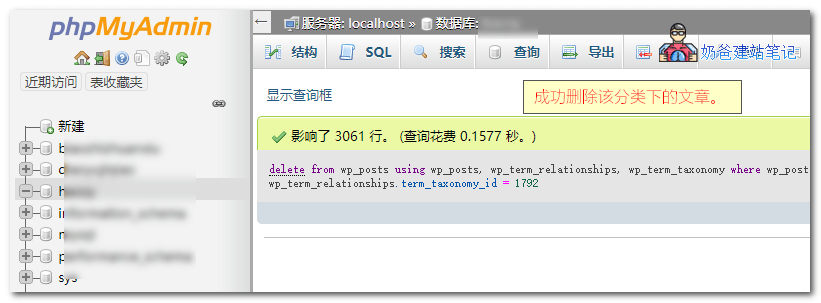
After execution, the result will be displayed, as shown in the figure below:
Bulk Replace Content and URLs
If your website has changed its domain name or name, then the URLs and names inserted in your previous articles need to be modified. Manually modifying them is too troublesome; just use a plugin with a graphical interface, which is very simple.
If you want to use a database command for replacement, use the following statement.
UPDATE wp_posts SET post_content = REPLACE(post_content, '原内容' , '替换为的内容');
Bulk Clear Featured Images
If some of your articles have featured images set while others do not, and after switching to a new theme, the featured images look ugly, you can use the following command to batch delete article featured image data (this will not delete the featured image files).
Related articles on WordPress featured images:
- WordPress Random Featured Image Plugin: Random Post Thumbnails
- 4 Methods to Delete WordPress Thumbnails_Batch Cleanup of Unnecessary Images
Insert the following code into the theme's functions.php file,Safe Method to Add Code to the functions.php File: Code Snippets
global $wpdb;
$wpdb->query( "
DELETE FROM $wpdb->postmeta
WHERE meta_key = '_thumbnail_id'
" );
After adding, visit the website and you will find that all article featured images have been cleared.Then delete the above code, otherwise you will never be able to add featured images.
Bulk Modify Post Publishing Status
WordPress article statuses include: Draft 'draft', Published 'publish', Pending Review 'pending'
We can use the following command to batch change article statuses.
UPDATE `wp_posts` SET `post_status` ='draft' WHERE (`post_status`='publish');
The above code means changing the post_status value in the wp_posts table to draft, which is the draft status. Which files to modify are determined by the post_status value being publish; only those that are publish (published) will be changed to draft.
Clear Media Library Database
If you need to clear WordPress media library information, you can execute the following commands in the database.
DELETE from wp_posts where post_type = 'attachment'
The above command can delete all media library information. If you want to query media library information, use the following command.
Select * from wp_posts where post_type = 'attachment';
After clearing the media database, how to delete the connection between media files and articles? Use the following command.
DELETE FROM `wp_postmeta` WHERE meta_key IN ('_wp_attached_file', '_wp_attachment_backup_sizes', '_wp_attachment_metadata', '_thumbnail_id')If you only want to query the association between the media library and articles, then use the following command.
SELECT * FROM `wp_postmeta` WHERE meta_key IN ('_wp_attached_file', '_wp_attachment_backup_sizes', '_wp_attachment_metadata', '_thumbnail_id')The above introducesWordPress batch delete category articles, clear featured images, modify article status methods. If you have other batch processing methods, feel free to share and discuss.