
When Naiba teaches everyone toBuilding a Foreign Trade Independent WebsiteIt was mentioned when building a foreign trade website that it is recommended to enable WordPress„s “Discourage search engines from indexing this site„ function for a new website initially, and then enable indexing after the website is completed and launched. If this is not done, it is highly likely that some test pages or already invalid pages will be indexed by search engines before your website is fully ready, which is not friendly towebsite SEO.
So, in case Google has already indexed some invalid pages, how can you manually request Google to remove them? The method is as follows:
1. Register a Google Search Console account.
Google Search Console is an essential tool for Google SEO. You only need a Google account to log in, then verify your website, and you can view various data about your site on Google from Google Search Console, including deleting website links.
For the registration and usage of Google Search Console, please refer to the previously published article:Google Search Console Tutorial_How to Use Google Search Console
2. Submit a removal request in Google Search Console.
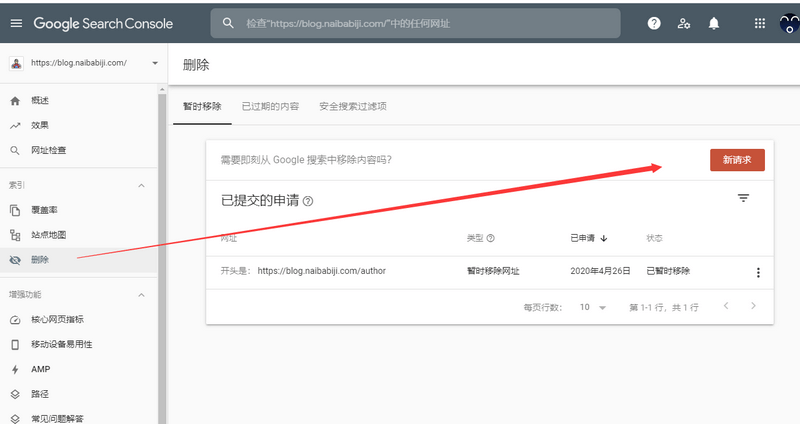 3. Enter the webpage links you need to remove.
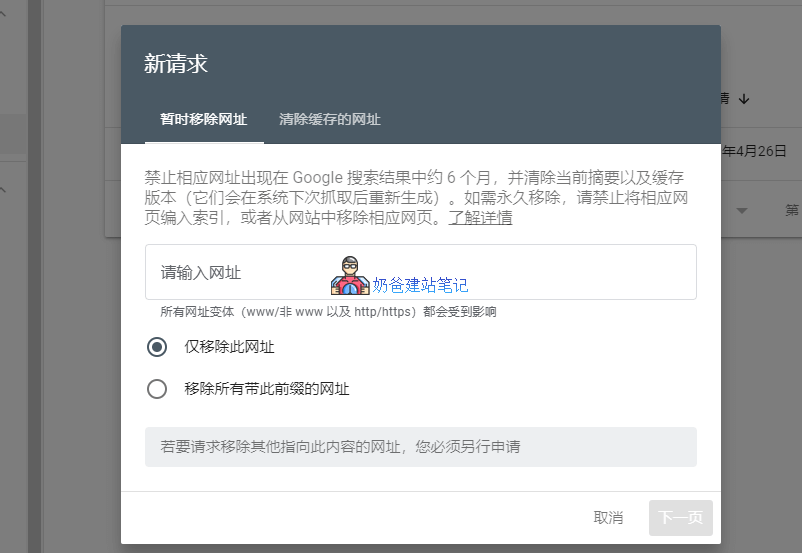
There are two options for submitting links: one is to temporarily remove the URL, and the other is to clear the cached URL.
- Temporarily remove URL: Prevents the corresponding URL from appearing in Google search results for about 6 months, and clears the current snippet and cached version (they will be regenerated after the next crawl). For permanent removal, prevent the page from being indexed or remove the page from the website.
- Clear cached URL: For the URL fragment entered below, keep its various variant forms in Google search results, only clear itself and the corresponding cached version until the system performs the next crawl.
How to block Google from crawling specific webpages and directories?
If you want to prevent Google or other search engines from crawling specific pages or directories on your site, how do you do it?
Here Naiba introduces two methods:
Method 1: Use SEO plugins. Almost every SEO plugin can set whether a page is allowed to be crawled. (Advanced WordPress SEO Plugin Rank Math Usage Tutorial (Latest 2020) )
Method 2: Use the robots.txt file to block. (What is robots.txt? The Correct WordPress robots.txt Writing Method and Generation Tool )