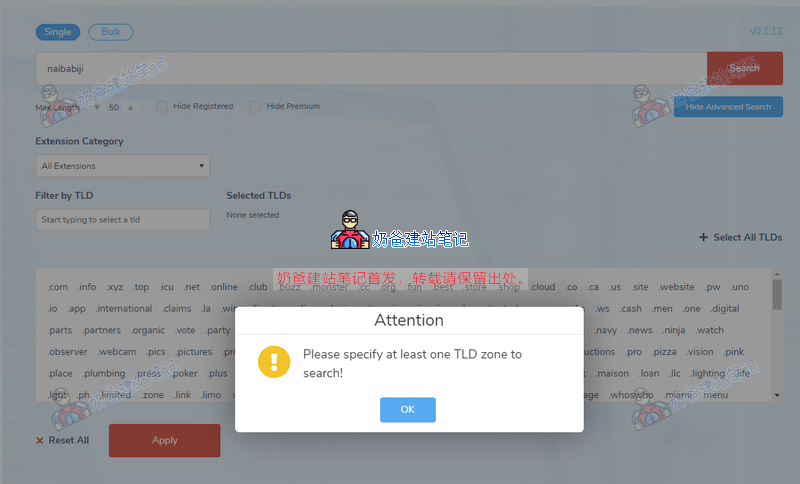
NameSilo Register Domain Prompt: Please specify at least one TLD zone to search!
A foreign trade user was preparing to register a domain on Namesilo to build a website when the prompt "Please specify at least one TLD zone to search!" appeared, as shown below: The reason for this issue is that you did not select which domain suffixes to search. You just need to add a few suffixes yourself...
Published onRecently Updated
About 1 minute read
Page Operations
Due to browser security restrictions, the webpage cannot directly add bookmarks for you. You can manually bookmark the current page using the following methods:
Windows / Linux: Press Ctrl + D.
macOS: Press Command + D.
Mobile browser: Open the browser menu and select „Bookmark“, „Add Bookmark“, or „Add to Home Screen“.
Open WeChat, scan the QR code to view the current page.
When a foreign trade user was preparing to register a domain on NameSilo to build a website, they were prompted: Please specify at least one TLD zone to search!, as shown in the image below:
The reason for this issue is that you did not select which domain suffixes to search for. You just need to add a few suffixes yourself to proceed with a normal search. As shown in the image below:
Since 2009, I have been using WordPress long-term, focusing on VPS, server maintenance, theme and plugin selection, Google SEO, and building foreign trade independent websites. The tutorials on this site are mainly derived from real-world experience in website building, migration, troubleshooting, and long-term maintenance.

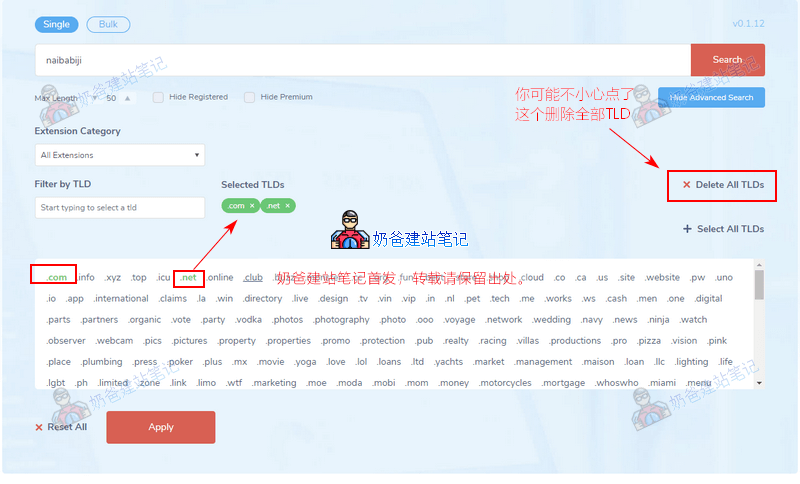 After adding, you can search normally.