
The one shared by Naiba in this articleWordPress Pluginis a small widget that allows you to like or vote for website articles, called Lotos Likes, which is a free WordPress plugin.
How to Use
1. Download the plugin and upload it to the WordPress website root directory via FTP, or you can directly search for Lotos Likes in the backend to install it.
2. Log in to WordPress and enable the plugin on the Plugins page.
3. Go to the Lotos Likes settings page and specify the WordPress page to enable the like icon. As shown below:
If you check Auto Display, the heart icon will automatically appear on the selected post type articles.
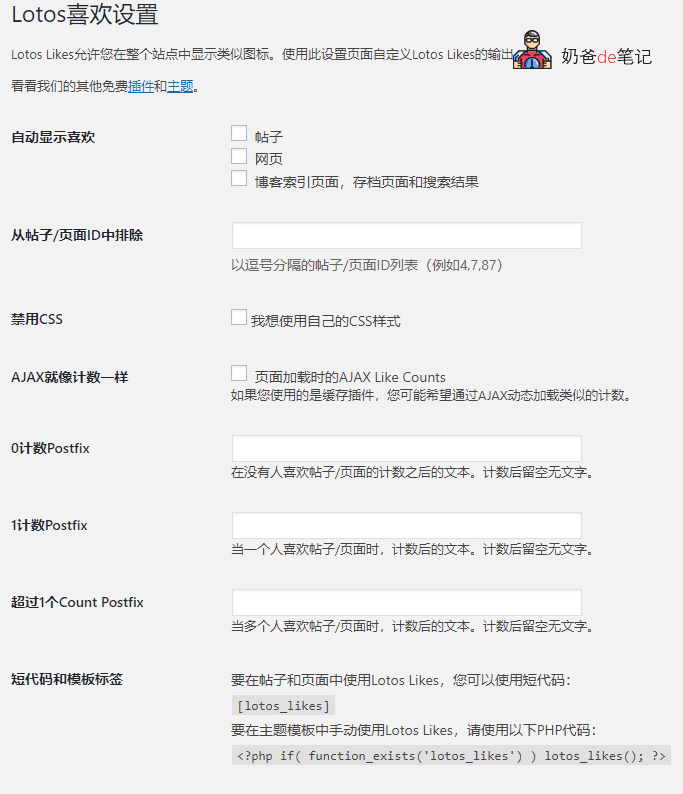
5. To use Lotos Likes in posts and pages, you can use the shortcode:
[lotos_likes]
6. To manually use Lotos Likes in theme templates, use the following PHP code:
<?php if( function_exists('lotos_likes') ) lotos_likes(); ?>Effect Demo
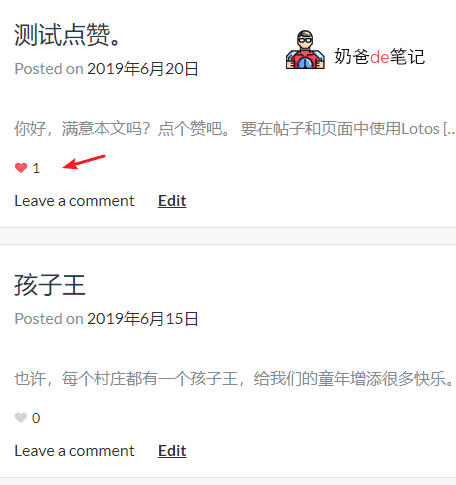
The effect shown in the figure below is the result of checking the automatic display in posts. If you want to add a small heart like button on your website for people to like, you can install thisLotos Likes plugin.
 Want to learn about other articles on this site?
How to Build a Website on Tencent Cloud_Steps to Build a Website on Tencent Cloud