
WordPress Chinese themeThere are relatively few, and even fewer free Chinese original themes. The theme shared in this article, named smarty_hankin, is a free original WordPress theme in Chinese.
The smarty_hankin style is relatively simple, but from the appearance, it reminds people of theTypechoprogram, while in fact it is WordPress.

Theme introduction and demo
An open-source WordPress theme smarty_hankin theme
- PJAX no-refresh experience
- 12 color schemes, 5 layouts, supports dark mode
- Sidebar widgets, music player, built-in Mac interface code highlighting with line numbers,
- Powerful backend settings
- Rich custom pages
- And more…
Theme download and installation
smarty_hankin is an open-source theme, so you only need to download the source code and upload it to the WordPress backend for installation.
Github download Gitee download
After downloading, first unzip it, then rename the folder to smarty_hankin and compress it into smarty_hankin.zip, then you can upload and install it directly from the WP backend.
Related Tutorials:2019 WordPress Theme Installation Tutorial and Download Address Recommendations
Theme settings
The smarty_hankin backend includes a theme settings menu, which can be seen in the left menu bar after installation. The supported settings are as follows:
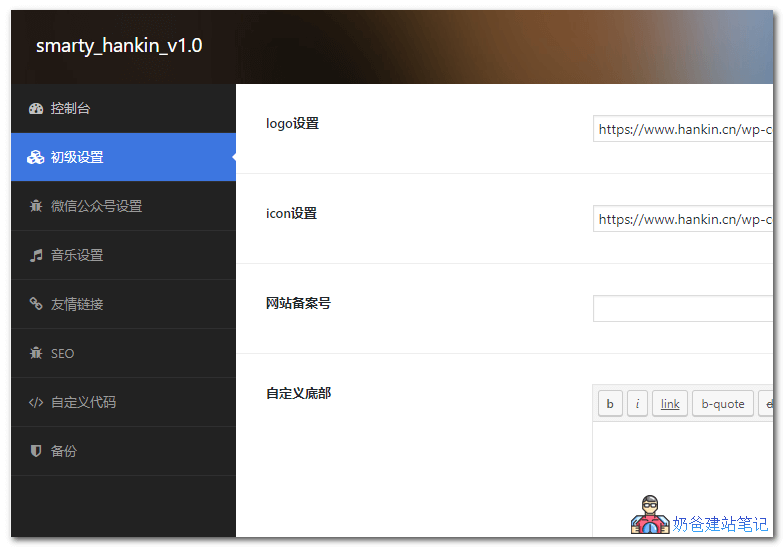
You can directly perform the following settings within the settings:
- Upload LOGO and icon images
- Set the filing number
- Custom footer code
- Add website announcements
- Set introduction content
- Custom social links
- Integrate with WeChat Official Account development
- Set up a music player
- Add friendly links
- Set website SEO information
- Custom CSS, JS, and tracking codes
smarty_hankin includes two menu display positions: the left-side menu and the top menu. After enabling the theme, you need to set the corresponding menu content yourself.
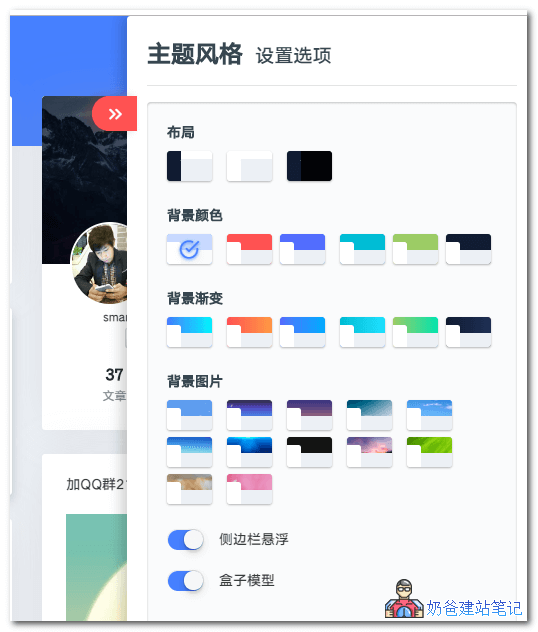
To switch styles, click the arrow icon in the upper right corner of the front page to pop up.
The above isNaibabijithe notes shared onWordPress Chinese Free Theme smarty_hankin. If you like it, go ahead and download and install it.