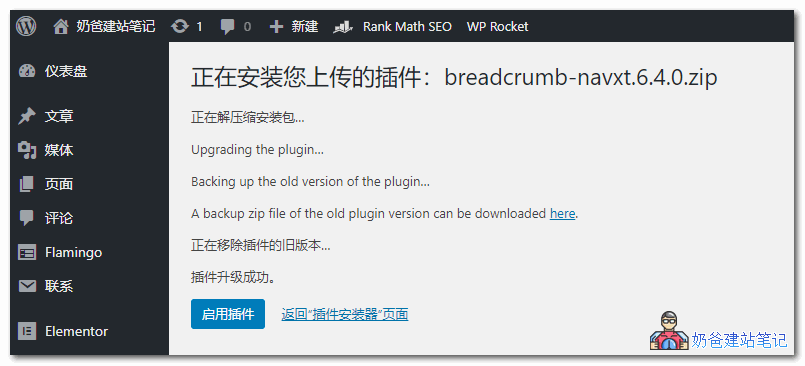
After uploading the new version of the plugin, it will automatically back up the old version of the plugin, then install the new one. If there are no issues, it will delete the old version and activate the new version of the plugin, which is very simple. Therefore, if we want to manually update WordPress plugins, we just need to use a browser proxy to access the WordPress website to download the latest installation package, and then upload it from the admin dashboard to update. It's quite simple, isn't it?Download LinkThe Easiest Method for Manually Upgrading WordPress Themes and Plugins – Easy Theme and Plugin Upgrades
The situation where the official WordPress website cannot be accessed normally in China has persisted for a long time. Our webmaster friends who use domestic serversInstalling a WordPress Websitewill encounter the issue of theme and plugin upgrades reporting429 error. If a domestic server prompts a 429 error when upgrading WP themes and plugins, there are several methods: 1. Use reverse proxy plugins shared by others, such askill 4292. Manual Update However, conventional manual updates are quite cumbersome, involving downloading, uploading, and deleting old versions of deactivated plugins, among other operations. Today, I recommend a method that allows you to update plugins and themes directly by uploading them through the WordPress admin dashboard. That isInstall the plugin named Easy Theme and Plugin Upgrades。 Note: Starting from WordPress version 5.5, similar functionality has been built-in, so there is no need to install Easy Theme and Plugin Upgrades anymore.As the name suggests, the purpose of this plugin is to make upgrading themes and plugins easy. How does it make it easy? You simply need to upload the new version of the plugin or theme installation package from the WordPress admin dashboard, and it will automatically upgrade to the latest version for you. Without this plugin, if we upload directly, it will prompt that the directory already exists. However, with Easy Theme and Plugin Upgrades, this situation is avoided, as shown in the figure below:
After uploading the new version of the plugin, it will automatically back up the old version of the plugin, then install the new one. If there are no issues, it will delete the old version and activate the new version of the plugin, which is very simple. Therefore, if we want to manually update WordPress plugins, we just need to use a browser proxy to access the WordPress website to download the latest installation package, and then upload it from the admin dashboard to update. It's quite simple, isn't it?Download Link
After uploading the new version of the plugin, it will automatically back up the old version of the plugin, then install the new one. If there are no issues, it will delete the old version and activate the new version of the plugin, which is very simple. Therefore, if we want to manually update WordPress plugins, we just need to use a browser proxy to access the WordPress website to download the latest installation package, and then upload it from the admin dashboard to update. It's quite simple, isn't it?Download Link🚀 Still feeling confused after reading the tutorial? Let me guide you step-by-step.
「Naibabiji WordPress Website Building Coaching Service」—From choosing a domain and buying hosting, to installing a Theme and publishing content, I「ll coach you through every step, helping you avoid detours and reach your goal directly.
👉 Learn about the Website Building Coaching Service
Comments are closed
The comment function for this article is closed. If you have any questions, please feel free to contact us through other channels.