Normally, when doing Google SEO, we hope that search engine spiders will crawl and fetch content on our website every day. However, if your server has resource limitations, Google spiders crawling your site too frequently may exhaust server resources or cause the site to load slowly.
In this case, we can consider appropriately reducing the crawl rate of search engines to ensure that the website can be accessed normally and not be brought down by spiders.
Set Googlebot's Crawl Rate
Google uses advanced algorithms to determine the optimal crawl rate for a website. Each time Google's search spider visits your site, it crawls as many pages as possible without overloading your server bandwidth.
If Google sends too many requests per second to your site, causing your server to slow down, you can limit the rate at which Google crawls your site.
You can limit the crawl rate for root-level sites (e.g., www.example.com and http://subdomain.example.com). The crawl rate you set is the upper limit for Googlebot's crawl rate. Note that Googlebot may not necessarily reach this limit.
Unless you find that your server is experiencing load issues and determine that the problem is caused by Googlebot accessing your server too frequently, we recommend that you do not limit the crawl rate.
You cannot change the crawl rate for non-root-level sites (e.g., www.example.com/folder).
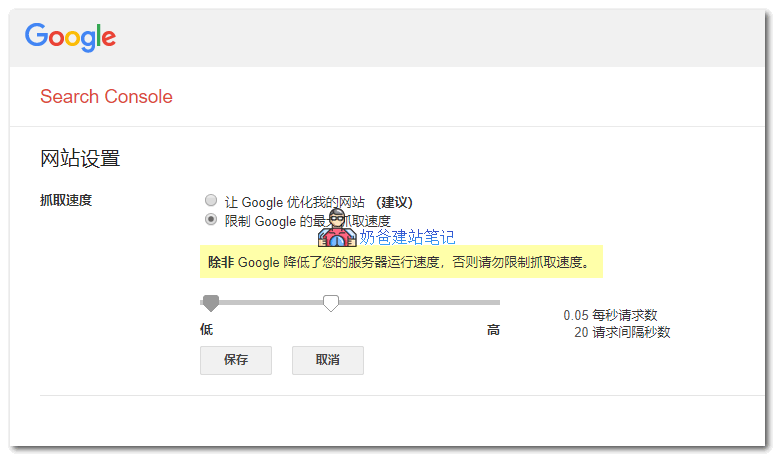
Specific Limitation Method:
Open the resource's„Crawl Rate Settings“ page。
- If the crawl rate is „Calculated optimal rate“, the only way to reduce the crawl rate is tosubmit a special request. You cannot increase the crawl rate.
- Otherwise, select the corresponding option and limit the crawl rate as needed. The new crawl rate is valid for 90 days.
Set Crawl Rate for All Search Spiders
In addition to individual settings, you can also use therobots.txt fileUse the Crawl-delay directive to set the crawl frequency for search engines.
Most search engines supportCrawl-delayparameter, which sets how many seconds to wait between consecutive requests to the same server:
User-agent: *
Crawl-delay: 10
You just need to add the above code to your website's robots.txt file, and wait for the search engine spiders to crawl and recognize it.
Although it is rare for spiders to bring down a website, it does happen. For ordinary foreign trade enterprise websites that do not have much content, there is no need for spiders to frequently crawl resources 24 hours a day. After all, if the website speed is slowed down, it will affect both SEO and user experience.
So when you find that your website is being crawled frantically by spiders, you can consider doing this.
Related articles: