
Home Astra Theme Tutorial Standard Post

Standard Post

Tutorial on Adding a Back to Top Button in Astra Theme

When using the Astra theme to build a website, how do you add a back-to-top button? Adding a back-to-top button for the Astra theme is very simple; you just need to set it in the customizer. The specific method is as follows: 1. Go to the Astra theme options and activate the scroll-to-top feature. 2. Enter the theme customizer interface, section...

Posted on January 16, 2020 About 1 minute read
Astra主题添加回到顶部按钮教程

When using the Astra theme to build a website, how do you add a back-to-top button? Adding a back-to-top button for the Astra theme is very simple; you just need to set it in the customizer.

The specific steps are as follows:

1. Go to the Astra theme options and activate the scroll-to-top feature.
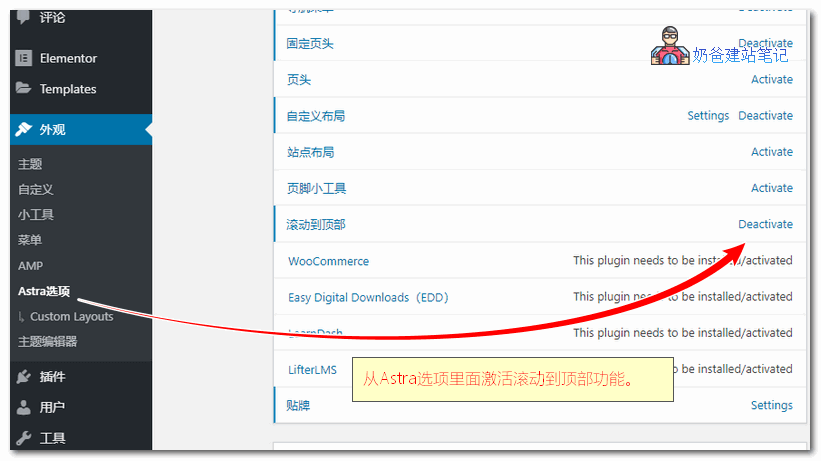
激活滚动到顶部功能

2. Enter the Theme customization interface, select Global, then Scroll To Top, and set the display position and color.
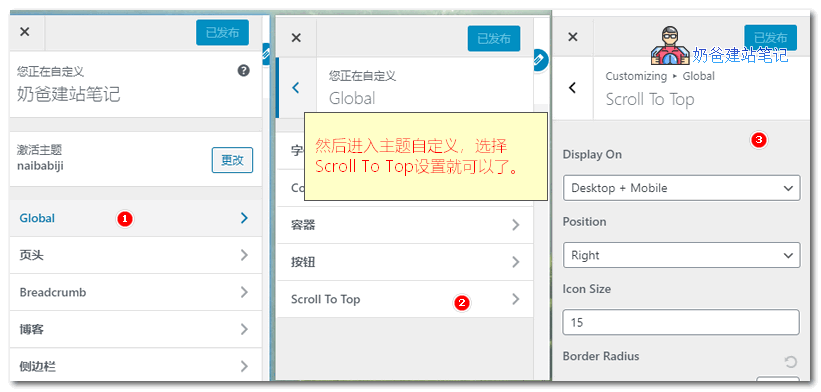
主题自定义设置

Note that this feature requiresAstra Proto work. If you are using the free version, you can refer to the previously publishedMethods to add a to top button using plugins and code

1.9/5 - (7 votes)
Previous WooCommerce Tutorial: Adding Variable Products with Optional Color Packages (Variable/Variation Products) Continue reading content around the same timeline. Next Display Site Icon in Google Search to Enhance Website Image View the next related tutorial or experience.

AI Website Building Assistant

🤖
Hello! I am the Naibabiji AI Assistant. How can I help you?
Quick Consultation: