
The situation where the official WordPress website cannot be accessed normally in China has persisted for a long time. Our webmaster friends who use domestic serversInstalling a WordPress Websitewill encounter the issue of theme and plugin upgrades reporting429 errorthe situation.
If upgrading WP themes and plugins on a domestic server prompts a 429 error, there are several methods:
1. Use a reverse proxy plugin shared by others, for examplekill 429
2. Manual update
However, conventional manual updates are cumbersome, requiring download, upload, and deleting old versions of deactivated plugins.
Today I recommend a method that allows you to update plugins and themes directly through the WordPress backend upload.
That is,Install the plugin named Easy Theme and Plugin Upgrades。
Note: Starting from WordPress version 5.5, similar functionality has been built-in, so there is no need to install Easy Theme and Plugin Upgrades anymore.
As the name suggests, this plugin makes updating themes and plugins easy. How easy?
You just need to upload the new version of the plugin or theme installation package from the WordPress backend, and it will automatically upgrade to the latest version.
Without this plugin, uploading directly would prompt that the directory already exists. Easy Theme and Plugin Upgrades avoids this situation, as shown below:
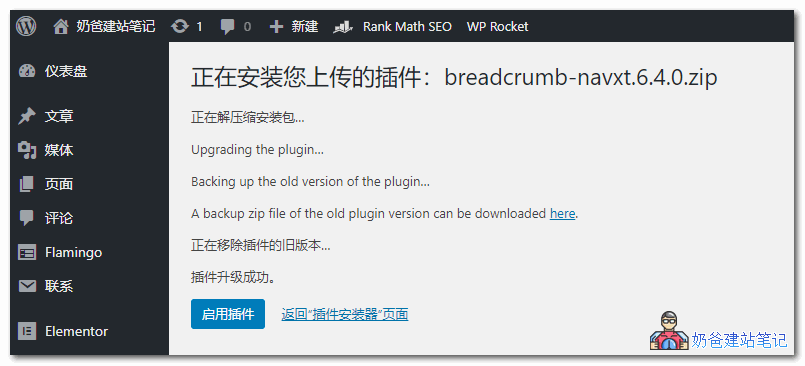
After uploading the new version of the plugin, the old version is automatically backed up, then the new one is installed. If there are no issues, the old version is deleted and the new version is activated. It's very simple.
So, to manually update a WordPress plugin, you just need to use a browser proxy to access the WordPress site, download the latest package, and then upload it from the backend to update. It's quite simple, right?