Selecting and installing a WordPress Theme is one of the important steps in creating and managing a WordPress website. In this process, users need to choose a Theme suitable for their website and proceed with installation and configuration. The WordPress ecosystem is well-developed, offering many free and paid Themes for everyone to choose and use. However, finding the right Theme for oneself is not easy, especially for beginners. Choosing the wrong Theme can lead to significant difficulties later in website building.
Understanding Theme Types and Characteristics
Before selecting a Theme, users need to understand the different types of Themes and their characteristics. WordPress Themes are generally divided into two types: free Themes and paid Themes. Free Themes typically offer basic features and functionalities, while paid Themes usually provide more features and functionalities, along with better technical support and update services.
Users can browse and select Themes through the official WordPress Theme directory or third-party Theme marketplaces. When choosing a Theme, users need to consider their website's type, style, and functional requirements, and select a Theme that fits their website.
Chinese Themes and Foreign Themes
The domestic WordPress community is no longer as active as it once was. Currently, there are relatively few companies or individuals in China developing WordPress Themes. Naiba knows that the only one still operating and developing as a company isLightning Blog. Almost all others are small teams or individual authors (Naiba has also developed a Theme suitable for beginnersLinghang Theme).
Domestic Themes are usually faster because domestic servers cannot use some foreign resources. Domestic Theme developers take national conditions into account and make corresponding optimizations for speed.
Compared to domestic Themes, there are more foreign Themes, and they are more design-oriented. If you plan to build a foreign trade website, naturally choosing a foreign Theme better aligns with the aesthetics and habits of foreigners.
Foreign Themes usually support page builders for DIY page design. However, without a certain level of aesthetic sense and proficiency with the builder, the results may not be ideal. The learning curve is higher compared to domestic Themes.
Where to find themes?
Free Theme
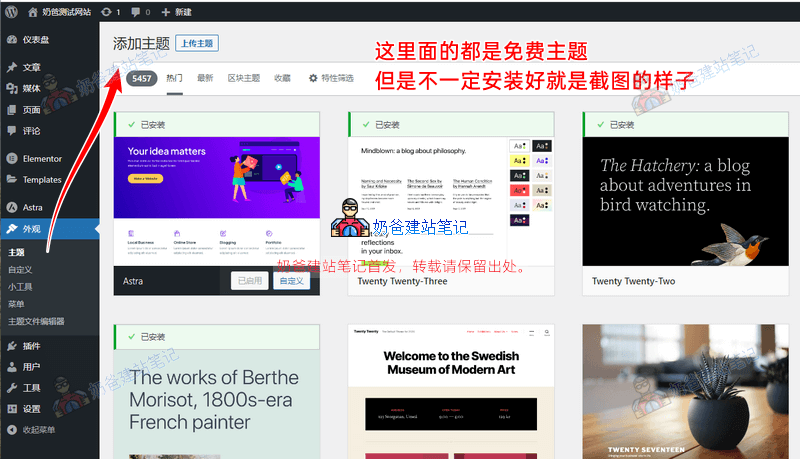
Users can download and install Themes through the Appearance function in the WordPress Admin Dashboard. In the Appearance function, users can select the „Add New Theme“ option, then search for or upload their own Theme files for installation.
These Themes in the WordPress Admin Dashboard can be installed for free. However, some Themes also have premium versions that require additional payment to use.
At the same time, some Themes require additional configuration after installation to achieve the same interface as shown in the screenshots.
Besides finding free Themes within the Themes section of the WordPress Admin Dashboard, you can also use search engines to find them online. However, Themes provided by unknown websites may pose risks, so caution is advised.
Paid Theme
Paid Themes fall into two scenarios: one is being listed on a paid Theme marketplace, and the other is selling on one's own website. This is similar to the difference between being listed on Alibaba and having an independent website in the foreign trade industry.
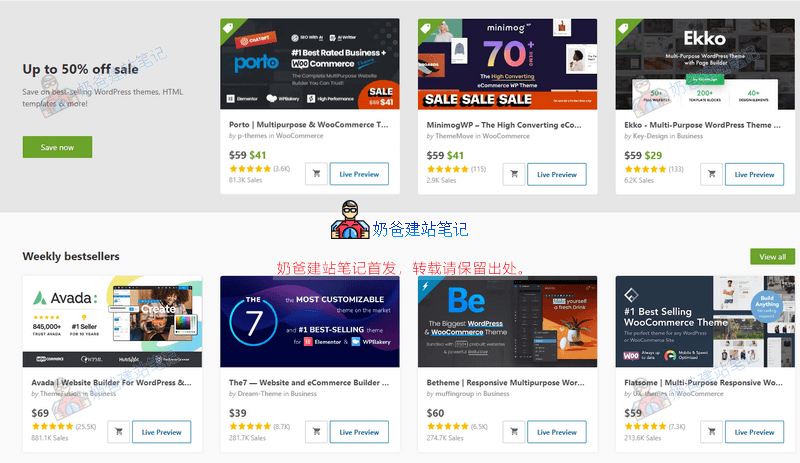
Themeforest is currently the largest WordPress paid Theme marketplace, offering many excellent Themes for sale. Prices are typically around $59. A Theme is a one-time purchase for lifetime use, although most Themes provide only 6 months of after-sales support. If continued after-sales service is needed, a renewal fee is required.
Related articles:Tutorial on Purchasing Premium WordPress Themes from Themeforest with Screenshots、Tutorial for Activating Premium Theme Keys Purchased from Themeforest
Another type is Themes sold on their own official websites, for example:Astra、Divi、Oceanwp、Blocksy、Kadencewpetc.
Naiba has purchased Astra and Blocksy. If needed, you canpurchase at a low price. As for Divi, it might seem good-looking, but beginners may not find it easy to handle. Caution is advised when considering it.
Choosing a Theme that Supports Which Builder
Choosing a Theme that supports which builder is a very important matter for beginners. Naiba recommends selecting a Theme that supports Elementor, as the learning curve for beginners is relatively low compared to other builders. Refer toElementor Tutorial。
Of course, if you are proficient in using Elementor, you don't need to purchase a paid Theme. A free Theme combined with Elementor or Elementor Pro can also build a great website.
If beginners are reluctant to spend money on a paid Theme, they can start by practicing with a combination of a free Theme and the free version of Elementor. If you find designing by yourself too difficult, it's more convenient to choose a good paid Theme, import its demo, and then modify it.
How to install a WordPress theme
The method to install a WordPress Theme is very simple. Log in to the WordPress Admin Dashboard, switch to the Theme menu, and select Add Theme.
For a free Theme, directly use the search Theme function to find the free Theme you wish to install, then click the Install button, and activate it after installation is complete.
For a paid Theme, first purchase the paid Theme to obtain a compressed package. Find the Theme compressed file within that package, then go to WordPress Admin Dashboard > Themes > Install Theme > Upload Theme. Upload the Theme compressed file to install and activate it.
Besides this method, you can also upload the Theme files directly to the corresponding folder on the server via File Manager or FTP. However, this method is too troublesome and is hardly used nowadays.
It's important to note here that after installing the Theme, its appearance may not match the demo you saw. This is because you haven't imported the Theme's Demo file. It will only look like the demo effect after importing the Demo data according to the Theme tutorial. Import methods vary for different Themes, so you need to refer to the Theme documentation. If you really don't know how to import, you cancontact Naiba for paid assistance。
Custom Theme
Customizing a Theme, which can also be called designing a Theme, allows users to further adjust and optimize the Theme through custom settings. For example, the Astra Theme allows you to easily modify the entire website's background, fonts, colors, spacing, and other elements.
You can also design a Theme yourself. Most of these paid Themes are designed to be used with page builder Plugins, so to design pages, you also need to master a page builder Plugin.
For beginners, it's much easier to directly find a suitable demo from the Theme's demos, import it into your website, and then replace and modify the text and image content of the demo, compared to designing pages yourself.
For example, the entire Naibabiji website uses the Astra Theme, but you won't find the exact same appearance in the Astra Theme demo library. This is because it was DIY designed by Naiba. You can also design your own once you become familiar with it.
In summary, selecting and installing a Theme is one of the important steps in creating and managing a WordPress website. Users need to choose a Theme suitable for their website, and perform installation, activation, and setup to achieve their website's design and functional requirements.