🚀 Is building a website too difficult? Let me guide you step by step—Learn about the 「Naibabiji WordPress Website Building Coaching Service」 →

Tutorial for Activating Themeforest Premium Theme License Key

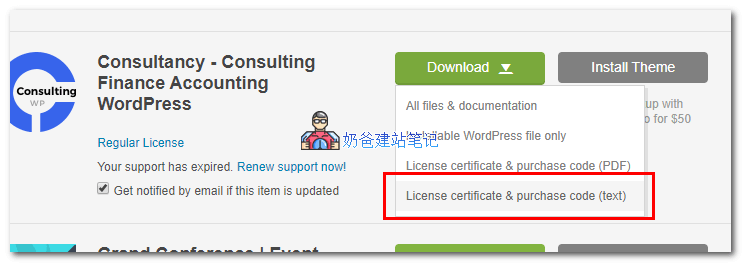
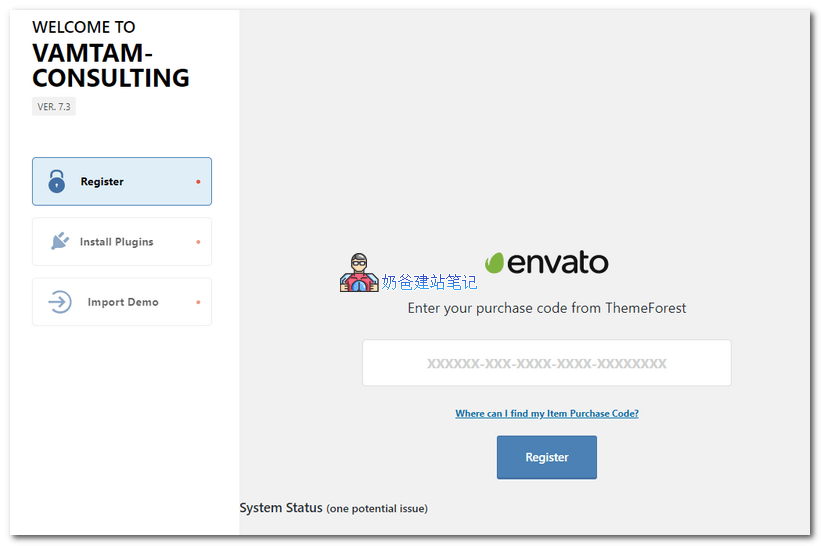
WhenThemeforest WebsiteSome paid WordPress themes purchased on Themeforest can be installed and used directly, while others require entering a verification key. So, where do you find this activation code information? The method is as follows: 1. In your Themeforest download list, click on the theme you purchased, then select „License certificate & purchase codethemeforest下载2. After downloading, open the text file and locate theItem Purchase Codeinformation. 3. Enter it into the theme's activation code field and save.wordpress主题激活After clicking Register, you will be prompted that activation was successful, and then you can use all the features of this theme.

🚀 Still feeling confused after reading the tutorial? Let me guide you step-by-step instead.

「Naibabiji WordPress Website Building Coaching」 — From selecting a domain and purchasing hosting to installing themes and publishing posts, I「ll guide you through every step, helping you avoid detours and reach your goals directly.

👉 Learn about Website Building Coaching Service
🔒

Comments are closed

The comment function for this article is closed. If you have any questions, please feel free to contact us through other channels.

×
二维码

Scan to Follow