
WeAfter building a website using WordPressAfter that, you will inevitably need to publish articles. Before publishing articles, you need to understand a few basic concepts: categories, tags, pages, and topics.
Below, Naiba will introduce these terms and their specific roles.
Terminology Explanation
Categories, tags, and pages are default features of WordPress.
Topics are not a default feature of WordPress, but you can implement them through plugins, modifying code, or using pages.
Categories
A simple example: categories are the classifications of your articles, such as Naibabiji'sWebsite Building Knowledge、Google SEOIt is a category.
The purpose of categories is to organize your articles, for example, technical logs, software downloads.
Categories are added under the Posts menu in the backend. The default Uncategorized category cannot be deleted, but you can edit it and change its name.
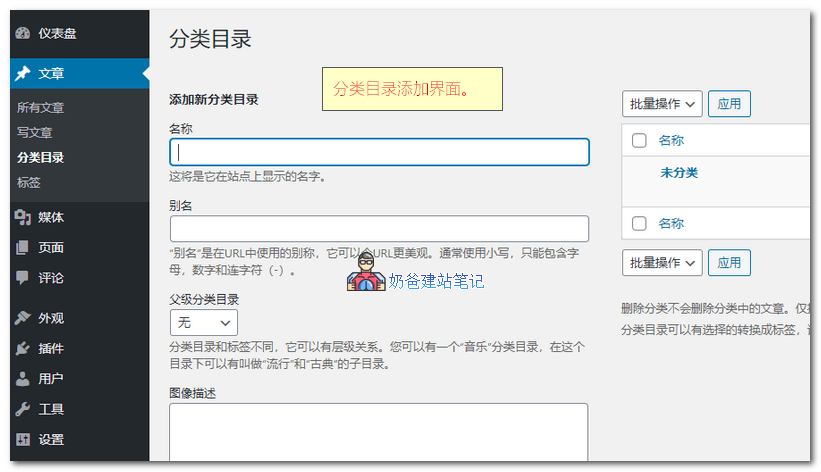
It is recommended to use English or pinyin for category slugs, not Chinese, otherwise the URL will look messy.
After adding article categories, you can select a category when publishing articles in the WordPress backend, as shown below:
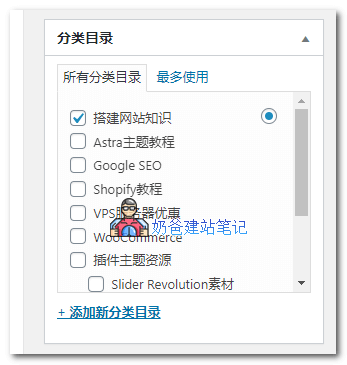
If you are using the Gutenberg editor, the interface is different from the image above, but it is still on the right sidebar; just look for it.
If no category is selected, the article will be classified under the default Uncategorized.
Tags
Tags: Everyone has a different understanding of tags. Their main function is similar to categories, but they connect articles through tags. An example might help you understand.
For example, two articles were published:
- 3 Methods to Exclude Specific Category Articles from Displaying on the WordPress Homepage(Published under the Experience & Tips category)
- WordPress New Version Chinese Simplified Local Download_Installation Package Program(Published under the Resources category)
However, both articles actually discuss WordPress, so both articles can be tagged with 'WordPress'. Then, all content related to WordPress can be aggregated together through tags, achieving an effect similar to categories. Demonstration:WordPress(Naibabiji initially used tags, but later hid and abandoned them. It's not that using tags is bad, but rather an issue with the website's planning.)
Pages
Pages are generally used for relatively independent content, such as About and Service pages.Naiba Foreign Trade Website Building ServiceIt uses pages.
Content published on pages does not appear in the list of latest articles on the website.
Series
Referred to as series abroad,Naibabiji's seriesIt is implemented using a plugin. It is equivalent to registering a new post type in WordPress. When you publish an article, you can check it (like selecting a category, but the function is the same as tags).
If the topic content generally does not change, you can directly use the page function to gather related articles together.
If your topic content will continuously add new articles, you can use a topic plugin or modify code to call tags to achieve this.
Their Differences
The largest number of items on a website is usually articles (for e-commerce sites using WordPress, it might be products).
And using articles requires the category function, so categories are a must.
Tags are used to assist categories and are suitable for aggregating articles from different categories.
Pages are generally used for relatively independent content. Topics are created as needed.
An article can have multiple categories and tags, but pages do not have a category selection.
All articles appear by default in the list of latest articles on the website, while pages and topics do not appear in the latest articles list.
How to Plan and Use Them
So how do you use article categories, tags, pages, and topics?
For example, I want to create a design blog to share design tutorials and design resources.
Then article categories can be divided into the following two categories
- Classification method one: categories such as CorelDRAW, Photoshop, Illustrator, InDesign, CAD, and Resource Downloads.
- Classification method two: categories such as Graphic Design, Interior Design, Exterior Design, Industrial Design, and Resource Downloads.
Then publish corresponding articles under the categories. Then use tags to connect the content together.
For example, if you publish a Photoshop article and categorize it under Graphic Design, add a PS tag to the article; and vice versa.
You might be wondering.
What if I don't want to display resource download articles on the website?
Simple, just hide them from displaying on the homepage. For methods, refer to:Method to Hide Specific Posts on the WordPress Website Homepage or Category Page
How do I use series and pages then?
Simple, the most basic page is to write an About page. If you offer services, write a Services page.
If you are willing to install a topic plugin, install it; if not, use pages to create a topic yourself.
For exampleSteps to Build Your Own WebsiteThis is a topic created with pages, which links together all the articles needed in the website building process, forming a topic page.
If you want the article list to update automatically, use a topic plugin or TAG calls, for exampleBaota Panel Usage TutorialThis topic effect.