I. Introduction: Is your website slow? Try Redis, the „memory rabbit“
There are many ways to optimize WordPress speed. The most common one is file cache optimization. Today, let„s talk about a technology that can make WordPress websites “fly„ —Redis Object Cache. Many friends ask me: „Why is the backend still laggy even after installing so many caching plugins?“ Actually, traditional page caching (e.g.,WP Super Cache) mainly caches HTML pages, with limited optimization for database queries. Redis, like a „rabbit“ living in memory, is specifically used to cache database query results, making every WordPress request faster. Especially in multi-site environments, improper configuration can easily cause problems—don„t worry, this article will guide you step by step, and also introduce how the latest WP Panel 1.2.5 perfectly solves the cross-site caching issue.
II. What is Redis Object Cache? What role does the plugin play?
Redis(Remote Dictionary Server) is an open-source, in-memory data structure storage system. You can think of it as an ultra-fast temporary warehouse where WordPress can store database query results (such as post lists, comment counts, option data) temporarily. When the same data is requested next time, it is fetched directly from memory without connecting to the MySQL database, thus greatly improving speed.
而Redis Object Cache plugin(Official website address) is the bridge connecting WordPress and Redis. After installation and activation, it automatically takes over WordPress's object cache mechanism and stores the data to be cached in Redis. The plugin also provides a graphical management interface for you to view cache hit rates, flush cache, etc. Simply put:The plugin tells WordPress „fetch data from Redis“, and Redis is responsible for „quickly providing it“。
III. Configure Redis Service on Baota Panel
Most domestic server users use Baota Panel, and configuring Redis is very simple. Naiba will take Baota Linux Panel as an example to guide you step by step.
1. Install Redis Extension
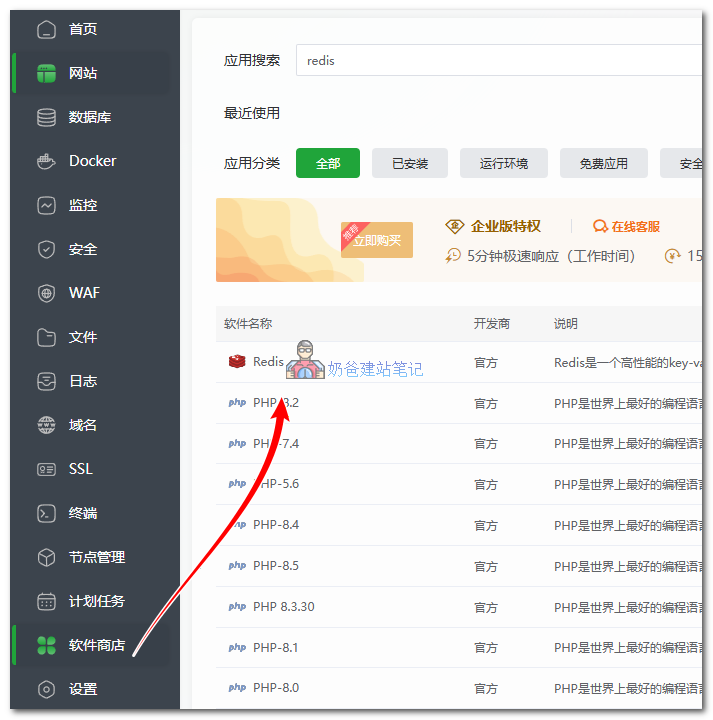
Log in to Baota Panel → Software Store on the left → Search for „Redis“ → Find the „Redis“ program (note: not the PHP extension) → Click Install. During installation, generally choose the default port (6379), set a password (it is recommended to check „Set Password“), and save.
[Friendly Reminder]After installation, you can see Redis is running in the „Runtime Environment“ of the Software Store.
2. Install Redis Object Cache Plugin
In WordPress backend → Plugins → Add New → Search for „Redis Object Cache“ → Install and Activate. After activation, go to the plugin settings and click „Enable“
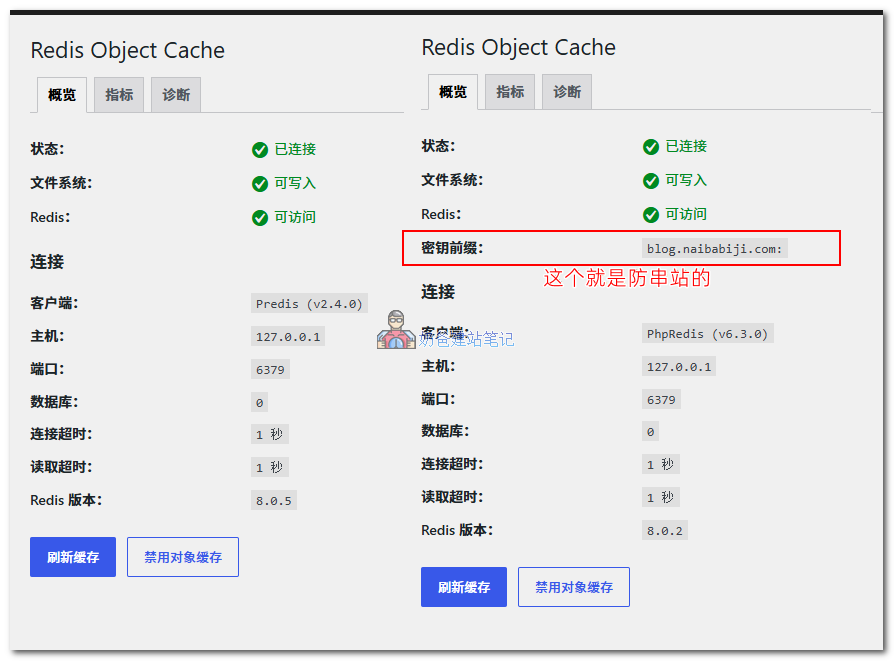
If it shows „Connected“, congratulations, Redis cache is working! You can check the hit rate via „View Cache“. Note thatif multiple websites on the same server use Redis cache, you need to configure a key prefix additionally, otherwise cache cross-site issues may occur.
IV. Multi-Site Cache Conflict Issue and the Beauty of WP Panel 1.2.5
Deploying multiple WordPress sites on one server is very common (e.g., usingWordPress Server Migrationsubsites or site networks). If they all share the same Redis database without setting independent prefixes (WP_REDIS_PREFIX) and cache key salts (WP_CACHE_KEY_SALT), data cross-contamination occurs—Site A„s data is read by Site B, causing display errors, login confusion, and other issues. This is a common headache for beginners.
The good news is thatWP Panelversion 1.2.5(a WordPress server management panel developed by Naiba) has perfectly fixed this pain point. The new version automatically generates independentWP_REDIS_PREFIX 和 WP_CACHE_KEY_SALTconfigurations for each site when creating a new site, writing them into the site's root directorywp-config.phpYou only need to enable Redis caching to enjoy a seamless experience without manually modifying configurations—very convenient.
Manual Configuration to Prevent Cross-Site Caching (If Not Using WP Panel)
If you are not using WP Panel, for example using Baota Panel, you can manually add the following code to wp-config.php (different for each site):
define('WP_REDIS_PREFIX', 'site_a_');
define('WP_CACHE_KEY_SALT', 'site_a_salt_');
Ensure that each site's prefix and salt are different to perfectly isolate data. Of course, with WP Panel, you can skip this step entirely.
V. Summary and Interaction
Today, Naiba guided you through configuring Redis object cache from scratch, showing how it helps WordPress eliminate slow queries, and also taught the configuration steps for Baota Panel. Most importantly, the multi-site cross-contamination issue now has a „one-and-done“ solution with WP Panel 1.2.5. If you are using other caching plugins (e.g.,6 Popular WordPress Caching Pluginslike Breeze or WP Super Cache), you can also combine them with Redis for better results. Note: page caching and object caching are complementary; don't enable only one type.
Finally, feel free to share your caching practice experiences or pitfalls in the comments. Naiba will reply promptly! If you found this article useful, please like and share it with friends who need it. See you next time!