
Have you noticed that the category URLs on Naibabiji do not include 'category'? For example, https://blog.naibabiji.com/tutorial looks shorter than the default URL.
Your category URLs probably contain 'category'. How to remove 'category' from category URLs? There are three methods:
Method 1: Use a dot for the category prefix.
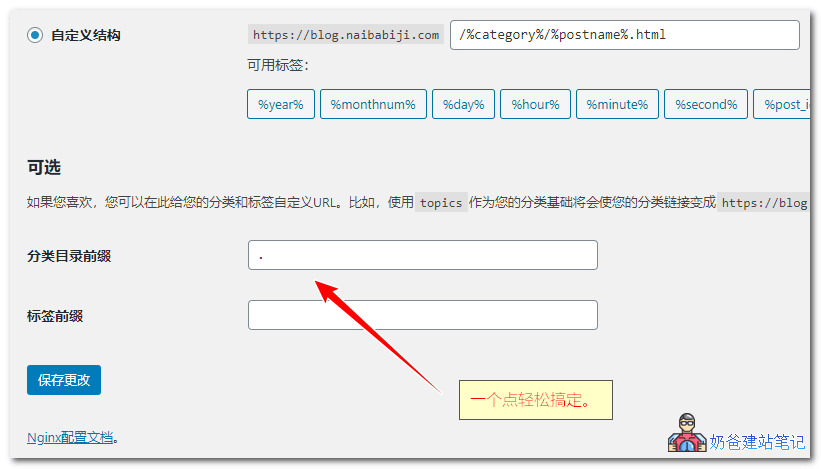
In the WordPress admin, set the category prefix to a dot (.) and save.
Method 2: Add code to the theme file.
Copy the code below and paste it into the theme's functions.php file, then save. This method is from the blog "I Love Shuizhuyu".
add_filter('request', function($query_vars) {
	if(!isset($_GET['page_id']) && !isset($_GET['pagename']) && !empty($query_vars['pagename'])){
		$pagename	= $query_vars['pagename'];
		$categories	= get_categories(['hide_empty'=>false]);
		$categories	= wp_list_pluck($categories, 'slug');

		if(in_array($pagename, $categories)){
			$query_vars['category_name']	= $query_vars['pagename'];
			unset($query_vars['pagename']);
		}
	}

	return $query_vars;
});

add_filter('pre_term_link', function($term_link, $term){
	if($term->taxonomy == 'category'){
		return '%category%';
	}

	return $term_link;
}, 10, 2);Method 3: Use a plugin.
If you have installedWPJAM BasicIf you use this plugin, it has this feature built-in.
If you dislike WPJAM Basic, you can installNo Category BaseThis plugin also supports multisite mode settings to remove the category URL from categories.
The Remove Category URL plugin can also eliminate the category link. https://wordpress.org/plugins/remove-category-url/
Which method is better?
Obviously, method one is the easiest to use.
Naiba tested all three methods, and there is no difference. Although in the sitemap, they will all appear as
https://blog.naibabiji.com/./vps-you-hui
this form with a ./ prefix, it does not affect Baidu or Google indexing, nor does it affect the normal display on the website; it only appearsSitemapinside.