
🚀 Is building a website too difficult? Let me guide you step by step—Learn about the 「Naibabiji WordPress Website Building Coaching Service」 →

How to Use FTP with the iPhone Lossless Music Player Foobar2000 Mobile Version

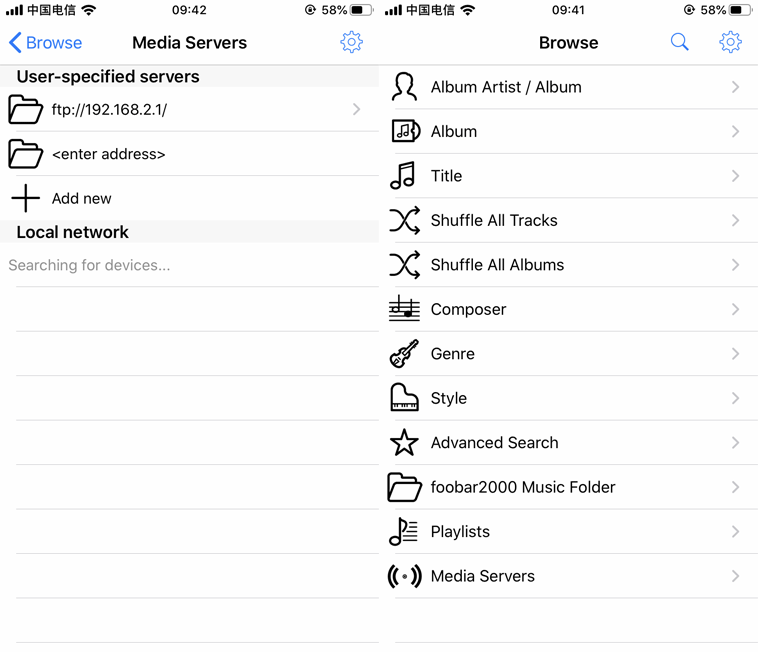
Is there any software for listening to local lossless music on an iPhone? The answer is yes. A friend recommended the Foobar2000 mobile version, a lossless music player app, to Naiba. I believe many friends who enjoy listening to local music have come across Foobar2000. Naiba installed Foobar2000 on the iPhone but got stuck when trying to transfer music files to the phone. The Foobar2000 iPhone version supports uploading music files from a computer to the Foobar2000 folder via LAN FTP. However, after enabling the FTP service (Server running) through the FTP Server interface in the Tools settings within Foobar2000 by default, computers on the local network simply couldn't connect.How to solve the issue where the computer cannot upload files to Foobar2000 via FTP?On the iPhone, if any app needs network access, it requires network permission authorization. However, when enabling the FTP service, no authorization prompt for Foobar2000 was seen, and there was no place to enable authorization in the iPhone settings. After exploring for a long time, it was finally discovered thatThe method to trigger the network permission switch for Foobar2000 on the iPhone is as follows:In the Browse interface, select Media Servers, then Add new to add a new server, for example, randomly enter an FTP server like ftp://192.168.2.1A network authorization button will then pop up. After allowing it, go back and enable the FTP service. You can then access the FTP service of the Foobar2000 mobile version from a computer and transfer files to the phone.

🚀 Still feeling confused after reading the tutorial? Let me guide you step-by-step.

「Naibabiji WordPress Website Building Coaching Service」—From choosing a domain and buying hosting, to installing a Theme and publishing content, I「ll coach you through every step, helping you avoid detours and reach your goal directly.

👉 Learn about the Website Building Coaching Service
🔒

Comments are closed

The comment function for this article is closed. If you have any questions, please feel free to contact us through other channels.

×
二维码

Scan QR Code to Follow

AI Website Building Assistant

🤖
Hello! I am the Naibabiji AI Assistant. How can I help you?
Quick Consultation: