
After upgrading to a new version of WordPress, the Gutenberg editor was introduced. The code you previously used to disable auto-save and revision versions may have become ineffective. This article shares the official WordPress recommendedMethod to Disable Revision Versions and Auto-Save。
What are WordPress Revision Versions and Auto-Save

If you are using the Gutenberg editor, you will notice that after clicking the Save Draft button once, an additional revision appears.
If you are using the old classic editor, you will find that it autosaves every minute, adding another revision.
Revisions look like this in the image below.
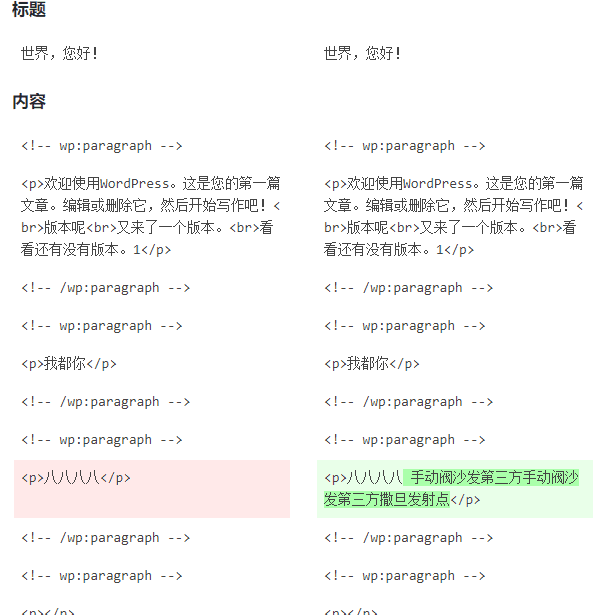
In some cases, this revision and autosave feature is useful.
But in most cases, autosave and revisions are useless. Over time, your database will retain a lot of revision data, causing database bloat, whichaffecting WordPress performance speed。
So if you don't need revisions and autosave, you can disable WordPress post revisions and autosave.
Official Recommended Method to Disable Revision Versions and Auto-Save
By default, WordPress has a WP_POST_REVISIONS function to control whether revisions are displayed.
We can set the revision feature by inserting relevant code into the WordPress configuration file wp-config.php.
//禁用WordPress修订版本
define( 'WP_POST_REVISIONS', false );
WP_POST_REVISIONS has three default values:
true (default), -1: means store every revision
false, 0: Do not store revision versions (except for one autosave version per post)
A value greater than 0: Set the number of revision versions to keep, older versions will be deleted.
So we also need to disable autosave. WordPress will autosave every once in a while by default (but Naiba tested in the new Gutenberg editor and found that revisions only appear when manually saving, no autosave was found; in the classic editor, autosave was found.)
Method to Disable Auto-Save
Insert this code snippet into the wp-config.php file to set the auto-save time interval.
define( 'AUTOSAVE_INTERVAL', 160 ); // 修改自动保存间隔时间为160秒
We can set the autosave interval by modifying this value of 160. Setting it to 86400 means autosave once a day. By that time, your article should have been published, effectively disabling WordPress's autosave feature.
Insert the above code into the wp-config.php file above /* That’s all, stop editing! Happy publishing. */ to take effect.
The above method comes fromofficial documentation.。
Method to Clean Up Revision Version and Auto-Save Data
If your WordPress has already saved many revision versions and auto-save data, you can useWP-Optimizeto clean and optimize your database.
If you are usingWP Rocketthis caching plugin, you can also clean up unnecessary database files in the settings.